Table of contents
Brotli compression for faster pages
Slow pages don't just "feel" bad – they quietly reduce conversion rate, increase paid media waste, and amplify support tickets (customers think your site is broken). Brotli compression is one of the rare performance changes that can reduce bytes across many pages with minimal product risk – if you implement it correctly.
Brotli compression is a server- and CDN-supported way to send smaller versions of text-based resources (HTML, CSS, JavaScript, SVG, JSON) over the network. The browser asks for compressed content and transparently decompresses it, so the user sees the same page – just delivered with fewer bytes.
What Brotli compression actually does
It's "content coding" for text resources
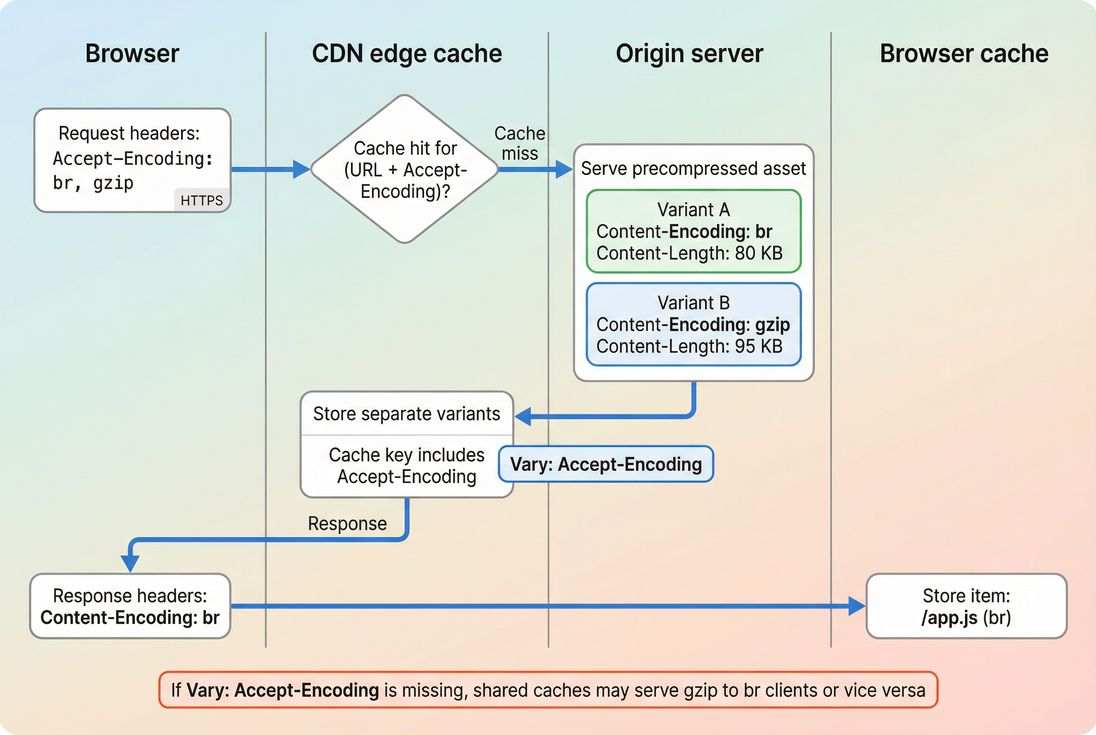
When a browser requests a page, it includes an Accept-Encoding header listing compression methods it can decode (commonly br for Brotli and gzip for gzip). If your server or CDN supports Brotli, it responds with:
Content-Encoding: br(meaning the bytes on the wire are Brotli-compressed)Vary: Accept-Encoding(meaning caches must keep separate versions by encoding)
If Brotli isn't available, the server typically falls back to gzip (Content-Encoding: gzip) or no compression.
This is separate from "image compression" (like WebP/AVIF) and separate from minifying code. Brotli targets text transfers; image formats target image bytes. You usually want both: Brotli for CSS/JS/HTML/SVG and modern image formats for images (see /academy/image-formats-webp-avif/).
Brotli vs gzip in practice
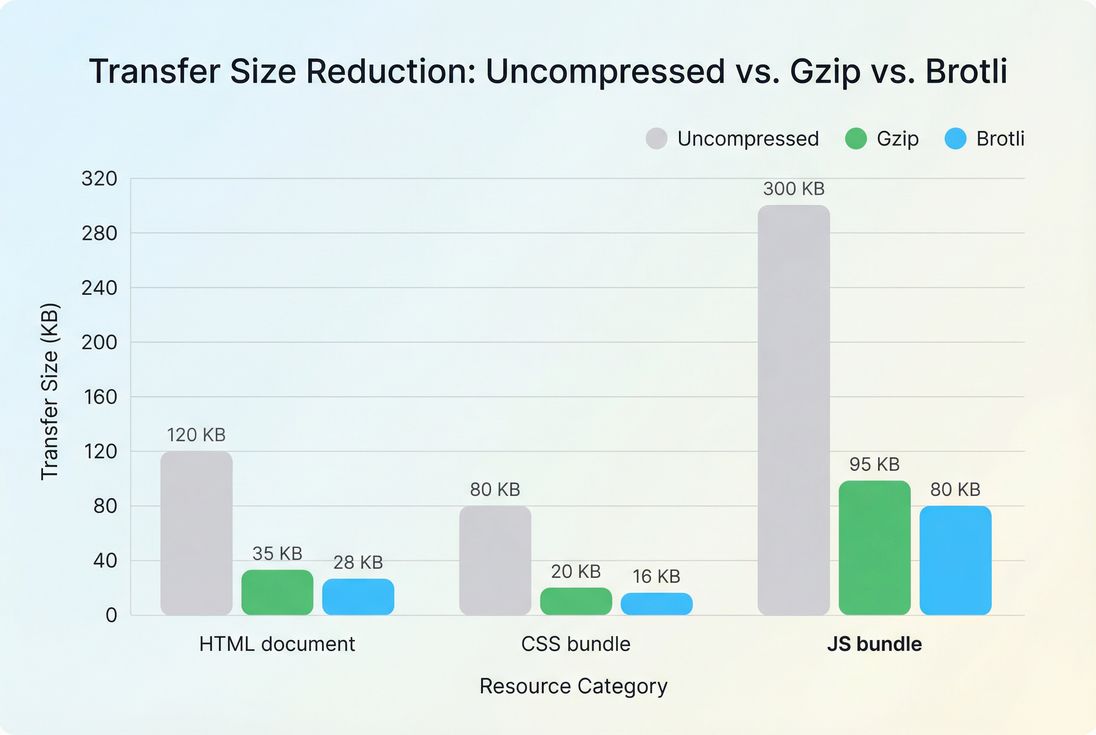
Brotli often achieves better compression than gzip on web text because it uses more modern techniques and (optionally) more CPU time to squeeze files smaller.
A simple way to interpret the benefit is: smaller transferred bytes for the same resource.
Where Brotli tends to win:
- CSS and JavaScript bundles
- HTML documents (especially with repeated markup)
- JSON payloads (API responses)
- SVG (when served as SVG files)
Where it usually does not help:
- Already-compressed files: images (JPEG/PNG/WebP/AVIF), video, PDF, ZIP
- Content that changes per request and is expensive to compress at high settings (unless you keep the Brotli level modest)
The Website Owner's perspective
If you're paying for traffic, you're paying for a chance to load a page. Brotli improves the "cost per successful view" by increasing the percentage of visitors who reach product pages before abandoning on slow connections – without changing design or copy.
When Brotli improves real speed
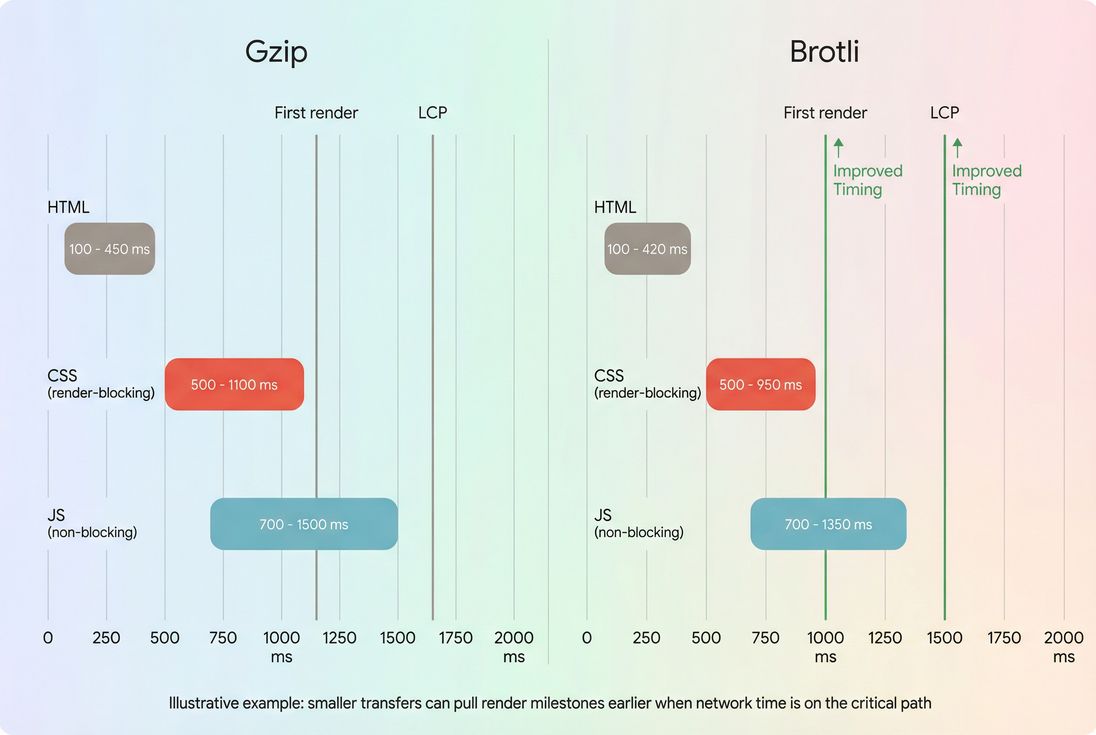
Brotli's business value comes from one thing: it reduces network transfer time for critical resources. Whether that improves your user-perceived speed depends on what's currently slowing you down.
The metrics it can influence
Brotli doesn't directly change how your page is built, but it can affect timing metrics by shortening downloads:
TTFB (Time to First Byte): can improve or worsen
- Improve if smaller bytes allow faster server-to-client delivery and your stack is otherwise fast
- Worsen if you compress dynamically at high levels and burn CPU per request
Learn more: /academy/time-to-first-byte/
FCP (First Contentful Paint): often improves when HTML/CSS arrive faster
/academy/first-contentful-paint/LCP (Largest Contentful Paint): can improve when the LCP depends on resources blocked by CSS/JS
/academy/largest-contentful-paint/
What Brotli does not fix:
- Heavy JavaScript execution and long tasks (see /academy/javascript-execution-time/ and /academy/long-tasks/)
- Render-blocking behavior caused by too much CSS/JS (compression helps bytes, but architecture still matters; see /academy/render-blocking-resources/ and /academy/critical-rendering-path/)
When it's a clear win
Brotli tends to move the needle when you have at least one of these conditions:
Mobile traffic is significant
Higher latency and lower throughput amplify the value of reducing bytes. This is why Brotli often has a bigger ROI than teams expect on "fast office Wi‑Fi" tests. See /academy/mobile-page-speed/.Large JS bundles or CSS bundles
Compression helps, but don't stop there – pair it with /academy/asset-minification/ and /academy/code-splitting/.Geographically distributed users
Distance increases the cost of every byte. Combining Brotli with /academy/cdn-performance/ and /academy/edge-caching/ is where you typically see the most consistent improvements.
When it barely matters
If your performance bottleneck is not transfer size, Brotli won't show much:
- Your HTML is small, but server response time is slow (start with /academy/server-response-time/)
- Your page is fast to download, but slow to render due to main-thread work (see /academy/reduce-main-thread-work/)
- Third-party scripts dominate (see /academy/third-party-scripts/)
How to verify Brotli is active
Don't rely on "we enabled Brotli" as a checkbox. Verify the actual responses for the pages and asset types you care about.
Check response headers (fastest)
In Chrome DevTools → Network:
- Click the HTML document request (top row)
- Confirm Response Headers include:
content-encoding: brvary: accept-encoding
Repeat for:
- your main CSS file(s)
- your main JS bundle(s)
Also check "Transferred" size vs "Resource" size. If the transferred bytes aren't meaningfully smaller, you may not be serving Brotli (or the resource is already compressed/minified to the point where gains are small).
If you use PageVitals synthetic tests, the Network request waterfall view makes it straightforward to inspect compression headers across requests and see which assets are large on the wire: /docs/features/network-request-waterfall/.
Validate with a controlled request
You can also test from a terminal by forcing accepted encodings:
- Request with Brotli support (look for
Content-Encoding: br) - Request with gzip only (look for
Content-Encoding: gzip)
This helps you confirm:
- Brotli is enabled
- Brotli is served only when requested
- Your caching layer is storing the correct variants
Use lab tests, then sanity-check field behavior
Lab tools (like Lighthouse) commonly flag missing compression via "Enable text compression." That's useful, but it's not the final word on ROI.
- Use lab tests to confirm the change reduces transfer size and doesn't hurt TTFB.
- Then confirm whether user experience improved in the field, because real networks and devices vary. See /academy/field-data-vs-lab-data/ and /academy/chrome-user-experience-report/.
If you're using PageVitals Lighthouse reports, you'll see compression-related opportunities inside Lighthouse test results: /docs/features/lighthouse-tests/.
The Website Owner's perspective
Treat "Brotli enabled" as a release that needs validation, not a configuration detail. The success criteria isn't a server setting – it's fewer transferred KB on your money pages, stable (or better) TTFB, and measurable improvements in LCP/FCP for real traffic segments.
How to enable it safely
The best Brotli implementation depends on whether your site serves mostly static assets, dynamic HTML, or both.
Prefer precompression for static assets
For versioned static files (like app.4f3c2.js), the safest and fastest pattern is:
- Build generates minified assets (see /academy/asset-minification/)
- Assets are precompressed to
.br(and often.gztoo) - CDN or origin serves the right variant based on
Accept-Encoding
Why this is safer:
- No per-request CPU cost (protects TTFB during traffic spikes)
- Compression output is consistent
- Easier caching (immutable URLs + long TTL)
Combine with strong caching:
Use moderate compression for dynamic HTML
Dynamic HTML (personalized pages, A/B tests, logged-in experiences) is often generated per request. Compressing it is still valuable, but don't turn it into a CPU bottleneck.
Practical guidance:
- Use Brotli for HTML responses if your server has headroom.
- Avoid very high Brotli levels on-the-fly (they squeeze slightly smaller files but can add measurable CPU time).
- Watch TTFB after rollout (see /academy/time-to-first-byte/).
If you're behind a CDN, consider letting the CDN handle compression at the edge when possible – this can reduce origin CPU cost and improve consistency across regions (see /academy/cdn-vs-origin-latency/).
Don't forget the "Vary" header
If your CDN or any intermediate cache is in play, missing Vary: Accept-Encoding is one of the most common causes of "Brotli is enabled but results are inconsistent."
What correct looks like:
Vary: Accept-Encodingon compressed responses- CDN caches separate gzip and br objects
- Browser cache stores the appropriate variant for the client
Only compress the right MIME types
Make sure you compress:
text/htmltext/cssapplication/javascript(and/ortext/javascript)application/jsonimage/svg+xml
Avoid compressing:
image/*formats like PNG/JPEG/WebP/AVIFvideo/*- archives like ZIP
- PDFs (often already compressed)
This prevents wasted CPU and sometimes avoids larger output (yes, double-compressing can backfire).
Benchmarks and common pitfalls
Benchmarks you can use for decisions
Exact savings vary, but for many production sites:
- Brotli vs no compression: very large savings (often multiple times smaller transfers)
- Brotli vs gzip: typically a meaningful additional reduction for CSS/JS/HTML, especially for larger bundles
Use this simple decision table to guide priorities:
| Situation | Brotli priority | Why |
|---|---|---|
| Large JS bundles, mobile-heavy traffic | High | Reduces transfer time of critical bytes |
| Dynamic HTML, CPU-constrained servers | Medium | Gains may be offset by higher TTFB |
| Mostly image/video pages | Low | Brotli doesn't help already-compressed media |
| CDN in front, static versioned assets | Very high | Precompressed + edge delivery is low risk |
Pitfall: "We enabled Brotli but nothing changed"
Common causes:
- Brotli enabled only for static assets, but your bottleneck is dynamic HTML
- CDN still serving gzip due to configuration or cache state
- Missing
Vary: Accept-Encoding - You tested a resource type that isn't compressed (fonts, images)
- You're looking at "resource size" instead of "transferred size"
Pitfall: Higher CPU, worse TTFB
This happens when:
- You compress dynamically at high settings
- Traffic spikes cause CPU contention
- Compression competes with application logic, database calls, or TLS work (see /academy/tls-handshake/)
If TTFB rises, you may see worse LCP even though assets are smaller – because everything starts later. The fix is usually:
- precompress static assets
- reduce Brotli level for dynamic responses
- push compression to the CDN
Pitfall: Compression hides bigger architectural issues
Brotli makes bytes smaller, but it doesn't change what you ship. If your JS bundle is huge, the best path is still to ship less JS:
- /academy/unused-javascript/
- /academy/javascript-bundle-size/
- /academy/code-splitting/
- /academy/async-vs-defer/
A practical rollout plan
If you want the most reliable ROI with minimal risk:
Start with static assets (CSS/JS/SVG)
Precompress and serve Brotli + gzip fallback. Ensure long-lived caching is correct (see /academy/cache-control-headers/).Verify headers and transfer sizes
ConfirmContent-Encoding: brandVary: Accept-Encodingon key pages and bundles.Measure impact on TTFB and LCP
Run before/after synthetic tests, then validate field trends (see /academy/measuring-web-vitals/ and /academy/core-web-vitals-overview/).Expand to dynamic HTML carefully
If you enable Brotli for HTML generated per request, monitor CPU and TTFB. Keep settings conservative if your origin is near capacity.Pair with "ship less" work
Compression is a multiplier, not a substitute. You'll get the biggest business impact when Brotli reduces already-disciplined payloads from minification, better caching, and smaller bundles.
If you want, share your stack (CDN, origin server, framework) and whether your HTML is mostly static or personalized, and I'll outline the safest Brotli configuration pattern and what to verify in the response headers.
Frequently asked questions
For most sites, yes for text assets. Brotli usually compresses HTML, CSS, and JavaScript smaller than gzip, which reduces transfer time on mobile networks. Keep gzip enabled as a fallback for older clients and proxies. The real decision is how to serve Brotli without increasing server CPU or TTFB.
It can, but only when network transfer is a meaningful part of your critical path. If your LCP element depends on render blocking CSS or large JS bundles, smaller transfers can speed up FCP and LCP. If your bottleneck is CPU, third-party scripts, or slow TTFB, Brotli alone may do little.
Use higher levels only when you precompress static files at build time or at the CDN. For dynamic HTML compressed on the fly, prefer moderate levels to avoid CPU spikes and higher TTFB. The best level is the one that reduces bytes without adding measurable server delay during traffic peaks.
It can if your server does not send a correct Vary header. Because Brotli and gzip produce different encoded versions of the same URL, caches must store them separately. If Vary: Accept-Encoding is missing or misconfigured, a CDN or proxy can serve the wrong variant to some users.
Check response headers and transfer sizes, not just a config toggle. In browser DevTools, confirm Content-Encoding: br for HTML, CSS, and JS, and compare transferred bytes. Validate multiple geographies and cache states, and cross-check lab tests against field trends using /academy/field-data-vs-lab-data/.
Want to take PageVitals for a spin?
Page speed monitoring and alerting for your website. Get daily Lighthouse reports for all your pages. No installation needed.
Start my free trial