Table of contents
Browser caching best practices
Repeat visitors are where most ecommerce sites make their money: shoppers compare products, revisit carts, and move across multiple category pages before buying. If your browser caching is weak, you keep re-downloading the same CSS, JavaScript, fonts, and images – and you pay that performance cost on every step of the journey.
Browser caching is the set of rules (mostly via HTTP response headers) that tells a user's browser what it can store locally and for how long, so future page views can reuse files from disk/memory instead of requesting them again over the network.
If you want the "why" and the foundational concepts first, see /academy/browser-caching/ and /academy/cache-control-headers/. This guide focuses on best-practice decisions you can implement safely.
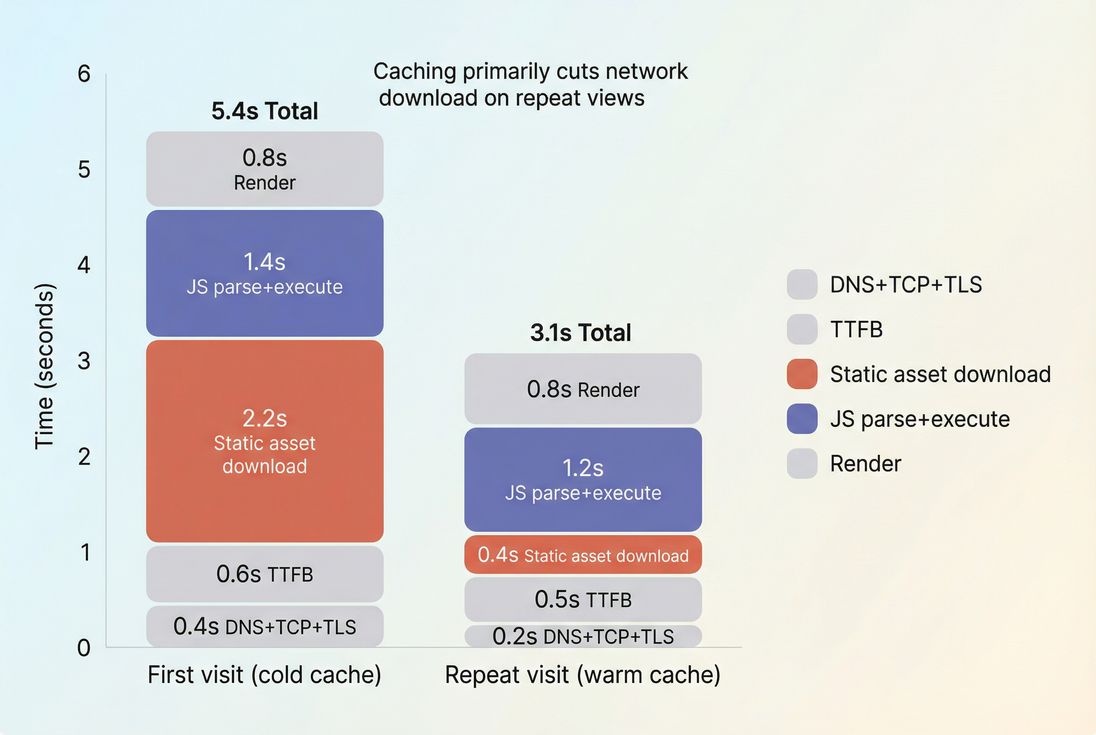
What browser caching reveals
Browser caching is less about "one perfect homepage load" and more about how expensive it is to keep using your site:
- Category → product → reviews → cart → checkout
- Marketing landing page → browse → come back later via email
- Logged-in dashboards where users return daily
When caching is configured well, repeat navigations avoid:
- extra HTTP requests (/academy/http-requests/)
- repeated TLS and connection overhead (helped by /academy/connection-reuse/)
- repeated downloads of unchanged assets
When it's configured poorly, you'll see:
- slow "next page" experiences even on fast devices
- higher mobile data usage (a conversion killer on cellular)
- more load placed on your origin (cost + reliability risk)
The Website Owner's perspective: Good caching reduces the performance penalty of browsing. That typically shows up as deeper session depth, lower bounce on category pages, and fewer checkout drop-offs during multi-step flows – not just a prettier Lighthouse score.
How browsers decide to reuse files
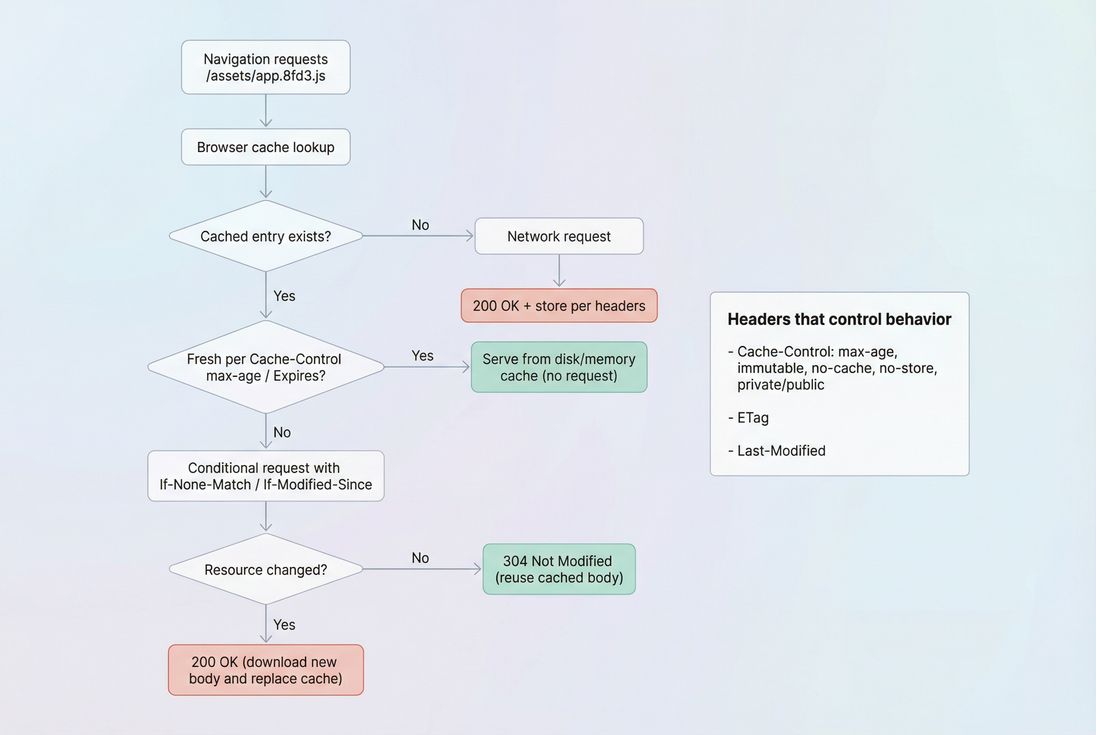
A browser reuses a resource when it believes it's still valid. That decision is driven by:
Freshness (how long it can be reused)
Primarily controlled by:
Cache-Control: max-age=...Expires: ...(older, less preferred)
If the browser considers the cached copy fresh, it will use it without a network request.
Revalidation (how it checks if it changed)
If the cached copy is stale, the browser may revalidate using conditional requests:
ETagwithIf-None-MatchLast-ModifiedwithIf-Modified-Since
If unchanged, the server returns 304 Not Modified, which saves download bytes (but still costs a request/round-trip).
Storage rules (whether it can be cached at all)
Controlled by:
Cache-Control: no-store(do not store, ever)Cache-Control: private(cache per-user, not shared caches)Cache-Control: public(cacheable by shared caches and browser, when otherwise allowed)
What to cache and for how long
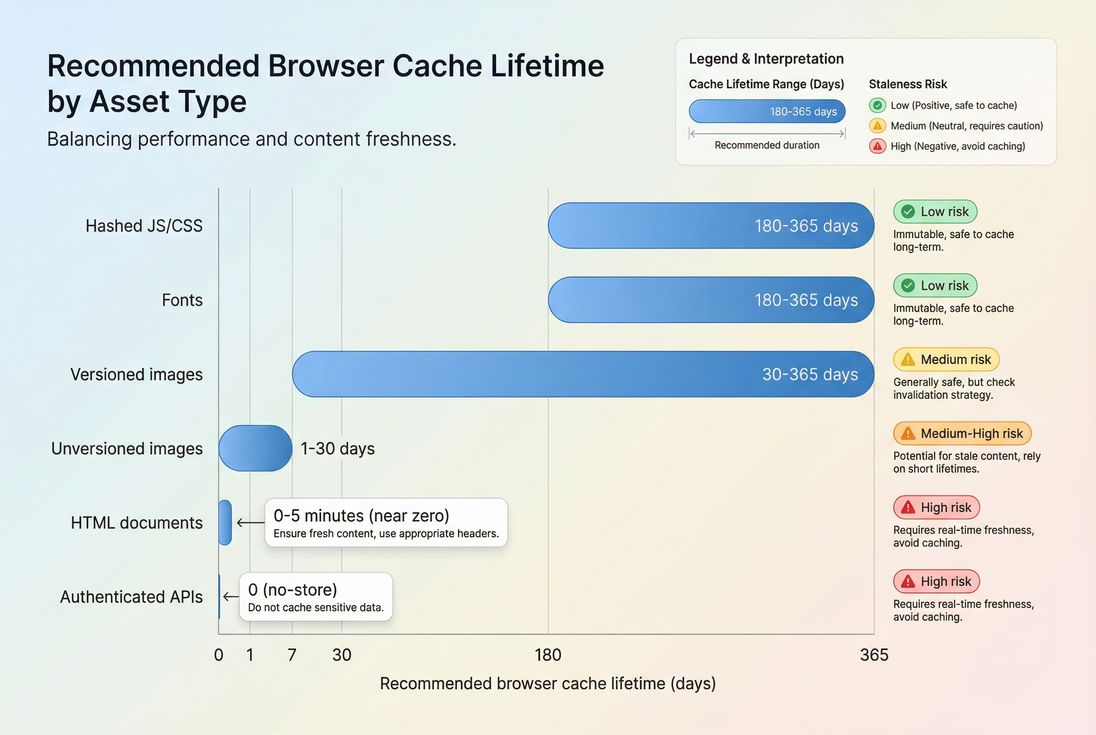
This is where most sites either win big or create subtle, expensive bugs. The safe rule is:
- Cache long only when the URL changes when the content changes.
- If the URL stays the same, keep caching short and rely on revalidation.
That usually means hashed filenames for static assets (bundlers do this well):app.8fd3a1c.js, styles.41b2.css
Practical TTL recommendations
| Resource type | Typical URL pattern | Recommended browser policy | Why |
|---|---|---|---|
| Versioned JS/CSS bundles | /assets/app.<hash>.js | public, max-age=31536000, immutable | Safe: URL changes on deploy |
| Fonts | /fonts/inter-roman.<hash>.woff2 | public, max-age=31536000, immutable | Large impact on repeat rendering |
| Product images | /img/p/sku1234.<hash>.webp | public, max-age=2592000 (30d) to 1y | High byte savings; ensure updates change URL |
| Unversioned images | /img/logo.png | public, max-age=604800 (7d) + revalidation | Avoid "stuck" old logos |
| HTML documents | /category/shoes | no-cache or short max-age | Prices/inventory/personalization change often |
| APIs returning user data | /api/account | usually private, no-store | Prevent leaking or staleness |
Internal references:
- If you're tuning time horizons intentionally, see /academy/effective-cache-ttl/ and /academy/cache-ttl/.
- For image payload reduction (which pairs well with caching), see /academy/image-optimization/ and /academy/image-formats-webp-avif/.
The Website Owner's perspective: A long TTL on versioned assets is "free speed" for repeat shoppers. A long TTL on unversioned assets is a brand and revenue risk – customers can see outdated pricing banners, old promos, or broken layouts after a release.
Header patterns that work in real life
Below are battle-tested patterns you can hand to a developer or implement via your CDN/origin config.
1) Versioned static assets (best case)
Use this when filenames include content hashes.
Recommended:
Cache-Control: public, max-age=31536000, immutable
Why it works:
max-age=31536000tells the browser it can reuse the file for a year.immutabletells the browser it doesn't need to revalidate during that time.- If you deploy new code, the filename changes, so the browser fetches the new file naturally.
2) Unversioned assets (common legacy case)
For /styles.css, /app.js, /logo.png without hashes.
Safer approach:
Cache-Control: public, max-age=604800(or less) plus validators (ETagorLast-Modified)
This reduces repeat downloads, but still lets browsers update within a week (and can update sooner through revalidation when stale).
3) HTML (the "don't break my site" case)
For pages where content changes frequently or varies by user.
Two common safe approaches:
- Require revalidation:
Cache-Control: no-cache
(This does not mean "don't cache"; it means "cache, but validate before using.") - Short freshness:
Cache-Control: max-age=60(or a few minutes)
Good for mostly-static marketing pages, less so for cart/checkout.
4) Sensitive pages and responses
For anything that could expose user data if stored.
Use:
Cache-Control: no-store
Typical examples:
- account pages
- checkout confirmations
- authenticated API responses containing PII
How caching changes show up in metrics
Caching improvements rarely look like "TTFB got better" (that's usually server + network, see /academy/time-to-first-byte/). Instead, caching changes show up as:
Fewer requests and fewer bytes on repeat views
Especially JS/CSS/font downloads.Lower LCP on repeat visits (sometimes dramatically)
Because fewer render-blocking assets are fetched. (See /academy/largest-contentful-paint/ and /academy/render-blocking-resources/.)Better stability across multi-step flows
Checkout steps often share the same bundles. Strong caching prevents "every step feels like a cold start."Faster interactions after navigation
If you stop re-downloading large scripts, you can reduce main-thread work and improve responsiveness. (See /academy/reduce-main-thread-work/ and /academy/interaction-to-next-paint/.)
Interpreting "effective cache TTL"
Many audits summarize caching with an "effective TTL" concept: how long assets are cacheable in practice, weighted by the important bytes.
What changes mean in business terms:
- TTL increases for versioned static assets: usually good; repeat experience improves.
- TTL increases for HTML or API responses: proceed carefully; might cause staleness bugs.
- TTL decreases after a deploy: often indicates your build stopped hashing filenames or a CDN/origin rule changed.
To avoid abstraction, here's a practical scenario:
- You deploy a redesign and forget to hash
styles.css. - You set
max-age=31536000anyway. - Half your customers keep the old CSS for months, causing layout issues and higher support tickets.
That's why TTL and versioning must be paired.
Common ways browser caching breaks
Hashed assets aren't actually hashed
Sometimes build pipelines output stable filenames (app.js) even though you assume hashing exists. This makes long TTLs dangerous.
What to do:
- Confirm filenames include content hashes.
- Ensure deploys generate new URLs when file content changes.
Cache-Control gets overwritten by the CDN
It's common to set correct headers at origin but override them at the edge (or vice versa).
What to do:
- Verify headers on the final response the browser receives.
- Align browser caching with CDN strategy (see /academy/edge-caching/ and /academy/cdn-performance/).
"no-cache" misunderstood
no-cache does not mean "do not cache." It means "must revalidate before using."
This is often a good middle-ground for HTML where you want:
- quick responses when unchanged (304)
- correctness when changed
Third-party scripts are uncacheable (or churn constantly)
You may see frequent downloads because vendors set short TTLs or change URLs often.
What to do:
- Reduce third-party scripts (see /academy/third-party-scripts/).
- Self-host where licensing allows (and then apply your caching policy).
Cookies inadvertently reduce cacheability
Responses that vary per user (because of cookies, auth, personalization) are harder to cache safely.
What to do:
- Keep shared static assets cookie-free (serve from a cookieless domain if needed).
- Mark personalized HTML as
privateand/or short-lived.
How to audit and enforce caching
Check headers and cache outcomes
You want to validate two things:
- Headers are correct (
Cache-Control,ETag, etc.) - Outcome is correct (from cache vs 304 vs full 200 download)
In Chrome DevTools Network:
- Look at the resource → Response Headers
- Look at Size: it may show "from disk cache" / "from memory cache"
- Compare first vs second load
If you use PageVitals, the synthetic waterfall makes this faster to verify across locations and runs: see /docs/features/network-request-waterfall/.
Test the right scenario: cold vs warm cache
A single test run often behaves like a cold cache. But shoppers rarely behave that way.
A practical testing routine:
- Run one test to represent first visit.
- Run a second navigation to represent repeat view (warm cache).
- Compare transferred bytes and the count of 200 vs 304 responses.
If you're optimizing multi-step flows (home → PDP → cart), pair caching with multistep journeys so you see compounding benefits across steps.
Use budgets to prevent regressions
Caching is notoriously easy to break during a redesign or CDN change. Protect it with guardrails:
- Budget: "% of JS bytes cacheable for 30+ days"
- Budget: "# of uncacheable static assets"
If you're enforcing this in PageVitals, start with /docs/features/budgets/.
The Website Owner's perspective: Caching isn't a one-time project. It's a regression risk. A single header change can quietly increase bandwidth bills and slow every returning shopper until someone notices conversion dropping.
Best-practice rollout plan
If you want a low-risk path that works for most websites:
Inventory your static assets
- Identify CSS/JS/fonts/images and whether they're versioned (hashed).
Set long TTL only for versioned assets
- Start with CSS/JS/fonts:
max-age=31536000, immutable
- Start with CSS/JS/fonts:
Keep HTML conservative
- Use
no-cacheor a shortmax-ageuntil you've validated no staleness issues.
- Use
Add validators everywhere
- Ensure
ETagorLast-Modifiedexists for resources you expect to revalidate.
- Ensure
Re-test user-critical flows
- Especially product → cart → checkout.
Pair caching with payload work
- Caching helps repeat views; compression and minification help all views:
Quick decision checklist
Use this as a final sanity check before you ship:
- Do all hashed assets have long TTL + immutable?
- Do unversioned assets avoid year-long TTL?
- Does HTML avoid being cached long in shared ways (and avoid staleness)?
- Are authenticated responses marked private or no-store?
- Can you demonstrate fewer bytes transferred on repeat views?
If you can answer yes, your caching setup is likely both fast and safe – the combination that actually improves revenue-critical journeys instead of just improving a lab score.
Frequently asked questions
For versioned static assets like CSS, JS, fonts, and product images, aim for 30 days to 1 year with immutable. For HTML documents, keep it short (often 0 to 5 minutes) and rely on revalidation. This balances fast repeat visits with safe content freshness.
It often improves repeat-visit speed and stability, which can reduce load time and help metrics like LCP and INP for returning users. But Core Web Vitals in the field blend many sessions. You will see the biggest impact on logged-in users, multi-page journeys, and repeat shoppers.
Common causes are short TTLs, missing Cache Control headers, assets without stable versioning, or responses marked no-store. Another frequent issue is third-party scripts you cannot control. Check response headers and whether requests are revalidated (304) versus fully downloaded (200).
Usually yes, but cautiously. Cache HTML with a short lifetime or require revalidation so users do not see stale prices, inventory, or personalized content. A typical pattern is Cache Control no-cache (revalidate every time) or max-age set to a few minutes for non-personalized pages.
Use hashed filenames for static assets, then set Cache Control public, max-age=31536000, immutable. Keep HTML short-lived with revalidation. Avoid caching sensitive responses with private or no-store. This setup delivers near-instant repeat visits while making deploys predictable and low-risk.
Want to take PageVitals for a spin?
Page speed monitoring and alerting for your website. Get daily Lighthouse reports for all your pages. No installation needed.
Start my free trial