Table of contents
Connection reuse and keep-alive
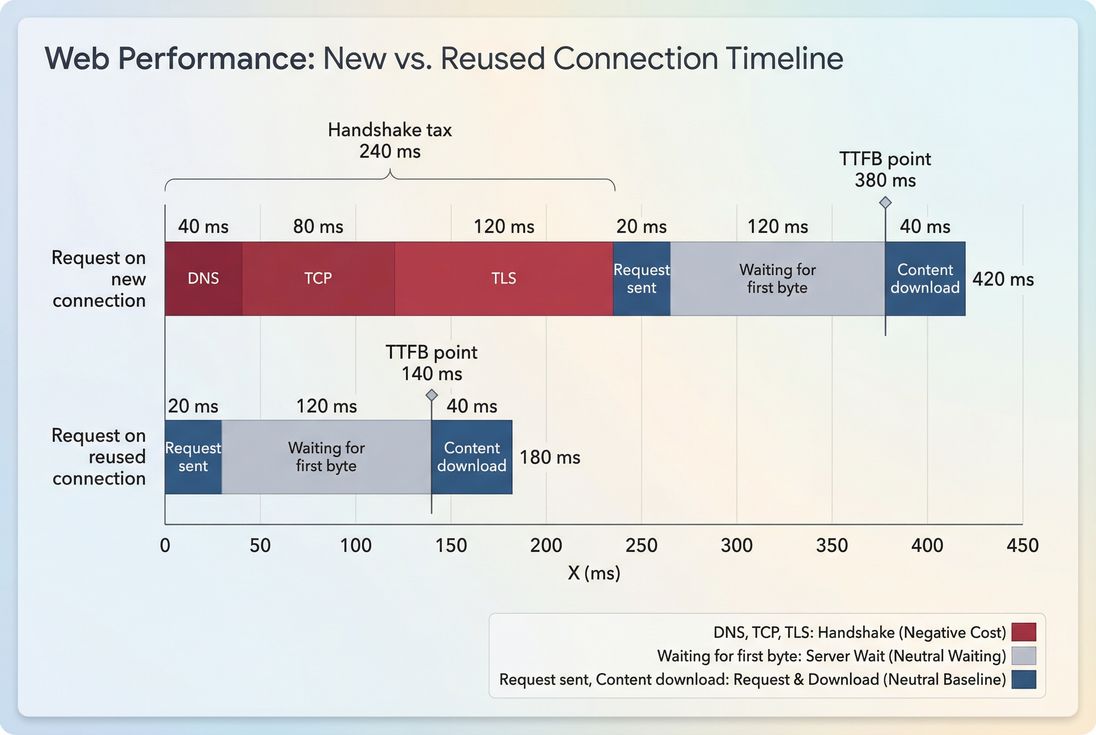
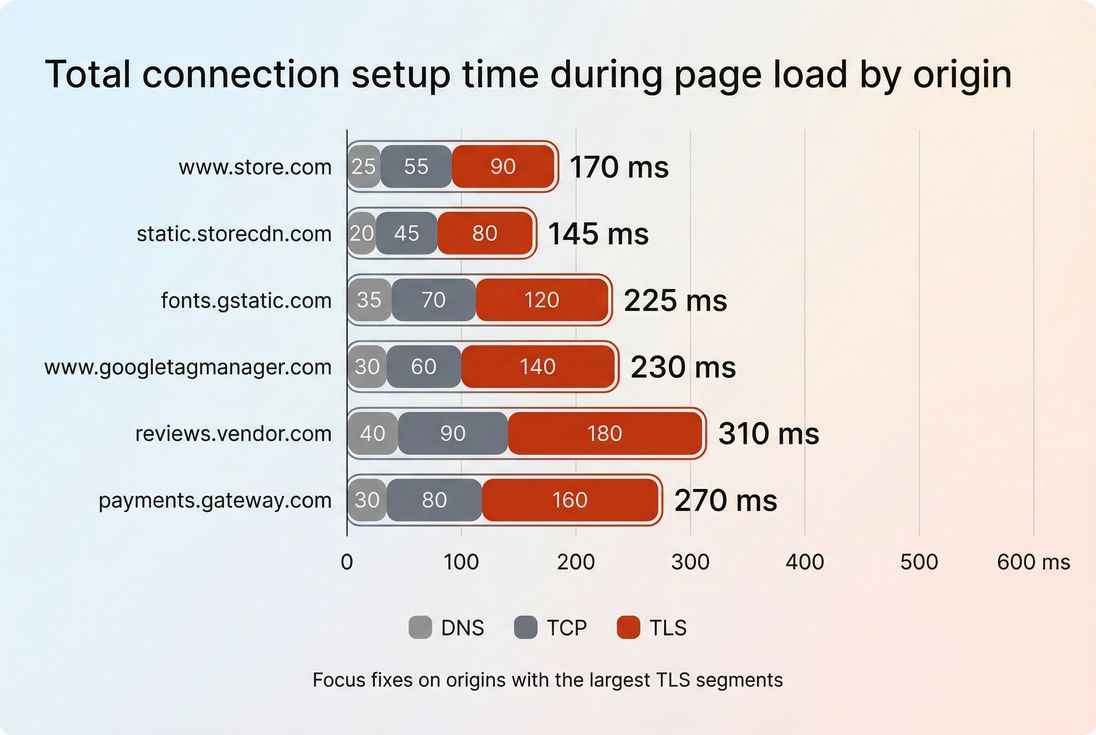
Every time a browser has to open a new connection, you pay a "handshake tax" before any bytes of your page can move. On mobile networks, that tax can easily be 100–300 ms per origin – and ecommerce pages often touch many origins (CDN, fonts, tag manager, reviews, fraud, payments). The business impact is simple: more connection setup time pushes out TTFB, delays LCP, and makes funnels feel sluggish right when users are deciding whether to buy.
Connection reuse means the browser sends multiple HTTP requests over an existing underlying connection (TCP + TLS), instead of creating a new one. Keep-alive is the server and infrastructure behavior that keeps connections open long enough to be reused (rather than closing them after each response or after a very short idle period).
Where the handshake tax comes from
A "new connection" isn't just one thing. It usually includes several steps, and any of them can dominate depending on the user's network and geography:
- DNS lookup: translating hostname to IP (see DNS lookup time)
- TCP handshake: establishing the transport connection (see TCP handshake)
- TLS handshake: negotiating encryption and certificates (see TLS handshake)
- Only then can the browser request the resource and wait for the server to respond
Connection reuse eliminates most of that setup for subsequent requests to the same origin. The practical outcome is not just "fewer milliseconds" in a lab report – it's fewer opportunities for mobile variability to blow up your p75/p90 performance (which is what users and Core Web Vitals ultimately reflect).
How to read reuse in a waterfall
Website owners usually encounter this topic when a waterfall shows lots of "connect" and "SSL" time sprinkled throughout the load, not just at the start.
A simple way to interpret a network waterfall:
- A request that creates a new connection typically shows non-zero time in phases like DNS, TCP connect, and TLS/SSL.
- A request that reuses a connection usually shows those phases as zero/blank, because the connection already exists.
If you're using PageVitals, the most direct way to see this is the Network Request Waterfall report:
Network request waterfall
How this is commonly "calculated"
There isn't one universal industry formula because browsers and tools expose the data differently, especially across HTTP/1.1 vs HTTP/2 vs HTTP/3. But most tools end up measuring variations of:
- How many requests required new connection setup (DNS/TCP/TLS present)
- How many distinct connections were opened per origin
- How much time was spent in connection setup phases across the page load
The most useful operational interpretation is:
- If new connections increase while your page and traffic sources are stable, you likely introduced a new origin, added redirects, changed CDN/origin behavior, or shortened keep-alive somewhere.
- If new connections decrease, you've usually consolidated origins, fixed infrastructure timeouts, or moved to HTTP/2/HTTP/3, and you should expect improvements in TTFB and often FCP and LCP.
The Website Owner's perspective
"I don't care about the protocol trivia. I care whether we're paying the handshake tax multiple times on the landing page and across the cart and checkout steps – because that's where conversion drops show up."
Why protocol changes what "good" looks like
- HTTP/1.1: Browsers open multiple parallel connections (often up to ~6 per host) to improve concurrency. Reuse exists, but you may still see several connections per origin.
- HTTP/2: Multiple requests share one connection via multiplexing. Ideally you see one connection per origin for most of the page.
- HTTP/3: Similar reuse benefits, but over QUIC. Often more resilient on lossy mobile networks (see HTTP/3 performance).
If you're still on HTTP/1.1 for critical origins, improving reuse can help – but moving to HTTP/2 performance or HTTP/3 is usually the bigger unlock.
What good looks like for ecommerce
"Good" depends on how many origins your page requires. A typical ecommerce page might involve:
- 1–2 first-party origins (HTML + assets)
- 1 CDN origin (images, JS, CSS)
- Several third-party origins (tags, A/B testing, reviews, fraud, payments)
So you're not aiming for zero new connections. You're aiming for:
- Only one handshake per origin per page load (HTTP/2/3)
- No repeated handshakes to the same origin mid-load
- Stable warm connections across fast navigations (product → cart → checkout)
Here's a practical benchmark table you can use when scanning waterfalls:
| What you see in waterfalls | Usually means | Why it matters | What to do next |
|---|---|---|---|
One DNS/TCP/TLS early for www and one for cdn | Healthy reuse | Less connection overhead, more stable p75 | Keep it stable; watch regressions |
| DNS/TCP/TLS repeats 3–10 times for same hostname | Keep-alive not effective or connections reset | Critical requests start late; LCP shifts right | Check load balancer/CDN timeouts; check Connection: close; check origin resets |
| Many handshakes to many third-party hosts | Third-party bloat | Handshake tax multiplies; more mobile variance | Audit tags; delay non-critical third parties |
| Handshake happens right before LCP image/script | Missing early connection warming | LCP waits on network setup | Consider preconnect for truly critical origins |
Why reuse breaks in production
When connection reuse is poor, it's almost never "the browser being weird." It's typically one of these patterns.
Too many origins (especially third-party)
Each distinct origin needs its own connection(s). If your landing page triggers requests to 15–30 hosts, you've guaranteed a lot of handshake work, no matter how good your first-party setup is.
Common causes:
- Tag sprawl (multiple analytics, ads, A/B testing, heatmaps)
- Multiple font providers or social widgets
- Reviews, chat, personalization, fraud checks firing too early
Mitigation usually starts with governance: decide which third-party scripts are allowed on the landing path and which must wait until after first render or after consent.
Related reading:
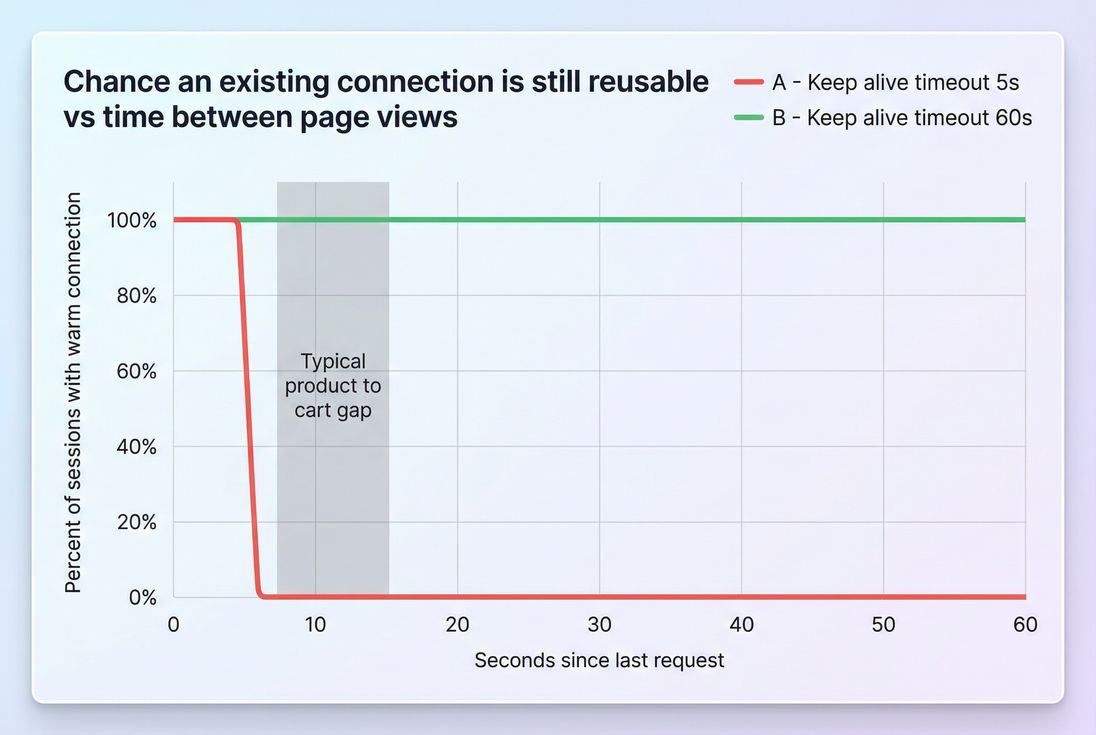
Keep-alive timeouts are too short
Keep-alive matters most across:
- "Soft pauses" during a single page load (bursty requests)
- Quick navigations during a session (product → cart in 5–15 seconds)
- Multi-step flows where the same hosts repeat
If your infrastructure closes idle connections aggressively (CDN, load balancer, reverse proxy, app server), the browser is forced to reconnect.
Common culprits:
- Load balancer idle timeout lower than you expect
- Proxy closing connections to origin
- App framework sending
Connection: close(or not supporting keep-alive well under load) - Frequent deploys/restarts causing connection resets
HTTP/1.1 domain sharding and legacy asset patterns
"Shard static assets across subdomains" used to be a performance hack for HTTP/1.1. Under HTTP/2/3, it often backfires by creating more origins and more handshakes.
If you see patterns like:
static1,static2,img1,img2…
…you may be paying more handshake tax than you realize.
Related reading:
Redirects create accidental new connections
Redirect chains are sneaky because they often introduce additional hostnames. Even a "simple" HTTP → HTTPS redirect can add extra work, and cross-host redirects can multiply it.
Related reading:
The Website Owner's perspective
"We added a tag for marketing and LCP got worse. The actionable question is: did we add new origins or redirects that forced new TLS handshakes before the hero finished loading?"
How to improve and keep it fixed
You'll get the biggest real-world gains by focusing on the few changes that remove handshakes from the critical path.
1) Consolidate and simplify origins
Start by listing every hostname on your key templates (home, PLP, PDP, cart, checkout). Then:
- Move critical assets back to your primary CDN/origin where possible
- Remove old sharding patterns
- Consider self-hosting the few critical third-party assets that are stable and cacheable (where licensing allows)
This reduces the number of "must-connect" hosts, which is the most reliable way to improve reuse.
2) Ensure HTTP/2 or HTTP/3 is enabled
For most sites, enabling HTTP/2 (and ideally HTTP/3 where supported) improves reuse because you can carry more requests over fewer connections.
- Validate the protocol negotiated on your main document and your asset host
- If you use a CDN, confirm HTTP/2/3 is enabled at the edge
Related reading:
3) Tune keep-alive safely (don't guess)
Keep-alive is a reliability setting as much as a speed setting. You want connections to remain open long enough for typical user behavior, without exhausting server resources.
A practical approach:
- Check your current idle timeouts at every layer: CDN → load balancer → reverse proxy → app server
- Increase the shortest timeout first (the weakest link closes the connection)
- Retest under realistic traffic (short timeouts can look "fine" in a single cold synthetic run)
The benefit you're looking for is fewer new connections on second/third navigations, not just a slightly better first-load score.
4) Use preconnect sparingly for critical third parties
If a third-party origin is truly required early (for example, a payment SDK on checkout), preconnect can start DNS/TCP/TLS earlier so the connection is ready when the resource is requested.
But preconnect has costs:
- It opens sockets that compete with other work
- It can waste resources if the origin isn't used quickly
A good rule: preconnect only for origins that are both critical and used within the first seconds of the page.
Related reading:
5) Reduce the number of requests that need the network
Connection reuse helps you avoid paying setup costs repeatedly, but the fastest request is still the one you never send.
Combine reuse work with:
- Browser caching and correct Cache-Control headers
- Edge caching for HTML where appropriate
- Asset minification and Brotli compression
- Code splitting to avoid shipping JS users won't execute
How to monitor it without getting fooled
Connection reuse is easy to "improve" accidentally in a single lab run (because the browser may keep connections warm between tests, or because the test order changes). The goal is repeatable evidence.
Use synthetic: prove fewer new connections
In synthetic runs, look for:
- Fewer requests showing DNS/TCP/TLS phases
- Fewer distinct connections per origin (especially on HTTP/2/3)
- Critical requests (HTML, render-blocking CSS, LCP image) no longer waiting on connection setup
If you need a single artifact to share with a developer or vendor, it's usually the waterfall:
Network request waterfall
Use field thinking: confirm impact on tails
Real users vary. That's where handshake overhead really hurts.
To validate business impact:
- Track field TTFB and LCP trends after changes
- Segment by device/network where possible (mobile users benefit most)
- Expect the biggest gains in p75/p90 stability, not just best-case medians
Related reading:
Prevent regressions with budgets
Connection reuse often regresses when someone adds a new tag, changes a CDN setting, or introduces an extra hostname for assets. Budgets help catch that early, before revenue dashboards do.
If you're using PageVitals, you can set up performance budgets to flag metric regressions in your workflow:
Performance budgets
The Website Owner's perspective
"I want an alert when a new vendor script adds three new origins on the PDP, because that change will quietly slow the next campaign's traffic – and we'll blame the ads instead of the page."
Quick diagnostic checklist
If your waterfalls show repeated connection setup, these checks usually find the cause fast:
- Count origins: are you connecting to too many hosts?
- Confirm protocol: are first-party origins using HTTP/2 or HTTP/3?
- Scan for repeats: does the same hostname show TCP/TLS setup multiple times?
- Check timeouts: CDN, load balancer, proxy, app server idle timeouts aligned?
- Audit third parties: anything starting before render that doesn't need to?
Connection reuse and keep-alive are not glamorous optimizations – but they're one of the cleanest ways to remove pure overhead from your critical path and make performance more consistent for real customers.
Frequently asked questions
On modern stacks using HTTP/2 or HTTP/3, most first party requests after the initial HTML should ride an existing connection, so you typically see one connection per origin per page load. If you see repeated TCP or TLS setup to the same origin, that is usually a fixable slowdown.
Yes. The browser still has to connect to the CDN edge, and reusing that connection avoids repeated handshakes during the page load and across fast navigations. Also, on cache misses the CDN connects to your origin; poor keep alive between edge and origin can increase TTFB for uncached pages.
Many tags introduce new origins, and each origin requires its own DNS, TCP, and TLS setup. Some tags also redirect through multiple hosts, multiplying connection setup costs. The practical takeaway is to audit which third parties are actually needed on the landing path and delay the rest.
Not always. Longer timeouts increase the chance a connection stays warm between navigations, which can reduce repeat TTFB and speed up multi step funnels. But overly long timeouts can increase server open connections and memory usage, triggering resets or throttling that makes performance less stable.
Use a before and after synthetic waterfall to show fewer new connections and less DNS or TLS time on critical requests, then validate impact in field metrics like TTFB and LCP. If you monitor Core Web Vitals over time, the improvement should show as lower tail latency, not just best case results.
Want to take PageVitals for a spin?
Page speed monitoring and alerting for your website. Get daily Lighthouse reports for all your pages. No installation needed.
Start my free trial