Table of contents
DNS prefetching explained
A slow page doesn't always lose visitors because your server is slow. Many real-world delays happen before the first byte – when the browser is simply trying to find where a third-party script, font, CDN image, or payment widget lives. Shaving even 50–200 ms off those early "waiting" periods can be the difference between a fast-feeling product page and one that starts behind.
DNS prefetching is a browser hint that tells the browser: resolve this hostname now, so if we need it soon, we don't have to wait later. Concretely, you add a tag like:
<link rel="dns-prefetch" href="//cdn.example.com">The browser performs the DNS lookup in advance (when it has idle time), so when a resource request actually happens later, the DNS step is already done or more likely to be cached.
The Website Owner's perspective: DNS prefetching is a low-effort way to reduce "random" delays caused by third-party vendors and separate hostnames. It's not a redesign or a backend project – more like removing speed bumps that show up during promotions, tag changes, and platform migrations.
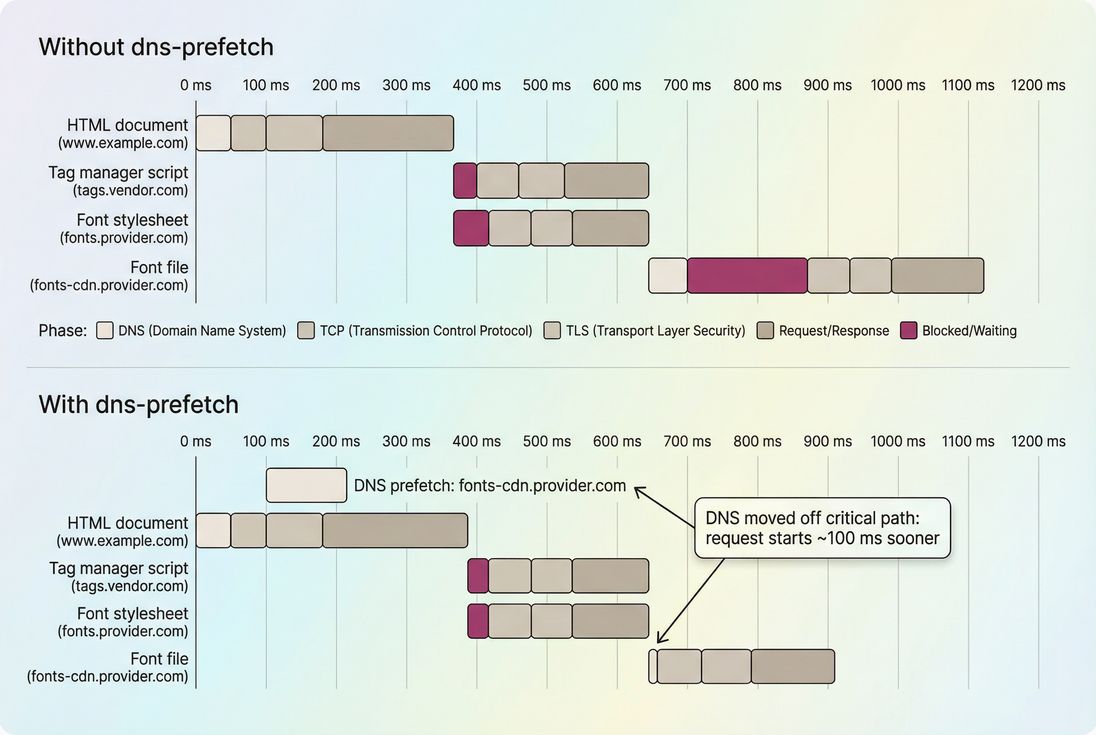
What DNS prefetching actually does
DNS is the phonebook lookup that converts a hostname (like fonts-cdn.provider.com) into an IP address so the browser can connect. If the browser doesn't already have that answer cached, it must ask a DNS resolver, wait for the reply, then proceed with the connection.
DNS prefetching:
- Starts the DNS lookup earlier (often in parallel with other work)
- Warms the browser/OS DNS cache so later requests can skip the DNS wait
- Only applies to hostnames you specify (usually third-party or separate subdomains)
It's part of a bigger family of "resource hints," alongside preconnect, preload, and prefetch.
What it does not do
DNS prefetching does not:
- Download the file
- Open a TCP connection
- Complete TLS negotiation
- Guarantee a speedup (caches, timing, and browser behavior matter)
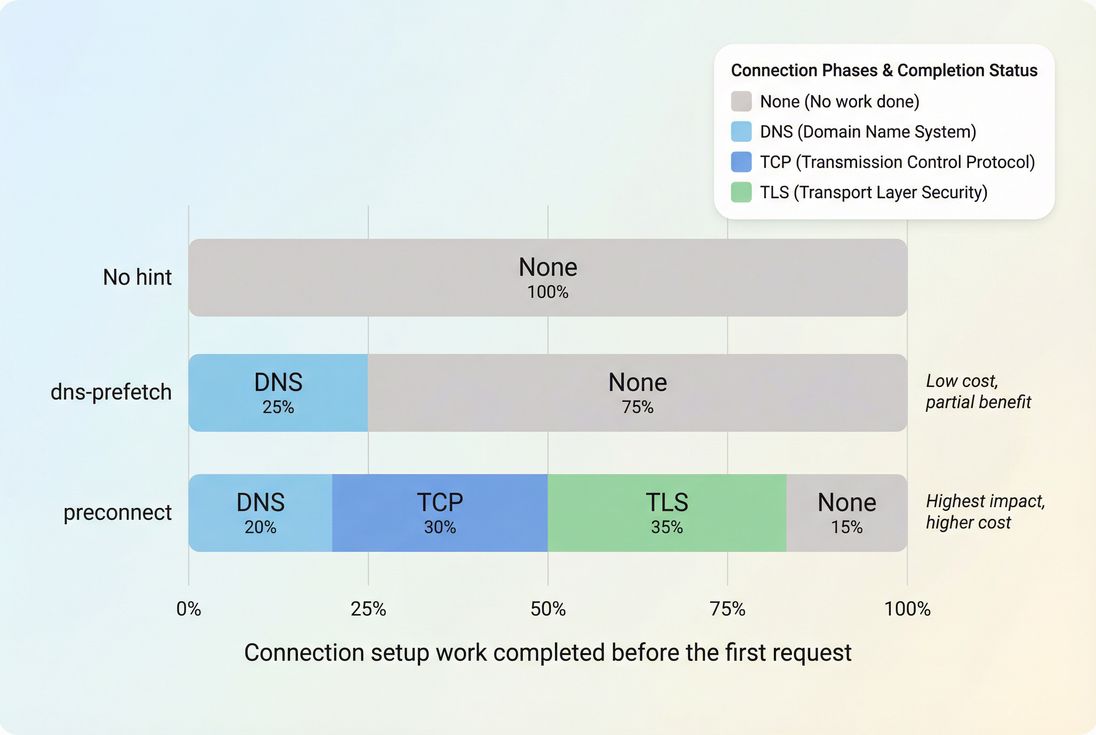
If you need to shorten the full connection setup (DNS + TCP + TLS), you're usually looking for preconnect, not dns-prefetch.
How browsers "calculate" DNS lookup time
In diagnostics tools, DNS lookup time is typically shown as:
- The time between
domainLookupStartanddomainLookupEnd(Resource Timing API conceptually) - The "DNS" segment in a network waterfall
- A contributor to first-time connection overhead along with TCP handshake and TLS handshake
See also: DNS lookup time and network latency.
Key interpretation: dns-prefetch usually doesn't reduce the DNS duration itself. It reduces the chance that DNS duration sits on the critical path when a resource becomes needed.
The Website Owner's perspective: If you see "DNS" showing up repeatedly as blocking time in waterfalls – especially for third-party domains – dns-prefetch is one of the few fixes you can ship quickly without renegotiating vendors or rewriting pages.
Where it helps (and where it doesn't)
DNS prefetching is most valuable when three things are true:
- The page will likely request a resource from a different hostname
- That hostname is not already cached
- That request happens early enough that DNS waiting affects user-visible milestones (like FCP or LCP)
High-probability wins
Common patterns where dns-prefetch helps:
- CDN hostnames (
cdn.example.com) when your HTML is onwww.example.com - Font hosts (especially if you load fonts shortly after initial HTML/CSS)
- Tag manager and A/B testing domains that trigger more downstream requests
- Payment, fraud, and personalization vendors used early on product/cart pages
- Multi-domain architectures (storefront on one domain, checkout on another)
If you operate multi-step flows, note that prefetch hints on step 1 can benefit step 2 – especially for multistep commerce paths (category → product → cart → checkout).
When it doesn't matter
dns-prefetch will usually do little when:
- Everything is served from the same origin and you already benefit from connection reuse
- Users mostly have warm caches (return visitors, long TTLs, stable third-party list)
- Your bottleneck is main-thread work (see reduce main thread work) rather than network setup
- The request is so late that DNS would have been cached anyway by other activity
dns-prefetch vs preconnect (practical)
dns-prefetch is "cheap but limited," preconnect is "strong but can be wasteful."
| Hint | Warms DNS | Opens TCP | Does TLS | Best for | Main risk |
|---|---|---|---|---|---|
dns-prefetch | Yes | No | No | Likely future connections | Too many lookups |
preconnect | Yes | Yes | Yes (for HTTPS) | Definitely-needed early connections | Consumes sockets / can be wasted |
preload | N/A | N/A | N/A | Must-have render resources | Wrong preloads waste bandwidth |
prefetch | N/A | N/A | N/A | Next-page navigation assets | Can compete with critical loads |
(Deep dives: preconnect, prefetch, preload)
What to prefetch on real sites
The most common mistake is treating dns-prefetch like a blanket rule: "prefetch every third-party domain." That creates noise and sometimes measurable overhead.
Instead, build a short list based on probability and timing.
Start from your "early request" list
Look at the first seconds of a typical page load and identify cross-origin hosts that appear early in the waterfall. These often include:
fonts.googleapis.com,fonts.gstatic.comcdn.*subdomains- Tag manager and analytics endpoints
- Fraud detection or payment scripts on cart/checkout
If you have access to a network waterfall report, that's the fastest way to see it. (If you use PageVitals, the relevant view is the Network request waterfall report: /docs/features/network-request-waterfall/.)
Prioritize by business impact, not just count
A simple prioritization that works well in practice:
- Origins needed for above-the-fold rendering (see above-the-fold content and critical rendering path)
- Origins needed to complete checkout or lead capture
- Origins needed for monetization tracking (only if required early)
If a third-party is only needed after consent, after interaction, or deep in the session, dns-prefetch on the landing page is often wasted.
The Website Owner's perspective: This is less about "tech correctness" and more about reducing risk in revenue moments. If a CDN hostname or payment vendor occasionally adds 150 ms of DNS wait during peak traffic, that's a conversion tax – dns-prefetch can reduce how often that tax hits.
Benchmarks: what's a "good" DNS situation?
DNS time varies widely by user network and resolver quality. Rough practical ranges you'll see in lab tools:
- ~10–30 ms: very good (nearby resolver, warm cache)
- ~30–80 ms: typical
- ~80–200 ms: common on mobile or congested networks
- 200+ ms: a red flag (resolver issues, distant DNS, or repeated cold lookups)
The important nuance: the win from dns-prefetch equals the DNS time that would have blocked a critical request. If DNS is 100 ms but it happens completely in parallel with other work, the user may see no improvement.
Don't prefetch volatile or user-specific hosts
Avoid prefetching hostnames that vary per user/session (or are created dynamically), like:
- Per-user tracking subdomains
- Short-lived A/B test endpoints
- Per-region hosts when you already have geo routing handled elsewhere
These can increase DNS churn and lower cache hit rates.
How to implement it safely
The standard HTML pattern
Add dns-prefetch hints in the document <head>:
<link rel="dns-prefetch" href="//cdn.example.com">
<link rel="dns-prefetch" href="//fonts.gstatic.com">
<link rel="dns-prefetch" href="//tags.vendor.com">
Practical notes:
- Use hostnames, not full URLs to files.
- Protocol-relative (
//) is common;https://is also acceptable in modern browsers. - Keep the list short and reviewed (treat it like a dependency list).
Pairing rules with preconnect
A common safe approach:
- Use preconnect for 1–3 origins that are definitely required immediately (fonts/CDN for hero content).
- Use dns-prefetch for the next tier of "very likely" origins.
If you already preconnect to an origin, you usually don't need dns-prefetch for that same origin.
Where teams get tripped up
Adding hints too late
If your tag manager injects dns-prefetch late in the load, you miss the point. Put hints in the HTML head where possible.Hinting for origins that don't matter
If an origin is only used after a user scrolls or after consent, prefer doing nothing – or consider later-stage strategies (like lazy loading where applicable).Using dns-prefetch as a substitute for reducing third parties
dns-prefetch can reduce one component of delay, but third-party scripts can still hurt via JavaScript execution time, long tasks, and render blocking behavior.
How dns-prefetch interacts with caching and TTL
DNS answers are cached at multiple layers:
- Browser cache
- OS cache
- Recursive resolver cache (ISP/enterprise)
- Sometimes intermediate network caches
A low TTL or frequent hostname changes can reduce the benefit of dns-prefetch. Separately, if you already have strong browser caching for the resource itself (see browser caching and Cache-Control headers), DNS may become a bigger relative share of "first-hit" latency.
The Website Owner's perspective: Treat dns-prefetch like an operational checklist item: whenever marketing adds a new tag or vendor, you either (a) delay it until after user-visible rendering, or (b) add the right hint if it must run early.
How to validate the win
Use lab tests to see the mechanism
dns-prefetch is easiest to verify in synthetic tests because you can see timing directly.
What to look for in a waterfall:
- A DNS lookup for
example-vendor.comoccurring before the request that needs it - The later request showing no DNS blocking (or a near-zero DNS segment)
- Earlier start time for the critical resource (CSS, font file, or early script)
If you can run a cold-cache test, do it – dns-prefetch is most visible there.
Related reading: field vs lab data and Measuring Web Vitals.
Use field data to confirm it matters for users
In real-user measurement, the impact may be muted because many users already have DNS cached (especially for large providers like Google Fonts).
So rather than expecting a giant sitewide shift, look for:
- Improvements on entry pages for new sessions
- Improvement in LCP distribution tails (p75/p90) rather than averages
- Reduced "random" regressions after third-party changes
If you're correlating with Core Web Vitals, focus on whether the resources behind LCP come from a hostname that benefits from earlier resolution. (Core Web Vitals overview: Core Web Vitals.)
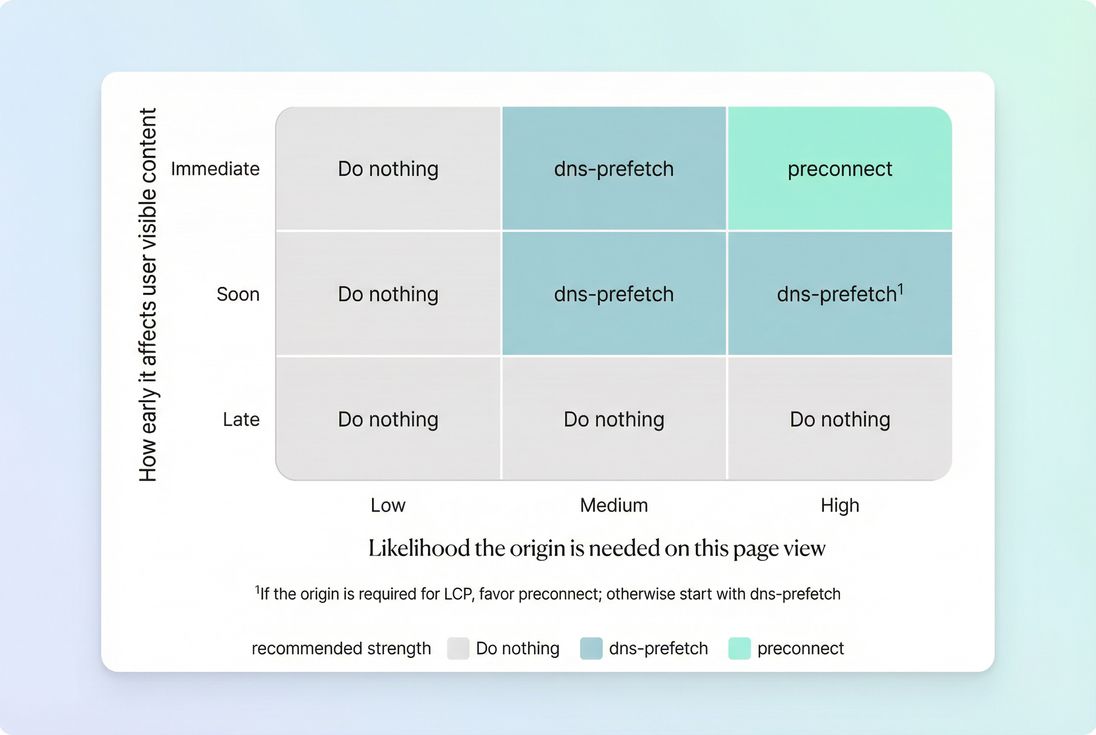
A simple decision matrix for teams
Use this to decide between doing nothing, dns-prefetch, and preconnect.
Common "it got worse" interpretations
If you add dns-prefetch and don't see improvement (or see noise), it's usually one of these:
- The DNS was already cached for most users, so the measurable delta is small.
- The hostname is requested too late for DNS to matter.
- The bottleneck is elsewhere (render-blocking CSS, big JS bundles, slow TTFB, or heavy third-party execution).
- You prefetched too many domains, adding overhead during startup.
In those cases, dns-prefetch isn't "bad" – it's just not the lever that moves your current bottleneck.
Practical rollout plan (what to do Monday)
- List cross-origin hosts used on your top landing pages and checkout/cart.
- From a waterfall, identify the earliest 3–10 that are both common and meaningful.
- Add
rel="dns-prefetch"for the "likely" tier. - Add
rel="preconnect"for the "must be early" tier (usually 1–3 origins). - Re-test and verify that DNS moved earlier and that key requests start sooner.
- Revisit monthly (tag managers change dependencies constantly).
If you're also trying to reduce overall dependency cost, pair this with audits of third-party scripts and page weight controls like asset minification and code splitting.
Bottom line
DNS prefetching is a small, targeted optimization that helps when your page relies on multiple hostnames – especially third parties – and DNS lookup time shows up as blocking in your critical path. Use it sparingly, verify it in a waterfall, and treat it as a dependency-management tool for real business pages (landing, product, cart, checkout), not as a blanket "speed hack."
Frequently asked questions
Sometimes. DNS prefetching does not make DNS itself faster, but it can remove DNS from the critical path so key resources start sooner. That can reduce LCP delays on first visits, especially when LCP depends on a CDN host, font host, or third party origin.
Keep it tight. Start with the 3 to 10 most important cross origin hosts used on the first page view or immediately after a click. Too many hints create extra DNS traffic and can compete for attention during startup. If a host is rarely needed, skip it.
Use dns-prefetch for likely future connections and preconnect for definitely needed early connections. Preconnect includes DNS plus TCP and TLS setup, so it can help more but also consumes sockets and can be wasteful. A common pattern is preconnect for critical fonts and dns-prefetch for analytics or chat.
It can if you overdo it. Prefetching many third party domains triggers extra DNS lookups, which can add overhead on mobile networks and reveal intended connections earlier. Limit hints to reputable providers you already load, avoid dynamic or user specific domains, and revisit the list after tag manager changes.
In synthetic tests, check the network waterfall and confirm that DNS resolution happens earlier than the resource request and that the request no longer blocks on DNS. In field data, expect smaller wins because many users have warm caches, so segment for first visits or cold starts when possible.
Want to take PageVitals for a spin?
Page speed monitoring and alerting for your website. Get daily Lighthouse reports for all your pages. No installation needed.
Start my free trial