Table of contents
Effective cache TTL settings (Only capitalize the first word)
A slow repeat visit is a tax you pay every day: loyal customers re-download the same CSS, JavaScript, fonts, and images, your ad spend buys fewer engaged sessions, and multi-step journeys (browse → product → cart → checkout) get progressively heavier instead of faster.
Effective cache TTL settings means setting cache lifetimes so that the browser can reuse previously downloaded files for a meaningful amount of time – without risking customers getting stuck on outdated code or content. In practical terms, it's about how long your assets can be used from cache before the browser has to hit the network again.
If you've ever seen a warning like "serve static assets with an efficient cache policy," this is what it's pointing at.
What effective cache TTL actually measures
Cache TTL (time to live) is the "freshness window" for a resource. During that window:
- The browser can use the file from its cache instantly (best case).
- Or it can revalidate with the server (still costs a round trip).
Effective TTL is the part website owners should care about: how much network traffic and latency caching actually avoids for real navigations.
Two sites can both "cache" assets, but one still makes conditional requests on every page view (ETag/Last-Modified checks), while the other truly reuses files without touching the network. From a user experience perspective, those are very different.
Related concepts worth understanding:
- Browser caching (what the browser does locally)
- Cache-Control headers (how you tell the browser what to do)
- Edge caching and CDN performance (caching in front of your origin)
The Website Owner's perspective: Effective TTL is how you stop paying repeated bandwidth and latency costs for the same assets across sessions, pages, and steps in checkout. If repeat visits are not getting noticeably faster, your caching strategy is probably not actually effective.
How it's determined in practice
Tools and browsers infer cache lifetime primarily from response headers:
Cache-Control: max-age=...(browser freshness lifetime)Cache-Control: s-maxage=...(shared caches like CDNs, not the browser)Expires: ...(legacy, still seen)- Validation headers:
ETagandLast-Modified(allow revalidation)
What changes the real-world effect:
Whether the file is fresh without revalidation
- A long
max-agemeans no request needed. - A short
max-age(or none) means frequent revalidation.
- A long
Whether the resource URL is versioned
- If filenames change when content changes, you can cache "forever" safely.
- If URLs are stable (like
/app.js), long TTLs risk shipping broken or inconsistent pages after deploy.
Whether you're measuring cold vs warm cache
- Lab tests often start cold (empty cache), so TTL improvements may not "move" lab LCP much.
- Field data captures repeat visits where TTL has major impact. See Field vs lab data.
Where caching happens
- Browser cache helps the same user.
- CDN caching helps everyone, but still requires a network request from the browser per navigation.
If you want a concrete place to verify this quickly, look at a request's response headers and whether it is "served from disk cache/memory cache" versus revalidated in the waterfall. In PageVitals reporting, the network request waterfall is the fastest way to see which assets are still going to the network.
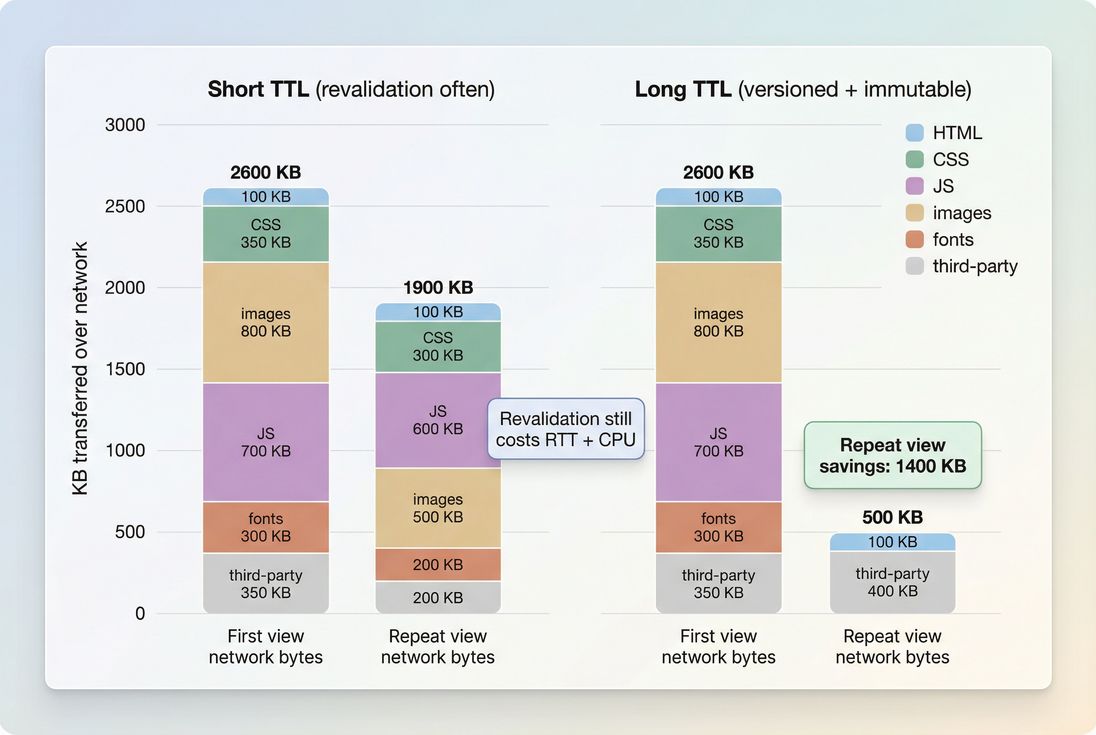
Effective TTL shows up most on repeat views: long-lived, versioned assets drop out of the network entirely, reducing bytes, latency, and main-thread pressure.
What good TTL looks like by asset type
Most caching problems come from treating every resource the same. A practical TTL strategy is "long for versioned static, short for HTML and data."
Here's a benchmark you can use as a starting point.
| Resource type | Typical URL pattern | Recommended browser caching | Why |
|---|---|---|---|
| Versioned JS/CSS bundles | /assets/app.abc123.js | Very long (months to 1 year) + immutable | Safe because the URL changes when content changes |
| Images you control | /images/hero.abc123.webp | Very long (months to 1 year) | Repeat views and back/forward navigations benefit |
| Fonts | /fonts/inter.abc123.woff2 | Very long (months to 1 year) | Fonts are reused across many pages |
| Unversioned JS/CSS | /app.js, /styles.css | Short (minutes to hours) unless you fix versioning | Prevents broken pages after deploy |
| HTML documents | /category/shoes | Short or must-revalidate | Content changes often; must not go stale |
| API responses | /api/products?page=1 | Depends (often short) | Highly business-specific, often personalized |
Key idea: Long TTL is not a "performance trick." It's a deployment strategy. If you can't guarantee cache busting, you can't safely cache long.
Helpful adjacent optimizations:
- Asset minification (smaller files cache faster and cost less when they miss)
- Code splitting (reduce what must be downloaded on first view)
- Image optimization (better formats reduce both first and repeat costs)
The Website Owner's perspective: Long TTLs are a margin lever. They reduce infrastructure cost and improve returning-user speed without redesigning your site. But they require operational discipline: versioned assets and predictable releases.
When effective TTL "breaks" (and how to avoid it)
Stable URLs with long TTL
This is the classic failure mode: you set a long cache lifetime on /app.js, deploy new code to the same URL, and some users keep the old file while others get the new one.
Symptoms you'll see:
- "It works for me" bugs that disappear on hard refresh
- Broken UI after deployment (old JS + new HTML)
- Sudden spikes in support tickets or checkout errors
Fix: ensure URLs change when content changes. Most build tools support fingerprinting/hashing for assets. Once filenames are content-addressed, you can safely apply a long TTL.
HTML cached like an asset
Caching HTML like static assets is risky for most sites:
- Prices, inventory, promotions, personalization, and experiment variants change
- Even a short-lived stale HTML page can show incorrect information
Common safe approach:
- Keep HTML short-lived or revalidated
- Cache aggressively at the CDN for anonymous traffic if appropriate, but be deliberate about variation (cookies, geolocation, device type)
If you're using a CDN, separate the browser TTL (max-age) from the shared-cache TTL (s-maxage) to avoid locking browsers into stale HTML while still keeping origin load under control.
"We have ETag, so we're fine"
ETag helps correctness, but it can still be slow:
- The browser still makes a request
- That request still pays DNS/TCP/TLS/RTT costs (even if small)
- On mobile, extra round trips can be noticeable
This is where effective TTL differs from "some caching exists." If revalidation happens constantly, performance still suffers – especially on multi-step journeys.
Related latency concepts:
How to set TTLs safely
This is the practical playbook that works for most e-commerce and content sites.
1) Split content into two buckets
Bucket A: Versioned static assets
- JS bundles, CSS, fonts, many images
- URLs must change when content changes
Bucket B: Documents and data
- HTML
- API responses
- Anything personalized or time-sensitive
This split lets you be aggressive where it's safe, and conservative where it's risky.
2) Use long TTL + immutable for versioned assets
For Bucket A, your goal is: "download once, reuse for a long time."
Typical header shape (conceptually):
Cache-Control: public, max-age=31536000, immutable
"Immutable" tells modern browsers they don't need to revalidate during the freshness window.
3) Keep HTML short-lived
For Bucket B (especially HTML), prefer:
- very short caching, or
- explicit revalidation
A common approach is "cache at the edge, revalidate at the browser," but the right answer depends on how often your pages change and how much personalization you do.
If you're unsure, start conservative for HTML and get aggressive only after you verify correctness.
4) Align TTL with release frequency
A practical rule of thumb:
- If you deploy multiple times per day, you have more reason to rely on versioned assets and long TTL (because correctness depends on it).
- If you deploy rarely, you still benefit from long TTL, but the business risk of stale assets may be lower.
5) Don't forget third-party and platform constraints
On Shopify, WordPress, and other platforms, you may have limits on how you control headers for certain assets. In those cases:
- prioritize caching on what you can control (theme assets, custom scripts, fonts you host)
- reduce reliance on heavy third-party scripts
- apply loading strategies like Async vs defer and Third-party scripts
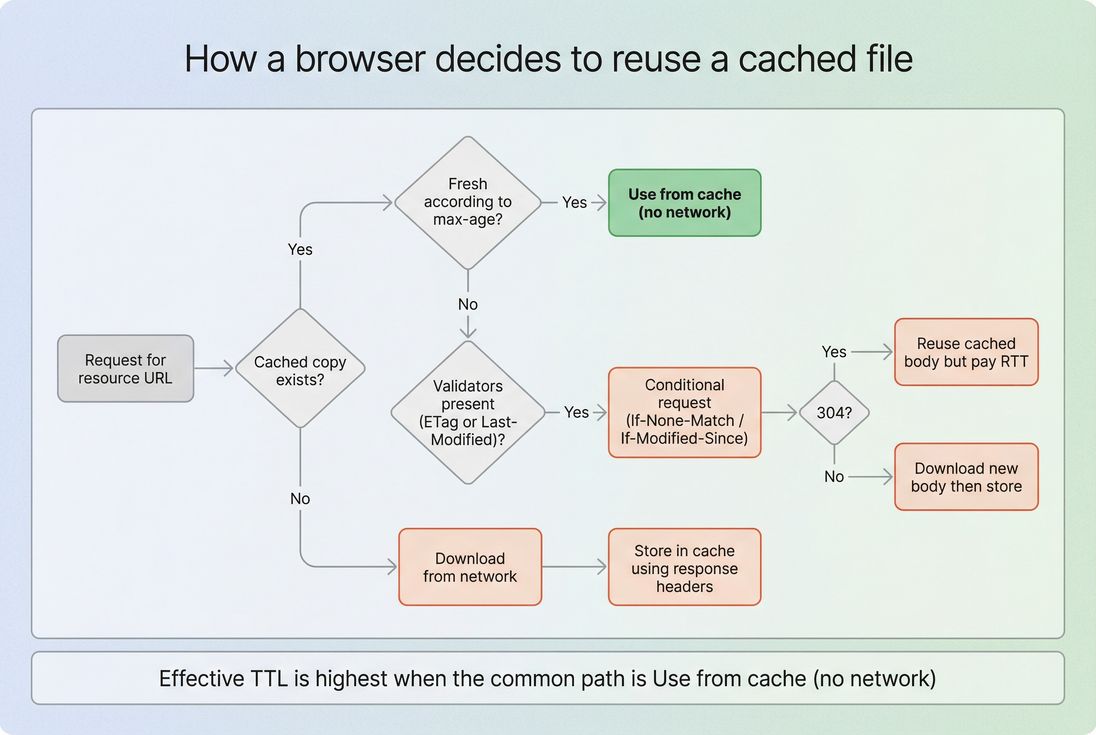
Long max-age on versioned assets shifts the common path to true cache reuse, avoiding round trips that still cost time even when the server replies 304.
How effective TTL impacts Core Web Vitals
Caching rarely improves the very first visit (cold cache) as dramatically as it improves subsequent navigations. But those subsequent navigations matter:
- Returning visitors (higher conversion intent)
- Multi-page sessions
- Checkout steps
- Internal search and filtering flows
Caching improves Web Vitals indirectly by removing work:
- Fewer network requests → less contention for critical resources → better LCP
- Less JavaScript re-downloaded and re-parsed → less JS execution time pressure
- Less main thread contention → better interaction responsiveness, supporting INP
It also reduces:
- TTFB sensitivity (because fewer requests go to origin/CDN)
- Variability across mobile networks (Mobile page speed)
If you're trying to improve LCP specifically, caching is a supporting lever. It's strongest when paired with:
The Website Owner's perspective: You usually don't win by shaving 50 ms off a single request. You win by preventing dozens of repeat requests across a session – especially on mobile – so your experience stays consistently fast for high-intent users.
How to interpret changes in effective TTL
Effective TTL changes typically show up in one of three ways:
1) Repeat-view speed improves without code changes
If you raise TTL for versioned assets, you may see:
- Similar first-view performance
- Better repeat-view performance (lower network bytes, fewer requests, smoother interactions)
If your analytics show a meaningful returning-user segment, this can translate into:
- lower bounce rate on landing pages for returning users
- faster product browsing across multiple PDPs
- fewer checkout slowdowns
2) Speed gets worse after a "minor" deployment
If effective TTL unexpectedly drops, look for:
- missing
Cache-Controlheaders on static assets - a CDN configuration change that overrides origin headers
- new asset URLs that are not versioned (e.g., moving from hashed bundles to a single
/bundle.js) - a third-party tag added across all pages
3) Support tickets spike after caching changes
If you increased TTL and users report broken layouts or missing functionality:
- suspect unversioned URLs cached too long
- check whether HTML references changed assets but clients are still holding old CSS/JS
In practice, the fix is almost always "restore short TTL for unversioned assets" and "implement fingerprinting."
How to audit and monitor TTL reliably
Use a waterfall to spot repeat downloads
A good caching setup has a clear pattern:
- First view downloads the heavy assets
- Subsequent navigations show those assets coming from memory/disk cache (or not requested at all)
In PageVitals, the network request waterfall helps you confirm whether key assets are cached, revalidated, or re-downloaded.
Don't trust only cold-cache lab tests
Many lab tools simulate a cold cache by default. That's useful for first impressions, but it hides the repeat-visit benefit of correct TTL.
Use both:
- synthetic tests to catch header regressions and new uncached assets
- field/RUM views to confirm real-user improvements (see Real user monitoring)
Put guardrails in place
If your team deploys often, caching regressions will happen unless you set expectations.
One effective approach is a budget or alert tied to:
- number of static assets with short TTL
- total bytes served with low cache lifetime
- newly introduced unversioned assets
If you're using PageVitals for synthetic testing, you can operationalize this with performance budgets so regressions get flagged as part of your workflow.
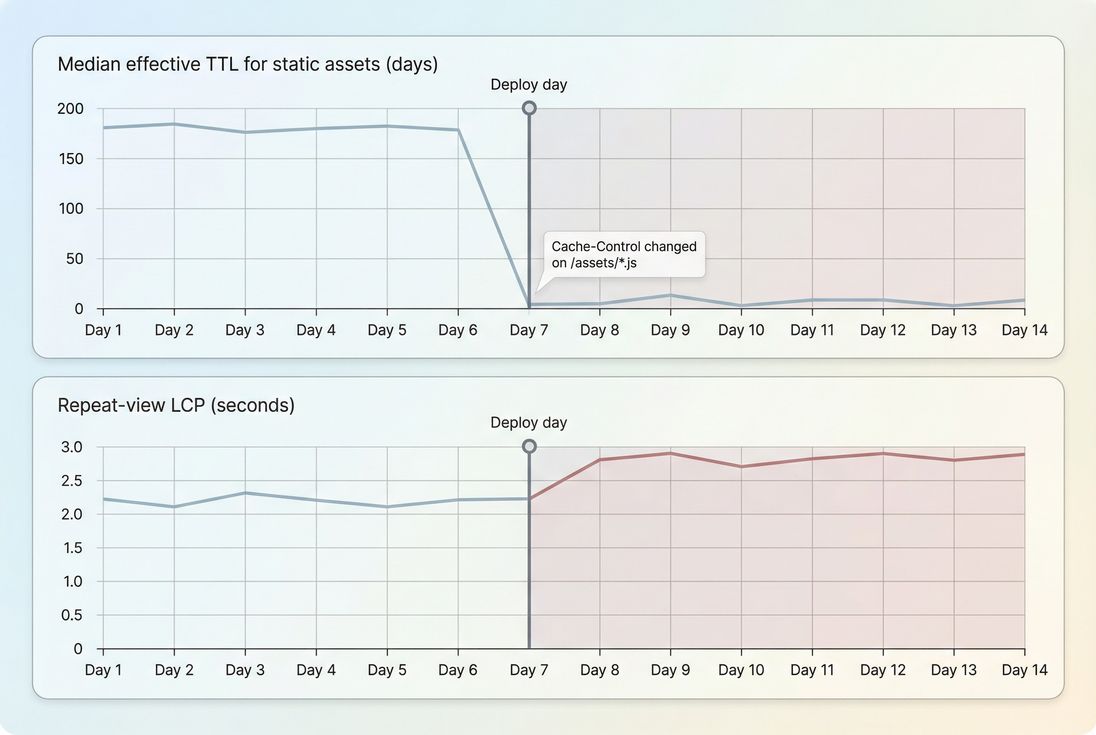
Effective TTL regressions often appear as a sudden drop after deploy, followed by slower repeat-view experience because assets start revalidating or re-downloading.
Practical fixes you can apply this week
If you want the highest-impact actions with the lowest risk, start here:
Identify your heaviest repeat-downloaded assets
- Typically JS bundles, CSS, fonts, hero images
- Confirm via a waterfall and real sessions
Enable filename fingerprinting for JS/CSS
- This is the prerequisite for safe long TTL
Apply long browser TTL only to versioned assets
- Keep HTML short-lived
Verify CDN is not overriding headers
- Make sure origin and edge policies align (see CDN vs origin latency)
Decide what to do about third-party
- Remove, delay, or replace where it blocks rendering
- Combine with Render-blocking resources and Async vs defer improvements
Related reading
Frequently asked questions
For versioned static assets like app.abc123.js or styles.abc123.css, aim for a very long TTL such as 1 year plus immutable. For images and fonts, the same applies if filenames are fingerprinted. For HTML, keep TTL short or require revalidation so content updates immediately.
Most warnings happen when important static files have short cache lifetimes or only rely on validation like ETag without a long max age. Tools treat that as low effective caching because the browser still makes a network request. Check response headers for Cache Control and verify that assets are versioned.
Long TTLs are safe only when the URL changes whenever the file changes, usually via filename fingerprinting from your build system or CDN. If you reuse the same URL for new JS or CSS, a long TTL can keep old code and break pages. Pair long TTL with versioned filenames.
If a third party asset is critical and frequently re downloaded, it can hurt repeat visit speed but you often cannot change its headers. Options include self hosting (if the license allows), replacing the vendor, delaying it with async or defer, or limiting it to pages where it drives revenue.
Caching improvements mostly affect repeat visits and multi page journeys like category to product to checkout. Validate with field data and conversion funnels rather than only cold cache lab tests. Look for fewer repeat downloads, improved LCP consistency, and lower bounce on returning sessions, especially on mobile.
Want to take PageVitals for a spin?
Page speed monitoring and alerting for your website. Get daily Lighthouse reports for all your pages. No installation needed.
Start my free trial