Table of contents
WebP vs AVIF image formats
If your homepage hero or product images are heavy, you are paying for it twice: slower pages (lost conversions) and higher infrastructure costs (more bandwidth and CDN spend). Switching image formats is one of the rare optimizations that can reduce load time without redesigning anything.
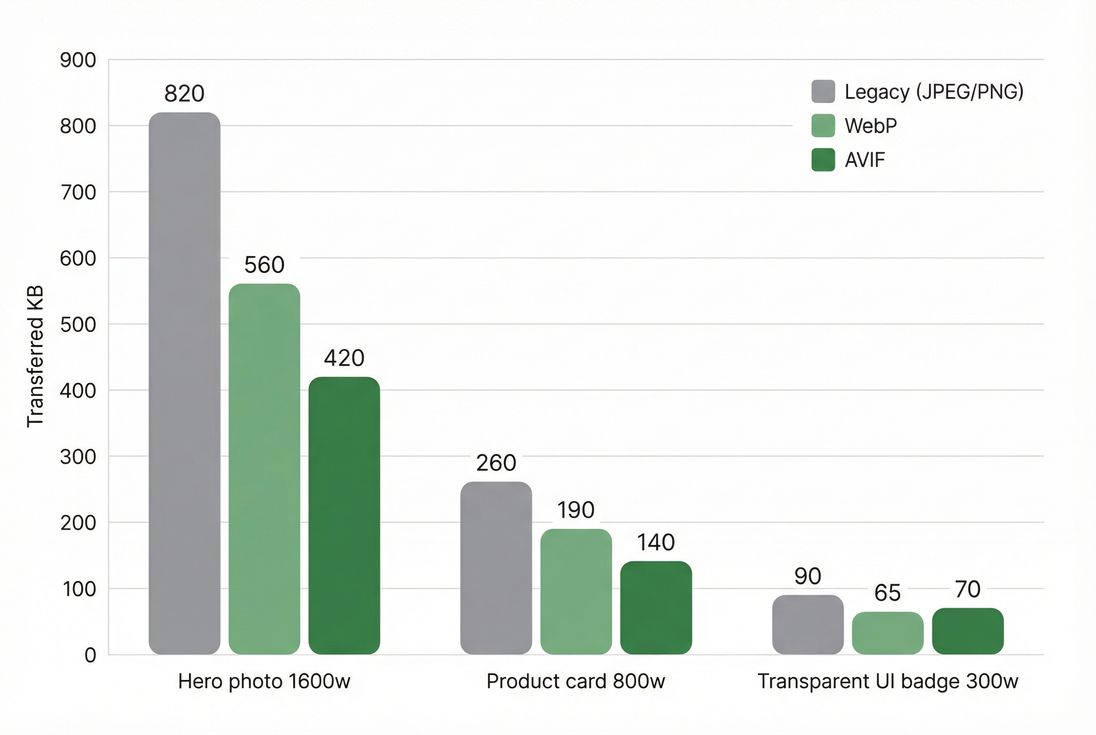
WebP and AVIF are modern image formats that usually deliver the same visual quality as JPEG/PNG at smaller file sizes. Smaller images download faster, can improve Largest Contentful Paint, and reduce total page weight.
What you are really deciding
Most format debates miss the practical point: you are choosing a tradeoff between bytes, CPU cost, and compatibility.
- Bytes affect download time (especially on mobile), and can materially move LCP and overall page load time.
- CPU cost affects encode time in your pipeline and can affect decode/render time on lower-end devices.
- Compatibility affects whether users get the optimized format or a fallback (and whether caching behaves correctly).
Think of "WebP vs AVIF" less like a single switch, and more like a delivery strategy:
- Serve AVIF where it is a clear win.
- Serve WebP where it is "good enough" and reliable.
- Keep JPEG/PNG fallbacks to avoid broken images.
The Website Owner's perspective: This is not about chasing a perfect format. It is about lowering your median and worst-case image bytes on revenue-driving templates (home, category, PDP) so more users hit good Core Web Vitals and fewer bounce on slow connections.
When does AVIF beat WebP?
Photographic images are where AVIF shines
For photographs (hero banners, product photography, lifestyle images), AVIF often compresses smaller than WebP at similar perceived quality. That can mean:
- Faster LCP if your LCP element is an image.
- Lower bandwidth costs.
- Better performance headroom when marketing adds more imagery.
In practice, the biggest wins come from:
- Large, above-the-fold images (the LCP hero, PDP gallery first image). See Above-the-fold optimization.
- Images that are served to many users (home/category pages).
Where WebP can be the better default
WebP is often the pragmatic choice when:
- You want a strong "next-gen" improvement with fewer edge cases.
- Your images are smaller and numerous (thumbnails), where the savings gap between AVIF and WebP is sometimes less meaningful than pipeline simplicity.
- You care about faster and cheaper encoding in bulk.
A practical benchmark table
Use this as a decision starting point, then validate on your own images:
| Scenario | Typical outcome | Recommendation |
|---|---|---|
| Large hero photo (LCP) | AVIF often saves meaningful bytes | Serve AVIF + WebP fallback |
| Product thumbnails | Savings vary; decode overhead matters | WebP often sufficient; AVIF optional |
| Transparent graphics | AVIF may not always beat WebP | Test; use WebP if AVIF not smaller |
| Flat illustrations/screenshots | Either can win depending on content | Test per asset type |
| Animated images | Better to avoid huge animated assets | Consider alternatives; test carefully |
If you want the broader optimization context, read Image optimization and Image compression.
What actually changes page speed
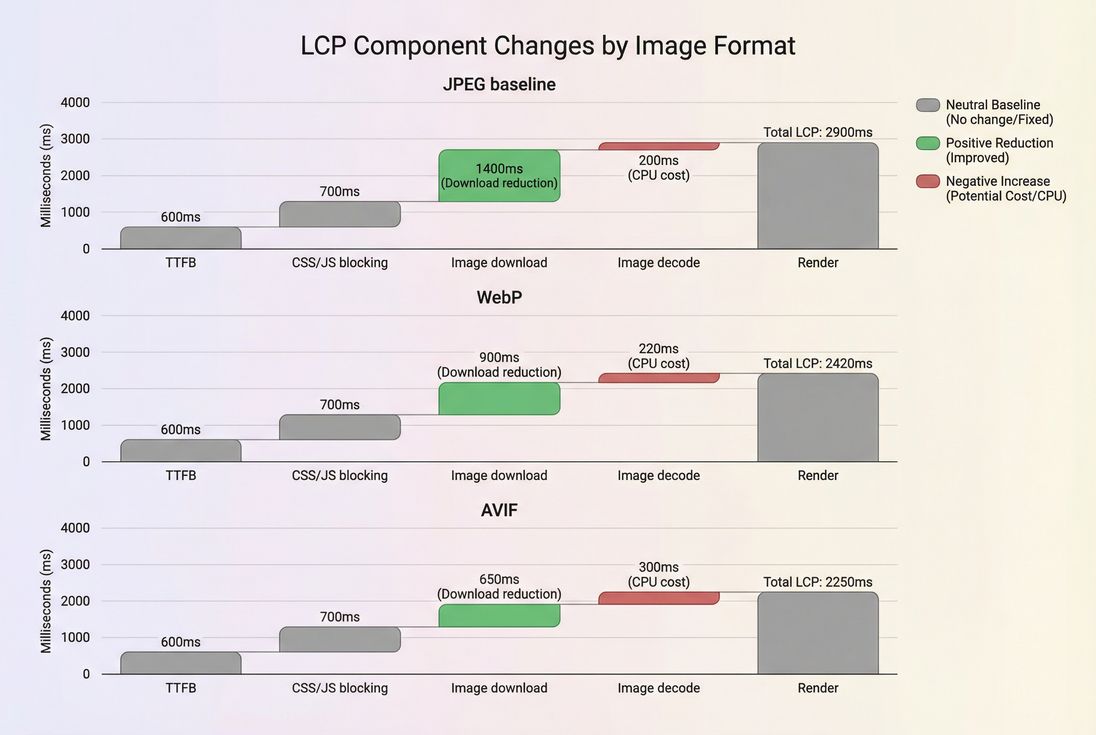
Switching formats primarily changes image bytes over the wire, and sometimes changes decode cost.
Bytes affect the critical path
If the image is render-critical (common for LCP), fewer bytes can reduce:
- Time waiting on the network
- Contention with other critical resources (CSS, JS, fonts)
This interacts with:
A simple way to internalize it: on slower mobile connections, saving a few hundred KB on your LCP image can be the difference between "feels instant" and "user bounces."
Decode and render can matter too
Even if your network is fast, images still need to be decoded and painted. Some devices struggle more with heavier decode work, which can indirectly affect:
- LCP (image isn't painted yet)
- Responsiveness during load (related to Main thread work and INP)
AVIF can be more CPU-intensive to encode, and in some cases to decode, than WebP. This is why testing on mid-tier Android hardware (not just desktop) matters.
Where AVIF can backfire
1) You optimize bytes but lose time elsewhere
If your LCP is not network-bound (for example, you are blocked by heavy scripts), switching formats may barely move the needle. In that case, image format changes should be secondary to:
- Fixing render-blocking assets (Critical CSS, Unused JavaScript)
- Reducing JavaScript execution time
- Cutting HTTP requests
2) You ship the wrong fallback behavior
The most common operational failure is not "AVIF looks bad," it is:
- The browser gets a format it cannot decode (broken image), or
- The CDN caches AVIF and serves it to a browser that only supports WebP/JPEG because your caching does not vary correctly.
If you do server-side negotiation (based on the Accept header), make sure your response is compatible with caching:
- Use correct
Vary: Acceptwhere appropriate. - Combine it with sane Cache-Control headers and long-lived Browser caching for immutable image URLs.
- Consider Edge caching to reduce repeat latency.
3) You use one quality setting for everything
A single "quality=50" across all assets is how teams accidentally damage conversion on PDPs.
Common artifacts to watch:
- Fine textures (fabric, hair) turning into mush
- Banding in gradients (backgrounds, shadows)
- Text overlays getting halos or fringing
A better mental model: different image types need different presets (hero photos, thumbnails, UI graphics, backgrounds).
The Website Owner's perspective: If product images look slightly worse, your conversion rate can drop quietly while performance dashboards look great. Always QA the top revenue pages visually before expanding a rollout.
How to ship WebP and AVIF safely
Use picture with ordered sources
The most reliable pattern is to offer AVIF first, then WebP, then a legacy fallback:
- Browser picks the first format it supports.
- You keep a guaranteed fallback.
- You can still use responsive sizing.
Combine this with Responsive images so you are not sending a 1600px image to a 390px device.
Do not skip width/height
Regardless of format, always include intrinsic dimensions to avoid layout shifts:
- Helps prevent CLS and Layout instability
- Keeps the page stable while images load
Lazy-load below-the-fold images
Next-gen formats reduce bytes, but you still do not want to load everything at once. Use Lazy loading for non-critical images, especially on category pages with many thumbnails.
Watch your caching keys
If you do format negotiation at the CDN/origin level:
- Ensure your cache key includes what matters (often
Accept). - Avoid fragmentation by only varying on a small set of image MIME types.
- Keep immutable URLs (fingerprinted filenames) so you can safely set long TTLs (Cache TTL).
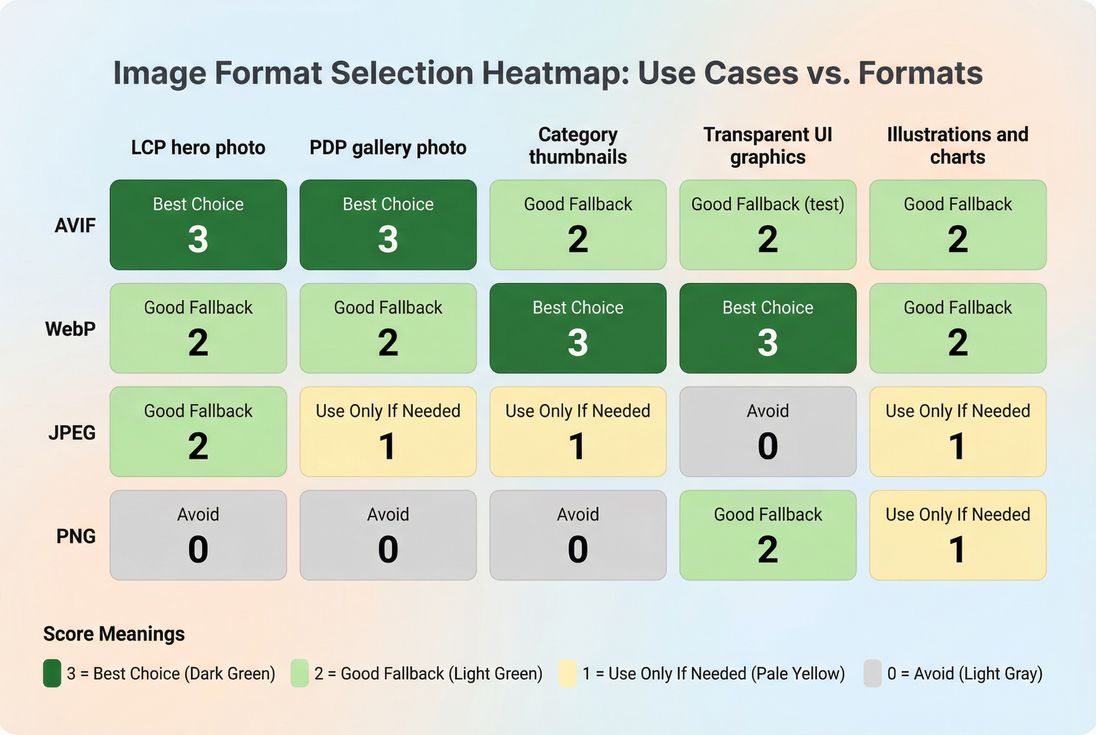
How to decide: a practical decision matrix
You do not need a philosophical answer. You need a consistent rule your team can execute.
A useful policy for many sites:
- PDP and homepage hero photos: AVIF + WebP + JPEG
- Thumbnails and grids: WebP + JPEG (add AVIF if you see meaningful wins)
- Transparency assets: Test AVIF vs WebP; do not assume AVIF wins
- Anything that looks worse in QA: increase quality or keep WebP/JPEG
How to validate wins (and avoid false wins)
Measure both lab and field impact
Format changes often look great in lab tests, but you should confirm they help real users.
- Lab tools show controlled results and are great for before/after comparisons. See PageSpeed Insights and Field vs lab data.
- Field data confirms whether real devices and networks improved. See CrUX data and Measuring Web Vitals.
What to look for in results
When you switch formats, pay attention to:
- LCP time (especially mobile p75)
- Total image bytes and the LCP image's request size
- Decode/render delay symptoms (LCP not moving much even though bytes dropped)
If LCP does not improve, the bottleneck may be elsewhere (TTFB, render-blocking CSS/JS, third-party tags). In that case, revisit:
A simple rollout checklist
Before you roll next-gen formats sitewide:
- Start with the top 5 templates (home, category, PDP, cart, landing page).
- Convert only the biggest images first (usually the LCP candidate).
- Verify fallbacks in Safari and older browsers.
- Check caching behavior (no wrong-format cache pollution).
- QA image quality on real devices.
- Expand coverage to long-tail images once the pattern is stable.
Recommended default strategy for most sites
If you want a definitive, low-regret approach that works for most e-commerce and content sites:
- Serve AVIF and WebP using
picture, with AVIF first. - Keep JPEG as the final fallback for photos, PNG for transparency-only needs.
- Use responsive sizing so you do not over-serve pixels (Responsive images).
- Prioritize the LCP image and other above-the-fold imagery (Above-the-fold optimization).
- Cache aggressively with immutable URLs, and confirm
Varybehavior if you negotiate formats (Cache-Control headers).
The real win is not choosing a winner between WebP and AVIF. The win is building a repeatable image delivery system that reliably ships the smallest acceptable bytes to every device without breaking quality or compatibility.
Frequently asked questions
Not usually. AVIF often compresses smaller than WebP for photographic images, but it can cost more CPU to encode and sometimes to decode. Most sites win by serving AVIF where supported, WebP as the next fallback, and JPEG/PNG last. Start with your largest images first.
Speed gains come from fewer bytes over the network and sometimes faster image decode. Typical savings versus JPEG range from modest to major depending on the image. The practical benchmark is whether your LCP image download time drops enough to move LCP into the good range on mobile.
It can if you push quality too low or pick the wrong encoder settings for your content. Watch for banding in gradients, smeared textures on products, and halos around text overlays. The right approach is per-image-type presets plus visual QA on top landing pages and product detail pages.
Yes, but it is manageable. Use HTML picture or server-side content negotiation to serve AVIF or WebP only when the browser requests it, and keep a JPEG/PNG fallback. Make sure caches vary correctly by Accept header so one user does not get the wrong format.
Convert and ship next-gen formats for the LCP hero image and top product images first, then expand. Keep fallbacks, track LCP and image bytes in lab and field data, and add a performance budget for total image weight. Roll out by template to avoid surprises.
Want to take PageVitals for a spin?
Page speed monitoring and alerting for your website. Get daily Lighthouse reports for all your pages. No installation needed.
Start my free trial