Table of contents
Above-the-fold content optimization
When your above-the-fold content is slow, shoppers don't "wait a little longer." They hesitate, bounce, and come back less often – especially on mobile networks where the first screen can look blank or broken for seconds. That's lost revenue you can't recover with better messaging lower on the page.
Above-the-fold content optimization is the practice of making the initial viewport (what users see without scrolling) render fast, stable, and usable by prioritizing critical HTML, CSS, images, and fonts – and delaying everything else.
It's not a single metric by itself. It's a performance goal that shows up most clearly in metrics like Largest Contentful Paint (LCP), First Contentful Paint (FCP), Speed Index, and CLS.
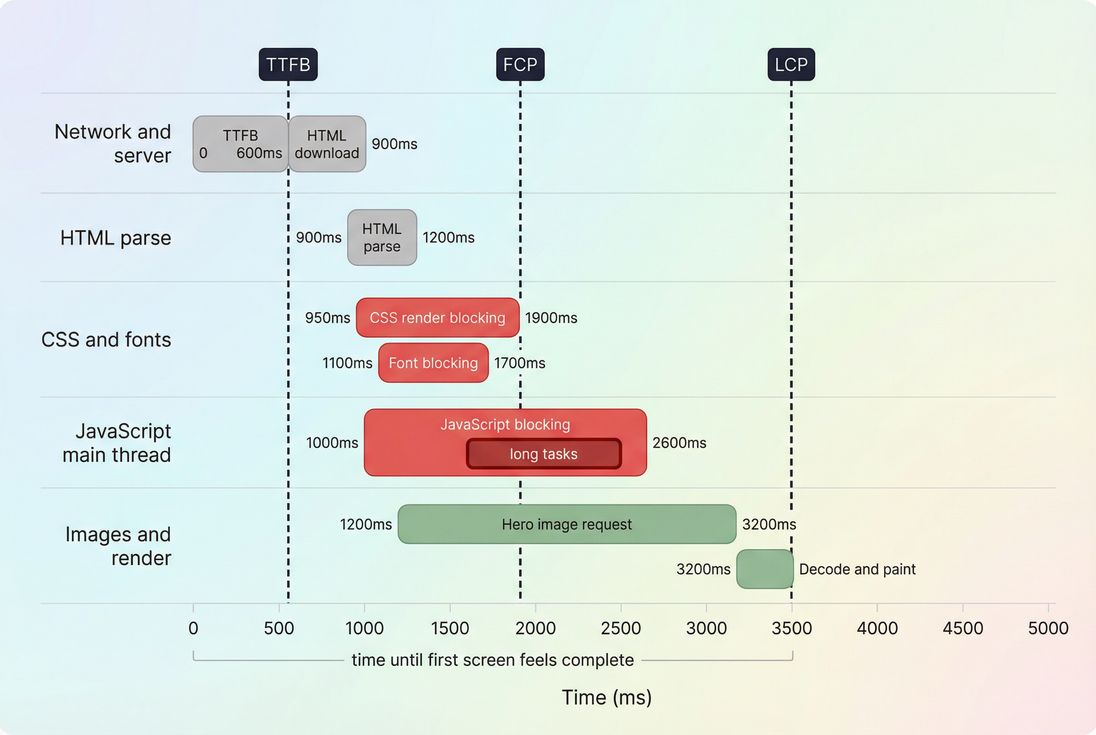
This timeline shows why above-the-fold optimization is mainly about shortening the path to FCP and especially LCP by reducing blocking CSS, heavy JavaScript, and delayed hero images.
What counts as above-the-fold
Above the fold is simply the content visible in the viewport at first load, before any scrolling. For an e-commerce site, that typically includes:
- Header (logo, navigation, search)
- Primary headline/value proposition
- Hero image or product image (often the LCP element)
- Price, rating, and primary CTA (add to cart, shop now)
- Key trust cues (shipping/returns, payment badges) if they're in-view
Two practical complications matter:
- It changes by device and browser UI. The "fold" on an iPhone on 4G is not the same as a desktop monitor on Wi-Fi.
- Your layout can change after load. Late-loading fonts, images without dimensions, and injected banners can push content down – hurting perceived quality and layout instability.
The Website Owner's perspective
Above-the-fold optimization is less about "making the whole page fast" and more about ensuring the first screen communicates credibility and a clear next action quickly. If your first screen is late, jumpy, or incomplete, you pay for traffic that never reaches the product details.
A useful rule of thumb
If a user can't confidently answer "What is this page and what should I do next?" from the first screen, you don't have an above-the-fold problem – you have a conversion problem caused by performance.
Which metrics reflect above-the-fold
Because "above-the-fold" is a visual goal, you interpret it through multiple measurements:
| Metric | What it tells you about above-the-fold | What a change usually means |
|---|---|---|
| FCP | When anything first appears (text, background, SVG) | Earlier FCP means less blank time, often improved server response or fewer render blockers |
| LCP | When the largest in-viewport element finishes rendering | Better LCP usually means the hero image/text arrives sooner and is not delayed by CSS/JS |
| Speed Index | How quickly the visible area fills in over time | Improvements mean faster progressive rendering, not just a single hero moment |
| CLS | Whether above-the-fold content moves around | Lower CLS means fewer "jumps" from images, fonts, banners, or late CSS |
| INP | How responsive the page feels to early taps/clicks | Worse INP often means heavy JS and long tasks even if LCP looks fine |
Benchmarks (commonly used guidance):
- LCP: good ≤ 2.5s, needs improvement 2.5–4.0s, poor > 4.0s
- CLS: good ≤ 0.1
- INP: good ≤ 200ms
(For the broader picture, see Core Web Vitals.)
How these are "calculated" in practice
Tools don't guess above-the-fold; they measure browser events:
- FCP is recorded when the browser first paints any content.
- LCP is recorded when the browser paints what it considers the largest contentful element in the viewport (commonly a hero image, product image, or large headline). The LCP candidate can change as new, larger elements appear, until the page settles.
- Speed Index reflects how quickly pixels in the viewport become visually complete over time (a "progress" measure rather than a single timestamp).
If you want an actionable workflow, start with LCP because it's usually the clearest proxy for "the first screen is ready."
What usually slows the first screen
Most above-the-fold issues come down to the critical rendering path: what the browser must download, parse, and execute before it can render meaningful pixels.
1) Render-blocking CSS
CSS is render-blocking by default because the browser won't paint until it can style the content. Common problems:
- One big stylesheet for the entire site (home + checkout + account) loaded on every page
- CSS frameworks where only a small fraction is needed above the fold (unused CSS)
- Fonts referenced early with slow delivery (font loading)
This is why critical CSS is often the highest-impact above-the-fold technique: get just enough CSS in place to paint the first screen, then load the rest.
2) Hero image priority mistakes
Your hero image is often your LCP element. LCP suffers when:
- The hero image is too large or not compressed (image compression)
- You serve a desktop-sized image to mobile (missing responsive sizing) (responsive images)
- The hero is lazy-loaded even though it's in the viewport (lazy loading)
- The image isn't discovered early (loaded via CSS background, JS injection, or late hydration)
Format choices matter too: WebP vs AVIF can be a meaningful lever if you have large imagery.
3) Too much JavaScript before first paint
Above-the-fold is often blocked not by downloading JS, but by executing it:
- Large bundles (JS bundle size)
- Heavy hydration work on modern frameworks
- Third-party scripts (A/B testing, tag managers, chat widgets) delaying the main thread (third-party scripts)
- Long tasks that prevent rendering (long tasks)
Even if your network is fast, the first screen won't render if the main thread is monopolized (reduce main thread work).
4) Slow server response and connection overhead
If HTML arrives late, everything arrives late. Look at:
- TTFB and backend response time (server response time)
- DNS/TLS connection setup (DNS lookup time, TLS handshake)
- CDN vs origin latency (CDN vs origin latency)
This is often the "hidden" blocker when teams focus only on front-end assets.
Fixes that move above-the-fold fastest
The best optimizations depend on what's actually blocking your first screen. In practice, these are the changes that most consistently improve LCP/FCP without causing regressions elsewhere.
Make the first render cheap (critical CSS)
Goal: render the first screen with minimal blocking resources.
Practical approach:
- Inline a small critical CSS slice for above-the-fold layout and typography.
- Load the full stylesheet after first render.
- Reduce dead weight with asset minification and removing unused CSS.
Common pitfall: inlining too much. Treat critical CSS like a budget. If it grows every sprint, you're rebuilding the same problem inside your HTML.
Prioritize the LCP element (usually a hero image)
For the above-the-fold image that drives LCP:
- Serve correctly sized images with
srcsetandsizes(responsive images) - Compress aggressively (image compression) and consider modern formats (image optimization)
- Avoid lazy-loading the in-viewport hero
- Preload the hero if discovery is late (preload)
- Ensure dimensions are set to prevent CLS (zero layout shift)
If your LCP is text (big headline), then fonts and CSS are the likely bottlenecks.
Delay non-critical JavaScript
Above-the-fold content rarely needs all scripts immediately.
- Use async vs defer correctly for non-critical scripts
- Split bundles by route/template (code splitting)
- Remove unused JavaScript and reduce JS execution time
Third-party scripts deserve special scrutiny. Many "conversion tools" reduce conversions if they delay the first screen.
The Website Owner's perspective
A good operational rule is: if a script doesn't help the user decide in the first screen, it shouldn't block the first screen. Move it later, load it conditionally, or remove it. Treat third-party tags like vendors that must earn their keep.
Improve connection and caching fundamentals
Above-the-fold wins often come from boring basics:
- Cache static assets with Cache-Control headers and strong browser caching behavior
- Use a CDN effectively (CDN performance, edge caching)
- Compress text assets (CSS/JS/HTML) with Brotli compression or Gzip compression
If HTML is dynamic, work on backend response and caching strategy first – otherwise front-end tuning hits a ceiling.
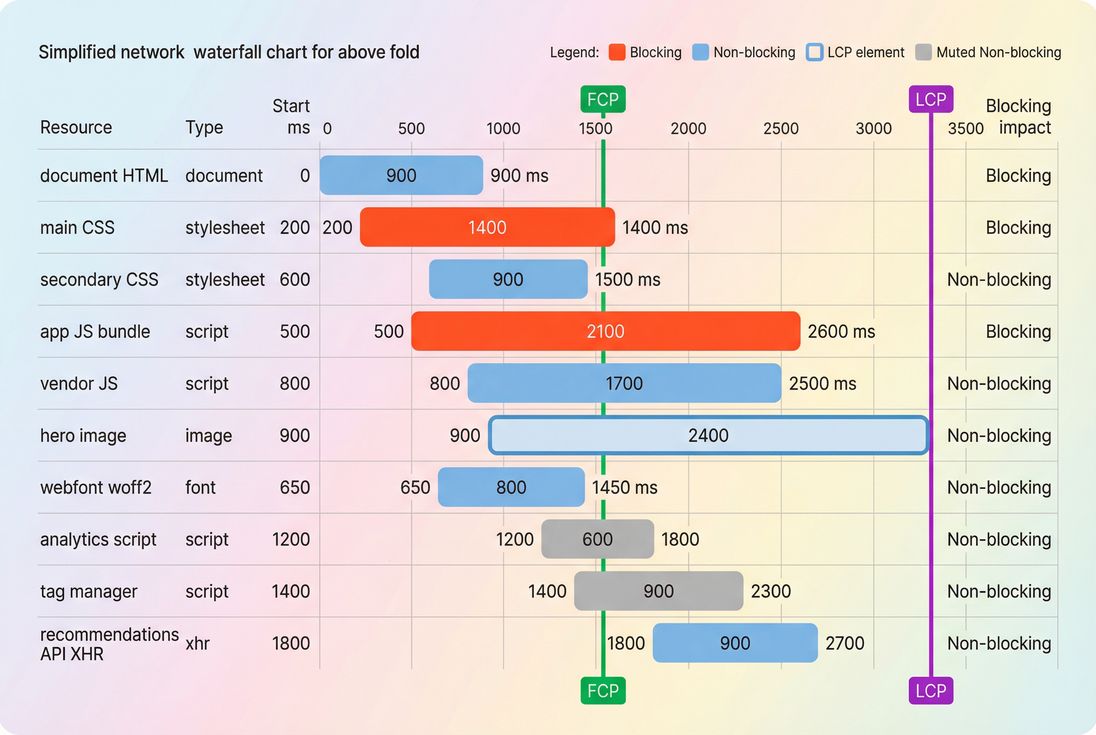
A waterfall like this helps you see whether CSS, JavaScript, or the hero image is actually on the critical path to LCP – so you fix the real bottleneck instead of guessing.
How to interpret improvements (and regressions)
Above-the-fold changes can move metrics in ways that confuse teams unless you interpret them as a system.
Pattern: FCP improves, LCP stays bad
Usually means:
- The browser can paint something sooner (like header text), but the hero/LCP element still arrives late.
- Common causes: hero image priority, late discovery, or slow image delivery.
Fix focus: hero image sizing/compression, preload, remove lazy-load, reduce JS that delays image request.
Pattern: LCP improves, but CLS worsens
Usually means:
- You made content appear sooner, but it's moving after it appears.
- Common causes: images without width/height, late fonts, injected banners, personalization modules.
Fix focus: reserve space (aspect ratios), stable placeholders, avoid late DOM insertion above the fold.
Pattern: Lab tests improved, field data did not
Usually means:
- Real users have slower devices, more third-party scripts, more variability in cache state, or different routes into the site.
- Validate with field vs lab data and sources like CrUX data.
If you use PageVitals, this is where comparing lab and field views becomes operational:
- Use the LCP field report: https://pagevitals.com/docs/features/field-testing/web-vitals/lcp-report/
- Use the network request waterfall in synthetic tests: https://pagevitals.com/docs/features/network-request-waterfall/
A practical workflow website owners can run
This is a repeatable, template-driven process (home, category, PDP, article, landing page). Don't optimize "the site" as one thing.
Step 1: Identify the LCP element
Run a consistent lab test (same device/network) and note:
- Is LCP an image, headline, or container?
- Is it truly above-the-fold and meaningful?
If you're working across teams, write it down per template: "PDP LCP is product image" or "Landing page LCP is hero headline."
Step 2: Determine what blocks it
Use a waterfall and main-thread view to answer:
- Did the hero request start late? (discovery/priority problem)
- Did it download slowly? (size/format/CDN problem)
- Did it finish but paint late? (CSS/JS/main-thread problem)
If you use PageVitals synthetic testing, the starting point is:
- Lighthouse test reports: https://pagevitals.com/docs/features/lighthouse-tests/
- Test configuration consistency: https://pagevitals.com/docs/features/test-agent-settings/
Step 3: Apply the smallest high-impact fix
Prioritize changes with clear, isolated effects:
- Fix hero image sizing/compression and don't lazy-load it
- Remove or delay render-blocking CSS/JS
- Reduce JS execution and third-party impact
- Improve TTFB and caching/CDN
Then retest and confirm the expected pattern: earlier hero request, fewer long tasks before paint, earlier LCP.
Step 4: Set budgets so you don't lose gains
Above-the-fold performance regresses quietly. Set budgets for:
- LCP time (per template)
- Max CSS/JS size loaded before first render
- Max hero image transfer size on mobile
See performance budgets. If you use PageVitals budgets, you can operationalize this with: https://pagevitals.com/docs/features/budgets/
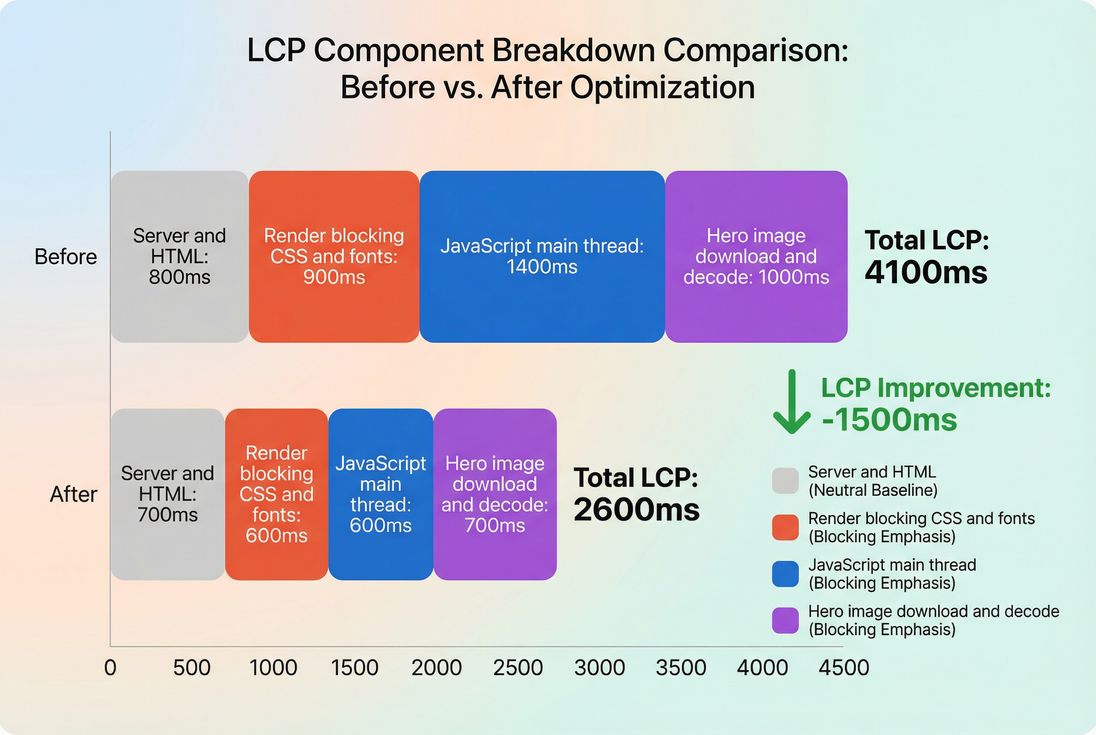
This kind of breakdown is how you translate "LCP improved" into operational causes: less JS blocking and a faster hero image typically drive the biggest above-the-fold wins.
Common above-the-fold anti-patterns
A few issues show up repeatedly on real sites:
- Lazy-loading the hero: Lazy-load below-the-fold images, not the first screen.
- Background-image heroes: CSS background images are often discovered later than HTML
<img>and are harder to prioritize. - One bundle to rule them all: Shipping checkout/account code on the homepage increases main-thread work.
- Font perfectionism: Multiple custom font files and weights can delay text paint; prioritize readable, fast loading typography.
- Third-party tag creep: Each new script competes for bandwidth and main-thread time during the critical window.
- Unbounded personalization: Injecting above-the-fold content after load is a recipe for CLS and delayed LCP.
The decision: what's "good enough"?
Above-the-fold optimization has diminishing returns. The business goal isn't a perfect Lighthouse score – it's a first screen that loads fast enough to keep users engaged.
Use this decision framework:
- If LCP is poor and your LCP element is the hero/product image: focus on image sizing, format, and priority.
- If LCP is poor and the waterfall shows late paint after downloads finish: focus on render-blocking CSS and JS execution.
- If LCP is okay but users still complain: look at CLS and INP (jank and responsiveness).
The Website Owner's perspective
The goal is to make the "buying moment" reachable. Above-the-fold speed is the gate. If the gate is slow, everything behind it – merchandising, personalization, content – doesn't get a chance to work.
Related concepts worth knowing
- Above-the-fold optimization (concept overview)
- Render-blocking resources (why CSS/JS block paint)
- Critical CSS (how to ship just enough CSS early)
- Image optimization and responsive images (hero image wins)
- Time to First Byte (server response sets the floor)
If you want to measure changes responsibly, also review measuring Web Vitals and field vs lab data.
Frequently asked questions
Aim to have the first screen feel complete within about 2 to 3 seconds on mid tier mobile. Practically, that means targeting LCP under 2.5 seconds and avoiding long blank states before the hero and primary CTA appear. Validate with field data because real networks vary.
Start where revenue is decided: product detail pages, category pages, and landing pages tied to paid campaigns. The homepage matters, but many shoppers enter deeper. Prioritize templates with the highest sessions times conversion value, then focus on the LCP element and render blocking resources on those templates.
Above the fold is the initial viewport without scrolling, which changes by device, browser UI, and layout. Use representative mobile and desktop viewports in lab tests, then confirm in the field by checking which element becomes LCP. Design around a resilient first screen, not a single pixel perfect breakpoint.
It can if you inline too much. The goal is a small critical subset that enables first render, while the full stylesheet stays cacheable. If critical CSS grows large, HTML becomes heavier and slows TTFB to first paint. Treat critical CSS as a budgeted asset you maintain per template.
LCP can improve while the page still feels unfinished if key elements appear late, shift around, or become interactive slowly. Check CLS for layout movement and INP for early taps. Also ensure the improved LCP element is actually meaningful, like the product image and price, not a placeholder.
Want to take PageVitals for a spin?
Page speed monitoring and alerting for your website. Get daily Lighthouse reports for all your pages. No installation needed.
Start my free trial