Table of contents
Async vs defer for JavaScript
A single script tag in the wrong place can quietly cost you money: it can delay product imagery, freeze the page right when a shopper tries to scroll, or make your "Add to cart" feel broken on mid-range phones. In performance terms, that shows up as worse LCP, more main thread work, and lower-quality interactions that can hurt INP.
Async and defer are HTML attributes that change how the browser loads and runs JavaScript. They let the browser download scripts without blocking HTML parsing, and (depending on which you choose) control when the code executes and whether execution order is preserved.
Why website owners care
If your JavaScript blocks the browser from building the page, you don't just get a slower "load time." You get:
- Later "first impression" content (hurts FCP and often LCP)
- More time where the page feels unresponsive (hurts interaction quality and lab metrics like Total Blocking Time)
- More risk that third-party scripts steal CPU at the worst moment (see third-party scripts)
The Website Owner's perspective: If you're paying for ads, you're buying clicks into a time window. Async/defer decisions are about protecting that window – showing the hero content sooner and keeping the page responsive long enough for users to browse and buy.
What async and defer actually change
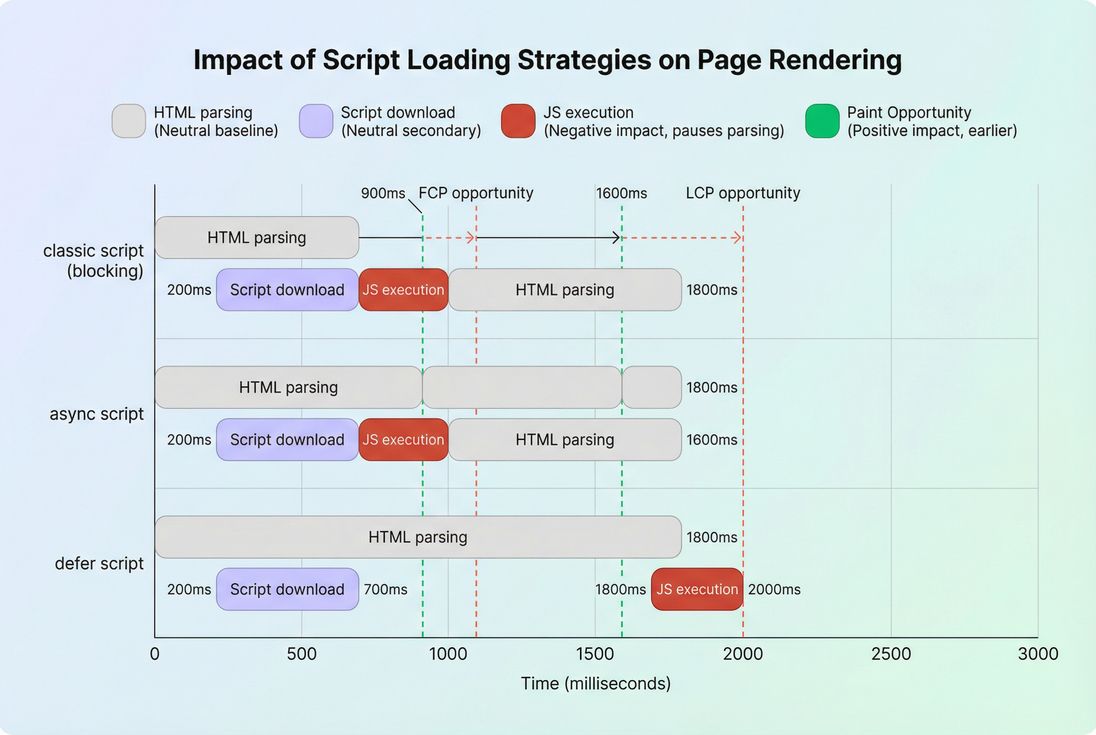
A normal script tag (no attribute) behaves like this:
- Browser parses HTML top to bottom.
- When it hits
<script src="...">, it pauses HTML parsing. - It downloads the script (if not cached), then executes it.
- Only after execution does HTML parsing continue.
That "pause" is why scripts are often called render-blocking resources. (More context: render-blocking resources and the critical rendering path.)
With async and defer, the browser can download in parallel while it keeps parsing HTML. The key difference is when execution happens and whether order is guaranteed.
Async in plain English
async means:
- Download the script in parallel (don't block parsing to fetch it).
- Execute it as soon as it's downloaded, even if HTML parsing is still in progress.
- Execution order is not guaranteed across multiple async scripts.
That "execute immediately" behavior is the biggest tradeoff: it can improve paint timing (because downloading didn't block parsing), but it can also interrupt parsing and consume main-thread time at unpredictable moments.
Defer in plain English
defer means:
- Download the script in parallel (don't block parsing to fetch it).
- Wait to execute until after the HTML is fully parsed.
- Preserve execution order among deferred scripts (top-to-bottom in the document).
- Deferred scripts run before
DOMContentLoadedfires.
For most site code that manipulates the DOM or depends on other scripts, defer is the stable choice.
Quick comparison table
| Attribute | Downloads while parsing | Executes while parsing | Preserves order | Best for |
|---|---|---|---|---|
| none (classic) | No | N/A (parsing paused) | Yes | Rare cases where script must run immediately to render correctly |
| async | Yes | Yes (as soon as ready) | No | Independent scripts (analytics, monitoring) |
| defer | Yes | No (after parsing) | Yes | Most first-party UI code, libraries, DOM-dependent scripts |
How "blocking" is effectively measured (without formulas)
Async/defer isn't a score by itself – it's a loading and execution strategy. The performance impact shows up indirectly in metrics and diagnostics like:
- How long HTML parsing is paused (classic scripts cause the biggest pauses)
- How soon above-the-fold content can render (often affects FCP and sometimes LCP)
- How much JavaScript runs before the user can interact smoothly (relates to JavaScript execution time, long tasks, and lab Total Blocking Time)
In practice, when you switch a script from classic → defer, you are usually trying to achieve two concrete changes:
- Earlier rendering: the browser can parse more HTML sooner, discover images/fonts earlier, and build the page faster.
- Less "startup jank": expensive JS work is pushed later, reducing the chance it competes with initial rendering.
The Website Owner's perspective: You don't need to care about HTML parsing as a concept. You care that shoppers see product content faster and the page doesn't freeze when they try to scroll. Async/defer is one of the simplest levers that can move those outcomes.
Which one should you choose
Most real sites have a mix of scripts. A useful way to decide is to classify each script by dependency and urgency.
Choose defer for most first-party scripts
Use defer when the script:
- Touches the DOM (queries elements, attaches listeners, measures layout)
- Depends on another script (libraries, shared modules, storefront frameworks)
- Must run in a predictable order
Examples on e-commerce pages:
- Product gallery initialization
- Search/autocomplete UI
- Cart drawer behavior
- Reviews widget initialization (if it depends on your DOM structure)
If you're also working on code splitting, defer pairs nicely with it: you can load your core bundle deferred, and lazy-load noncritical features later.
Choose async for truly independent scripts
Use async when the script:
- Does not depend on DOM being complete
- Does not need to run in sequence with other scripts
- Is not required for rendering or immediate interaction
Typical candidates:
- Analytics beacons
- Some performance monitoring tags
- Ad pixels (with caution – ads can still consume CPU when they execute)
Important nuance: async avoids blocking downloads, not blocking execution. If the script is heavy, it can still create main-thread contention and worsen responsiveness. That's why "just make it async" is not a complete performance strategy – especially with large third-party bundles.
When a blocking script is acceptable
A classic blocking script can be acceptable when:
- It's extremely small
- It must run before anything else to prevent broken rendering (rare)
- You've confirmed it doesn't delay paint meaningfully in lab/field data
If you're using a blocking script only because "that's how the theme shipped," that's usually not a good reason. Consider whether the code can be deferred, split, or replaced.
When async or defer breaks things
If you've ever "optimized" scripts and then watched a checkout stop working, it's usually because the site relied on timing side effects. Here are the most common failure modes.
Async dependency collisions
Because async scripts execute as soon as they're ready, two scripts can run out of order.
Symptoms:
ReferenceError(a library hasn't loaded yet)- Features work on reload but not on first load (cache changes timing)
- A/B test or personalization runs inconsistently
Fixes:
- Switch dependent scripts to
deferso order is preserved - Bundle dependencies together (or use code splitting correctly)
- Avoid injecting multiple async tags that rely on each other
Defer reveals DOM timing assumptions
Defer runs after HTML parsing finishes. If your old code assumed the script executed while the DOM was still being constructed (classic blocking behavior), switching to defer can expose fragile initialization patterns.
Symptoms:
- Event listeners not attached early enough for certain interactions
- UI flashes uninitialized (not usually CLS, but a perceived quality drop)
- Race conditions with inline scripts
Fixes:
- Ensure initialization runs at the right lifecycle moment
- Make dependencies explicit (don't rely on "the script tag happened to be above this markup")
Third-party scripts and consent timing
Consent managers, tag managers, and marketing tags often have strict sequencing requirements.
Common trap:
- Making the tag manager async, then expecting downstream tags to behave deterministically
In many setups, defer for the container script is safer than async because it's easier to reason about order. If consent must be evaluated first, you may need a small inline config + deferred container, not a free-for-all of async tags.
Relevant concept links:
How async and defer affect Core Web Vitals
Async/defer choices don't "directly" change a Web Vital – they change scheduling, which changes what happens on the network and main thread during the critical window.
LCP: biggest wins when scripts block discovery
If a classic script in the <head> blocks parsing, the browser may discover your hero image later. That can push out LCP.
Switching to defer often helps because the browser can:
- Parse enough HTML to find the LCP element earlier
- Start fetching the LCP image earlier
- Render earlier if main-thread execution is reduced during initial paint
For deeper LCP improvements, also look at:
INP: async can be a hidden risk
INP is about interaction responsiveness, often hurt by main-thread congestion. Async scripts can execute at awkward times (e.g., while the user starts scrolling or taps a filter), creating long tasks and delayed input handling.
If INP is a priority, treat large async scripts skeptically and watch:
CLS: usually indirect, but still real
Async/defer doesn't directly cause layout shift, but changing script timing can change when UI elements are inserted (e.g., banners, widgets, ads), which can worsen CLS if you don't reserve space.
If deferring a script delays insertion of a promo bar, reserve its space to avoid shifts:
A practical decision workflow
Here's a workflow that fits how busy teams actually ship changes.
1) Inventory your scripts
List every <script> in your HTML and group them:
- First-party bundles (your app/theme)
- Platform scripts (Shopify, WordPress plugins, etc.)
- Third-party tags (analytics, ads, chat, A/B testing)
2) Mark each script by two labels
- Dependency: does it require another script or specific DOM elements?
- Urgency: must it run before the first render / above-the-fold experience?
In most stores:
- Dependency-heavy + not urgent → defer
- Independent + not urgent → async
- Urgent and small → consider inline (carefully) or keep blocking (rare)
3) Implement the smallest safe change
Common "high confidence" changes:
- Move noncritical scripts out of the head, or add
defer - Avoid multiple async scripts that rely on shared globals
- Reduce payload with asset minification and remove unused JavaScript
4) Retest and watch for regressions
You're validating two things:
- Performance: earlier render, fewer long tasks, less blocking
- Correctness: conversions, tracking, and UI still behave
How to verify the impact (lab + field)
What to check in lab tests
In a lab tool (Lighthouse, WebPageTest-style waterfall, DevTools), confirm:
- The script is no longer flagged as render-blocking (see render-blocking resources)
- HTML parsing proceeds without long pauses early on
- Long tasks in the first few seconds are reduced (see long tasks)
- LCP and TBT move in the right direction (see LCP and Total Blocking Time)
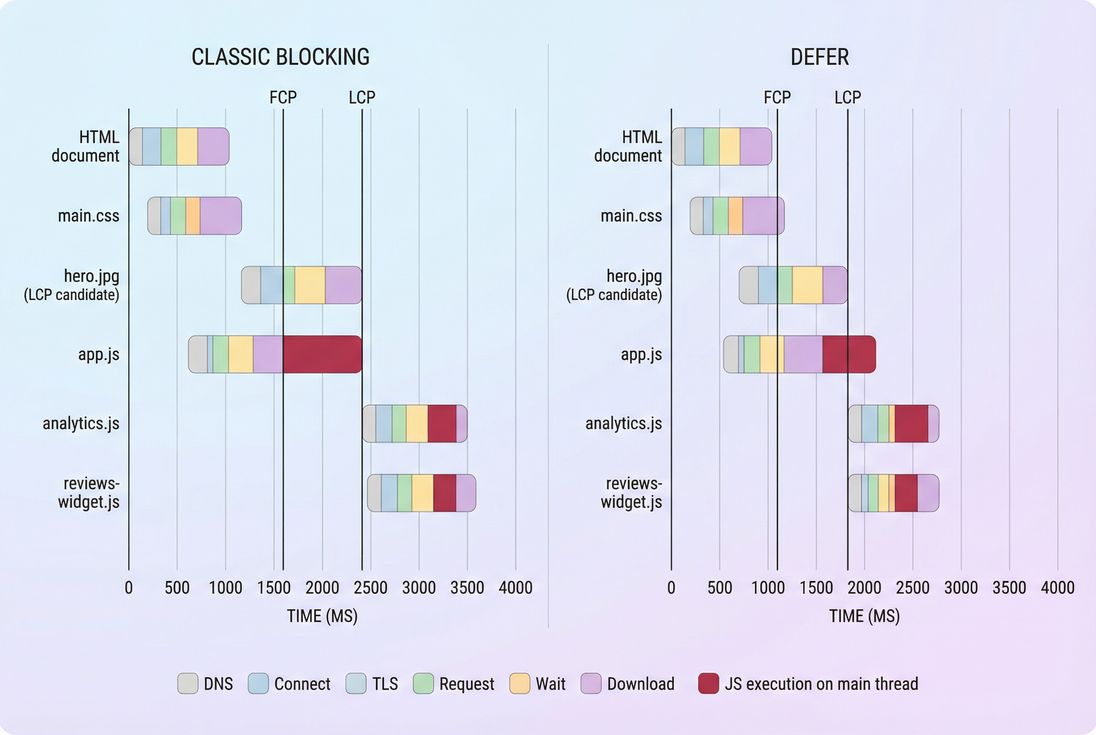
If you use PageVitals, the most direct places to confirm this behavior are:
- The Network request waterfall to see request timing and blocking patterns
- Lighthouse tests to compare key lab metrics and audits before/after
What to check in field data
Lab improvements don't always translate 1:1. Validate with real-user data concepts:
- Look for sustained shifts in LCP/INP distributions, not one-off wins
- Segment by device/network if possible; script timing issues are often worst on mobile
- Use a reasonable observation window (days to weeks) because traffic mix changes
Helpful context:
The Website Owner's perspective: A lab test tells you if you removed a technical bottleneck. Field data tells you if you removed a business bottleneck – faster hero render for actual shoppers, and fewer "rage clicks" because the main thread is busy.
Implementation notes that matter in real sites
Script location still matters
Even with defer, putting huge bundles in the head can still compete for bandwidth and CPU early. If a script is truly below-the-fold, you can often load it later via lazy-loading patterns (conceptually similar to lazy loading for images, but applied to JS features).
Type module changes defaults
If you use type="module", modern browsers treat module scripts like deferred by default (download during parsing, execute after parsing). That often helps, but you still need to manage execution cost and dependency order.
Don't "async everything" in tag managers
Tag managers can make it easy to add dozens of scripts. The performance outcome is usually:
- More CPU contention
- More network contention
- Less predictable execution
If marketing scripts are important, that's fine – but treat them like a budgeted system. Consider performance budgets and regularly prune.
Bottom line recommendations
If you want a rule set that works for most e-commerce sites:
- Default to
deferfor your main first-party JS bundles. It's the best balance of speed + predictability. - Use
asynconly for scripts that are truly independent. If it depends on DOM or other scripts, it's not independent. - Treat heavy third-party scripts as performance risks even with async/defer. They can still hurt responsiveness through execution.
- Validate with both a waterfall and real-user outcomes. You're aiming for earlier paint and fewer long tasks without breaking conversion flows.
If you share a few example script tags (theme/app bundle, analytics, reviews, A/B test), I can suggest a safe ordering and attribute strategy that minimizes regressions while targeting LCP and INP wins.
Frequently asked questions
For most first party JavaScript that powers UI behavior, defer is the safer default because it preserves execution order and waits until HTML parsing is done. Use async mainly for truly independent scripts like analytics. If a script touches the DOM or depends on other scripts, prefer defer.
Yes. Async can execute earlier than you expect and out of order, which can break dependencies, event listeners, or tag sequencing. Defer can expose timing issues if your code assumed blocking scripts finished before the DOM existed. The fix is usually ordering, dependency cleanup, or explicit initialization after DOM is ready.
Expect the biggest wins on pages where a render blocking script is delaying the first paint or LCP element. Defer often improves FCP and sometimes LCP by removing parser blocking downloads. Async may improve paint timing too, but can worsen INP if it executes during busy moments on the main thread.
Use a lab test to confirm the script is no longer render blocking and that the execution timing moved later. Then verify user impact in field data, since async and defer mainly change scheduling. Watch for regressions in conversion flows, consent logic, and any events that must fire before analytics initialization.
Only when it is truly required to render above the fold content correctly, and the code is small and fast. In practice, that usually means a tiny inline snippet for critical configuration, feature flags, or security decisions. Large blocking bundles are almost always a net negative for speed and usability.
Want to take PageVitals for a spin?
Page speed monitoring and alerting for your website. Get daily Lighthouse reports for all your pages. No installation needed.
Start my free trial