Table of contents
Critical rendering path optimization
Most "slow site" complaints aren't about your checkout, your search, or your catalog depth. They're about the first 1–3 seconds: the page looks blank, half-styled, or frozen. That moment is where bounce rate spikes, ad spend gets wasted, and shoppers lose trust before they ever see your offer.
Critical rendering path optimization means reducing the work (and waiting) the browser must complete to render the first useful pixels – especially above-the-fold content – by controlling which resources block rendering and when they load.
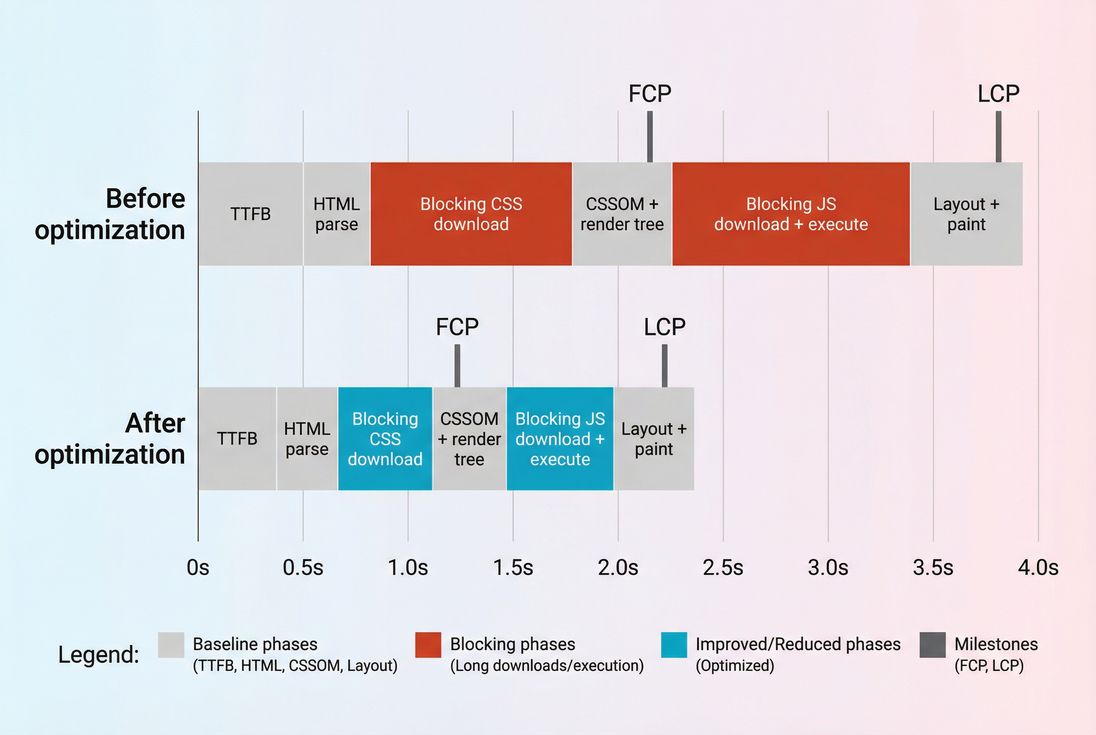
Critical rendering path optimization is about moving FCP and LCP earlier by shrinking (or removing) render-blocking work like CSS and synchronous JavaScript.
What the critical rendering path controls
The browser can't paint your page until it completes a short but strict chain of dependencies. In practical terms, the critical rendering path (CRP) determines:
- How quickly users see anything (closely tied to First Contentful Paint)
- How quickly users see the main content (closely tied to Largest Contentful Paint)
- How stable the page feels while it appears (related to CLS and layout instability)
- Whether the page "feels stuck" during early load (often tied to main thread work and long tasks)
The browser steps (plain English)
For most pages, the high-level sequence is:
- Fetch HTML (your TTFB is the first gate)
- Parse HTML into the DOM
- Discover critical resources (CSS, JS, fonts, hero image)
- Fetch and process CSS to build the CSSOM
- Combine DOM + CSSOM into a render tree
- Layout (calculate sizes/positions)
- Paint and composite pixels to the screen
The "optimization" part is deciding what must happen before first paint and what can happen after without harming the initial experience.
The Website Owner's perspective: If your hero banner, headline, price, and primary CTA aren't visible quickly, your best marketing doesn't matter. CRP work is the difference between shoppers seeing your offer immediately vs. waiting through a blank page and bouncing.
Where critical paths break
Most CRP problems come from a small set of causes. You'll usually find one (or two) dominating your slow first render.
Render-blocking CSS
By default, CSS files in the document head block rendering. The browser delays painting because it can't safely render without knowing styles.
Typical "how this happens" scenarios:
- A theme ships one giant stylesheet for the entire site (home + PDP + PLP + blog)
- You have multiple CSS files that all load before paint
- You're shipping lots of unused CSS
Related reading: Render-blocking resources, Critical CSS, Asset minification
Synchronous JavaScript in the head
JavaScript can block rendering in two ways:
- Network blocking: the browser stops parsing HTML to fetch a script
- Execution blocking: the browser is busy running code instead of rendering
This is why "I reduced JS bundle size" often improves both perceived speed and responsiveness:
- Smaller bundles download faster (JS bundle size)
- Less work on the main thread (JS execution time)
Related reading: Async vs defer, Unused JavaScript, Code splitting
Font loading delays
Fonts are easy to underestimate. A custom font can delay text rendering or cause reflows when it arrives, which can hurt both perceived speed and stability.
Related reading: Font loading, Zero layout shift
Slow HTML delivery (high TTFB)
If HTML is slow, everything else starts late. You can optimize CSS and JS all day, but a late first byte keeps the browser waiting.
Common sources:
- No edge caching / weak CDN strategy (CDN performance, Edge caching)
- Backend work on every request
- Extra redirects or connection setup (DNS/TLS/TCP)
Related reading: Server response time, DNS lookup time, TLS handshake, TCP handshake
Third-party scripts
Chat widgets, A/B tools, tag managers, and affiliate scripts often load early and do too much work too soon.
Related reading: Third-party scripts
How to measure CRP changes
CRP is a process, not a single number. So you measure it by watching the metrics and artifacts that CRP directly influences.
Metrics that move when CRP improves
Use these as your "did it work?" indicators:
| What you're trying to improve | Metric(s) that should improve | Why it maps to CRP |
|---|---|---|
| First pixels appear sooner | FCP | Rendering is unblocked earlier |
| Main content appears sooner | LCP | The hero/headline/image can render earlier |
| Less "stuck" feeling | Total blocking time (lab), INP (field) | Less early JS execution and fewer long tasks |
| Better perceived progress | Speed Index | More of the viewport fills sooner |
A common trap: celebrating a small FCP win while LCP stays bad. That usually means you unblocked some paint, but the actual LCP element (often a hero image or headline block) is still delayed by image priority, CSS, or JS.
Artifacts that pinpoint the cause
To make CRP actionable, you need the "why," not just the score:
- A request waterfall showing which resources block first render
See: Network request waterfall - A lab report that flags render-blocking resources and long tasks
See: Lighthouse tests - Field data to validate real-user impact (not just a single test run)
See the concept: Field vs lab data and CrUX data
The Website Owner's perspective: Lab tests help your team move fast and debug. Field data tells you whether the business actually improved – especially for mobile users on real networks, where CRP problems are amplified.
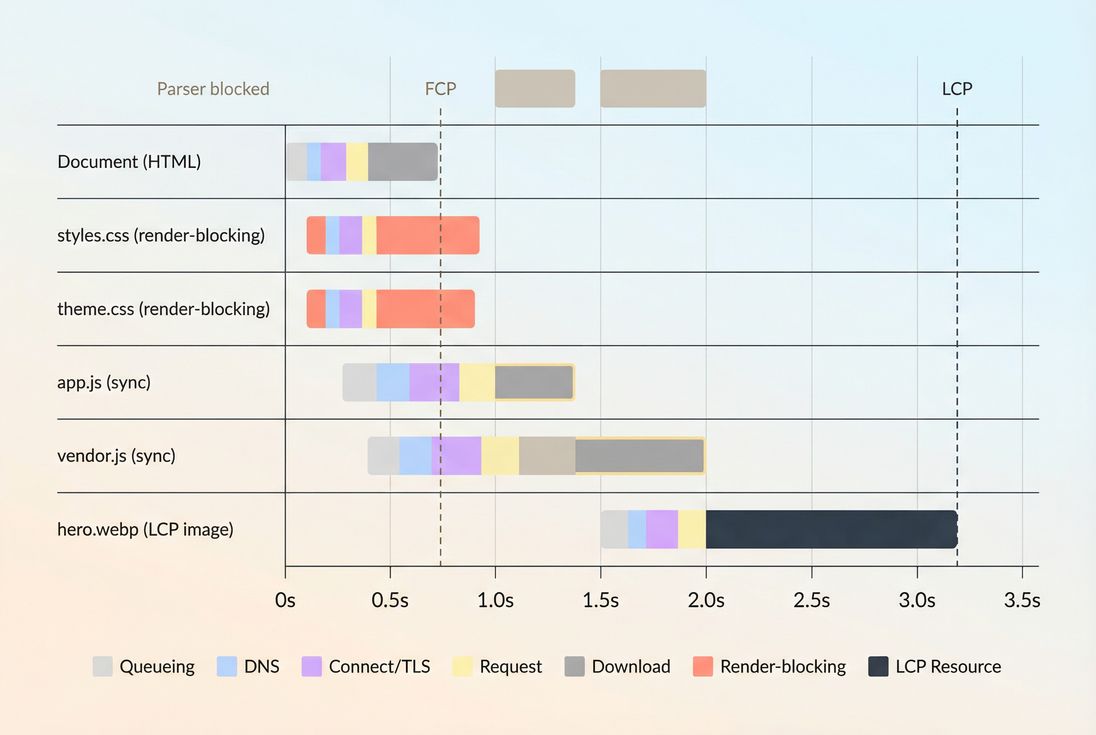
A waterfall makes CRP visible: render-blocking CSS and synchronous JS delay FCP, and a late-starting hero image often pushes LCP out even further.
Which optimizations matter most
The best CRP optimizations reduce blocking work before first paint and ensure the browser prioritizes what users will actually see first.
1) Make above-the-fold truly first
Start by identifying what must render immediately:
- Header/nav (minimal)
- Headline/value prop
- Price and primary CTA (e-commerce)
- Hero image or product image (if it's the LCP element)
Then optimize delivery around it:
- Use above-the-fold optimization to reduce what competes with the hero
- Avoid loading carousels, reviews widgets, or "recommended products" JS before first paint
Practical rule: If it's below the fold, it shouldn't block above-the-fold paint.
2) Reduce render-blocking CSS
Your options, from most common to most impactful:
- Remove unused CSS (often the biggest win)
See: Unused CSS - Minify CSS and compress transfers
See: Asset minification, Brotli compression, Gzip compression - Inline critical CSS for above-the-fold, defer the rest
See: Critical CSS
What "good" looks like:
- One small, cacheable base stylesheet
- Optional route/template CSS loaded only when needed (PDP vs PLP vs blog)
- Minimal critical inline CSS to render the initial viewport without a flash
3) Stop blocking on JavaScript
JavaScript is where many modern stacks lose CRP.
Key tactics:
- Use
deferfor scripts that don't need to run before first paint
See: Async vs defer - Split bundles so initial route JS is small
See: Code splitting - Remove unused JavaScript (common with large libraries and plugins)
- Delay third-party scripts until after first paint or after consent
See: Third-party scripts
Important nuance: "Defer everything" can backfire if you defer code that's required to render the LCP element (for example, a client-rendered hero). In that case, you may need SSR, partial hydration, or a smaller critical JS path.
4) Prioritize the LCP resource
Even if CSS/JS are perfect, LCP can be slow if the LCP element (often an image) starts downloading late.
Actions that typically help:
- Preload the LCP image when it's known at HTML time
See: Preload - Use modern image formats and right sizing
See: Image optimization, WebP vs AVIF, Responsive images - Avoid lazy-loading the hero/LCP image (lazy loading is for below-the-fold)
See: Lazy loading
5) Fix the network gates early
If connection setup or distance to origin is slowing the earliest requests, CRP will suffer.
Look at:
- CDN vs origin latency
- Connection reuse
preconnectfor critical third-party origins (fonts, CDN)
See: Preconnectdns-prefetchfor likely upcoming origins
See: DNS prefetch
Caching also matters because repeat visitors shouldn't pay the same CRP costs:
How to interpret changes (and avoid false wins)
CRP improvements should show up as earlier paint milestones, but you still need to interpret which change matters.
If FCP improves but LCP doesn't
Usually means:
- You unblocked initial paint (good), but
- The LCP element is still delayed by image priority, client rendering, or a late font swap
Next step: check whether the LCP request starts early in the waterfall and whether it's properly sized/compressed.
If LCP improves but conversions don't
Common reasons:
- Layout shifts or late pop-ins hurt trust (CLS)
- Interaction lag remains due to JS execution (INP, long tasks)
- The "fast" experience is on one template, but key landing pages are still slow
This is where segmentation matters: measure by template (home, PLP, PDP, checkout) and by device/network.
If lab improves but field doesn't
Often:
- The lab device/network differs from your real users (Mobile page speed)
- A/B tools or ads behave differently for real users
- Caching differences (returning users vs new users)
- Regional latency differences
Use Real user monitoring concepts and CrUX data to confirm real-world impact.
The Website Owner's perspective: Don't ship CRP changes just to win a lab score. Ship them to make the first impression feel instant for the customers you actually pay to acquire (usually mobile, often on mid-tier devices).
A practical CRP optimization workflow
This is a repeatable process busy teams can run without turning performance into a never-ending research project.
Step 1: pick one template and one goal
Examples:
- PDP: improve LCP by making product image load first
- Landing page: improve FCP by reducing blocking CSS
- Blog/article: reduce third-party impact to avoid long blank screen
Step 2: find the blocker
Use:
- A waterfall to see what's delaying render and LCP (Network request waterfall)
- A Lighthouse run to identify render-blocking resources and main-thread issues (Lighthouse tests)
Step 3: apply the smallest high-impact change
Prioritize changes with low risk and clear outcomes:
- Remove unused CSS/JS
- Defer non-critical scripts
- Inline a small critical CSS set
- Preload the LCP image
- Fix caching headers for static assets
Step 4: validate with both lab and field
- Lab tells you if the CRP chain shortened today
- Field tells you if it stayed improved for real traffic
If your team uses performance budgets in delivery pipelines, set guardrails so CRP doesn't regress with the next release (see: Performance budgets).
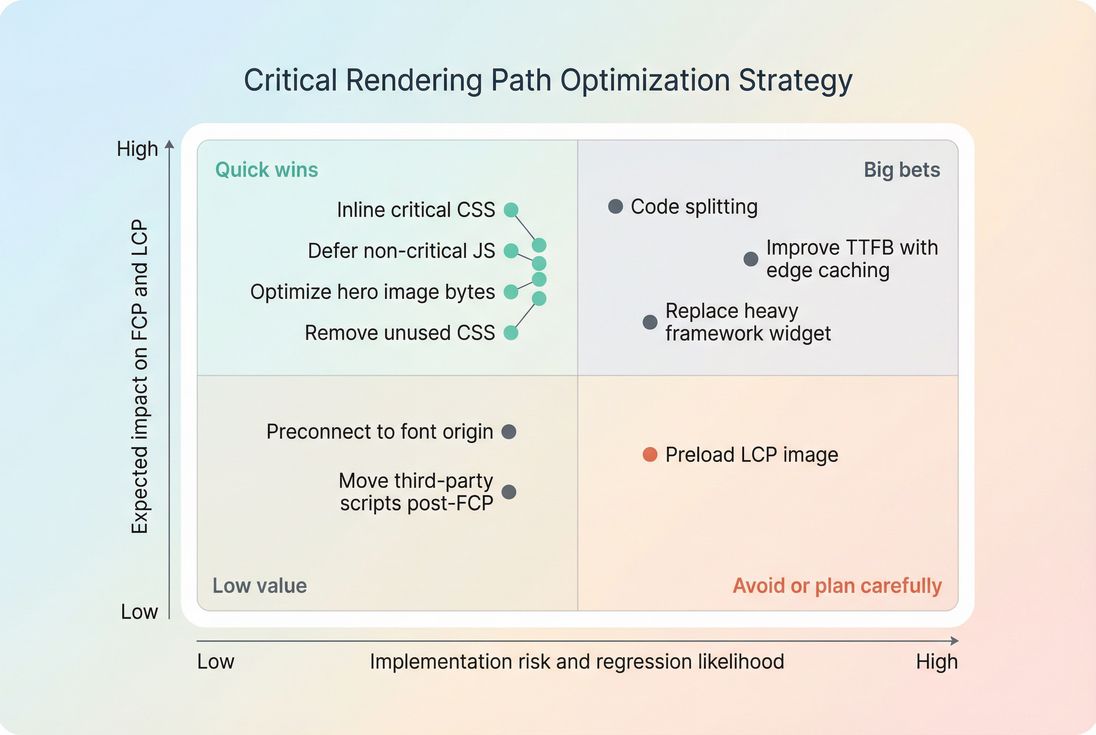
CRP work is easiest when you rank changes by impact vs. risk – most teams should exhaust quick wins before attempting high-risk rewrites.
The short list of CRP quick wins
If you want the "do these first" list, start here:
- Fix HTML delivery and caching basics: reduce TTFB where it's clearly high; ensure static assets are cached with sane Cache-Control headers.
- Eliminate render-blocking CSS bloat: remove unused CSS, minify/compress, then consider critical CSS.
- Defer what doesn't create pixels: use async vs defer properly; cut unused JavaScript.
- Make LCP intentional: preload the LCP image when appropriate (Preload), ensure correct sizing and compression (Image optimization).
- Tame third parties: move third-party scripts later or gate them behind interaction/consent.
CRP optimization isn't about making everything load late. It's about making the right things load early.
Related concepts
- Critical rendering path
- Render-blocking resources
- Core Web Vitals
- Field vs lab data
- Measuring Web Vitals
Frequently asked questions
Not exactly. The critical rendering path is the sequence of work the browser must do before it can show the first meaningful pixels. Optimizing it typically improves Core Web Vitals like FCP and LCP, but you can have good CRP and still fail INP due to heavy interactivity code.
Start with the biggest bottleneck. If TTFB is high, fix backend and CDN because every render step waits on HTML. If TTFB is reasonable but FCP and LCP are late, prioritize render blocking CSS, large JS bundles, and font loading. Use a waterfall to confirm where time is spent.
For mobile, aim for LCP under 2.5 seconds and FCP under about 1.8 seconds on typical pages, with stable layout to avoid CLS issues. The critical rendering path work should be front loaded into a small set of essential CSS and minimal synchronous JavaScript to paint the hero quickly.
If the waterfall shows early CSS requests delaying first paint, or Lighthouse flags render blocking resources, CSS is often the culprit. Large frameworks, multiple theme files, and unused CSS frequently block rendering. Splitting CSS by route and inlining a small critical CSS set usually produces visible improvements.
Yes, if you inline or defer the wrong things. The main risks are unstyled content flashes from missing critical CSS, broken functionality from deferring required scripts, and layout shifts from late loading fonts or images. Roll out changes behind feature flags, test key templates, and monitor field metrics after release.
Want to take PageVitals for a spin?
Page speed monitoring and alerting for your website. Get daily Lighthouse reports for all your pages. No installation needed.
Start my free trial