Table of contents
DNS lookup time optimization
A slow DNS lookup doesn't just "cost a few milliseconds." It delays the first byte you can get from every new hostname – your CDN, your font host, your analytics vendor, your A/B testing tool, your payment widget. For ecommerce, those delays stack up into slower category pages, slower product pages, and a checkout that feels less reliable.
DNS lookup time is the time it takes the browser to translate a hostname (like static.example.com) into an IP address so it can start connecting to the server.
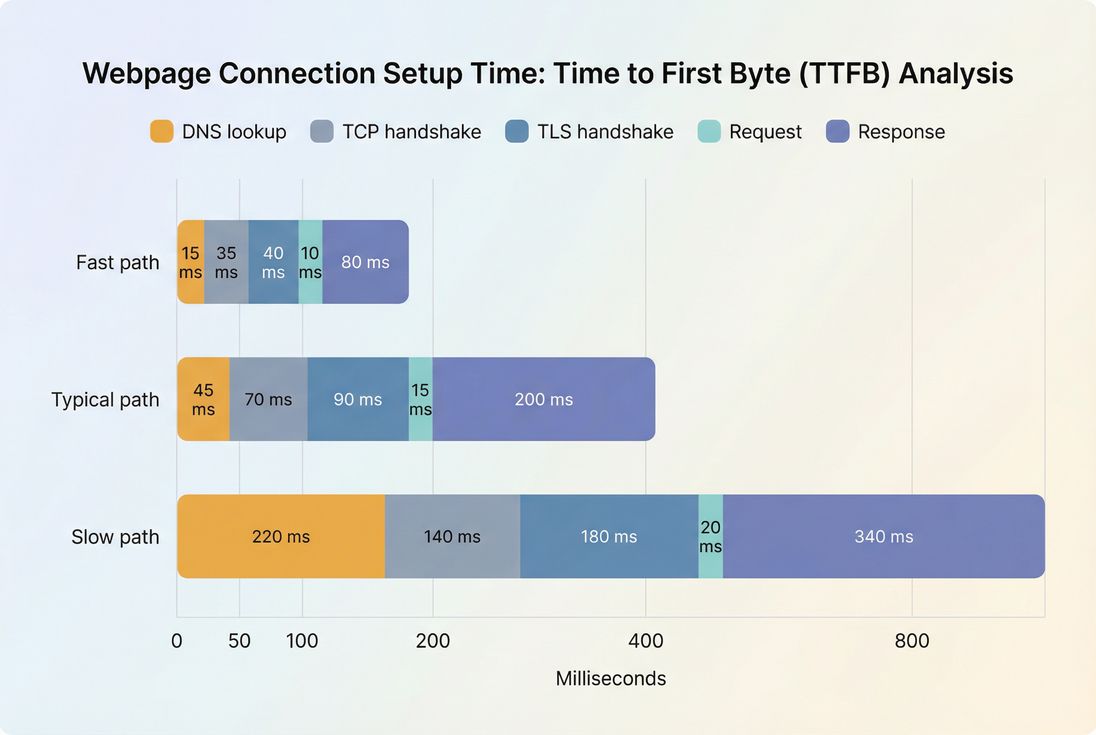
What this metric reveals
DNS lookup time is a "gating" metric: it often doesn't dominate your page load, but when it's slow it can stall the start of connection setup for critical resources.
It is most informative when you look at it in context:
- Which hostname was slow? Your own origin, your CDN, or a third party?
- Was it on a critical request path? HTML document, render-blocking CSS, font files, hero image, checkout scripts.
- Was it a cold-cache scenario? First visit, private browsing, new device, or new geography.
If you're already optimizing TTFB, TLS handshake, and network latency, DNS is the next place where "small" delays can still create noticeable UX regressions – especially on mobile and international traffic.
The Website Owner's perspective
DNS lookup time answers a practical question: "Are we losing time before we even start talking to the server?" If a new marketing tag adds two extra hostnames, DNS time can rise immediately – even if your servers didn't change at all. That can show up as slower landing pages, lower conversion rates, and higher bounce from paid traffic.
How DNS lookup time is measured
In most performance tools and waterfalls, DNS lookup time is shown per request and represents the duration between:
- DNS start: when the browser begins resolving the hostname
- DNS end: when the browser receives an answer (or times out/falls back)
In browser performance timing APIs, you'll see these as the domainLookupStart and domainLookupEnd timestamps for a navigation or resource request. Practically, it's just the gap between those two markers in the request waterfall.
Important nuance: DNS time can be 0 ms when the hostname is already cached (in the browser, OS, or recursive resolver). That's why DNS issues often show up more clearly in:
- First-visit synthetic tests
- New geographies (where caches are cold)
- Newly introduced third-party domains
- "Empty cache" lab runs
To interpret it correctly, pair it with the rest of the request phases like TCP handshake and TLS handshake, because DNS might not be the only connection setup bottleneck.
If you use PageVitals, the clearest place to see DNS timings is in the request waterfall: Network request waterfall. (Even if you're using another tool, the same principle applies: find the per-request DNS segment and identify which hostnames matter.)
What influences DNS lookup time
DNS speed is not one thing; it's the sum of multiple real-world factors. The most common drivers are below, in the order website owners typically encounter them.
Visitor location and resolver quality
The browser typically asks a recursive resolver (often the ISP, sometimes a public resolver). That resolver then queries your authoritative DNS if it doesn't have a cached answer.
So DNS lookup time can vary widely depending on:
- Visitor geography (latency to resolvers and authoritative servers)
- Mobile networks vs Wi‑Fi (higher RTT and packet loss on mobile)
- Resolver performance (some ISP resolvers are slower or overloaded)
This is why you should avoid "we fixed DNS" conclusions based on a single lab run. Use field vs lab data thinking: lab can reproduce cold-cache pain, field tells you how often it happens.
Caching and TTL behavior
DNS caching exists at multiple layers:
- Browser cache
- OS cache
- Recursive resolver cache
Longer TTLs can improve cache hit rates (fewer lookups), but TTL alone is not a magic lever – especially for third parties you don't control.
Also, caching affects what you see in metrics:
- You may see 0 ms lookups often (warm cache).
- But the first lookup for a hostname can still be slow and impactful.
CNAME chains and extra lookups
A common hidden problem is a long CNAME chain, such as:
www → provider-alias → region-alias → edge-alias → A/AAAA
Each step can require additional DNS work. Some tools show this as a single "DNS" segment, but the user still pays the time.
This becomes especially common when:
- Marketing tags route through multiple aliases
- CDNs are layered (CDN in front of another CDN/service)
- "Tracking domains" are CNAME'd to vendor infrastructure
DNSSEC and record complexity
DNSSEC can add overhead to validation (often more noticeable on slower resolvers). It's usually worth keeping for security and integrity, but if you see DNSSEC-related latency spikes, it's a signal to validate configuration and authoritative performance.
Too many hostnames (death by a thousand cuts)
The biggest fixable DNS problem for many ecommerce sites isn't one slow lookup – it's too many unique hostnames on the critical path.
Common sources:
- Multiple analytics/ads vendors
- Multiple font providers
- Chat widgets, heatmaps, personalization tools
- Social embeds
- A/B testing tools pulling from separate domains
This interacts with HTTP requests: each new hostname adds not only DNS, but also TCP/TLS setup (unless already established).
The Website Owner's perspective
DNS issues often show up right after "harmless" changes: adding a tag, switching review widgets, installing a new personalization script. If your page now depends on 12 hostnames instead of 6, you're paying multiple connection setup costs before users see value – especially first-time visitors from ads.
What "good" looks like (benchmarks)
DNS lookup time depends on geography and cache warmth, so benchmarks should be used as triage, not as absolute pass/fail criteria.
Here's a practical way to think about it for critical hostnames (HTML, critical CSS, primary JS, fonts, key APIs):
| Per-hostname DNS lookup time | Interpretation | What to do |
|---|---|---|
| 0–20 ms | Excellent | Usually cached or very close resolver/authoritative. Don't over-optimize. |
| 20–50 ms | Good | Typical for healthy setups in-region. Monitor for regressions. |
| 50–100 ms | Watch | Can start delaying first render/TTFB on mobile. Investigate hostname count and CNAME chains. |
| 100–200 ms | Problem | Often noticeable on cold cache, international, or mobile. Prioritize fixes. |
| 200+ ms | Critical | Usually indicates long chains, poor authoritative performance, or resolver/network issues. Act quickly. |
Two interpretation rules that prevent wasted effort:
One slow third-party hostname can matter more than your average.
A single 180 ms lookup on a render-blocking third-party font can hurt more than five 15 ms lookups elsewhere.DNS matters most when it blocks something early.
If a slow hostname is only used for a below-the-fold widget, it's a lower business priority.
For broader user impact, connect DNS findings back to Core Web Vitals metrics like LCP (for the rendering timeline) and TTFB (for early network responsiveness).
When DNS becomes a real problem
DNS is worth escalating when it creates one of these patterns.
Pattern 1: "First view is slow, repeat view is fine"
This is classic DNS + connection setup overhead. Returning visitors benefit from cache and existing connections, but first-time visitors (often your paid traffic) take the full hit.
Actions often focus on:
- Reducing unique hostnames
- Using preconnect for truly critical third-party origins
- Delaying non-essential vendors until after first render
Pattern 2: "International traffic is disproportionately slow"
If your DNS provider's anycast footprint is weak in certain regions, or authoritative responses are slower far from your DNS PoPs, international visitors will see higher DNS times and worse mobile page speed.
Actions often focus on:
- Authoritative DNS provider quality and regional performance
- CDN strategy (not just DNS) via CDN performance and CDN vs origin latency
Pattern 3: "Small marketing changes cause big speed regressions"
Adding a script can add:
- A new hostname (DNS)
- A new connection (TCP/TLS)
- More main-thread work (JS execution)
This is why DNS analysis pairs naturally with third-party scripts governance.
Pattern 4: "Checkout pages are flaky"
Checkout often pulls in payment providers, fraud detection, address autocomplete, and additional tracking. DNS slowness here can feel like "site instability," not just slowness.
Treat checkout DNS dependencies as production-critical infrastructure.
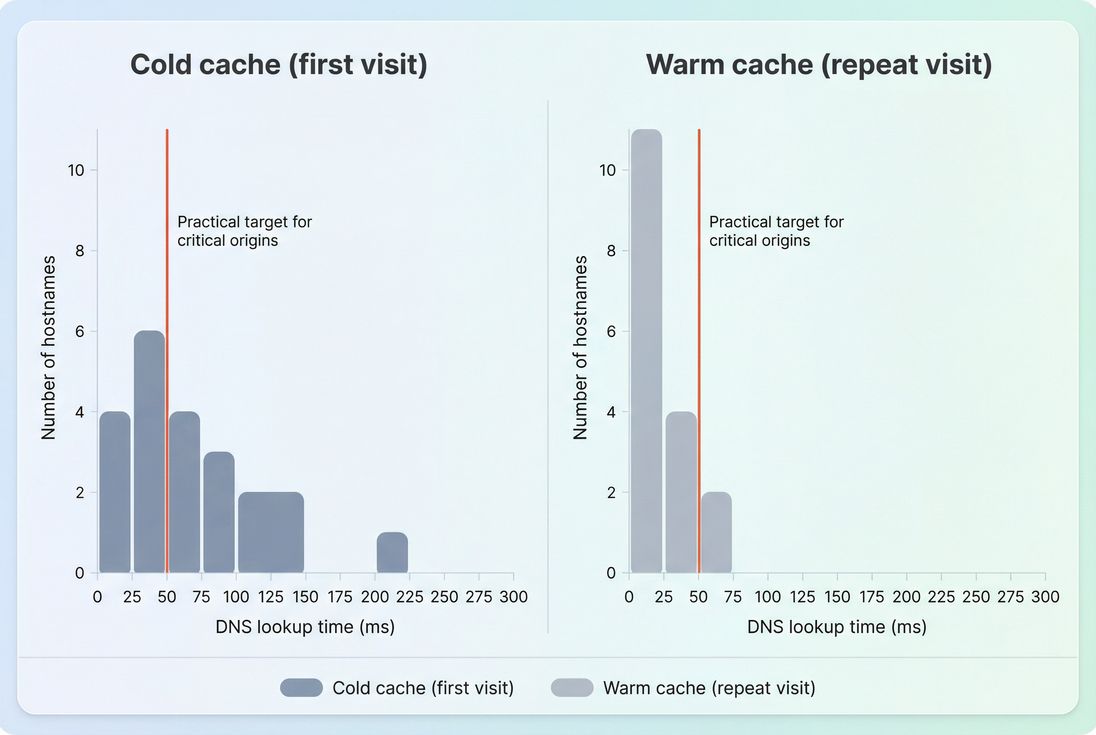
How to reduce DNS lookup time (what actually works)
DNS optimization usually pays off through fewer lookups and making the remaining lookups faster and earlier.
1) Reduce unique hostnames on the critical path
This is the highest ROI lever for most sites.
Practical moves:
- Consolidate assets: serve images, CSS, and JS from fewer domains (often your CDN domain).
- Self-host where it's reasonable: for example, fonts (see font loading) often benefit from consolidation and caching control.
- Audit third parties: remove vendors that don't produce measurable business value, or load them later.
Tie this to a wider request strategy: fewer hostnames also improves connection reuse and reduces repeated TCP/TLS handshakes.
2) Use dns-prefetch and preconnect selectively
These hints don't "make DNS faster," but they can make DNS happen earlier, off the critical path – if used correctly.
- dns-prefetch is lightweight: it asks the browser to resolve a hostname in advance. Read more: DNS prefetch.
- preconnect is heavier: it resolves DNS and also starts TCP/TLS. Read more: Preconnect.
Rules of thumb:
- Use preconnect for very few origins that are definitely needed immediately (fonts, critical CDN, key API).
- Use dns-prefetch for likely-soon-but-not-immediate origins.
- Avoid adding hints for every vendor "just in case." That creates wasted work and can even contend for network resources.
3) Shorten or eliminate CNAME chains
If your critical hostnames have long alias chains:
- Simplify DNS records where possible.
- Avoid stacking aliases across providers.
- Be cautious with "CNAME masking" for third-party vendors; it can introduce complexity and inconsistent performance.
You may not always control vendor DNS, but you can control whether a vendor is on the critical path.
4) Choose infrastructure that reduces global DNS latency
When DNS is consistently high across many users/regions, consider:
- Using an authoritative DNS provider with strong anycast coverage.
- Ensuring your CDN hostname strategy doesn't force extra lookups.
- Aligning CDN and origin choices (see CDN vs origin latency) so you're not "fast DNS, slow everything else."
5) Make caching work for you (without breaking ops)
For hostnames you control:
- Ensure reasonable TTLs (not overly low unless you truly need rapid changes).
- Avoid unnecessary DNS churn that keeps caches cold.
- Keep critical hostnames stable (avoid frequent changes to CDN hostnames or tracking subdomains).
This doesn't help the very first ever lookup, but it improves repeat visits and reduces resolver load.
The Website Owner's perspective
The most profitable DNS optimization is usually governance: fewer vendors, fewer hostnames, fewer surprises. If marketing can add tags freely, DNS time will regress unpredictably. Treat new hostnames like new dependencies that need performance review – especially for landing pages and checkout.
How website owners should interpret changes
DNS lookup time is noisy, so interpretation should be grounded in "what changed" and "where it changed."
If DNS time improves
Common reasons:
- You removed a third-party hostname (fewer lookups)
- You added selective preconnect/dns-prefetch for a critical origin
- You switched to faster authoritative DNS (regional improvement)
- You reduced CNAME chain length
Business interpretation: first-time visitors reach content faster, and your earliest milestones (TTFB, FCP, LCP) become more consistent.
If DNS time gets worse
Common reasons:
- New tag/vendor introduced new hostnames
- Vendor started routing through a different DNS/CDN path
- TTL lowered dramatically (more cache misses)
- Regional DNS outage or resolver issues
Business interpretation: paid traffic and new customers feel the slowdown first; international conversion and mobile bounce often move before your team notices in a single office-based test.
A helpful way to avoid misreads is to segment by "cold vs warm" and by geography, using real user monitoring principles and/or CrUX data for broad trends.
A practical workflow to diagnose and fix DNS
This workflow keeps DNS work focused on business outcomes, not vanity improvements.
Step 1: Identify critical hostnames
List which hostnames are required for:
- Initial HTML document
- Render-blocking CSS (critical rendering path)
- Fonts
- Hero/LCP asset (LCP)
- Cart and checkout dependencies
Step 2: Use a waterfall to find slow DNS segments
Look for requests with noticeably large DNS phases, and note:
- Hostname
- Whether it's first-party, CDN, or third-party
- Whether it appears on the critical path
In PageVitals, you can validate this visually using the Network request waterfall.
Step 3: Reduce hostnames before micro-tuning
If your page needs 15–30 hostnames to render, DNS tuning won't save you. Prioritize:
- Removing/defer-loading non-essential vendors (third-party scripts)
- Consolidating static assets
- Fixing obvious CNAME chain bloat
Step 4: Add preconnect/dns-prefetch only for proven-critical origins
Implement carefully, then re-test to confirm it improved start time for the key connection phases rather than increasing noise.
Step 5: Validate across regions and repeat runs
DNS is variable. Confirm you improved median and "bad tail" behavior, not just one run.
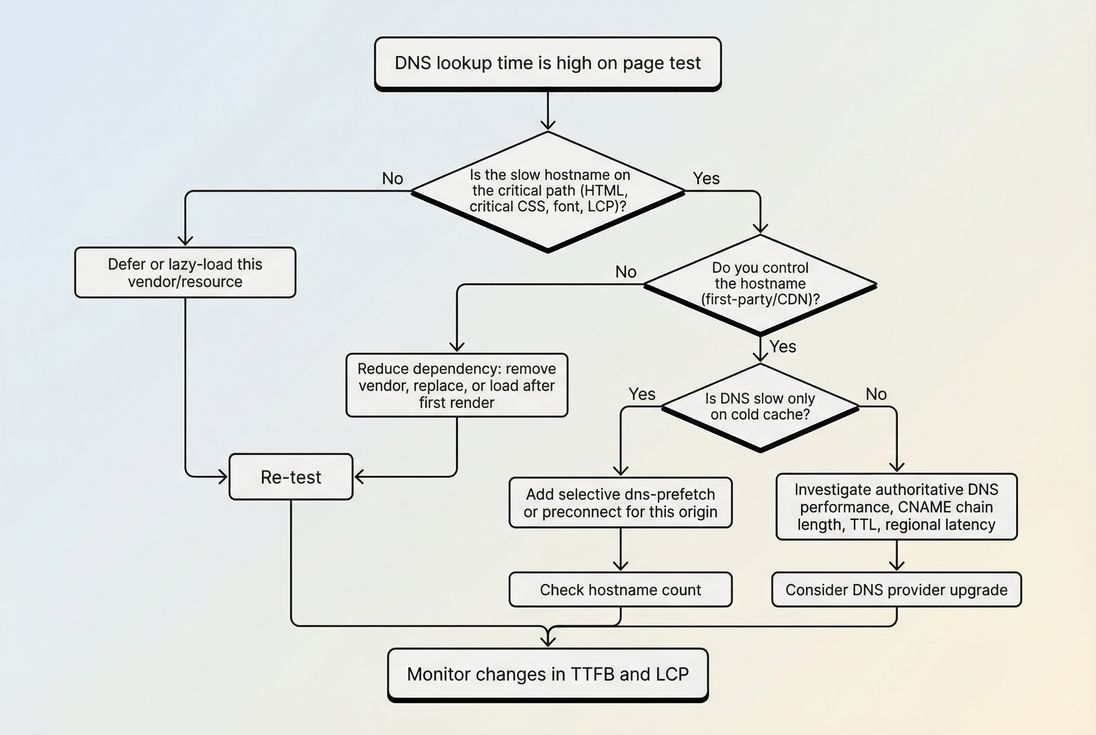
How DNS ties to broader speed work
DNS rarely lives alone. It tends to be part of a chain:
So DNS optimization is best treated as part of your connection strategy:
- Fewer hostnames → fewer DNS lookups and more connection reuse
- Earlier connection setup → smoother critical path (above-the-fold optimization)
- Less third-party bloat → fewer unpredictable dependencies
When DNS improvements don't move the needle, it's often because the real bottleneck is elsewhere – like server response, render-blocking CSS, or heavy JavaScript (reduce main thread work, unused JavaScript).
Quick checklist (printable)
- Identify critical hostnames (HTML, critical CSS, fonts, LCP asset, checkout).
- Count unique hostnames needed for first render; reduce first.
- Inspect CNAME chains on critical hostnames.
- Add preconnect only to a small number of proven-critical origins.
- Use dns-prefetch for likely-soon origins, not everything.
- Validate across regions and cold-cache scenarios; don't trust a single run.
- Monitor whether improvements translate into better TTFB and Core Web Vitals.
If you want, share a list of the top hostnames from your homepage and checkout (CDN, fonts, analytics, payments). I can help you classify which ones are truly critical and which DNS optimizations are worth doing first.
Frequently asked questions
For most visitors, individual DNS lookups should usually be under 50 ms, and ideally closer to 20–30 ms for critical origins. Spikes over 100 ms can noticeably delay first requests, especially on mobile. Focus on the lookup that blocks your HTML, critical CSS, fonts, and checkout scripts.
Sometimes, but first confirm the slowdown is from authoritative DNS, not the visitor resolver, a long CNAME chain, or too many third-party hostnames. Switching to a faster, anycast DNS provider helps most when your authoritative responses are slow or inconsistent across regions. Measure improvements by geography, not just one lab test.
A 0 ms DNS time usually means the hostname was already resolved and reused from browser, OS, or resolver cache. That is common on repeat visits, SPA navigations, or when multiple resources share the same host. It is not proof DNS is fast; it may simply be cached for that user.
DNS lookup time is not a Core Web Vital itself, but it can delay the network phases that feed them, especially TTFB and early render milestones like FCP and LCP. It matters most on cold caches and when critical resources come from many different hostnames. Reducing hostnames often beats micro-optimizing one lookup.
No. Prefetching every third-party domain can create unnecessary DNS work and noise, and it can mask which vendors truly matter. Use dns-prefetch or preconnect only for origins that are required on the first view (above the fold, cart, checkout). Remove or delay vendors that are not essential to early rendering.
Want to take PageVitals for a spin?
Page speed monitoring and alerting for your website. Get daily Lighthouse reports for all your pages. No installation needed.
Start my free trial