Table of contents
Edge caching strategies
A slow origin is expensive: it raises bounce rate, forces you to overprovision servers, and makes performance unpredictable during promotions. Edge caching is one of the few changes that can reduce latency and reduce infrastructure stress at the same time.
Edge caching strategies are the rules and patterns you use to store and serve responses from CDN "edge" locations (close to users) instead of repeatedly generating them at your origin. The strategy is not just "turn cache on" – it's deciding what to cache, how long, how to vary, and how to keep it fresh without breaking personalization or correctness.
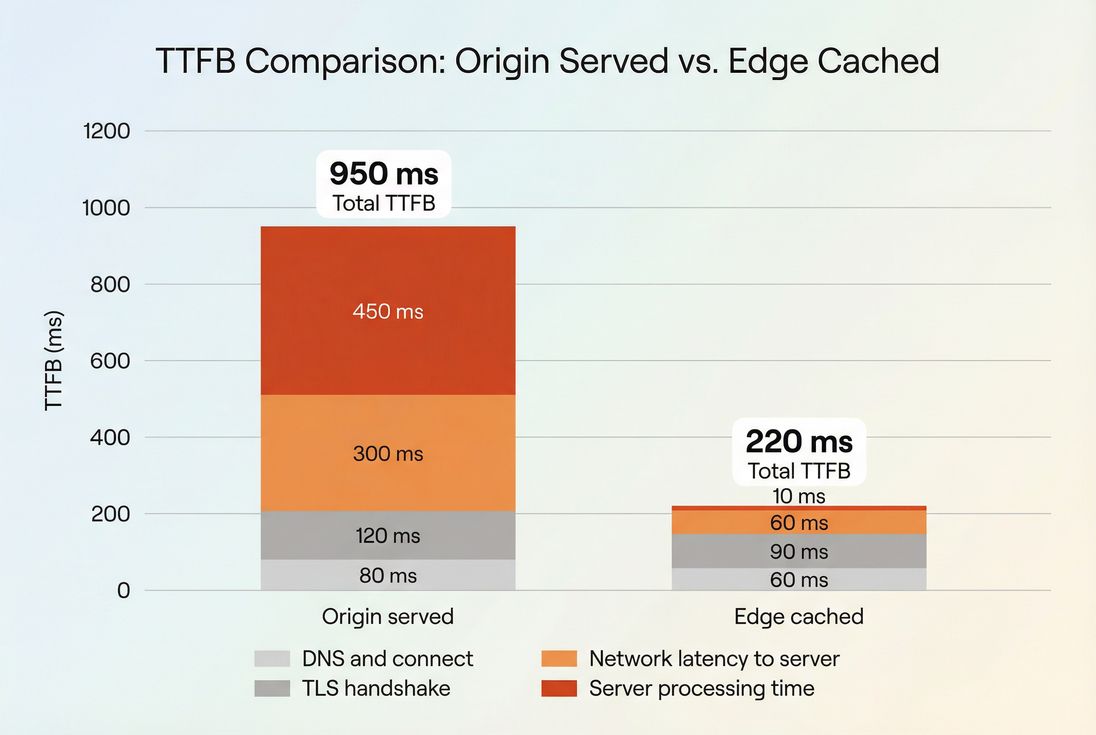
What edge caching reveals
Edge caching isn't a single metric, but it directly changes the metrics that drive business outcomes:
- Lower and more stable TTFB (see /academy/time-to-first-byte/)
- Better LCP for pages where the LCP element depends on slow HTML, CSS, or images (see /academy/largest-contentful-paint/)
- Lower origin load, which reduces "random" slowdowns during traffic spikes
Most teams feel this as: fewer "the site is slow today" complaints, fewer emergency scaling events, and better paid traffic efficiency (because landing pages don't waste clicks).
The Website Owner's perspective
If edge caching reduces TTFB by even a few hundred milliseconds on high-traffic landing pages, you're not just improving a score – you're buying more reliable conversion during campaigns and reducing the operational risk of peak days.
Which pages should be cached
A practical edge caching strategy starts by classifying your site into "safe to cache" and "must be dynamic," then handling gray areas with patterns like short TTLs, careful cache keys, and selective bypass.
Strong candidates
These should usually be cached aggressively:
- Static assets: images, CSS, JS, fonts
Pair edge caching with long-lived browser caching (see /academy/browser-caching/), compression (see /academy/brotli-compression/ and /academy/compression-gzip/), and modern formats (see /academy/image-formats-webp-avif/). - Marketing pages: home, landing pages, content pages
Especially effective when your origin is far from your customers (see /academy/cdn-vs-origin-latency/). - Category and product listing pages (often)
Typically "mostly static" and can tolerate short staleness windows.
Usually avoid caching (or cache carefully)
These commonly require bypass or strict variation:
- Cart, checkout, account pages (personal data risk)
- Personalized pages (pricing by segment, logged-in recommendations)
- Anything behind Authorization headers unless you fully understand per-user caching behavior
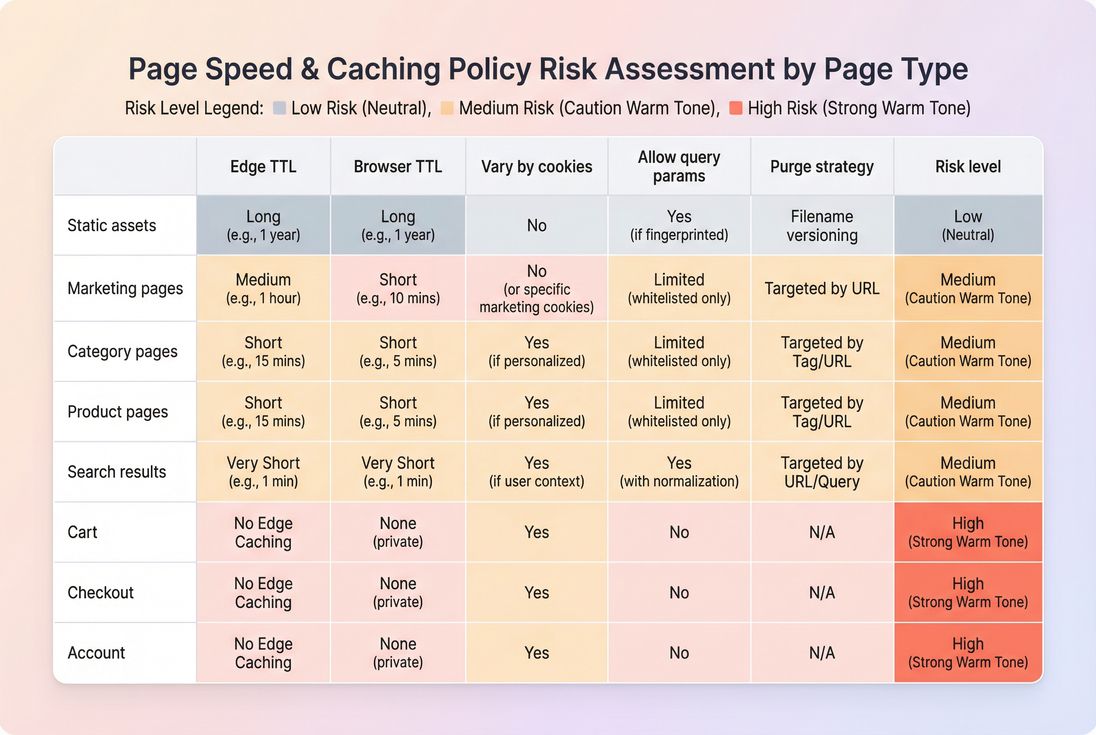
A usable policy matrix
| Page type | Typical edge TTL | Vary by cookie? | Notes |
|---|---|---|---|
| Images/CSS/JS/fonts | Long (days to 1 year) | No | Use fingerprinted filenames so you can cache "forever." |
| Blog/marketing pages | Medium (minutes to hours) | Rarely | Purge on publish; otherwise rely on TTL. |
| Category/listing | Short (30s to 5m) | Sometimes | Great ROI; inventory changes can be handled with short TTL or purge. |
| Product detail | Short to medium (1m to 30m) | Sometimes | Vary only on what truly changes the HTML (geo, currency). |
| Cart/checkout/account | No cache | Yes (bypass) | Treat as private; avoid accidental sharing. |
For more on choosing TTLs, see /academy/effective-cache-ttl/.
How edge caching decisions are made
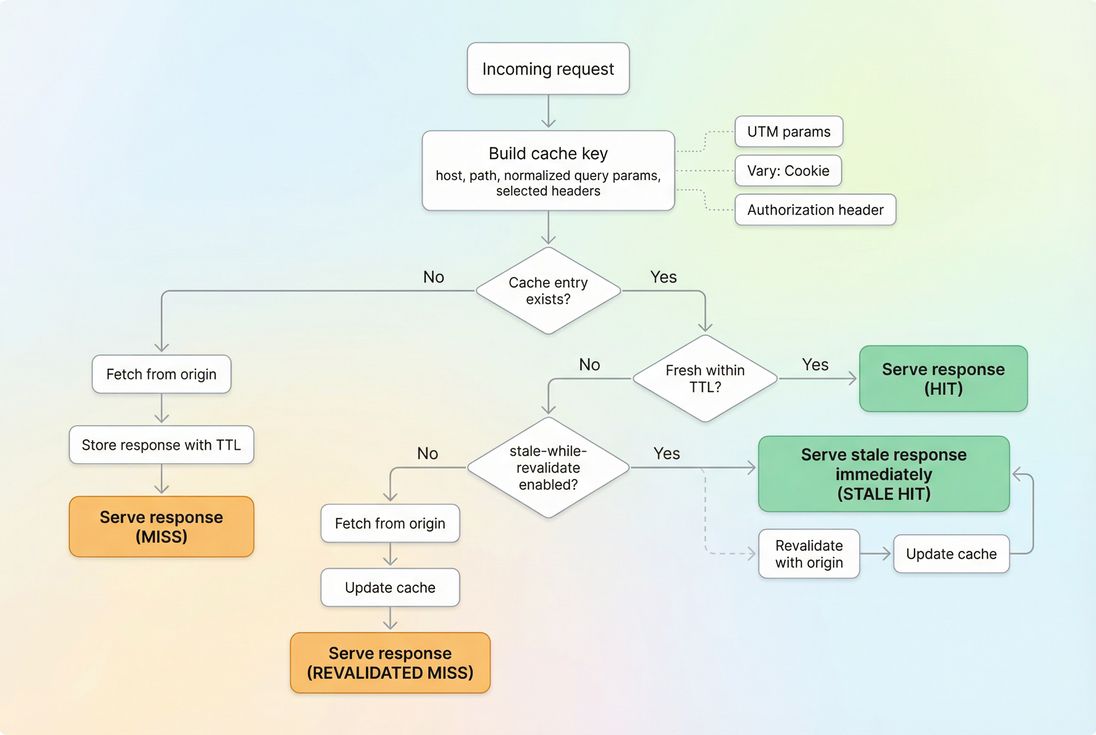
At a high level, every CDN edge cache makes the same decision:
- Create a cache key (what makes this request "the same" as another request)
- Look up that key in cache
- If found and fresh, return a hit
- If missing or stale, fetch from origin (a miss), then maybe store it
Your strategy controls steps 1 and 4.
Cache keys: the #1 source of surprises
A cache key commonly includes:
- URL path (
/products/widget) - Query string (
?color=blue) - Hostname (
www.example.com) - Sometimes headers (like
Accept-Encoding) and cookies
Small cache key mistakes cause big problems:
- Including irrelevant query parameters (like
utm_source) explodes the cache into thousands of variants and destroys hit rate. - Varying on all cookies often makes HTML effectively uncacheable, because every visitor has a different cookie jar.
- Missing a required vary dimension (like currency) can serve the wrong content to the wrong users.
Practical guidance: strip or ignore marketing query strings at the edge, and only include cookies in the cache key when the cookie changes the actual response.
The Website Owner's perspective
A "low cache hit rate" is rarely a mysterious CDN problem. It usually means your cache key is too unique (too many variants), so you're paying for a CDN without getting the speed or the origin offload benefits.
Cache-Control: how your origin communicates intent
Most caching behavior comes down to correct Cache-Control headers (see /academy/cache-control-headers/). The directives that matter most for edge caching strategy:
publicvsprivate
Public can be cached/shared; private should not be served across users.max-agevss-maxages-maxageis for shared caches (CDNs) and can differ from browser caching.stale-while-revalidate
Lets the edge serve a slightly stale response while fetching a fresh one in the background – often a strong UX win for HTML.no-store/no-cache
Commonly used for sensitive flows; be careful not to apply them sitewide.
Also consider Vary. Overusing it (especially Vary: Cookie) can crater your cache efficiency.
What actually influences performance
Edge caching impacts multiple pieces of the critical path:
- Lower server work (less origin rendering time)
- Lower network latency (edge is geographically closer)
- Often fewer slow connections to origin (depending on CDN configuration)
This typically improves TTFB, which then cascades into LCP and overall page load time. If you're working on above-the-fold rendering too, combine caching with /academy/critical-rendering-path/ work and /academy/critical-css/ decisions.
How to keep cached content fresh
Caching only helps if you can keep it "fresh enough" for your business. There are three common freshness models, and most mature sites use a mix.
1) TTL-only (simple, predictable)
You set a TTL and accept that content can be stale for up to that long.
Use TTL-only when:
- Content changes infrequently (docs, posts)
- Staleness is acceptable (category pages during normal days)
Risk:
- Promotions, pricing, or inventory can look wrong until the TTL expires.
2) Purge/Invalidate (fast correctness)
You cache with a longer TTL, but when content changes you purge it.
Use purge when:
- Product price changes should be reflected quickly
- Campaign landing pages are updated frequently
Operational reality:
- Your CMS, commerce platform, or deploy pipeline needs to trigger purges reliably.
- Purging "everything" is a common anti-pattern; it causes a thundering herd of misses.
3) Stale-while-revalidate (best of both)
The edge serves cached content immediately, even if slightly stale, and refreshes in the background.
Use this when:
- You want consistently fast pages under load
- You can tolerate brief staleness (often seconds to a couple minutes)
This pattern is especially helpful for HTML on content-heavy sites.
How to measure and interpret changes
If you change edge caching rules and your Core Web Vitals don't improve, you need to determine whether you fixed the bottleneck you actually have.
What to track
Track these together (not in isolation):
- TTFB: should drop for cacheable pages (see /academy/time-to-first-byte/)
- Cache hit rate: percentage of requests served from edge cache (HTML and static assets separately)
- Origin load: requests per second, CPU, and response times
- LCP on key templates: especially landing, category, product pages (see /academy/largest-contentful-paint/)
- Field vs lab differences: edge caching often looks better in real traffic than a single lab location (see /academy/field-data-vs-lab-data/ and /academy/chrome-user-experience-report/)
Reading the outcomes
Common patterns and what they mean:
- TTFB improves, LCP unchanged
Your bottleneck is likely render-side: blocking CSS/JS, image priority, fonts, or main-thread work. Review /academy/render-blocking-resources/, /academy/javascript-execution-time/, and /academy/font-loading-performance/. - Cache hit rate improves, TTFB unchanged
You might still be revalidating too often, or your edge location is not close to users, or TLS/connection setup dominates. Look at /academy/tls-handshake/, /academy/tcp-handshake/, and /academy/connection-reuse/. - Hit rate is low only on marketing campaigns
Usually query strings (UTMs) or A/B testing parameters are fragmenting the cache key. - Random slow spikes despite caching
Often purge storms (too much invalidation at once) or an origin dependency that still runs on "cached" pages (uncached API calls, third-party scripts). See /academy/third-party-scripts/.
Verifying in a waterfall
A network waterfall helps you confirm whether the document and critical assets are truly edge-cached and whether TTFB is improving for the right resources. If you use PageVitals, the documentation for the waterfall report is here: /docs/features/network-request-waterfall/. For interpreting TTFB specifically: /docs/metrics/time-to-first-byte/.
What you're looking for:
- Response headers that indicate cache status (HIT/MISS/STALE, varies by CDN)
- Lower and more consistent TTFB across repeat runs
- Fewer expensive origin waits on the HTML document request
When edge caching breaks
Edge caching problems are usually not subtle. They show up as "wrong content" incidents or unexpectedly low hit rates.
Failure mode: caching personalized content
Symptoms:
- Users see someone else's cart count or name
- Logged-in banner appears for logged-out users
Fix:
- Mark personalized responses
privateor bypass cache when specific cookies are present - Split pages into cacheable shell + uncached personalized calls (if your architecture supports it)
Failure mode: "we cache nothing because cookies exist"
Symptoms:
- Every HTML request is a miss
- CDN costs money but origin load doesn't drop
Fix:
- Only vary/bypass on the cookies that change output
- Consider stripping analytics cookies from cache consideration at the edge
Failure mode: staleness during promotions
Symptoms:
- Promo banner lingers after campaign ends
- Price updates take too long to appear
Fix:
- Purge only affected paths/templates
- Use shorter TTLs for promotion-sensitive pages
- Prefer versioned assets and targeted invalidation rather than global purges
A practical rollout plan
If you want a strategy that survives real operations (deploys, campaigns, merchandising), implement in this order:
- Lock in static asset caching
- Fingerprint filenames for CSS/JS bundles (often produced by your build tooling)
- Set long TTLs and confirm Brotli is enabled (see /academy/brotli-compression/)
- Normalize cache keys
- Strip or ignore UTM parameters
- Ensure only meaningful query parameters affect caching
- Cache HTML for the pages that pay
- Start with marketing pages and top landing pages
- Then expand to category/product templates with short TTLs
- Add safe freshness controls
- Purge on deploy/publish for known URLs
- Consider stale-while-revalidate for stability
- Measure impact on TTFB and LCP
- Validate for multiple geographies and device profiles (see /academy/mobile-page-speed/)
The Website Owner's perspective
The goal isn't "maximum caching." The goal is a stable, repeatable performance baseline that keeps conversion predictable during campaigns – without creating a new class of content correctness incidents.
How this connects to Core Web Vitals
Edge caching is rarely the only fix, but it's a foundational one because it improves the starting point of almost every navigation.
- Better TTFB makes it easier to hit good LCP and overall load time targets.
- Once server delivery is fast, you can focus on render-side wins like /academy/above-the-fold-content/, /academy/code-splitting/, /academy/asset-minification/, and /academy/async-vs-defer/.
For context on how all these metrics relate, see /academy/core-web-vitals-overview/ and /academy/web-performance-metrics/.
Frequently asked questions
The biggest win is usually lower TTFB, especially for visitors far from your origin server. For cacheable HTML and API responses, it is common to see hundreds of milliseconds saved. That often improves LCP and overall conversion on mobile. Static assets typically become consistently fast worldwide.
For static assets like images, CSS, and JavaScript, aim for very high cache hit rates, often above 90 percent. For HTML on ecommerce, 50 to 80 percent can be strong depending on personalization and inventory rules. If your hit rate is low, the cause is usually cookies, query strings, or short TTLs.
It can if you cache pages that must be real time. The fix is not avoiding caching entirely, but using safer patterns: cache longer for static parts, keep real time fragments uncached, set short TTLs where needed, and purge on critical updates. Always test product and cart flows carefully.
Look for response headers that indicate cache status, then confirm with TTFB and waterfall timing in a synthetic test. A cache hit typically shows lower TTFB and fewer origin waits. Also watch consistency: edge hits tend to be stable across repeated tests, while origin responses fluctuate more.
No. Browser caching stores responses on the visitor device, while edge caching stores them on CDN servers close to visitors. Edge caching helps first time visitors and reduces origin load. Browser caching helps repeat visits on the same device. You typically want both, coordinated via Cache Control headers.
Want to take PageVitals for a spin?
Page speed monitoring and alerting for your website. Get daily Lighthouse reports for all your pages. No installation needed.
Start my free trial