Table of contents
HTTP/2 performance benefits
A "fast enough" site doesn't just feel better – it converts better. When pages stall during early loading (blank screen, missing hero image, delayed CSS), you pay for it in bounce rate, paid traffic efficiency, and checkout completion.
HTTP/2 is a newer version of the HTTP protocol that lets the browser download many files at the same time over a single connection, with less overhead per request. In practice, it reduces "waiting in line" for resources, especially on mobile and asset-heavy pages.
What makes HTTP/2 tricky is that it's not a single score you optimize – it's a delivery layer. The benefits show up indirectly in outcomes you already care about: TTFB, FCP, LCP, and overall page load time.
What HTTP/2 changes on the wire
If you only remember one thing: HTTP/1.1 loads lots of assets by opening multiple connections and juggling requests; HTTP/2 loads lots of assets by multiplexing them over one connection.
Key HTTP/2 features that impact speed:
- Multiplexing (multiple streams on one connection): many requests/responses in parallel without waiting for the previous one to finish.
- Binary framing: more efficient parsing and less ambiguity than text-based HTTP/1.1.
- Header compression (HPACK): repeated headers (cookies, user agents, etc.) shrink significantly across many requests.
- Prioritization (in theory): the browser can express which resources matter more. In reality, prioritization behavior varies and has had interoperability issues across browsers/servers/CDNs.
- Server push (mostly "don't use" now): pushing assets before the browser asks often backfires (cache collisions, wasted bandwidth). Most teams should rely on
preload/preconnectinstead.
Here's the simplest comparison for decision-making:
| Topic | HTTP/1.1 behavior | HTTP/2 behavior | Why it matters |
|---|---|---|---|
| Parallel downloads | Limited per connection; often needs multiple connections | Many streams over one connection | Less queuing for CSS/JS/images |
| Connection cost | Often repeated across sharded domains | Reused more effectively | Fewer TCP handshakes and TLS handshakes |
| Request overhead | Larger repeated headers | Compressed headers (HPACK) | Helps pages with many requests |
| Head-of-line blocking | App-layer blocking common | App-layer blocking removed, but TCP HOL still exists | Explains why HTTP/3 can beat HTTP/2 on lossy networks |
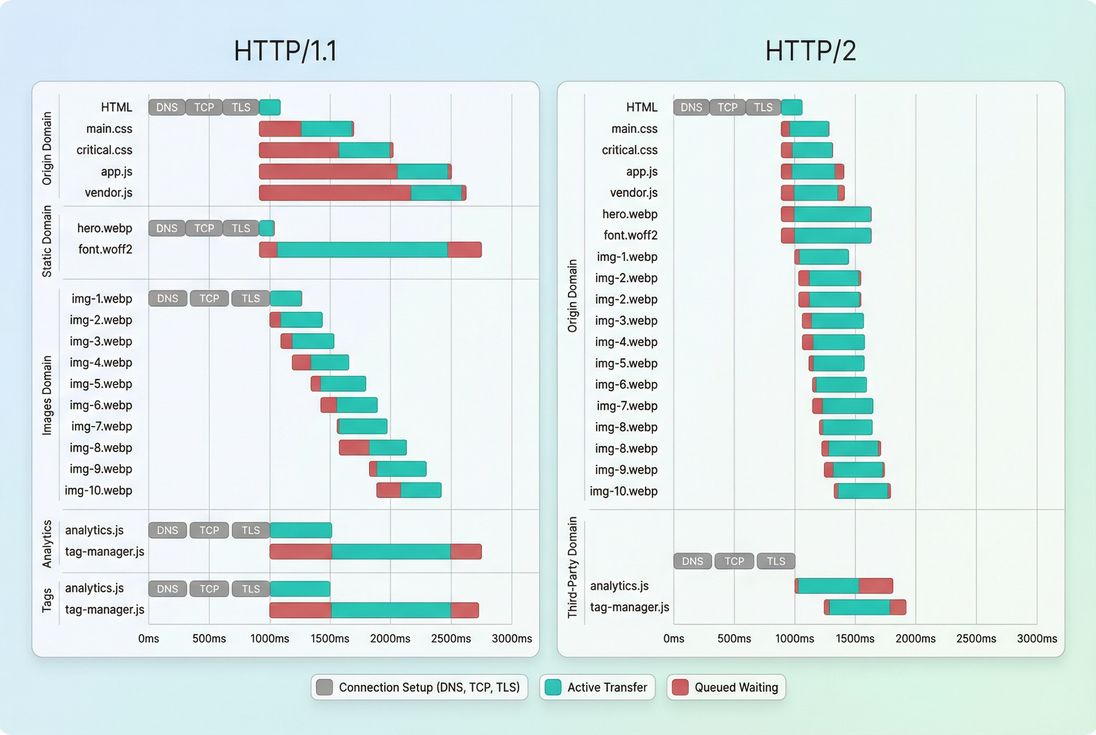
HTTP/2 usually wins by reducing repeated connection setup and eliminating request queuing for same-origin assets – two common causes of late CSS, fonts, and LCP images.
The Website Owner's perspective: If your waterfall shows lots of "stalled/queued" time before critical files start downloading, HTTP/2 is often a high-ROI infrastructure fix. If the waterfall is mostly "download done, but page still slow," your bottleneck is probably JavaScript and rendering, not the protocol.
How website owners "calculate" the benefit
Because HTTP/2 is not a standalone metric, the clean way to quantify its value is as a before/after delta under controlled conditions:
- Run a synthetic test with a fixed device/network profile (same location, same throttling).
- Record medians (not a single run) for:
- Enable HTTP/2 on the same host/CDN path.
- Re-test and compute the change (example: LCP drops from 3.2s to 2.7s).
What you're really measuring is a bundle of effects:
- Connection setup avoided: fewer repeats of DNS lookup time + TCP + TLS.
- Better parallelism: fewer "request waits its turn" delays.
- Less header overhead: especially helpful with large cookies and many small files.
A practical "sanity check" calculation is to count how many new connections your page opens and ask: Did HTTP/2 reduce that? If you previously relied on multiple subdomains (static1, static2, etc.), HTTP/2 can reduce connection churn – but only if you also stop sharding.
Why HTTP/2 speeds up real pages
HTTP/2's speed gains typically come from three places. The business relevance is that they impact the critical rendering path – the chain of events required before users see the page and can start acting.
Fewer expensive handshakes
Every new connection can incur:
- DNS resolution (DNS lookup time)
- TCP setup (TCP handshake)
- TLS negotiation (TLS handshake)
On mobile networks, the latency component dominates. If you create extra connections through sharding or lots of third parties, your "free" asset parallelism can become "paid" in handshake time.
This is why connection reuse matters: HTTP/2 makes reuse more effective for same-origin assets.
Less request queuing for same-origin assets
HTTP/1.1 browsers limit parallel connections per origin and often end up queuing requests. That queuing is deadly when it affects:
- render-blocking CSS (render-blocking resources)
- font files (font loading)
- the LCP image
HTTP/2 multiplexing reduces that queuing because many responses can flow concurrently on one connection.
Smaller repeated headers
If you have:
- big cookies,
- verbose security headers,
- lots of requests,
then HPACK header compression can reduce bytes transmitted and improve responsiveness, especially when many files are small.
This isn't a substitute for payload optimizations like Brotli compression or asset minification – it's a different layer.
When HTTP/2 helps most
HTTP/2 is most impactful when your page is "request-heavy" and "latency-sensitive."
Typical high-win scenarios:
- E-commerce category pages with many thumbnails + JS/CSS chunks
- Content sites with many ads/analytics calls (though third-party behavior may not change much)
- Mobile traffic (high latency, variable throughput)
- CDN-delivered sites with lots of cacheable assets (HTTP/2 shines when the server can respond quickly)
A useful heuristic: if your page has 50–200+ requests (see HTTP requests) and your users are often on mobile networks (see network latency), HTTP/2 tends to be worth it.
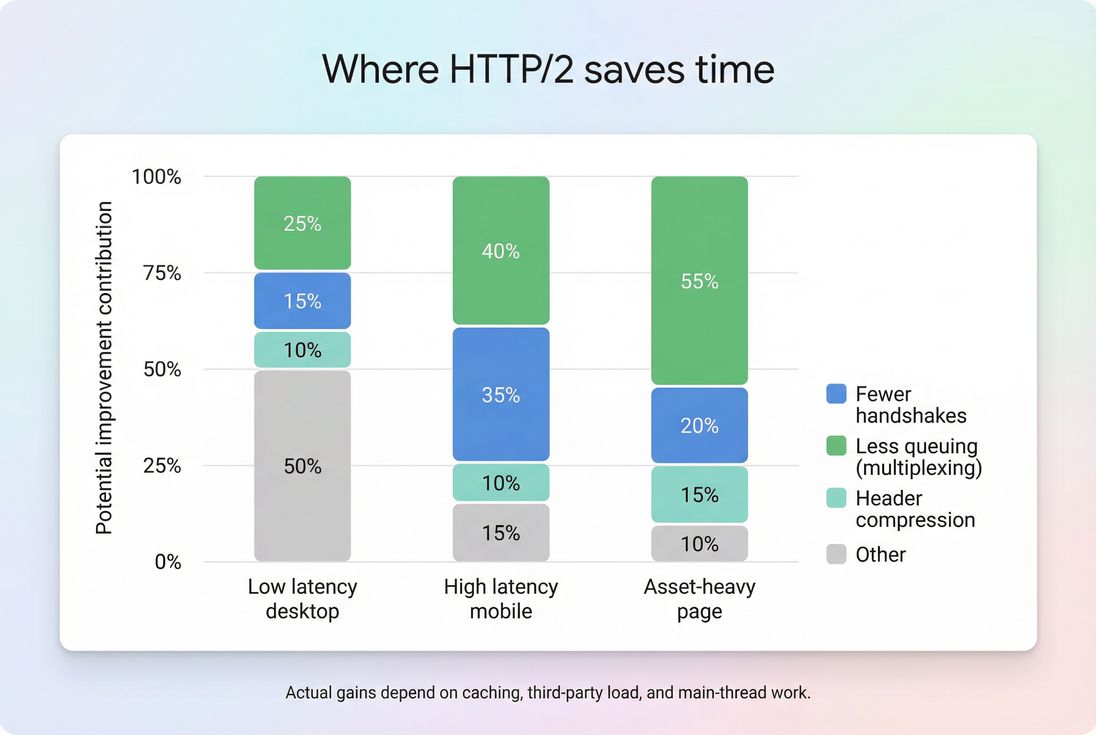
HTTP/2 gains usually come from reduced queuing and fewer handshakes; on high-latency mobile, those two factors dominate.
Benchmarks you can use for planning (directional, not guarantees):
| Page type | Typical conditions | HTTP/2 impact you're likely to see |
|---|---|---|
| Simple landing page (few assets) | <30 requests, good caching | Small; often within noise |
| Marketing site (moderate assets) | 50–100 requests | Noticeable in FCP/LCP if queuing existed |
| E-commerce PLP/PDP | 100–250+ requests | Often meaningful, especially for images/fonts/CSS |
| JS-heavy SPA | Large bundles, heavy main thread | Network may improve, but INP/TTI-like issues remain |
The Website Owner's perspective: If you're spending on acquisition, HTTP/2 helps protect ad ROI by reducing the number of sessions that abandon before the page becomes visually complete (often reflected in FCP/LCP). It's less about "milliseconds for bragging rights" and more about fewer failed landings during peak campaigns.
When HTTP/2 gains disappear
HTTP/2 is not a magic switch. These are the common "we enabled it and nothing changed" outcomes – and what they imply.
Your bottleneck is server time, not transport
If server response time is high, HTTP/2 can't compensate. You'll see a high TTFB regardless of protocol.
Fixes tend to be backend and caching-focused:
- CDN performance and edge caching
- correct Cache-Control headers and better browser caching
- reducing origin latency (CDN vs origin latency)
Your bottleneck is main-thread work
HTTP/2 can deliver JS faster – sometimes making the problem more obvious. If your page is slow because the browser is busy parsing/executing JavaScript, focus on:
- reduce main thread work
- JavaScript execution time
- code splitting
- removing unused JavaScript and unused CSS
- handling scripts with async vs defer where appropriate
This is why network upgrades often move LCP a bit, but barely touch INP.
TCP head-of-line blocking still exists
HTTP/2 multiplexes streams, but it still runs over TCP. If packets are lost, TCP retransmission can delay everything on that connection – one reason HTTP/3 performance can be better on unreliable networks.
You kept HTTP/1.1-era "hacks"
The biggest self-inflicted HTTP/2 blocker is domain sharding.
If you split assets across many subdomains to increase parallelism, you also create more:
- DNS lookups
- TCP/TLS handshakes
- competing connections that undermine prioritization
Under HTTP/2, sharding frequently makes things worse.
Third-party scripts don't benefit much
Many third parties already use HTTP/2, but you still pay their cost:
- extra connections
- their own server latency
- their JavaScript execution
Use this as a trigger to audit third-party scripts rather than expecting HTTP/2 to "fix" them.
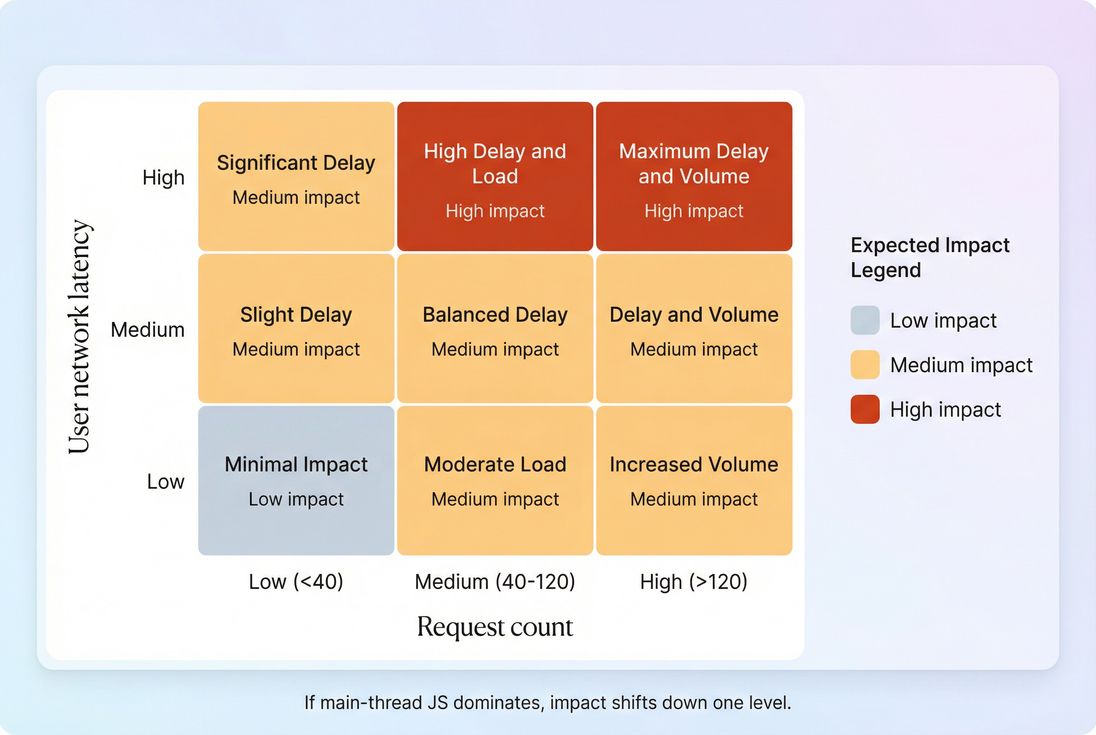
Use request count and user latency to predict whether HTTP/2 will move the needle, then validate with before/after tests.
How to validate HTTP/2 correctly
You're trying to answer two questions:
- Is HTTP/2 actually being used?
- Did it improve the user-visible outcomes?
Confirm the protocol in the browser
In Chrome DevTools → Network:
- Enable the Protocol column.
- Look for
h2on your main document and static assets.
If only some assets are h2, you may have a mixed setup (CDN supports it; origin doesn't; or certain hostnames aren't configured).
Use a waterfall to spot "why"
HTTP/2 improvements show up as:
- fewer connections
- fewer "stalled/queued" segments
- earlier start times for critical CSS/fonts/LCP images
If you use PageVitals, the Network Request Waterfall report is the fastest way to see this pattern end-to-end (/docs/features/network-request-waterfall/).
Measure in both lab and field
- Synthetic tests tell you what changed (great for protocol changes).
- Field data tells you whether users benefited across devices and networks.
Use the mental model from field vs lab data and validate outcomes with CrUX data when your traffic volume supports it.
The Website Owner's perspective: Don't declare victory because "we enabled HTTP/2." Declare victory because your key templates (home, PLP, PDP, checkout) improved on LCP or overall load time in the field – especially on mobile, where revenue impact is usually highest.
Practical implementation checklist
Most teams enable HTTP/2 via a CDN or modern web server, but the real performance win comes from avoiding counterproductive patterns.
Enable HTTP/2 where it matters
- Ensure your CDN and origin support HTTP/2 for the hostnames serving:
- HTML
- CSS/JS
- images
- fonts
Browsers typically use HTTP/2 over TLS (via ALPN). "h2c" (cleartext) exists but isn't the common web path for real users.
Remove HTTP/1.1 workarounds
- Stop domain sharding unless you have a proven, measured reason.
- Don't split assets across many subdomains "for parallelism."
- Re-check any old build pipeline decisions like aggressive bundling or sprite sheets; under HTTP/2, you can often make smarter tradeoffs:
- keep critical CSS small (critical CSS)
- avoid shipping one massive JS bundle (JS bundle size, code splitting)
Still do the basics (HTTP/2 doesn't replace them)
HTTP/2 won't fix oversized payloads. Keep doing:
- Brotli compression (or at least Gzip)
- image optimization and modern formats (WebP vs AVIF)
- caching correctness: Cache-Control headers and effective cache TTL
- remove render blockers and heavy third parties
Prefer preload/prefetch over server push
If you're trying to make HTTP/2 "more aggressive," start with:
- preconnect for critical third-party origins
- preload for critical fonts/CSS/LCP images
- prefetch for likely next navigations
HTTP/2 server push is usually not worth the complexity today.
How to prioritize HTTP/2 vs other work
If you're deciding what to do this quarter:
- Prioritize HTTP/2 when your site is request-heavy and you see queuing/handshake overhead.
- Prioritize backend/caching when TTFB is the big bar in your waterfall (TTFB, server response time).
- Prioritize frontend JS when the network finishes early but the page becomes usable late (reduce main thread work, long tasks).
HTTP/2 is a foundational upgrade that removes avoidable network friction. The best results come when you pair it with better caching, fewer third parties, and smaller critical resources – so the protocol can spend its efficiency on the files that actually drive Core Web Vitals.
Frequently asked questions
It depends on request count and latency. If your pages load dozens to hundreds of assets (CSS, JS, images, fonts) on mobile networks, HTTP2 can cut noticeable time by reducing connection overhead and allowing true multiplexing. If you are dominated by heavy JavaScript execution or slow server response, gains will be modest.
HTTP2 can improve LCP when the LCP resource is delayed by request queuing, extra handshakes, or render blocking CSS arriving late. It rarely improves INP directly, because INP is mostly main thread and JavaScript work. Treat HTTP2 as network plumbing that reduces waiting, not as a fix for heavy frontend code.
Usually no. Domain sharding was an HTTP1 workaround to bypass per-host connection limits, but it adds DNS, TCP, and TLS cost. Under HTTP2, sharding often makes performance worse by creating more connections and splitting prioritization. For images, use modern formats and responsive images instead of sprites.
Yes, but for different reasons. A CDN reduces distance and lowers TTFB, while HTTP2 reduces client-side connection and request overhead. Together they compound. The biggest remaining wins are fewer handshakes, better concurrency for many small files, and improved delivery of critical CSS and fonts. Measure at the edge and at the origin.
For most sites, enable HTTP2 now and add HTTP3 where supported. HTTP3 can reduce transport-level head-of-line blocking and is often better on lossy mobile networks, but it is not universal and still requires good caching and smaller payloads. HTTP2 remains a strong baseline and is widely supported by CDNs and browsers.
Want to take PageVitals for a spin?
Page speed monitoring and alerting for your website. Get daily Lighthouse reports for all your pages. No installation needed.
Start my free trial