Table of contents
HTTP/3 and QUIC performance
Speed wins don't always come from shrinking JavaScript or compressing images. Sometimes the fastest path to better conversions is simply making your site less fragile on real networks – mobile, congested Wi‑Fi, and long-distance connections where packet loss and latency are normal. That's where HTTP/3 and QUIC can matter: they can reduce "network drama" that turns a fast site in the lab into a slow site in the field.
HTTP/3 is the newest version of HTTP. It runs on QUIC, a transport protocol built on UDP, designed to reduce handshake overhead and recover better from packet loss than TCP-based HTTP/2. In plain English: HTTP/3 aims to deliver the same bytes with fewer delays when the network isn't perfect.
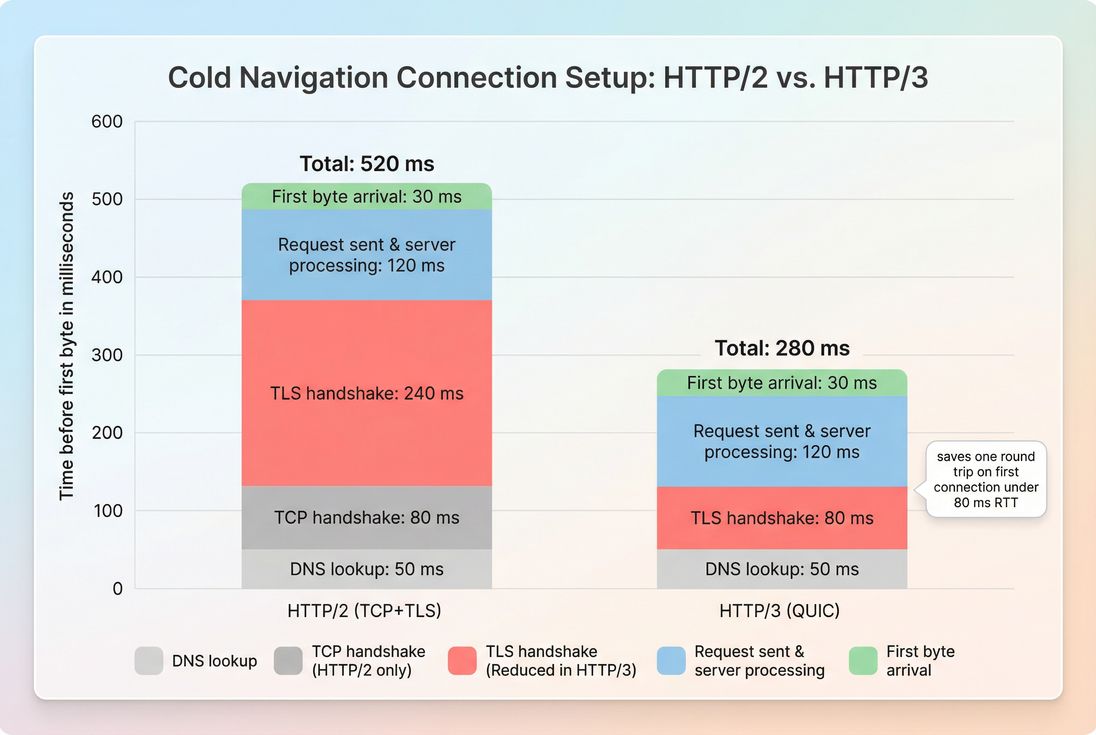
*HTTP/3 mainly reduces connection setup delays (especially on cold connections), which often shows up as improved TTFB for first navigations on mobile and high-latency visitors.*
What HTTP/3 changes
Most website owners experience HTTP/3 as a toggle in their CDN, but the meaningful changes are under the hood:
QUIC replaces TCP for transport
HTTP/2 runs over TCP. TCP is reliable, but it has a well-known weakness for page loads: when packets are lost, TCP can stall multiple streams while it recovers. That's one reason "everything feels slow" on unstable networks.
QUIC (used by HTTP/3) was designed to:
- Start faster in many real-world cases (fewer round trips before secure traffic flows).
- Recover better from packet loss without stalling unrelated requests the same way TCP can.
- Support connection migration (useful when a user switches networks, like Wi‑Fi to cellular).
If you want the foundational differences between protocol generations, it helps to review HTTP/2 performance and then treat HTTP/3 as "HTTP/2-style multiplexing, but with a transport designed for the modern internet."
Faster handshakes matter most on cold starts
For a first-time visitor (or someone whose connection state expired), early delays often come from:
- DNS lookup time
- TCP handshake
- TLS handshake
- Distance/RTT (see network latency and ping latency)
HTTP/3 can reduce handshake-related round trips. Practically, that tends to improve early-request timing like TTFB on cold navigations – especially when RTT is high.
The Website Owner's perspective
If you're fighting high mobile bounce rates on paid landing pages, HTTP/3 is worth testing because it targets the "first few seconds" problem: the part of the visit where users decide whether to stay.
It doesn't fix backend slowness
HTTP/3 can't compensate for slow origin work, slow database queries, or cache misses. If your server takes 600 ms to generate HTML, the protocol might shave some network setup time, but it won't turn slow into fast.
If your server response time is the bottleneck, fix that first.
When HTTP/3 helps most
HTTP/3's upside is highly dependent on network conditions and page shape. Here's where it tends to pay off.
Mobile and long-distance visitors
If a meaningful part of your traffic is:
- International (farther from your origin or even your CDN edge)
- On cellular networks
- On congested Wi‑Fi
…then latency and packet loss are more common, and HTTP/3 has more opportunities to reduce stalls.
This is also why you should expect a bigger shift in p75 field performance than in a local lab run. (See field vs lab data.)
Pages with many critical requests
Even if your page is "small," the browser may need many requests before it can render the key content:
- CSS + critical fonts (font loading)
- Above-the-fold images (above-the-fold optimization)
- Multiple JavaScript chunks (code splitting)
- Third-party scripts (third-party scripts)
When the network is lossy, recovering from dropped packets without stalling unrelated requests can improve "time to usable content," which often feeds into LCP stability.
Networks with packet loss
Packet loss is the scenario where HTTP/3 most consistently beats HTTP/2 in practice. With TCP, a single lost packet can trigger behavior that slows down other in-flight streams. QUIC is built to reduce that type of cross-stream stalling.
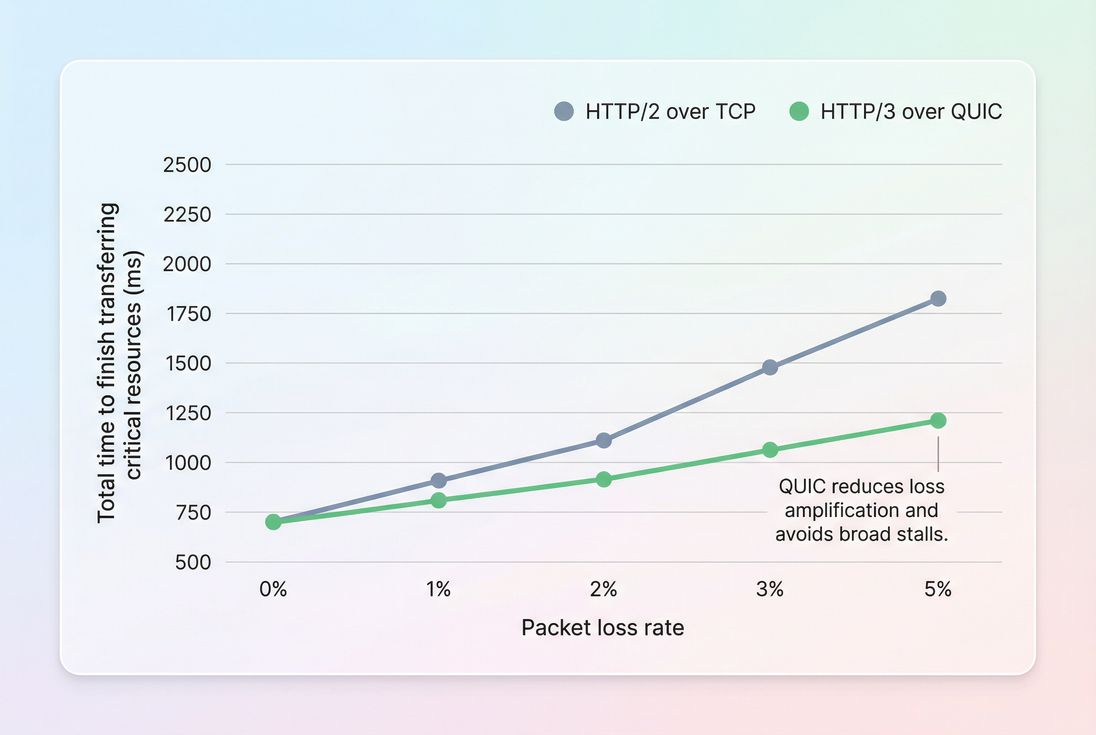
*HTTP/3's advantage grows as packet loss increases, which is why improvements often show up in mobile p75 rather than desktop lab tests.*
When you should not expect much
HTTP/3 may not move the needle if:
- Your site is already bottlenecked by JavaScript (JS execution time and reduce main thread work).
- You're serving from a strong edge cache and already have excellent connection reuse and long-lived sessions.
- Your audience is mostly desktop, low-latency, low-loss.
- Your LCP is dominated by render blocking (render-blocking resources) or unoptimized images (image optimization).
The Website Owner's perspective
If your homepage LCP is 4–5 seconds because the hero image is huge and CSS is blocking rendering, HTTP/3 won't save you. Prioritize the big rocks first (image format, caching, critical CSS, third-party control), then use HTTP/3 as a resilience upgrade.
How to measure real impact
Because "HTTP/3 performance" isn't a single number, you measure it through the metrics it influences and by isolating protocol usage.
Start with the outcomes you care about
For most businesses, HTTP/3 matters only if it improves outcomes like:
- Better Core Web Vitals pass rate
- Faster TTFB (especially cold navigations)
- More stable LCP
- Better real-user experiences on mobile (often reflected in p75)
If you're unsure which data source to trust, read Measuring Web Vitals and CrUX data.
Separate lab expectations from field reality
Lab tests often run on stable connections with predictable latency. That can understate HTTP/3's benefits.
Field data (RUM and CrUX) captures the messy reality: variable RTT, loss, device differences, and real routing.
A practical approach:
- Validate negotiation: Confirm real traffic is using h3 (not just enabled).
- Measure by segment: Mobile vs desktop, country/region, and connection type if you have it.
- Compare p75 changes: Improvements often concentrate in slower percentiles.
If you use PageVitals, the most relevant places to validate changes are:
- The protocol and request behavior in the /docs/features/network-request-waterfall/ view (to confirm what the browser actually did).
- Field segmentation tools under /docs/features/field-testing/ to see whether p75 improved where you expected.
Look for these patterns in your data
Good signs:
- Lower p75 TTFB on first navigations
- Improved p75 LCP on mobile or high-latency geos
- Fewer long stalls in request waterfalls (more consistent early progress)
Red flags:
- No increase in h3 adoption (your "enable" didn't reach users)
- Slightly worse p50 with no p75 gains (could be CPU overhead or negotiation quirks)
- Spikes in early timing (Alt-Svc misconfigurations or edge issues)
The Website Owner's perspective
Don't judge HTTP/3 by a single Lighthouse run. Judge it by whether your slowest-but-common users (often mobile p75) became faster, because that's where revenue leakage typically happens.
What influences HTTP/3 results
HTTP/3 can be enabled and still fail to deliver meaningful gains. The difference is usually in these factors.
CDN and edge placement
HTTP/3 is commonly terminated at the CDN edge, so your "distance to edge" matters more than "distance to origin" for most requests. If your edge caching is weak (low hit rate), you might still pay for slow origin fetches.
Related reading:
Caching and connection longevity
HTTP/3 helps most on cold connections. If your users navigate multiple pages and you already have good cache and connection reuse, the incremental benefit may be smaller.
Make sure basics are solid:
Network path and UDP blocking
HTTP/3 uses UDP (typically on port 443). Some networks block or degrade UDP. Browsers will generally fall back to HTTP/2, but the transition can be imperfect depending on configuration.
The goal is: if UDP is blocked, users should still get fast HTTP/2 without extra delays.
Page architecture (request count and criticality)
If your above-the-fold depends on dozens of requests, network improvements can matter more. If it depends on one large image and a blocking CSS file, you'll usually get more by fixing:
Common rollout mistakes
Most HTTP/3 "regressions" come from configuration, not the protocol itself.
Alt-Svc misconfiguration
HTTP/3 discovery is commonly advertised via Alt-Svc. If it's wrong (bad max-age, wrong host, inconsistent behavior), you can get inconsistent negotiation and wasted attempts.
What to do: verify headers at the edge, verify behavior across pages, and keep a clean fallback.
Assuming it fixes slow TTFB
If your HTML isn't cached at the edge and your origin is slow, you'll still have slow TTFB. HTTP/3 reduces some network overhead; it doesn't remove backend work.
What to do: address backend and caching first (TTFB is often an origin/cache story, not a protocol story).
Ignoring the "many small things" bottleneck
If your site is heavy on third-party scripts, unused JavaScript, and render blockers, HTTP/3 may be statistically real but operationally irrelevant.
Prioritize:
How to decide if it's worth it
A simple decision table helps set expectations before you invest time.
| Your situation | Expected HTTP/3 benefit | Why |
|---|---|---|
| Mobile-heavy, global traffic | High | More latency and loss to overcome |
| Domestic traffic, strong CDN | Medium | Some cold-start savings, fewer stalls |
| Mostly desktop, low RTT | Low | Less handshake and loss pain |
| Backend slow / low cache hit rate | Low until fixed | Origin time dominates |
| Many critical requests above-the-fold | Medium to high | Loss recovery helps request-heavy loads |
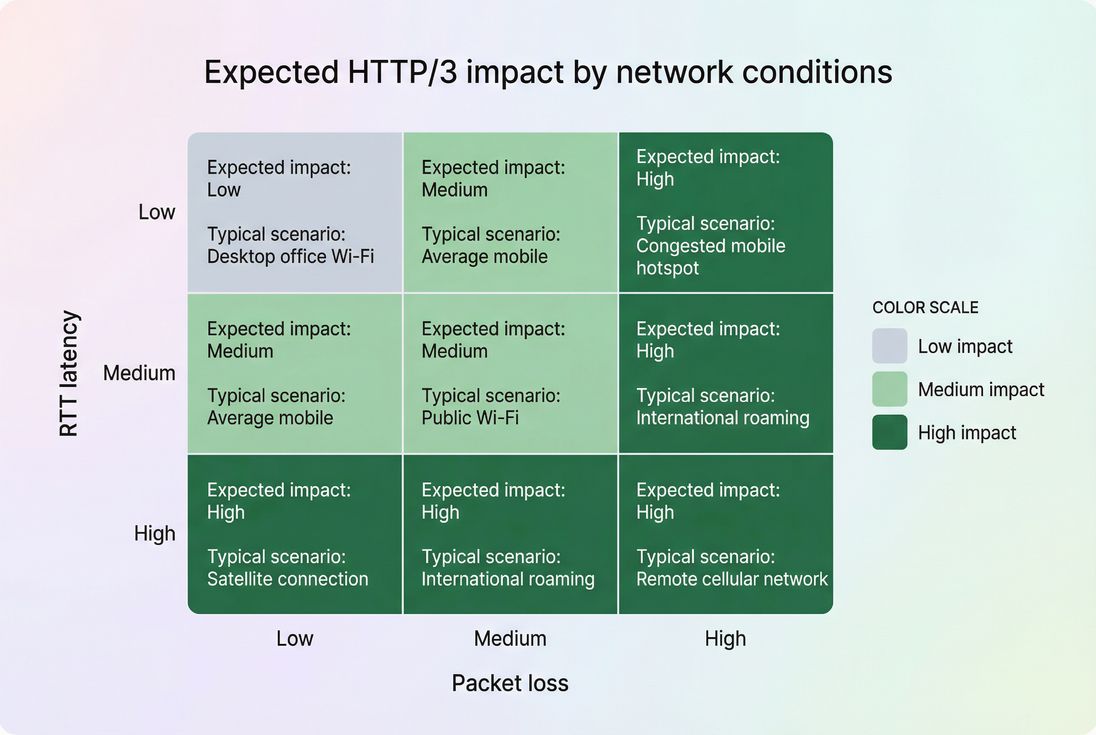
*HTTP/3 is primarily a network-conditions upgrade: the worse the real network, the more likely users feel the difference.*
Rollout checklist for website owners
If you want the upside without surprises, treat HTTP/3 like any other performance change: controlled rollout, validated adoption, then outcome measurement.
Confirm CDN support and scope
- Enable HTTP/3 at the CDN edge.
- Ensure HTTP/2 stays enabled and healthy as fallback.
Validate protocol negotiation
- Use browser DevTools to confirm requests show
h3. - Check multiple geos and networks (mobile and Wi‑Fi).
- Use browser DevTools to confirm requests show
Measure with the right lens
- Compare before/after p75 for TTFB and LCP.
- Segment by mobile vs desktop and by region.
- If you're using PageVitals, use /docs/features/chrome-ux-report/ and /docs/features/field-testing/ to validate that real users improved where you expected.
Watch for regressions
- Unexpected increases in early timing can indicate negotiation or edge issues.
- Confirm that UDP-blocked environments quickly fall back to HTTP/2.
Lock in fundamentals
- HTTP/3 benefits stack best with strong caching and fewer bytes:
Interpreting changes without overreacting
HTTP/3 improvements can be real and still look "small" in dashboards. Here's how to interpret them correctly:
- A 30–80 ms p75 TTFB improvement on mobile can be meaningful if it reduces abandonment on paid traffic. The first impression window is short.
- No change in lab doesn't mean no change for users. Lab networks are often too clean.
- Improvements clustered in certain regions are normal and expected – HTTP/3 is most valuable when RTT and loss are worse.
- If LCP doesn't move, it doesn't automatically mean HTTP/3 failed. Your LCP might be constrained by render-blocking CSS, image size, or main-thread work.
The Website Owner's perspective
The right goal isn't "turn on HTTP/3 and hope Lighthouse improves." The goal is "reduce real-user slow tails that hurt revenue," especially for mobile and international visitors.
Bottom line
HTTP/3 (via QUIC) is best understood as a reliability and latency upgrade for real networks, not a magic speed button. It tends to help most when your customers are mobile, global, or frequently on imperfect connections – and when your page requires multiple important requests early in the load.
Enable it when your fundamentals are solid, measure adoption and p75 outcomes, and use field data to confirm you actually improved the experiences that impact sales and retention.
Frequently asked questions
Sometimes, but not always. HTTP/3 tends to help most on mobile and long-distance visitors where latency and packet loss are common. The business win usually shows up as lower p75 TTFB and smoother loading during poor networks, which can reduce bounce and improve LCP stability.
Check response headers and protocol in browser DevTools, your CDN analytics, and your RUM or field data tooling. You want to see a meaningful share of requests negotiated as h3, not just enabled server-side. Also confirm UDP fallback behavior so blocked networks still get HTTP/2.
On clean, low-latency networks the change may be small. On higher latency or lossy networks, cold navigations often improve by tens to a couple hundred milliseconds in early-request timing (especially TTFB). Look for improvements concentrated in mobile p75, not just lab medians.
Yes. Misconfigured Alt-Svc, buggy edge support, packet amplification limits, or CPU overhead at the edge/origin can reduce throughput. Some corporate and hotel networks block UDP, causing negotiation delays if your fallback is slow. Always measure real-user impact and keep HTTP/2 healthy.
Usually no. If you still have slow server response time, heavy JavaScript, render-blocking resources, or poor caching, those will dominate outcomes. Treat HTTP/3 as a network resilience upgrade: valuable when you already have solid fundamentals and a mobile-heavy or global audience.
Want to take PageVitals for a spin?
Page speed monitoring and alerting for your website. Get daily Lighthouse reports for all your pages. No installation needed.
Start my free trial