Table of contents
Largest contentful paint (LCP)
When your homepage hero, product image, or main headline shows up late, users don't describe it as "a 1-second delay." They describe it as "this site feels slow" and leave – often before they ever see your offer, price, or value proposition.
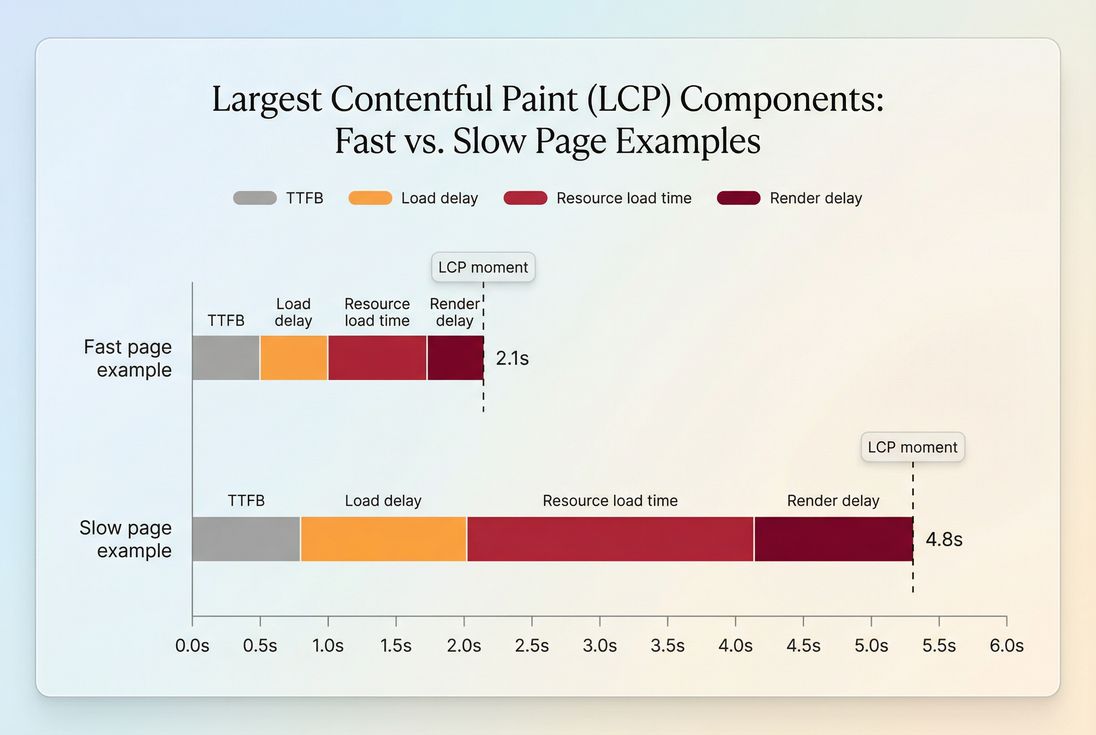
Largest Contentful Paint (LCP) is the time it takes for the largest important piece of content in the viewport (usually a hero image, featured product image, or big text block) to render during page load. In plain English: LCP measures when the page finally looks "ready" to a human.
What LCP reveals (and what it doesn't)
LCP is one of the three Core Web Vitals because it captures a moment users care about: when the main content becomes visible.
Common real-world LCP elements:
- A homepage hero image
- A product detail "main image"
- A large H1 + intro block on content pages
- A prominent promotional banner
Less obvious but important details:
- LCP is chosen from specific element types:
<img>,<video poster>, and certain text-containing block elements (like headings/paragraph blocks). - CSS background images are not LCP candidates. If your hero is a background image, the user still sees it late, but LCP might instead be measured on a text block. That can hide the true problem.
- LCP focuses on the viewport (above-the-fold), which is why above-the-fold optimization is often the highest ROI place to work.
What LCP does not tell you:
- Whether the page is responsive to input (that's INP)
- Whether the page jumps around (that's CLS)
- Whether everything is fully loaded (that's closer to "page load time" style metrics, which are often less actionable)
The Website Owner's perspective
LCP is the metric you use to answer: "How long does it take before shoppers see what we're selling?" If that moment moves later, you should expect higher bounce, lower engagement, and fewer users reaching key steps like add-to-cart or lead form start.
How LCP is determined
LCP is not a single hardcoded element. The browser watches the viewport while the page loads and keeps updating the "largest contentful element so far."
Here's the practical mental model:
- The browser starts rendering above-the-fold content.
- Each time a larger candidate element appears (or finishes rendering), the browser updates the LCP candidate.
- The reported LCP is the final largest candidate's render time, typically finalized when:
- the user interacts (click/tap/scroll), or
- the page finishes loading enough that no larger content appears
So if your page shows a headline quickly, then later swaps in a huge hero image, the image will usually become the LCP element, and LCP will land later.
The four delays that usually drive LCP
You'll often see LCP explained as four buckets (no formulas needed – just a way to reason about it):
Server response (TTFB): how long until the browser gets the first byte.
Related: TTFB, server response time, CDN performanceLoad delay: time spent waiting before the browser even starts downloading the LCP resource (common with CSS/JS priorities, late discovery, or heavy render-blocking).
Related: render-blocking resources, critical rendering pathResource load time: downloading the LCP resource (often an image).
Related: image optimization, image compression, WebP vs AVIF, network latencyRender delay: the resource is available, but the browser can't paint it yet (often main-thread contention from JavaScript, or layout/style work).
Related: reduce main thread work, JavaScript execution time, long tasks
This breakdown matters because the fix depends on which delay dominates.
What "good" looks like in practice
Google's Core Web Vitals thresholds for LCP (evaluated at the 75th percentile of real users) are:
| LCP (p75) | Status | What it usually feels like |
|---|---|---|
| ≤ 2.5s | Good | Main content appears quickly; page feels dependable |
| 2.5s–4.0s | Needs improvement | Users notice the wait; higher bounce on landing pages |
| > 4.0s | Poor | Page feels broken or heavy, especially on mobile |
Two practical notes for decision-making:
- Percentiles matter more than averages. Averages can look "fine" while a big chunk of mobile users suffer. The 75th percentile is designed to represent "most users."
- Mobile is the truth serum. Desktop often hides problems. If you only fix desktop LCP, you may not move revenue metrics.
For deeper context on data sources, see field vs lab data and CrUX data.
The Website Owner's perspective
Don't ask "Is our LCP 2.5 seconds in a test?" Ask: "Do most mobile users see our hero/product within 2.5 seconds?" That framing keeps the metric tied to bounce rate, landing page ROI, and paid traffic efficiency.
Why LCP gets worse (common patterns)
When LCP regresses, it's usually because the critical path to the LCP element got longer. These are the patterns that show up most often on real sites.
1) The LCP element is too heavy
Most commonly: the hero image is huge (file size and/or pixel dimensions), or served in an older format.
High-impact fixes:
- Use modern formats: WebP vs AVIF
- Compress and resize correctly: image compression, responsive images
- Avoid shipping a 2500px-wide hero to a 390px-wide phone
Also watch for:
- Carousels/sliders that load multiple "hero" images eagerly
- Personalization that swaps in a larger image late (making LCP later)
2) The LCP resource is discovered late
Late discovery creates load delay. Causes include:
- LCP image referenced deep in CSS
- The hero only appears after client-side rendering
- Overuse of lazy loading on above-the-fold content (lazy-loading the LCP image is a classic self-inflicted wound)
Related concepts:
- Lazy loading (great for below-the-fold; dangerous for LCP elements)
- Critical CSS (helps the browser render above-the-fold sooner)
3) Render-blocking CSS/JS delays painting
Even if the image downloads quickly, the browser might not paint it because it's busy:
- parsing large CSS
- executing heavy JS
- doing layout repeatedly
Related concepts:
- Unused CSS and asset minification
- Unused JavaScript, code splitting
- Async vs defer for non-critical scripts
4) Slow server or uncached HTML
If HTML arrives late, everything starts late.
Common causes:
- Slow backend work on the initial request
- No edge caching for HTML
- Personalization that disables caching entirely
Related concepts:
How to diagnose LCP without guessing
The goal is not "improve LCP" in the abstract. The goal is: identify the LCP element and shorten its path to pixels.
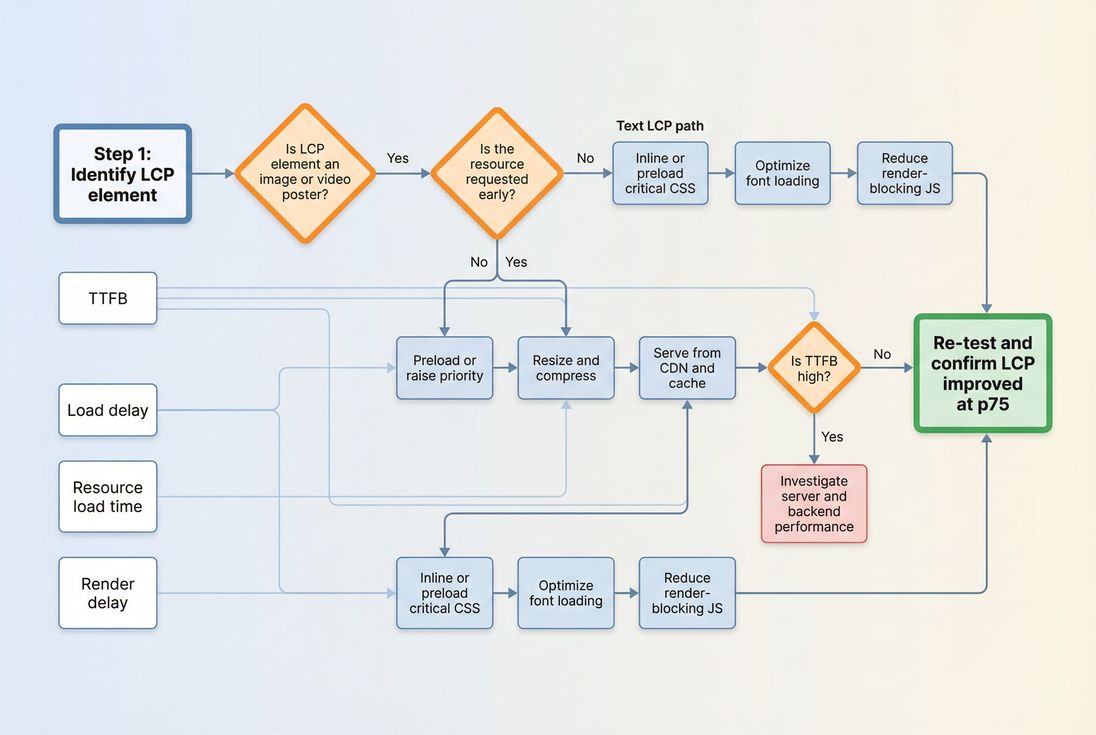
Step 1: Identify the LCP element
In lab tools (like Lighthouse), you can typically see which element was LCP and often a selector or preview. In real-user monitoring, you want the same: what element is it on which templates (home, category, PDP, article, etc.).
If you're using PageVitals, start with:
- The metric definition and context: /docs/metrics/largest-contentful-paint/
- Real-user distribution and template impact: /docs/features/field-testing/web-vitals/lcp-report/
Step 2: Check whether it's an image problem or a render problem
A quick way to avoid week-long rabbit holes:
If the LCP element is an image, your biggest wins usually come from:
- earlier discovery (preload/priority)
- smaller bytes (compression/format)
- faster delivery (CDN/caching)
If the LCP element is text, your biggest wins usually come from:
- faster HTML/TTFB
- earlier CSS availability (critical CSS)
- fonts not blocking text render
Step 3: Use the waterfall to find the blocker
A network waterfall makes LCP concrete: you can literally see what had to finish before the LCP element could paint.
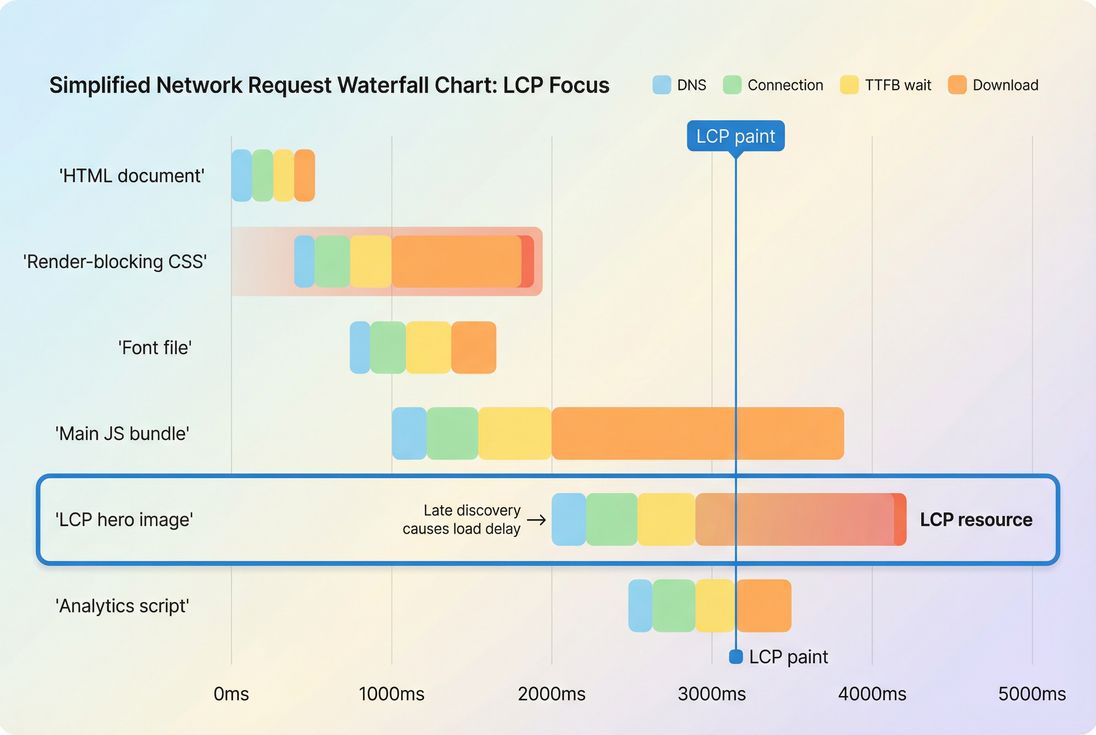
If you're new to waterfall analysis, it helps to understand:
Fixes that reliably move LCP
This section is intentionally opinionated: these are the changes that most often move LCP on real sites, tied directly to the four delay buckets.
Reduce TTFB (start everything earlier)
If your TTFB is slow, LCP improvements elsewhere can be capped.
Common high-ROI actions:
- Put cacheable HTML behind a CDN: CDN performance, edge caching
- Fix caching headers and TTL strategy: Cache-Control headers, effective cache TTL
- Reduce backend work on the initial request (database, personalization, A/B scripts)
Related reading: time to first byte
Eliminate load delay (discover the LCP resource sooner)
For an LCP hero image:
- Do not lazy-load it. Lazy loading is for below-the-fold content.
Related: lazy loading - Consider preload for the LCP image, especially on templates where it's predictable.
Related: preload - Avoid hiding the hero behind client-side rendering when you can server-render or stream it.
For text LCP:
- Ensure critical CSS is available immediately:
- inline critical CSS or
- split and load critical CSS first
Related: critical CSS
Reduce resource load time (make the LCP bytes smaller)
For most sites, this is the "fastest win" because it's measurable and isolated.
Checklist:
- Serve correctly sized images: responsive images
- Use modern formats where supported: WebP vs AVIF
- Compress aggressively but safely: image compression
- Cache images well and use CDNs effectively: browser caching, CDN vs origin latency
Reduce render delay (free the main thread)
If your LCP resource downloads early but the paint still happens late, you're usually main-thread bound.
High-impact actions:
- Remove or delay non-critical third parties: third-party scripts
- Cut JS payload and execution:
- Reduce long tasks and layout churn:
How to interpret LCP changes
LCP going down is good – but you still need to interpret why it moved and whether it will stick.
A drop after an image change is usually stable
Example: you convert a 900KB hero JPEG to a 220KB WebP and fix responsive sizing. That typically improves LCP across:
- mobile and desktop
- many geographies
- many connection types
It's also lower risk to deploy and easy to roll back.
A drop after "defer some scripts" can be fragile
If you improved LCP by deferring scripts, confirm:
- you didn't break analytics consent timing or revenue tags
- you didn't increase CLS by loading UI late
- you didn't harm interaction responsiveness (track INP)
Watch for template-level tradeoffs
A common ecommerce scenario:
- You optimize the homepage hero and see a big LCP win.
- But product pages are still slow because the LCP element is the main product image loaded from a different system (PIM/DAM) with weaker caching.
Treat LCP as template-specific and prioritize:
- top landing pages (paid + organic)
- category pages (browse)
- PDP (purchase intent)
The Website Owner's perspective
LCP is most useful when it's tied to a revenue path. Improving LCP on a low-traffic blog post might not move the business. Improving LCP on top paid landing pages often lowers CAC by reducing wasted clicks.
Measuring LCP the way Google evaluates it
For Core Web Vitals, what matters is real-user LCP at the 75th percentile. Lab improvements are valuable, but you want confirmation in field data.
To understand measurement approaches:
If you're using PageVitals, these are the most relevant guides:
- Improving LCP step-by-step: /docs/guides/how-do-i-improve-lcp/
- LCP metric details: /docs/metrics/largest-contentful-paint/
- Field LCP analysis: /docs/features/field-testing/web-vitals/lcp-report/
A practical LCP action plan (one week)
If you want a pragmatic approach that doesn't turn into a months-long refactor:
- Pick one high-value template (homepage, top category, or top PDPs).
- Identify the LCP element and confirm whether it's an image or text.
- Quantify the dominant delay (TTFB, load delay, download, render delay).
- Apply one targeted fix (not five):
- Image: resize + compress + modern format, and ensure it's not lazy-loaded
- Text: critical CSS + font loading fixes (font loading)
- Server: caching/CDN/TTFB work
- JS: remove or defer one heavyweight script
- Re-test and validate in field data over enough traffic to trust the percentile movement.
If you keep the loop tight – identify → fix → verify – LCP becomes one of the most actionable performance metrics you can manage.
Frequently asked questions
Aim for a 75th percentile LCP of 2.5 seconds or less on mobile to be in the good range. For ecommerce, getting closer to 2.0 seconds usually reduces bounce on landing pages and makes category and product pages feel noticeably faster, especially on slower networks.
LCP often worsens because something upstream slowed down: higher server response time, a new third party tag delaying rendering, a larger hero image, or cache misses after a deploy. LCP is sensitive to the full critical path, not just visual design changes.
Use both. Lab tests are best for debugging repeatably and catching regressions before release. Real user data tells you business reality across devices and networks and is what Google uses for Core Web Vitals evaluation. Treat lab as diagnosis and field as the scorecard.
In Chrome DevTools and Lighthouse you can see which element was considered LCP, typically a hero image, banner, or H1 block. In PageVitals you can review LCP in synthetic reports and use the LCP field report to see how it behaves across real sessions.
Usually conversions first. LCP is strongly tied to perceived speed and whether users trust the site enough to keep shopping. SEO benefits come from meeting Core Web Vitals thresholds at scale, but business impact often shows up earlier in bounce rate, add to cart rate, and lead form completion.
Want to take PageVitals for a spin?
Page speed monitoring and alerting for your website. Get daily Lighthouse reports for all your pages. No installation needed.
Start my free trial