Table of contents
Layout instability and CLS fixes
Layout jumps are a quiet conversion killer: users tap "Add to cart," the page shifts, and they tap something else. Even when they don't misclick, visual instability makes a site feel unreliable – exactly the wrong feeling when someone is deciding whether to trust you with a purchase.
Layout instability is the general problem: page elements move after they appear. CLS (Cumulative Layout Shift) is the Core Web Vitals metric that scores how severe those unexpected movements are during a visit. Lower is better, and "good" CLS usually correlates with fewer rage taps, fewer abandoned forms, and fewer "this site feels janky" impressions. (For the Core Web Vitals context, see /academy/core-web-vitals-overview/ and the dedicated /academy/cumulative-layout-shift/ page.)
What CLS reveals about business risk
CLS is not about "beauty." It's about whether users can reliably interact with your site.
When layout shifts happen near key actions, they create measurable business problems:
- Misclicks and wrong navigation (taps land on a different link or product tile)
- Interrupted reading (users lose their place on PDPs, sizing guides, or FAQs)
- Checkout friction (address fields jump, error messages appear and push buttons)
- Trust loss (especially when the shift is caused by ads, popups, or consent UI)
The Website Owner's perspective: CLS is a "silent funnel leak." If you're investing in SEO, paid traffic, or email, layout instability wastes that spend by reducing the percentage of sessions that reach add-to-cart and complete checkout – without showing up as an obvious outage.
Benchmarks that matter in practice
Google's common thresholds are a good operating baseline:
| CLS (field, 75th percentile) | Meaning | What users feel |
|---|---|---|
| ≤ 0.10 | Good | Mostly stable; occasional minor shifts |
| 0.10–0.25 | Needs improvement | Noticeable movement; some misclick risk |
| > 0.25 | Poor | Frequent or large jumps; high frustration |
Two important interpretation notes:
- Use the 75th percentile from field data for decision-making (see /academy/field-data-vs-lab-data/ and /academy/chrome-user-experience-report/). Averages hide bad experiences.
- Segment by template and device. A global CLS can look fine while your product page or checkout is broken on mobile.
How CLS is computed (without the math headache)
CLS is built from individual layout shift events. Each event is scored based on two practical ideas:
- How much of the screen moved or was affected (a big hero section shifting is worse than a small badge)
- How far it moved (a 200px jump is worse than a 5px nudge)
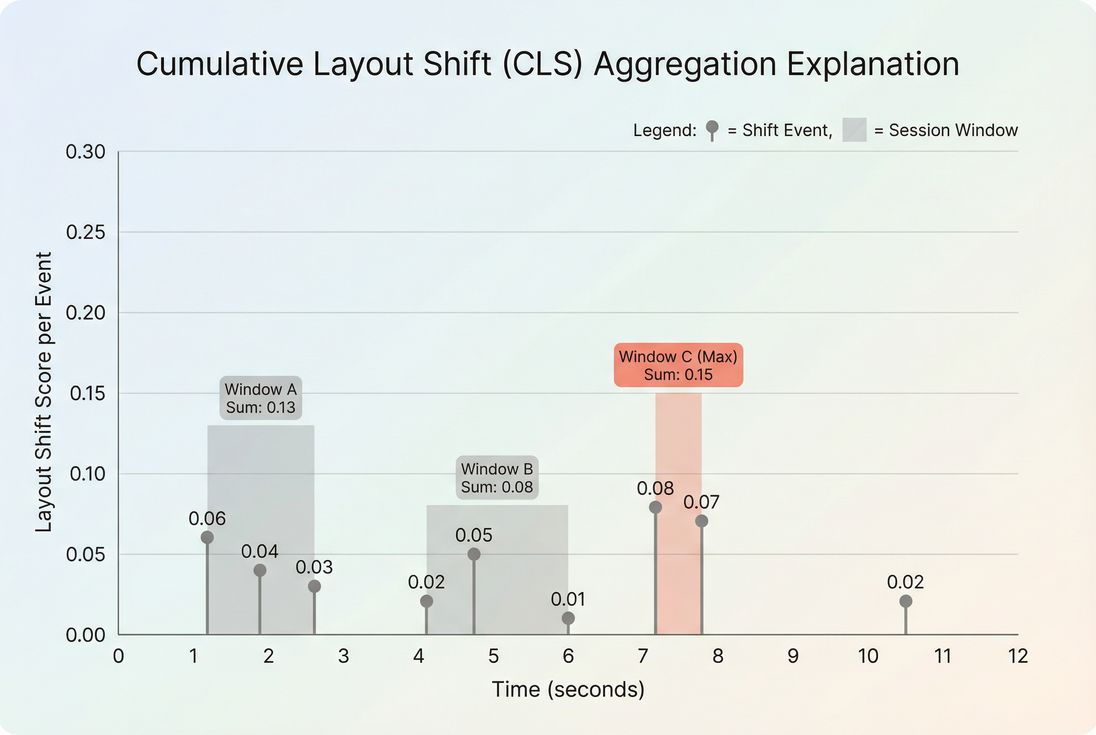
Those event scores are then grouped into short bursts of shifting called session windows:
- A session window starts with a shift.
- It continues as long as subsequent shifts happen close together (within about a second of each other).
- The window has a maximum duration (about 5 seconds).
- Your CLS for the page is the highest-scoring window, not the total of every shift across the whole visit.
CLS also tries to focus on unexpected shifts:
- Shifts that happen immediately after a user action are generally ignored (so opening an accordion doesn't penalize you the way a random banner injection does).
- This is why "we only shift after the user clicks" can be a valid design approach – when implemented correctly.
Why this definition matters for fixes
Because CLS is the worst burst, you'll often get the biggest improvement by fixing one late-loading component that causes a single ugly jump – rather than polishing a dozen tiny ones.
The Website Owner's perspective: Don't chase perfection everywhere. Find the one shift that spikes a session window on PDPs or checkout and eliminate it. That often drops CLS below 0.10 faster than broad refactors.
When CLS breaks on real sites
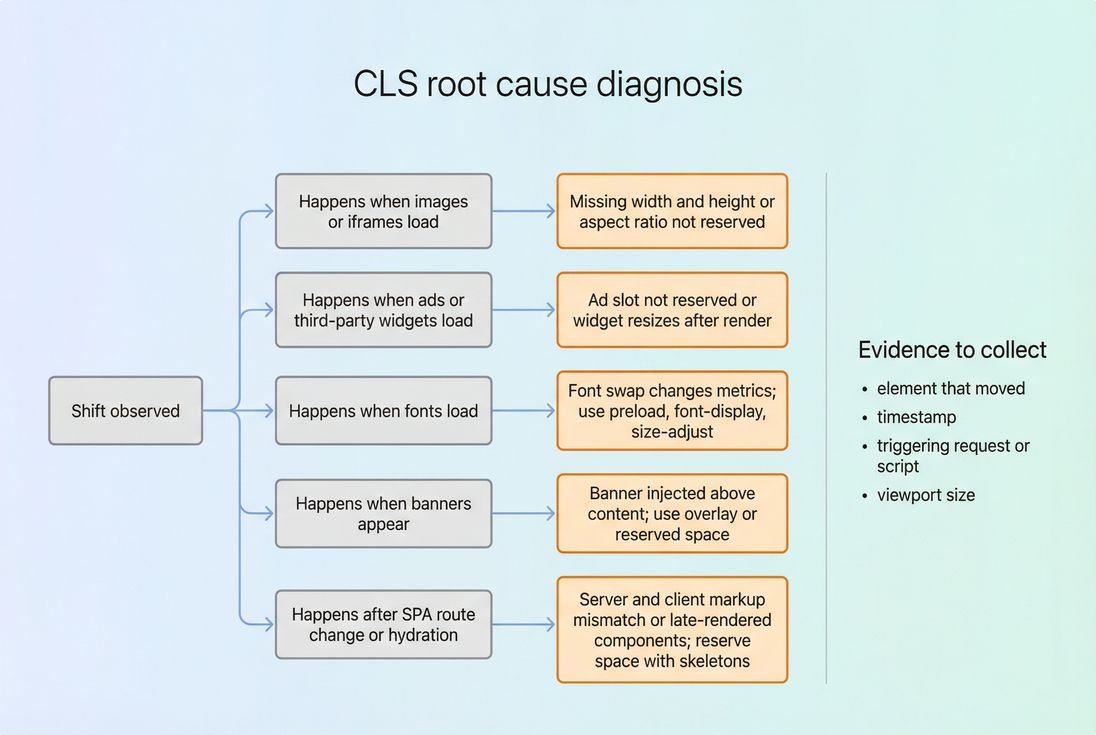
Most CLS regressions come from a small set of repeat offenders. The pattern is the same: something appears late, changes size, or pushes existing content down (or sideways).
1) Images and video without reserved space
Common examples:
- Product images loading into a container that had no height
- Responsive images that don't preserve aspect ratio
- Embedded video/iframes without dimensions
Fix principle: Always reserve space so the browser can lay out the page before the asset arrives.
Relevant reading: /academy/responsive-images/, /academy/image-optimization/
2) Ads and third-party widgets
Ads are CLS machines when the slot height is unknown or the creative returns late and resizes.
Typical CLS triggers:
- Collapsing/expanding ad containers
- A/B testing tools injecting DOM above content
- Review widgets that render after hydration and expand
Fix principle: Pre-allocate a stable slot and avoid resizing after render.
Relevant reading: /academy/third-party-scripts/
3) Cookie consent and promo banners
A banner that pushes the whole page down is often a top CLS contributor – especially on mobile.
Fix principle: Don't push content. Overlay it (or reserve space from the start if it must be inline).
If you need to keep synthetic tests consistent while debugging, see /docs/guides/removing-cookie-consent-banners-from-your-lighthouse-tests/.
4) Web fonts swapping (FOIT/FOUT effects)
Fonts can change text width and line breaks after initial paint, shifting headings, price blocks, and buttons.
Fix principle: Make font rendering predictable by controlling loading and matching fallback metrics.
Relevant reading: /academy/font-loading-performance/
5) Late-loading "above the fold" UI
Examples:
- A header that grows after JS runs
- A sticky bar that appears and pushes content
- A product page that injects size/availability modules above the price
Fix principle: Render the above-the-fold layout deterministically – even if the content is a placeholder.
Relevant reading: /academy/above-the-fold-content/, /academy/critical-rendering-path/
How to diagnose CLS fast (without guesswork)
You want to answer two questions:
- What moved?
- What caused it to move (resource/script/component)?
Step 1: Confirm with field and lab data
- Field data tells you if real users are suffering and where (device, page group). See /academy/measuring-web-vitals/ and /academy/field-data-vs-lab-data/.
- Lab data helps you reproduce and debug quickly (e.g., Lighthouse, DevTools). See /academy/google-pagespeed-insights/.
If you use PageVitals field testing, start with the CLS report to see distribution and impacted pages: /docs/features/field-testing/web-vitals/cls-report/.
Step 2: Reproduce on the right template and breakpoint
CLS is often breakpoint-specific:
- Mobile: stacked layouts, carousels, sticky UI
- Desktop: multi-column grids, ad side rails, mega menus
Reproduce using the same conditions users face: cold cache, throttled network, consent enabled, and typical third-party tags.
Step 3: Identify the exact shift in DevTools
In Chrome DevTools Performance:
- Record a trace while the page loads.
- Turn on layout shift regions (DevTools highlights what moved).
- Click the layout shift event and note the affected nodes.
Then connect that shift to network and JS:
- Which resource finished right before the shift?
- Did a script inject DOM?
- Did an element change height after data arrived?
If you have a request waterfall view available, it's often the fastest way to correlate "resource finished" → "layout jumped." (PageVitals provides a waterfall in docs here: /docs/features/network-request-waterfall/.)
Which fixes move CLS fastest
Most websites don't need exotic solutions. They need consistent layout rules.
Reserve space for media (the #1 CLS fix)
Do this for:
<img>product images- hero banners
- iframes (YouTube, maps, payment widgets)
- embedded videos
Practical rules:
- Always set width and height attributes on images (modern browsers use them to preserve aspect ratio).
- For responsive containers, preserve aspect ratio with CSS (
aspect-ratio) so the box has height before the image loads. - Avoid "lazy loading" above the fold. Lazy-loading an above-the-fold hero often creates CLS when the placeholder collapses (see /academy/lazy-loading/).
Stabilize ad and widget slots
If you run ads or third-party components:
- Create fixed-height (or min-height) containers for each slot size you allow.
- If the creative can be multiple sizes, choose a stable strategy:
- reserve the largest expected size (best for stability)
- or reserve a standard size and allow overflow within the slot (not pushing other content)
Also audit third-party scripts (see /academy/third-party-scripts/):
- Load non-critical tags later using patterns like
deferwhere appropriate (see /academy/async-vs-defer/) - Remove or replace tags that inject top-of-page DOM after load
Make banners non-disruptive
For consent, promos, "free shipping" bars, chat widgets:
- Prefer overlay positioning (fixed/sticky) that doesn't reflow the document.
- If it must be inline, reserve space from the first paint (even if the content is empty initially).
- Avoid inserting anything above the H1/product price after initial render.
The Website Owner's perspective: This is often an organizational issue, not a coding issue. If marketing tools can inject banners whenever they want, CLS becomes a recurring regression. Put guardrails around where banners can appear and how they're rendered.
Fix font-induced shifting
Font work is subtle but high leverage on product and category pages (prices, ratings, CTA buttons).
Actions that usually help:
- Preload critical fonts (
<link rel='preload' as='font'>) to reduce late swaps (see /academy/preload/). - Use
font-displayintentionally (swap is fine, but manage the consequences). - Match fallback fonts more closely using modern font metric controls (reduces line-wrap changes).
- Keep font files small (subset where possible) and compressed (see /academy/brotli-compression/ and /academy/gzip-compression/).
Avoid layout-affecting animations
Animations should not move surrounding content unexpectedly.
Rules:
- Animate with
transformandopacity(they don't cause reflow). - Avoid animating
height,width,top,leftfor elements that push other content.
This doesn't just help CLS – it reduces main-thread work too (see /academy/reduce-main-thread-work/ and /academy/long-tasks/).
Handle SPA route changes and hydration
Single-page apps can create CLS when:
- server-rendered layout differs from client-rendered layout
- client-only components render late and expand (recommendations, upsells, reviews)
Fix patterns:
- Render skeletons with the same final dimensions.
- Avoid "late header growth" (e.g., user state changes that resize nav).
- Defer non-critical modules below the fold with stable placeholders.
How to interpret CLS changes over time
CLS isn't a metric you "set and forget." It moves when your site changes.
A CLS regression usually means ownership changed
When CLS spikes after a release, it's often one of:
- a new third-party tag
- a change in ad behavior
- a CMS content pattern (e.g., editors inserting large images without dimensions)
- a new UI component above the fold
A practical way to manage it is with a performance budget (see /academy/performance-budget/). If you use PageVitals budgets, the docs are here: /docs/features/budgets/.
Don't overreact to tiny shifts
Because CLS is based on the worst burst, small fluctuations happen. What matters:
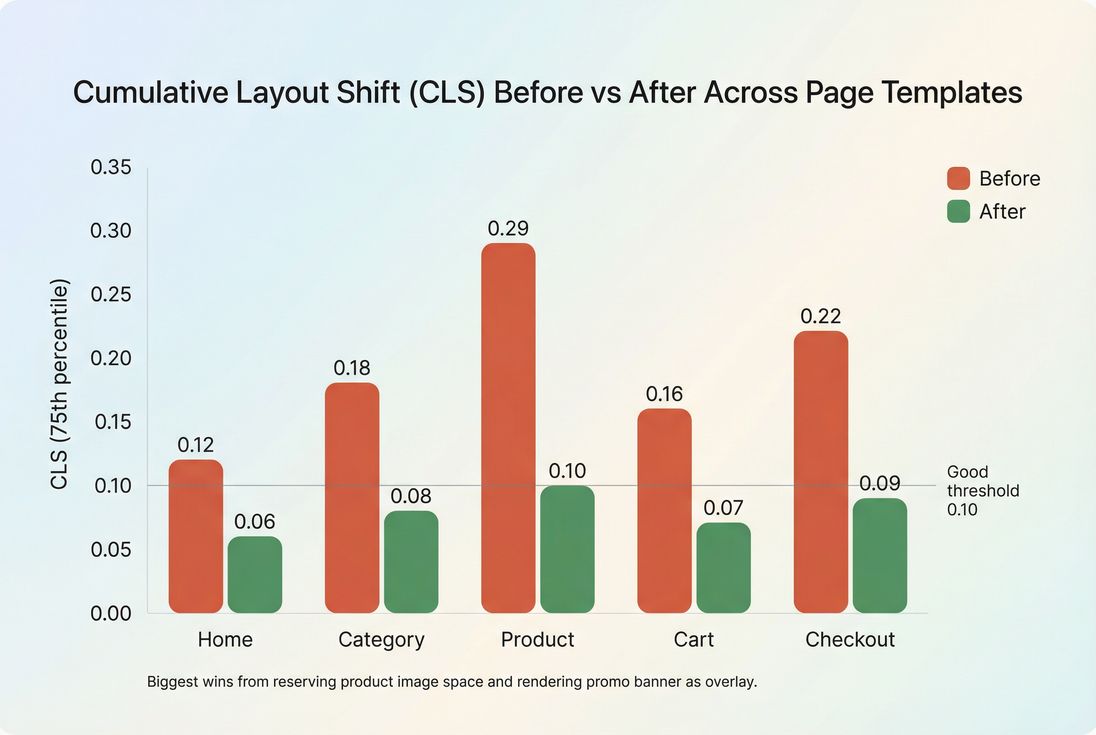
- Did the 75th percentile cross a threshold (0.10 or 0.25)?
- Did it worsen on high-value templates (PDP, cart, checkout)?
- Did it worsen on mobile?
If your CLS improved but conversions didn't, check whether you fixed shifts near key interactions. A large shift far below the fold can hurt CLS without hurting revenue much.
A practical CLS playbook for busy teams
If you want the shortest path to "good" CLS:
- Start with PDP and checkout on mobile. That's where instability hurts revenue most.
- Find the single worst shift burst (the session window that dominates the score).
- Apply the standard fix pattern:
- missing dimensions → reserve space
- ads/widgets → fixed slot, no resize
- banners → overlay or pre-reserved space
- fonts → preload and metric-compatible fallback
- Lock the behavior in with a lightweight rule:
- CMS guidance (image dimensions required)
- tag governance (where injections are allowed)
- performance budgets for regressions
For more on the general goal and why it's achievable, see /academy/zero-layout-shift/ and /academy/layout-instability/.
Frequently asked questions
Aim for a CLS at or below 0.10 at the 75th percentile of real users. That level usually removes the most noticeable misclick and frustration moments on product and checkout pages. If you are above 0.25, treat it as urgent because customers will see visible jumps during browsing and buying.
Lab tests often use a clean run with predictable timing, while real users experience variable networks, cached and uncached states, personalization, consent banners, and third-party scripts. Those conditions create late-loading content that shifts the page. Use field data to prioritize templates and devices actually impacted.
The most common triggers are new ad slots, tag manager changes, consent or promo banners injected above content, web font changes, and personalization widgets. Any change that inserts or resizes content after the page is visible can spike CLS. Treat marketing and A/B tooling as part of performance governance.
Start by reproducing the issue on the exact template and breakpoint where users report it. In Chrome DevTools, enable layout shift regions and record a performance trace to see what moved and when. Then map that shift to a resource or script in the network waterfall to find the owner.
Lower CLS reduces misclicks, prevents users from losing their place, and increases trust during checkout. The impact is usually strongest on mobile and on templates with interactive elements near shifting areas, like add-to-cart buttons. Measure changes with conversion funnels and session replays, not only scores.
Want to take PageVitals for a spin?
Page speed monitoring and alerting for your website. Get daily Lighthouse reports for all your pages. No installation needed.
Start my free trial