Table of contents
Long tasks and main thread blocking
When your page "looks loaded" but taps feel ignored, shoppers hesitate, rage-click, and abandon. That is not a design problem – it is a responsiveness problem caused by the browser being too busy to react.
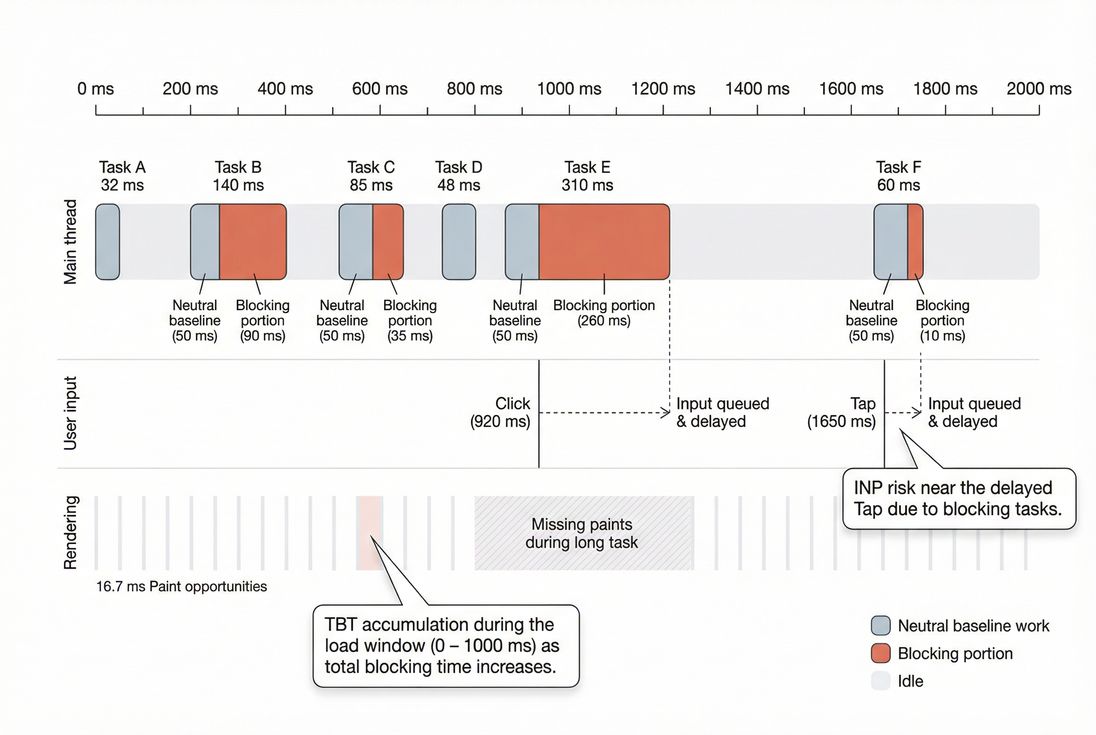
Long tasks are chunks of work on the browser's main thread that run for more than 50 ms without yielding. Main thread blocking is the practical outcome: while that work runs, the browser cannot reliably respond to user input, update the UI, or paint the next frame.
Why website owners should care
Main thread blocking usually shows up as:
- "Add to cart" clicks that feel delayed
- Filter drawers that open late (or open, then freeze)
- Text inputs that lag behind typing
- Checkout pages that momentarily lock up after address validation
These moments are disproportionately expensive. You can have a competitive LCP and still lose conversions if the UI is unreliable during interaction.
The Website Owner's perspective: If customers can see the page but cannot use it smoothly, you are paying to acquire traffic you cannot convert. Responsiveness issues also inflate support load ("checkout is broken"), increase coupon abandonment, and reduce repeat purchases because the experience feels fragile on mobile.
What the main thread actually does
The browser's main thread is where most page work happens:
- Running JavaScript (your code and third parties)
- Calculating styles and doing layout
- Updating the DOM
- Painting and compositing frames
- Dispatching and handling user input events
It is effectively a single busy checkout lane. If one customer's order (a big JavaScript task) takes too long, everyone behind them waits – including the next tap, scroll, or keystroke.
This is why "main thread blocking" is broader than "too much JavaScript." Heavy rendering work (layout thrash, large DOM updates, expensive CSS) can block the main thread too. See main thread work for a deeper breakdown of what typically consumes it.
What counts as a long task
A task is a unit of work the browser runs on the main thread. A long task is any task whose duration exceeds 50 ms.
Why 50 ms? Because a smooth UI needs to update roughly every 16.7 ms (60 fps). If you routinely run tasks longer than 50 ms, you are likely skipping frames and delaying event handling in ways users notice.
How long tasks are "calculated" in practice
Long tasks are not a single score by themselves. They are observed and summarized in different ways:
Count of long tasks
How many tasks exceed 50 ms.Worst long task duration
The maximum task length (for example, a 900 ms hydration task).Total time spent in long tasks
Sum of all long-task durations over a window.Blocking portion (what matters most in lab metrics)
For each long task, only the time beyond the first 50 ms is considered the "blocking" part.
Example: a 230 ms task contributes 180 ms of blocking.
That "blocking portion" concept is central to Total Blocking Time (TBT), and it is often what teams use to quantify "how bad" main thread blocking is during load.
Long tasks vs main thread blocking
- Long task = a measurable symptom (task duration > 50 ms)
- Main thread blocking = the user-visible effect (input and rendering must wait)
You can have main thread blocking without massive JavaScript bundles if layout and style work is expensive. And you can have large bundles without terrible blocking if work is deferred, chunked, or moved off-thread.
Where long tasks show up in metrics
Long tasks are a root cause that influences several metrics:
INP (field responsiveness)
INP measures how quickly the page responds to real user interactions (tap, click, key). Long tasks harm INP when they overlap with, or occur immediately after, an interaction – because the event handler cannot run and the next paint is delayed.
Practical interpretation:
- If INP is poor primarily on PDPs or checkout steps, suspect long tasks from:
- UI frameworks doing heavy updates
- Validation and formatting scripts
- Third-party tags firing on interaction
- Personalization work tied to input
TBT (lab debugging)
TBT is a lab metric (Lighthouse-style) that accumulates blocking portions of long tasks during page load. It is excellent for identifying heavy main-thread work before users interact.
If your lab TBT drops after a change, it usually means you:
- reduced JavaScript execution time,
- deferred work to after the critical load, or
- broke one long task into smaller tasks that yield.
If you want to see how a synthetic test reports TBT, PageVitals documents it here: Total Blocking Time metric.
LCP and CLS (indirect)
- Long tasks can delay rendering and push out LCP because the browser cannot paint while blocked.
- Long tasks can indirectly worsen CLS if late-running scripts inject content or change layout after initial render, especially when the page is already busy.
What usually creates long tasks
Most long tasks fall into a few repeatable buckets. The fastest fixes come from correctly identifying which bucket you are in.
Heavy JavaScript execution
Common causes:
- Large bundles and large dependency graphs
- Expensive initialization (framework boot, hydration)
- JSON parsing and data transformations on the main thread
- Polyfills and transpiled helper code
Related concepts and fixes:
- Reduce bundle size: unused JavaScript, JS bundle size
- Split by route/feature: code splitting
- Reduce parse/compile pressure: asset minification, Brotli compression
Third-party scripts
Third parties often create long tasks because:
- they run at unpredictable times,
- they compete with your app for CPU,
- they can trigger layout and style recalculation,
- they may do repeated work (polling, observers, event listeners).
Start here: third-party scripts.
Practical examples that frequently show up in long-task traces:
- Tag manager containers that load multiple tags at once
- A/B testing tools that rewrite DOM
- Review widgets that render large UI blocks
- Fraud detection scripts that hook into checkout interactions
The Website Owner's perspective: If a script does not directly improve revenue, trust, or compliance, it should not be allowed to degrade checkout responsiveness. Treat third-party CPU like any other vendor cost: measure it, set limits, and renegotiate (or remove) when it exceeds the budget.
Expensive rendering and layout work
Long tasks are not only "JS time." Rendering work can dominate, especially on content-heavy pages:
- Large DOM trees
- Frequent DOM writes that trigger reflow
- Layout thrashing (read layout → write layout → read layout)
- Complex CSS selectors and expensive effects
- Web fonts that shift layout or cause repeated style recalculation (see font loading)
SPA navigation and hydration spikes
Single-page apps often produce long tasks during:
- initial hydration,
- route transitions,
- opening modals/drawers that mount big component trees.
If the UI stutters specifically on first interaction, hydration is a prime suspect: the page looks ready, but the CPU is still catching up.
How to interpret changes without overreacting
Long task data can be noisy unless you interpret it with context.
Use lab and field for different decisions
- Lab (Lighthouse / synthetic): Use long tasks and TBT to find what code is heavy and when it runs. Great for debugging regressions before release.
- Field (real users): Use INP (and segmentation by device/network) to confirm business impact.
If you need a refresher on the difference, see field vs lab data and Measuring Web Vitals.
Practical benchmarks you can use
These are decision-driving guidelines, not laws:
| Signal | "Healthy" | "Concerning" | "High risk" |
|---|---|---|---|
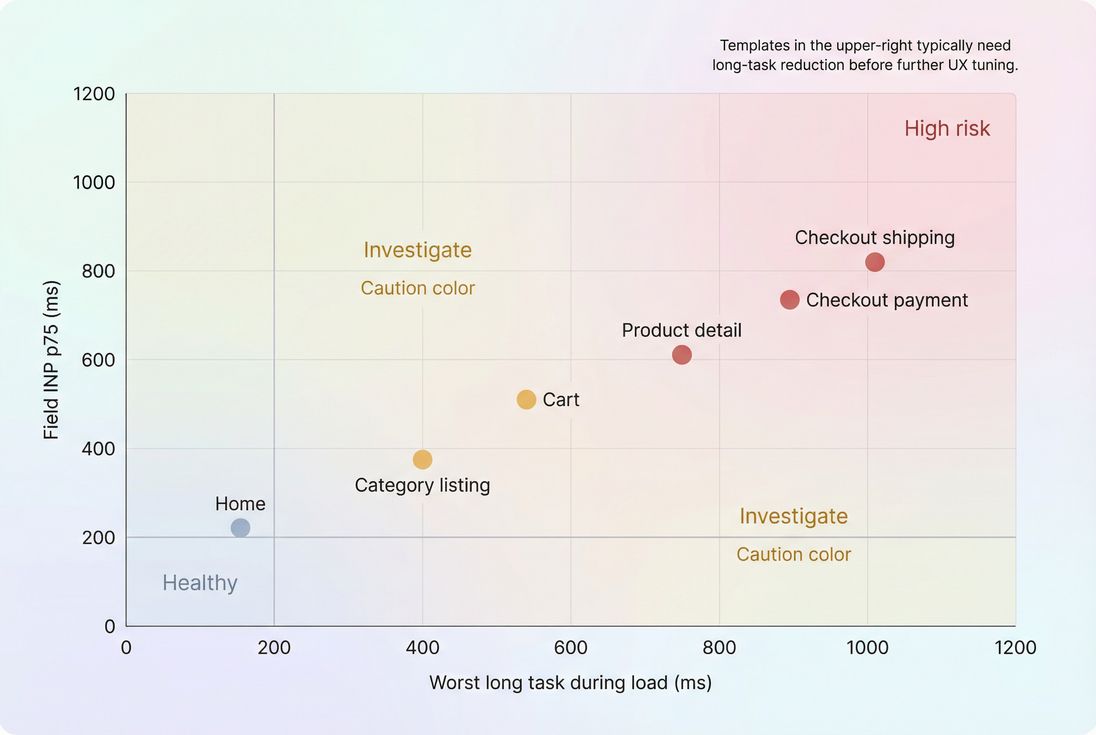
| Worst long task during load | under 200 ms | 200–500 ms | over 500 ms |
| Pattern | occasional | repeated on key pages | repeated + overlaps interactions |
| TBT (lab) | low | moderate | high |
| INP (field) | good | needs improvement | poor |
What matters most is where long tasks occur:
- A 400 ms task after the page becomes idle might be acceptable.
- A 150 ms task triggered by "Add to cart" is a conversion killer.
Watch for "false wins"
You can reduce TBT by deferring work, but still harm users if that work moves to the moment they interact.
Example:
- You defer your personalization script to after load (TBT improves).
- The user clicks a size selector and the script runs then (INP worsens).
The goal is not "move work later." The goal is "make work smaller, or move it off the main thread, especially around interactions."
What to fix first (highest ROI)
Think in terms of removing, delaying, splitting, or offloading.
1) Identify the biggest tasks and their owners
You need to answer:
- Which long tasks are the longest?
- Which script (URL) or function is responsible?
- Do they happen during load, on interaction, or continuously?
Chrome DevTools Performance traces work well for this. In PageVitals, the long task opportunity report is documented here: Long tasks opportunity.
2) Remove unused and duplicate work
This is usually the fastest win.
Typical actions:
- Remove unused libraries and components (unused JavaScript)
- Reduce tag manager bloat (third-party scripts)
- Replace heavy widgets with lighter alternatives (or server-rendered HTML)
3) Change how scripts load
Many long tasks happen early because scripts are loaded and executed too soon.
- Use
deferfor non-critical scripts and carefully useasyncwhere safe. See async vs defer. - Delay third-party tags until after consent, after idle, or after key interactions (depending on what they do).
- Preload only what is truly critical (see preload and critical rendering path).
4) Split long work into smaller chunks
If you cannot remove the work, yield so the browser can handle input and paint.
Approaches:
- Break up large loops into batches
- Use scheduling primitives (
setTimeout(0),requestIdleCallback, or modern task scheduling where supported) - Avoid doing large DOM updates in one synchronous burst
Rule of thumb: if an operation might take 200–500 ms on a mid-tier phone, assume it will create a long task and design it to be incremental.
5) Move CPU-heavy work off the main thread
If you do significant computation (search indexing, large parsing, crypto, analytics processing), consider Web Workers.
Workers will not fix everything (DOM work still must occur on the main thread), but they can eliminate long tasks caused by pure computation.
6) Reduce layout and rendering cost
If traces show style/layout/paint dominating:
- Reduce DOM size on key pages (especially filters, mega menus, and product grids)
- Avoid layout thrashing (batch reads and writes)
- Limit expensive CSS effects in scroll-bound areas
- Ensure images have dimensions to reduce reflow (see responsive images and image optimization)
A practical before/after plan
Below is a simple way to communicate progress to stakeholders without drowning them in traces: show which changes removed how much blocking time and why that matters.
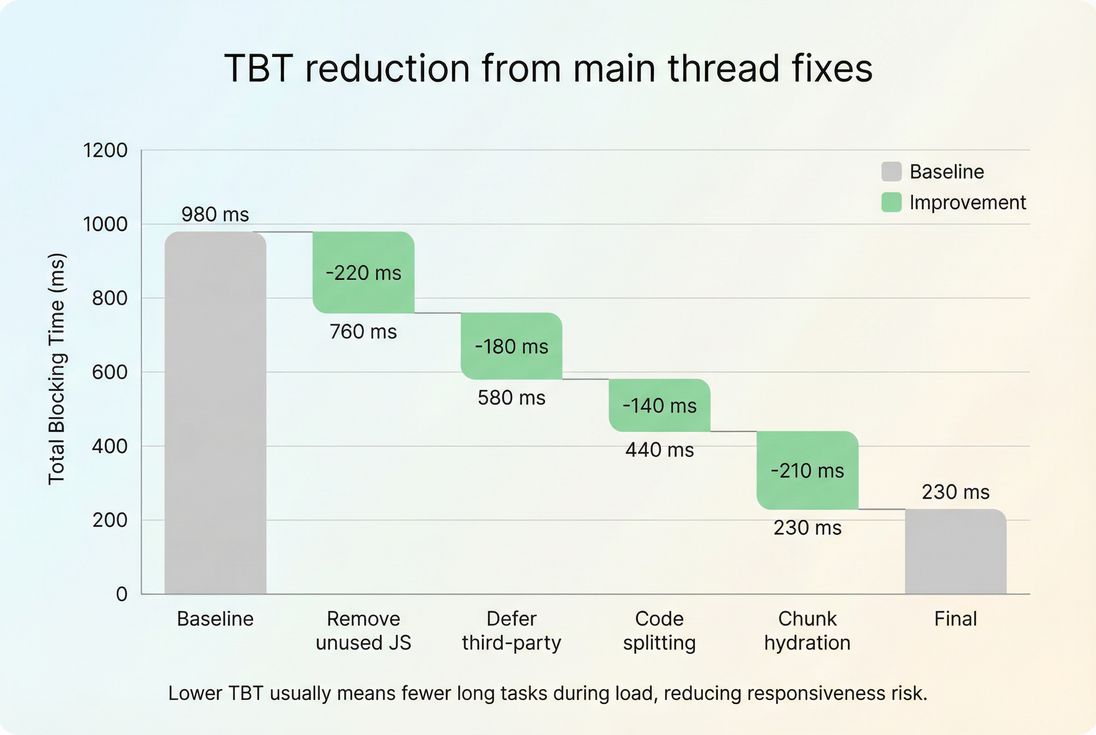
This kind of breakdown supports real decisions:
- "Removing unused JS" is often a one-time cleanup with durable gains.
- "Defer third-party" may require stakeholder negotiation but can unlock large improvements.
- "Chunk hydration" may require engineering investment but improves interaction reliability.
How to prevent long tasks from coming back
Long tasks are regression-prone because marketing tags, experiments, and new UI features tend to accumulate.
Set performance budgets that reflect responsiveness
Budgets should be enforced on the pages that make money (PDP, cart, checkout), not just the homepage. Start with:
- maximum acceptable worst long task,
- maximum acceptable TBT in lab,
- and a target INP in the field.
Related reading: performance budget. If you want to implement budgets inside PageVitals, see Performance budgets.
Treat third parties as production dependencies
Create a lightweight process:
- Any new vendor script must show its CPU cost impact.
- Anything that adds repeated long tasks needs mitigation (delay, isolate, or remove).
- Re-test after vendor updates (they change frequently).
Segment by mobile
Long tasks are much more visible on mid-tier mobile CPUs. Always validate on mobile profiles (see mobile page speed).
The simplest way to think about it
- Long tasks tell you the browser is doing uninterrupted work for too long.
- Main thread blocking is what your customers feel: delayed taps, delayed typing, delayed visual updates.
- Your job is to ensure the main thread can respond and paint when it matters – especially on money pages and on mobile.
If you want the fastest path to improvement, start by cutting or deferring unnecessary JavaScript (unused JavaScript, async vs defer), then tackle the largest interaction-adjacent tasks using chunking and off-main-thread strategies.
Frequently asked questions
Any long task can be a problem if it happens during user input, but patterns matter. For page load, aim for zero tasks above 200 ms and very few above 50 ms. If you see repeated 300 to 800 ms tasks, users will feel lag, and INP risk increases.
LCP can be good while the page still feels unresponsive. That usually means the main thread is busy running JavaScript, laying out the page, or executing third party code. Users see content, then tap and nothing happens for a moment. That gap is main thread blocking.
Use Total Blocking Time as a lab debugging signal and INP as the business outcome in the field. TBT helps you find long tasks during load in Lighthouse style tests. INP tells you if real users experience delay when interacting. Improvements should reduce both, but INP is the goal.
Yes. Tag managers, A B testing, chat widgets, reviews, and personalization often create long tasks through heavy JavaScript execution and layout work. The impact is worst on mobile CPUs. The practical approach is to measure which scripts produce the longest tasks, then delay, trim, or remove them.
For product and checkout pages, prioritize responsiveness: keep INP in the good range and avoid repeated long tasks during common actions like opening a variant picker or applying a coupon. In lab tests, aim for low TBT and eliminate tasks over 200 ms, especially on mid tier mobile profiles.
Want to take PageVitals for a spin?
Page speed monitoring and alerting for your website. Get daily Lighthouse reports for all your pages. No installation needed.
Start my free trial