Table of contents
Mobile page speed optimization
Mobile speed isn't a vanity metric. It directly changes how many visitors become customers, how much you pay for acquisition, and how often people bounce before even seeing your offer – especially on paid mobile traffic where intent is high but patience is low.
Mobile page speed optimization is the practice of reducing the time and work required for a page to become visibly useful and reliably interactive on real mobile devices and networks. In practice, it means improving mobile-focused user experience metrics like Largest Contentful Paint (how fast the main content appears), Interaction to Next Paint (how responsive the page feels), and Cumulative Layout Shift (how stable the layout is).
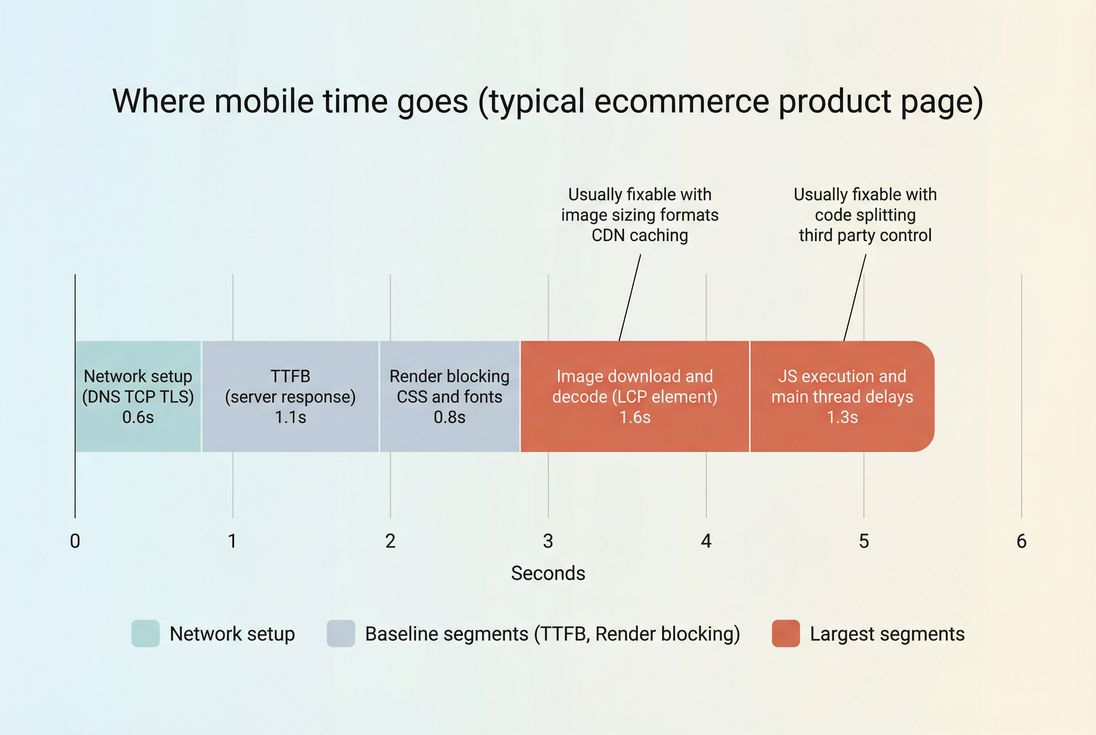
A practical way to think about mobile speed: it's a budget that gets consumed by network, server response, render blocking, images, and JavaScript.
What mobile speed actually includes
"Mobile speed" is not one number. It's a set of outcomes users feel:
- Can I see the main content quickly? This maps strongly to FCP and especially LCP.
- Can I tap, scroll, and type without lag? This maps to INP, long tasks, and main thread work.
- Does the page stay stable? This maps to CLS and layout instability.
On mobile, the same site can behave very differently because:
- Latency dominates: higher network latency and slower DNS lookup time and handshakes (TCP handshake, TLS handshake).
- CPU is constrained: JavaScript that's "fine" on desktop can cause long main-thread blocks on mid-range phones.
- Bandwidth is inconsistent: image-heavy pages suffer more when throughput drops.
- Resource contention is real: mobile devices and browsers are aggressive about saving power and memory.
The Website Owner's perspective: If your mobile conversion rate is materially lower than desktop, assume performance is part of the gap until you've proven otherwise. It's one of the few levers that can improve conversion without changing your product, pricing, or creative.
How it's measured and calculated
Mobile speed is typically evaluated using two data sources, and you need both.
Lab (synthetic) testing
Synthetic tests run under controlled conditions and help you reproduce bottlenecks consistently. This is where metrics like Speed Index and waterfall analysis are most useful, because you can see why a page is slow.
Key mobile lab signals include:
- Time to First Byte (TTFB) and server response time
- Critical rendering path delays caused by render-blocking resources
- JavaScript execution time and CPU blocking
- Total request count and weight (HTTP requests)
- Image format, sizing, and loading behavior (image optimization, lazy loading)
If you use PageVitals synthetic testing, the most direct way to understand the "why" is the network request waterfall in the docs: /docs/features/network-request-waterfall/.
Field (real user) data
Field data tells you what real users experience across real devices, networks, and geographies. It's how Core Web Vitals are evaluated and how you should judge business impact.
Two common sources:
- Your own real user monitoring (RUM)
- Aggregate Chrome data like CrUX data (Chrome UX Report)
If you're looking at CrUX inside PageVitals, see: /docs/features/chrome-ux-report/.
How "good" is defined (practically)
For most businesses, the most decision-useful benchmarks are Core Web Vitals thresholds (measured at the 75th percentile of visits):
| Metric | Good | Needs improvement | Poor | Why it matters on mobile |
|---|---|---|---|---|
| LCP | ≤ 2.5s | 2.5–4.0s | > 4.0s | First meaningful impression of product/content |
| INP | ≤ 200ms | 200–500ms | > 500ms | Taps and typing feel laggy, hurting add-to-cart and checkout |
| CLS | ≤ 0.1 | 0.1–0.25 | > 0.25 | Misclicks and visual jank reduce trust and task completion |
For mobile optimization work, LCP is usually the first domino: improve it and bounce drops, engagement rises, and the rest of the funnel gets more opportunity to work.
What slows mobile pages down most
Most mobile speed problems are not "mysteries." They cluster into a few repeatable bottlenecks.
1) Slow server response (TTFB)
If TTFB is high, everything downstream starts late.
Common causes:
- Origin is slow (database, SSR rendering, overloaded CPU)
- Cache misses due to personalization or poor cache keys
- Too many redirects or expensive middleware
- No edge caching for HTML
What to do:
- Use edge caching for cacheable HTML and stabilize cache behavior with Cache-Control headers
- Improve CDN performance and understand CDN vs origin latency
- Reduce backend work per request, especially on key landing pages
2) Render-blocking CSS, fonts, and early JavaScript
Mobile browsers can't render until they've resolved critical CSS and blocking scripts.
Common causes:
- One giant CSS file for the entire site
- Web fonts delaying text rendering
- Non-critical JS loaded in the head without async vs defer
- Too many early third-party tags
What to do:
- Inline and prioritize critical CSS for above-the-fold content (above-the-fold optimization)
- Remove unused CSS and use asset minification
- Fix font loading strategy (font loading)
- Move non-critical scripts to
deferor load later; be aggressive with third-party scripts
3) Heavy or misconfigured LCP element (usually images)
On many mobile ecommerce pages, the LCP element is a hero image or product image. It's often too big, requested too late, or served in the wrong format.
What to do:
- Serve correct formats (WebP vs AVIF)
- Compress appropriately (image compression)
- Use responsive images so mobile doesn't download desktop-sized assets
- Preload the LCP image when appropriate (preload)
- Avoid lazy-loading the LCP image (lazy-loading above-the-fold often backfires)
4) JavaScript main-thread congestion
Even if downloads are fast, the page can "look done" but feel broken if the main thread is busy.
Common causes:
- Huge bundles (JS bundle size)
- Too much work during startup (hydration, analytics, A/B testing)
- Poor splitting and late-loaded routes
What to do:
- Use code splitting and remove unused JavaScript
- Reduce JavaScript execution time
- Audit "must-run-now" code vs "can-run-later" code; especially third-party
The Website Owner's perspective: If marketing insists every tag is "required," treat it like a performance P&L. Every new vendor script has a cost in conversion. Make teams justify that cost with measurable lift, and remove tags that don't earn their keep.
How website owners should interpret changes
Mobile performance moves for reasons that have nothing to do with your code – so interpretation matters.
A small change can be meaningful
If your mobile LCP drops from 3.6s to 3.1s, that might not sound dramatic. But on mobile, shaving 500ms off the moment users see the main content can reduce bounces on paid traffic and increase product discovery. It also tends to compound: faster LCP often improves scroll depth and reduces rage taps.
Segment before you celebrate (or panic)
Always answer: "Who got faster?"
Segment by:
- Device class (mid-range Android vs high-end iPhone)
- Network quality (high vs low latency)
- Geography (CDN routing differences)
- Page templates (home, category, PDP, checkout)
This is why the distinction between field vs lab data matters: lab is controlled; field is reality.
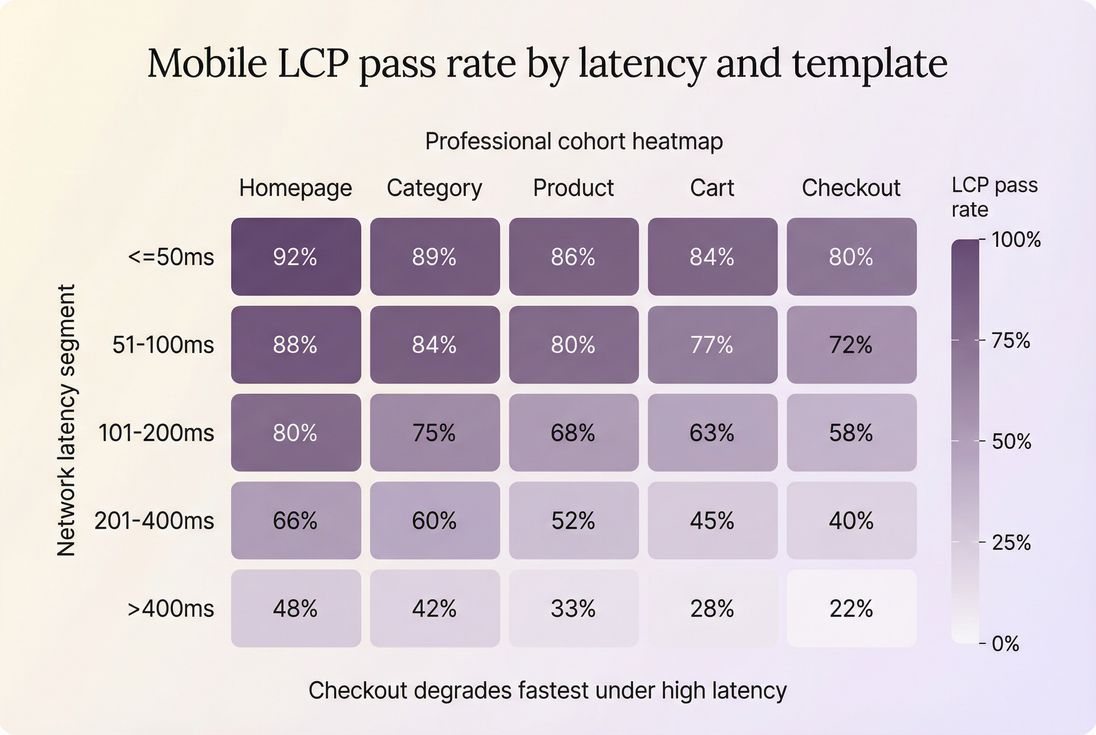
Segmentation prevents false conclusions: a "small" average change may hide a big win (or loss) on slow mobile networks where conversion is most sensitive.
Watch for "metric tradeoffs"
Some changes improve one metric while hurting another:
- Aggressively delaying JS can improve INP, but may cause late UI insertion and hurt CLS if not handled carefully.
- Switching fonts can speed rendering but create layout shifts if sizing changes.
- Adding client-side personalization can improve relevance but hurt INP due to added main-thread work.
Use Core Web Vitals as your guardrails, not a single metric in isolation.
Which mobile optimizations usually pay back fastest
If you're prioritizing like a business (time and money limited), focus on fixes that:
- affect the most traffic, and
- move CWV thresholds, and
- reduce ongoing risk of regressions.
High-ROI starting points
- Fix caching first
- Improve browser caching with correct cache headers
- Tune Cache TTL for static assets
- Adopt Brotli compression (or Gzip compression) for text assets
- Optimize the LCP resource
- Convert and compress images (image optimization)
- Ensure correct intrinsic size and responsive
srcset(responsive images) - Preload only what's truly critical (preload)
- Reduce render-blocking work
- Critical CSS and remove render-blocking resources
- Use preconnect / DNS prefetch for critical third-party origins (sparingly)
- Cut JavaScript cost
- Reduce bundle weight (JS bundle size)
- Remove unused JavaScript
- Apply code splitting for routes and components
- Control third-party scripts (third-party scripts)
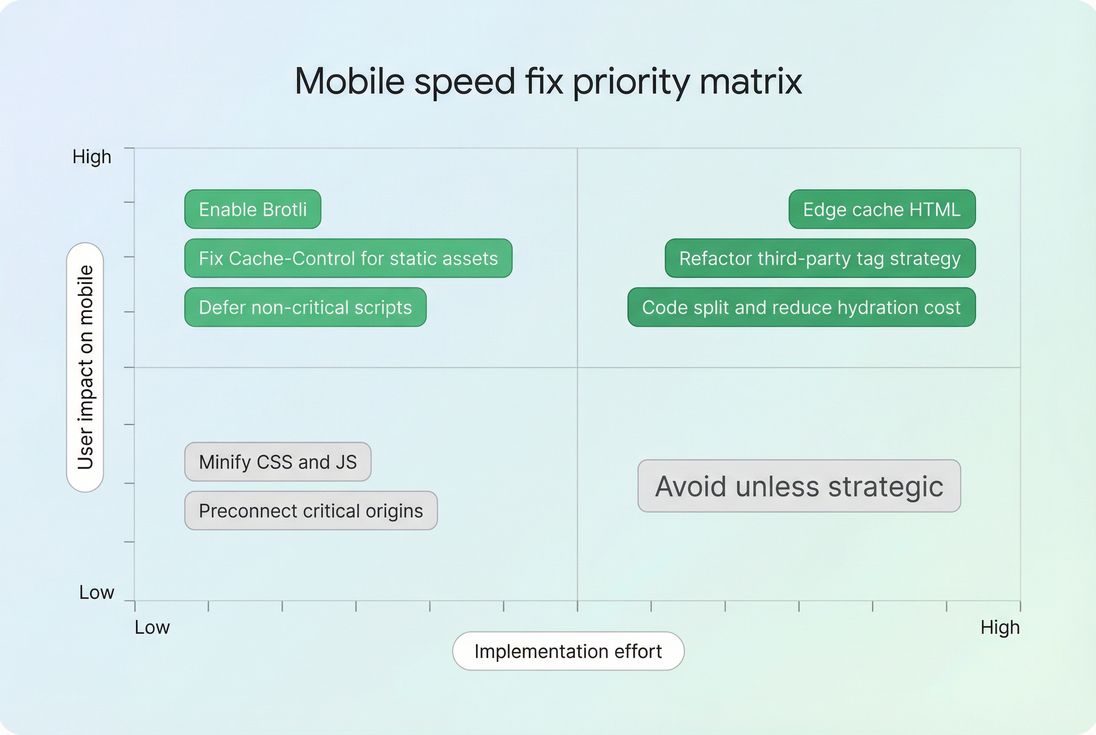
Prioritize the fixes that move mobile user experience quickly, then invest in the deeper work (like HTML edge caching and JS refactors) once you've captured easy wins.
How to run a mobile optimization project that sticks
Speed work often fails because teams treat it as a one-time cleanup. The durable approach is: measure → change → verify → prevent regressions.
1) Establish the baseline correctly
- Use lab tests to identify the bottleneck (waterfall + main thread).
- Use field data to confirm it hurts real users and to find segments most affected.
- Decide which templates matter most (landing pages, category, PDP, cart, checkout).
If you're using PageVitals, align your measurement approach with the docs guide: /docs/guides/synthetic-vs-field-testing/.
2) Make changes that map to a metric
Tie each change to a mechanism:
- TTFB improvements: caching, backend, CDN routing (TTFB)
- LCP improvements: LCP image, critical CSS, render-blocking removal (LCP)
- INP improvements: reduce long tasks, defer work, remove heavy third-party (INP)
- CLS improvements: reserve space, stabilize fonts, avoid late DOM injection (zero layout shift)
3) Verify with the right success criteria
- Synthetic: confirm the bottleneck is reduced (smaller blocking time, earlier LCP resource request, lower TTFB).
- Field: confirm percentiles improve, especially p75.
Don't declare victory based on a single "good run." Mobile variability is high; you need trends.
4) Prevent regressions with budgets
Performance budgets turn speed into an enforceable standard.
Examples of budgets that work on mobile:
- Max JS per route/template
- Max total third-party requests
- Max LCP image weight
- Max TTFB for uncached HTML
Learn the concept: performance budgets.
If you're implementing budgets in PageVitals, see: /docs/features/budgets/.
The Website Owner's perspective: Budgets aren't about being strict for its own sake. They protect revenue. Without budgets, performance slowly degrades release after release until paid traffic efficiency drops – and then you end up "paying twice": once in engineering time, and again in wasted ad spend.
A practical mobile speed checklist (in priority order)
If you want a "start Monday" plan, this is a solid sequence:
- TTFB + caching
- Verify CDN is in front of HTML where possible (edge caching)
- Fix cache headers (Cache-Control headers)
- Enable compression (Brotli compression)
- LCP resource
- Identify the LCP element (often the hero/product image)
- Ensure responsive sizing and modern formats (WebP vs AVIF)
- Preload only if it's truly the LCP resource (preload)
- Render path
- Inline critical CSS and remove unused CSS (critical CSS, unused CSS)
- Fix font loading (font loading)
- JavaScript
- Remove unused code (unused JavaScript)
- Split bundles (code splitting)
- Triage third-party (third-party scripts)
- Re-test and segment
- Validate improvements on slow networks and mid-tier devices
- Confirm CWV movement at p75 in field data
Related concepts
- Mobile page speed
- Measuring Web Vitals
- PageSpeed Insights
- Connection reuse
- HTTP/2 performance and HTTP/3 performance
Frequently asked questions
Aim to pass Core Web Vitals on mobile: LCP under 2.5 seconds, INP under 200 milliseconds, and CLS under 0.1 for at least 75 percent of visits. If you need a single business friendly target, focus on improving mobile LCP first because it strongly tracks with perceived speed.
Mobile is usually limited by slower CPU, higher network latency, and more variable connectivity. The same JavaScript bundle and third party tags that are fine on desktop can cause long tasks and delayed rendering on mid range phones. Measure both lab and field mobile data to see the real bottleneck.
Use Lighthouse to diagnose and reproduce issues, but manage the business outcome with field Core Web Vitals. Lighthouse is a controlled synthetic test; your customers experience device diversity, network variability, and personalization. Treat Lighthouse as a debugging tool and Core Web Vitals as the KPI for release decisions.
The biggest wins typically come from reducing server response time, optimizing the LCP element, and cutting JavaScript execution. Concretely that means edge caching for HTML, smaller and properly sized hero images, fewer render blocking resources, and removing or delaying third party scripts that block the main thread.
Tie performance changes to conversion rate or revenue per session by segmenting by device and landing page. Compare before and after periods while controlling for campaign mix and seasonality. Look for improvements in mobile LCP and INP alongside higher add to cart and checkout completion, especially on slower network segments.
Want to take PageVitals for a spin?
Page speed monitoring and alerting for your website. Get daily Lighthouse reports for all your pages. No installation needed.
Start my free trial