Table of contents
Ping latency and website speed
When a shopper taps "Add to cart," the biggest delays aren't always images or JavaScript – they're often distance and extra network round trips. High ping latency quietly taxes every new connection, redirect, and third-party call. That turns into slower product pages, delayed checkout steps, and lower conversion rates – especially on mobile.
Ping latency is the round-trip time (RTT) between a user's network and a server (or CDN edge): how long it takes for a small message to go there and come back. In plain terms: it's your network distance + routing quality score, measured in milliseconds.
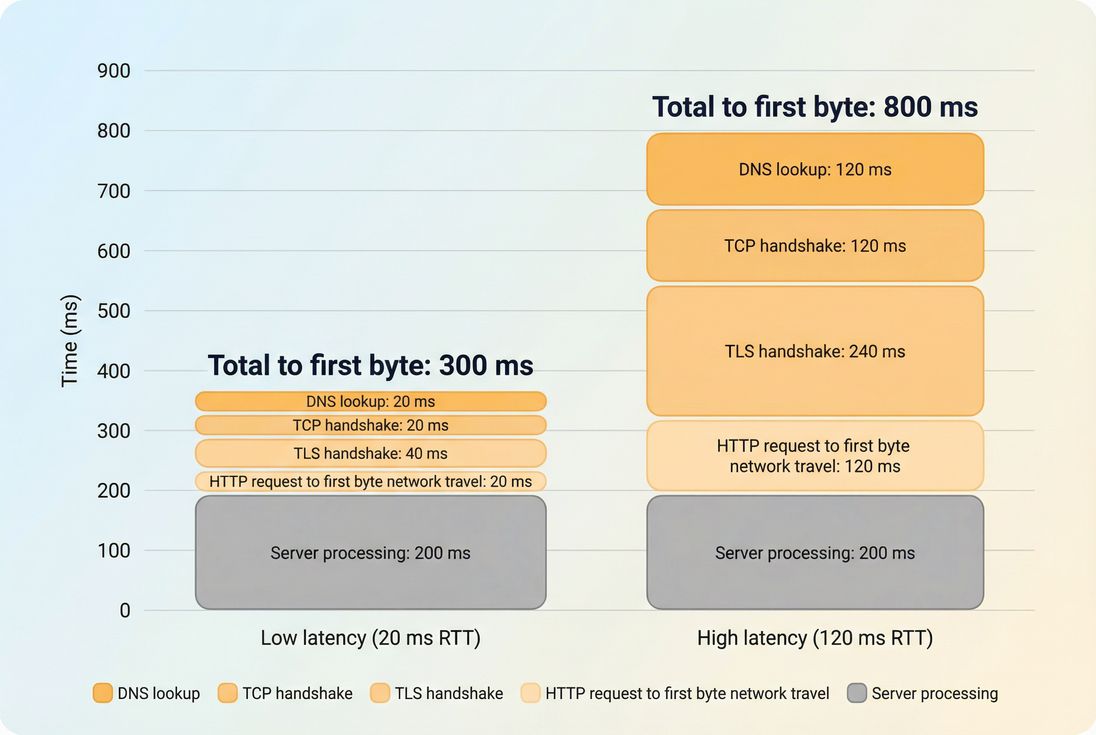
Is latency your bottleneck?
Ping latency matters most when your page is round-trip heavy – meaning the browser must wait for multiple back-and-forth steps before it can render or fetch the next critical resource.
What ping is (and isn't)
- Ping (ICMP) latency: what you get from
ping yourdomain.com. It's a generic RTT signal, but ICMP is sometimes deprioritized or blocked. - Web-relevant RTT: the RTT your browser experiences during connection setup and requests. Many performance tools expose this as "RTT" rather than ICMP ping. (See also: Network latency and TCP handshake.)
Ping latency is not a Core Web Vital by itself, but it strongly influences metrics that matter – especially TTFB and, downstream, LCP as covered in Core Web Vitals.
The key interpretation: "latency is a multiplier"
Latency often behaves like a multiplier because modern page loads include repeated "wait for the network" moments:
- DNS lookup (sometimes multiple lookups): see DNS lookup time
- TCP connect: see TCP handshake
- TLS negotiation: see TLS handshake
- Redirects (each redirect adds more waiting)
- Fetching render-blocking CSS/JS: see Render-blocking resources
- Third-party tags: see Third-party scripts
The Website Owner's perspective: If latency is high, "small" architecture decisions – like adding one more vendor tag, one more redirect, or splitting code into extra chunks – stop being small. They become revenue-impacting because every step costs more time for far-away or mobile users.
How it's typically summarized
You'll usually see latency reported as:
- Median (p50): what a "typical" user gets
- p75: common standard for web performance reporting (also used heavily in field data)
- p95/p99: where the pain is (mobile, congested routes, weak WiFi)
If your p50 is fine but p95 is bad, you don't have a "slow site" as much as a consistency problem (often routing, mobile networks, or regional distance).
How latency turns into slowness
Latency becomes user-visible when it increases time to first byte and delays critical resources along the critical rendering path.
Where ping shows up in a real page load
A simplified sequence for the first request to a host often looks like this:
- DNS lookup
- TCP connection
- TLS negotiation (HTTPS)
- Request sent, first byte returns (TTFB includes this travel time + server time)
After the first connection is established, your browser can benefit from:
- Keep-alive / connection reuse: Connection reuse
- HTTP/2 multiplexing: HTTP/2 performance
- HTTP/3 improvements to setup and loss recovery: HTTP/3 performance
So, ping latency hurts most when you:
- open lots of new connections (many domains, many third parties)
- force sequential requests (redirects, dependency chains, blocking scripts)
- can't reuse a connection efficiently
A practical way to "feel" the cost
Instead of formulas, use this rule of thumb:
- At 20 ms RTT, even 5–6 required round trips are usually tolerable.
- At 120 ms RTT, those same 5–6 round trips can add ~600–700 ms before you even consider images, JavaScript work, or server processing.
Here's a quick mental model:
| Required round trips before rendering | 20 ms RTT adds about | 100 ms RTT adds about | 200 ms RTT adds about |
|---|---|---|---|
| 1 | 20 ms | 100 ms | 200 ms |
| 3 | 60 ms | 300 ms | 600 ms |
| 6 | 120 ms | 600 ms | 1200 ms |
That's why latency is disproportionately damaging to:
- uncached HTML (affects TTFB, pushes out LCP)
- checkout flows (multiple sequential calls)
- tag-heavy marketing stacks (many third-party domains)
Latency vs TTFB: what to conclude
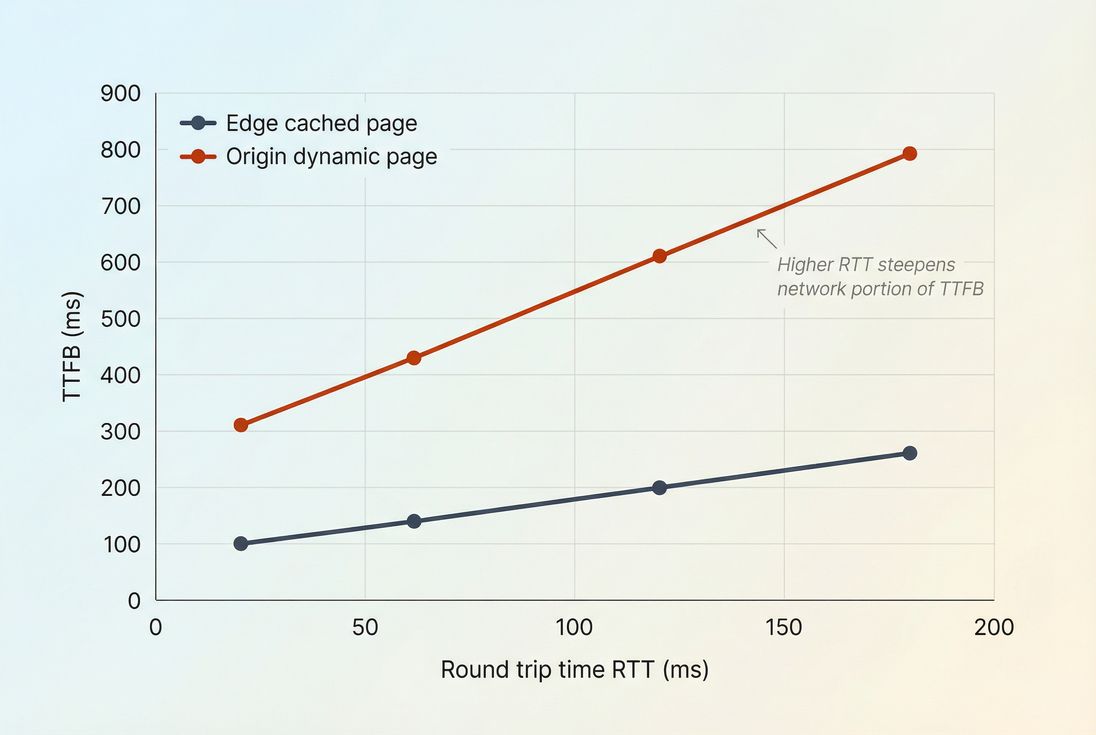
TTFB includes both network travel and server time. If you're trying to decide what changed:
- Ping/RTT up + TTFB up: likely network path, region mix shift, CDN/edge issue, ISP congestion.
- Ping/RTT stable + TTFB up: likely origin/server processing, caching regressions, database issues, bot load, or WAF overhead. See Server response time.
What numbers should you expect?
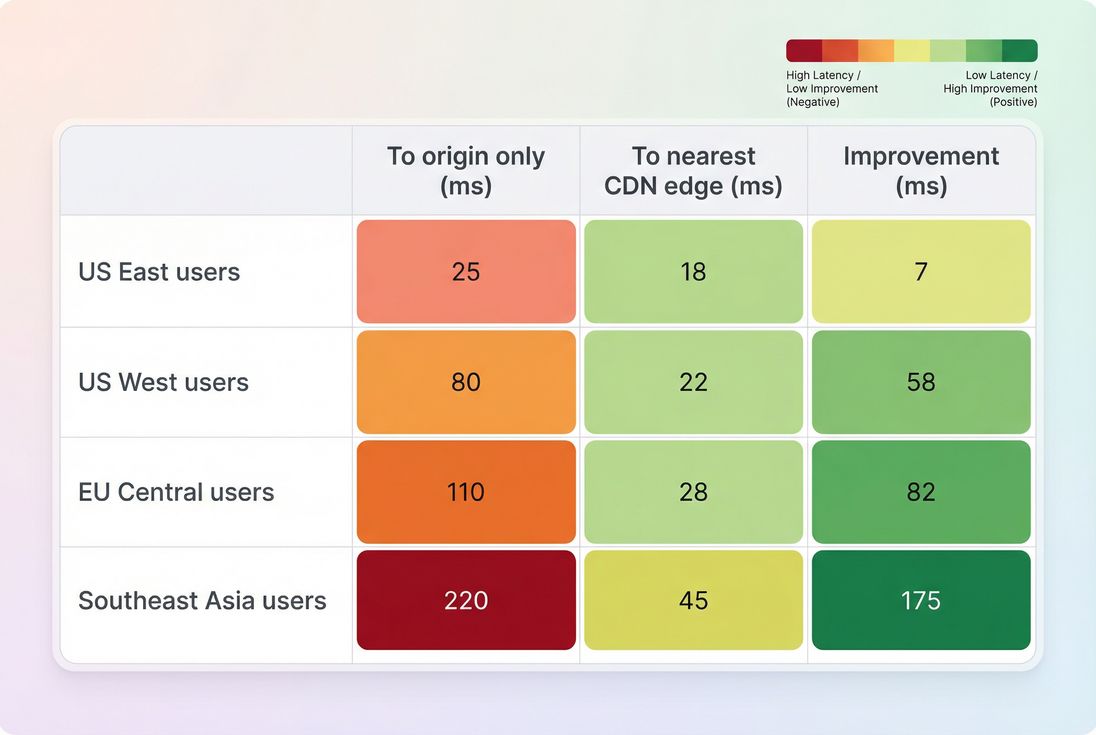
"Good" ping latency depends on where your customers are and whether you serve content from an edge close to them. A US-only brand can have excellent numbers that look terrible to APAC users if everything comes from one US region.
Practical benchmarks (p75)
Use these as decision-support ranges, not absolutes:
| Audience to serving location | p75 RTT that usually feels strong | p75 RTT that becomes risky |
|---|---|---|
| Same metro / same state | 10–30 ms | 60+ ms |
| Same country (large) | 30–70 ms | 100+ ms |
| Cross-continent | 90–160 ms | 200+ ms |
| Global (unoptimized) | 150–250 ms | 300+ ms |
Two important nuances:
- Mobile users often see higher RTT than desktop users due to radio scheduling and carrier routing (even with good bandwidth). See Mobile page speed.
- Variability matters. A stable 80 ms can outperform a "sometimes 30, sometimes 250" situation.
The Website Owner's perspective: Benchmarks help you decide where to spend: if most revenue is domestic and p75 is already under 40–50 ms, a new CDN contract might not move conversion as much as fixing heavy JavaScript or LCP images. If p75 is 120+ ms for a big customer region, proximity becomes a business priority.
When to treat it as a priority
Move ping latency up your priority list when:
- you're expanding into new geographies (new ad campaigns, marketplaces)
- you see regional conversion gaps
- your LCP and TTFB are "mysteriously" worse outside your home region
- you rely on multiple third-party services on critical pages
This is also where comparing CDN vs origin distance becomes crucial. See CDN vs origin latency and CDN performance.
What causes latency to rise?
Ping latency is partly physics (distance) and partly operations (routing, congestion, and how many networks you traverse).
Common causes you can act on
1) Your origin is far away
If your HTML is served from one region, distant users will always pay for it. This is why edge strategies matter: Edge caching.
2) Too many distinct hostnames Every new domain can mean new DNS, TCP, and TLS work – especially painful under high latency:
- consolidate domains where practical
- reduce third-party tags on critical pages: Third-party scripts
- use DNS prefetch and Preconnect for critical third parties (sparingly)
3) Redirect chains Redirects create sequential waits. Fixing redirects is often a "free" win under high RTT.
4) Packet loss and jitter You can have a "fine average ping" but poor experience if there's loss:
- Loss forces retransmits and stalls.
- Jitter causes inconsistent load times. This is common on mobile and congested WiFi.
5) Routing and peering issues Sometimes your hosting/CDN is healthy but a specific ISP route is bad. This shows up as a regional or ISP-specific spike.
Causes that look like latency but aren't
Latency gets blamed for issues that are actually:
- slow server processing (TTFB rises without RTT rising): Server response time
- main-thread overload (INP issues): Main thread work and Long tasks
- large, late LCP resources (images/fonts): Image optimization and Font loading
How to reduce and validate it
You can't optimize the public internet, but you can reduce how much your site depends on long round trips, and you can shorten the distance to the user.
1) Serve critical content closer
- Put cacheable assets behind a well-performing CDN: CDN performance
- Push HTML caching to the edge where possible: Edge caching
- If HTML can't be cached, consider multi-region origins and smart routing (especially for international revenue)
Decision hint: If your latency problem is mostly outside your "home" region, proximity fixes (CDN/edge) tend to beat micro-optimizations like shaving 30 KB of JavaScript.
2) Reduce required round trips
This is where many sites win big – without changing hosting.
- Reuse connections aggressively: Connection reuse
- Prefer HTTP/2 (and consider HTTP/3 where safe): HTTP/2 performance, HTTP/3 performance
- Remove redirect chains and consolidate canonical URLs
- Avoid "chatty" waterfall dependencies:
- reduce render-blocking scripts/styles: Render-blocking resources
- inline or prioritize critical CSS: Critical CSS
- use Async vs defer correctly
- reduce unnecessary requests: HTTP requests
Also evaluate code splitting carefully. Splitting can help JS execution, but if it creates more sequential fetches, high-latency users may lose. See Code splitting and JS bundle size.
3) Make each request cheaper
Even if RTT doesn't change, you can reduce how long the browser stays blocked:
- compress text assets: Brotli compression or Gzip compression
- cache assets properly so repeat views don't pay setup cost: Browser caching, Cache-Control headers, Effective cache TTL
- optimize image formats to reduce transfer time (especially helpful on mobile): WebP vs AVIF
4) Validate with the right data
Latency is notoriously sensitive to where and how you measure. Use both lab and field approaches:
- Synthetic tests tell you: "From Los Angeles on a cold cache, what is RTT and what is the waterfall?"
- Field data tells you: "For real customers, what do p75 and p95 look like, and what changed after deployment?"
To keep interpretation clean, anchor on the distinction in Field vs lab data and use user-based sources like CrUX data when available.
If you're using PageVitals specifically, the most direct places to validate latency's impact are:
- the RTT metric definition and reporting context: /docs/metrics/round-trip-time/
- the request-by-request dependency view: /docs/features/network-request-waterfall/
- and field visibility via CrUX: /docs/features/chrome-ux-report/
The Website Owner's perspective: Validation is where teams waste quarters. If you "optimize latency" by switching providers but only test from one location, you can accidentally improve dashboards while leaving real customers unchanged. Always validate by revenue regions (top markets) and by p75/p95, not a single average.
Quick checklist for busy teams
If ping latency looks high or volatile, prioritize in this order:
- Confirm where users are (top geos, mobile share)
- Compare RTT vs TTFB (network vs backend)
- Reduce round trips (redirects, third parties, new domains)
- Serve closer (CDN + edge caching strategy)
- Validate in both lab and field (Measuring Web Vitals)
Ping latency won't be the only reason a site is slow – but when it's high, it amplifies everything else. The best outcomes usually come from a two-part approach: shorten the distance and make your pages less dependent on round trips.
Frequently asked questions
For most US-focused stores, p75 latency under 50 ms to your edge is solid, 50 to 100 ms is workable, and over 100 ms starts to noticeably inflate TTFB and resource loading. Global audiences need regional expectations. Watch p95 and spikes, not only averages.
Low ping means the network is not the main bottleneck, but you can still be slow due to high server processing time, heavy JavaScript, render-blocking CSS, large images, or third-party scripts. Use TTFB plus LCP and INP to separate network delay from backend delay and browser work.
A CDN usually reduces latency for cacheable content by serving from a nearby edge, but it does not automatically fix slow origin responses for uncached or personalized pages. The biggest gains come when HTML and key assets can be edge-cached or when your CDN optimizes routing and connection setup.
Sudden increases often point to routing changes, ISP congestion, WiFi or mobile network issues, packet loss, or a CDN or hosting provider incident. If only one region spikes, it is usually a path or peering problem. If all regions spike, your edge or origin may be overloaded.
Track both. Ping latency tells you about distance and network quality, which drives the minimum possible response time. TTFB includes latency plus server processing and caching, which is what users experience. If ping is stable but TTFB rises, the issue is usually backend or caching, not geography.
Want to take PageVitals for a spin?
Page speed monitoring and alerting for your website. Get daily Lighthouse reports for all your pages. No installation needed.
Start my free trial