Table of contents
Preconnect for faster resource loading
If a critical script, stylesheet, font, or CDN image is hosted on a different domain, your page can spend hundreds of milliseconds doing "setup work" before it can download anything useful. That delay shows up as slower rendering, weaker Core Web Vitals, and (for many sites) measurable conversion loss – especially on mobile and first-time visits.
Preconnect is a browser hint that tells the browser: start connecting to this origin now, before you actually request a file from it. The browser can resolve DNS, negotiate TCP, and complete TLS earlier, so when the real request happens it can start downloading immediately.
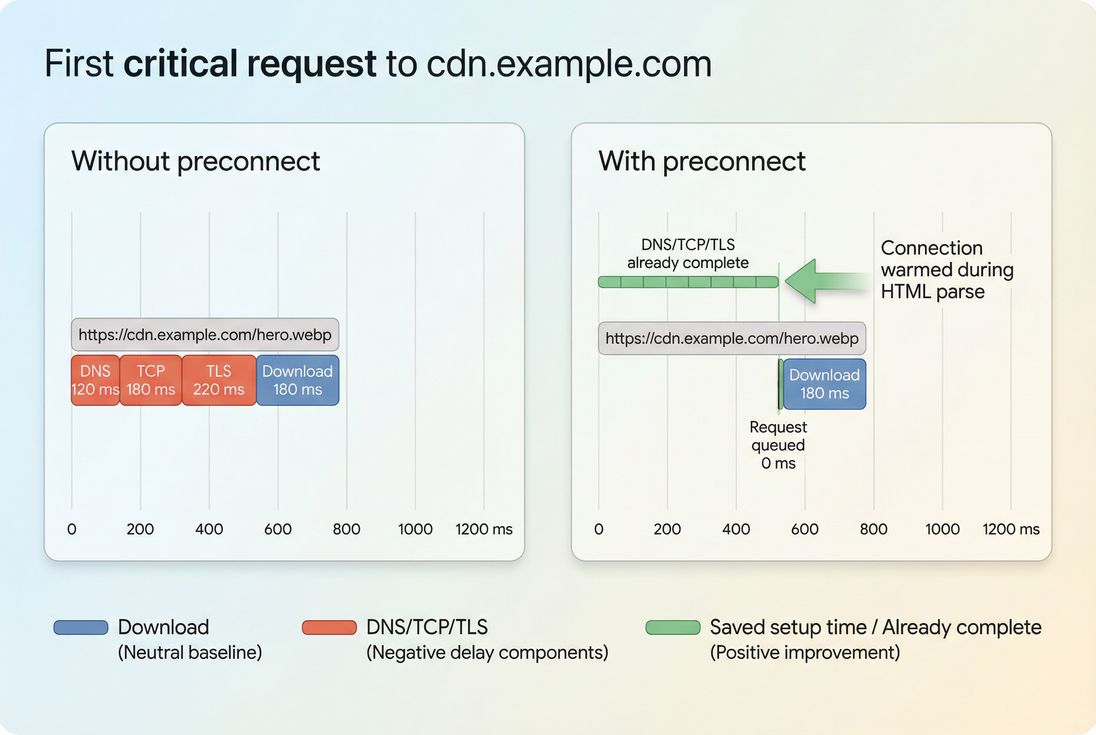
Preconnect shifts DNS, TCP, and TLS earlier so the first critical request can start downloading sooner – often improving LCP when that request blocks above-the-fold rendering.
What preconnect actually does
When your HTML references a resource on a different origin (for example https://cdn.example.com or https://fonts.gstatic.com), the browser can't fetch it instantly. It typically needs to complete a chain of connection setup steps:
- DNS lookup (find the IP for the hostname)
Related: DNS lookup time - TCP handshake (establish a reliable connection)
Related: TCP handshake - TLS handshake (negotiate encryption for HTTPS)
Related: TLS handshake - Only then can it request and download the actual file.
On a fast desktop connection, this setup might be "only" tens of milliseconds. On real mobile networks, it can be a few hundred milliseconds – sometimes more – especially when network latency is high.
Preconnect tells the browser to start steps 1–3 early, often while it's still parsing the <head> of your HTML. Then when the browser later discovers it needs hero.webp or a render-blocking CSS file from that origin, the connection is already available (or closer to ready).
A few details that matter in practice:
- Preconnect is per origin, not per URL. It uses scheme + host + port (for example
https://cdn.example.com), not a path. - It's a hint, not a guarantee. Browsers may ignore it under resource pressure, user data-saver modes, or if too many hints exist.
- It benefits first use most. If the origin is already connected (because of earlier requests or good connection reuse), preconnect doesn't add much.
When preconnect moves your metrics
Website owners should think about preconnect as a way to reduce avoidable waiting right before a critical resource starts downloading. The biggest wins show up when:
- The resource is render-blocking or LCP-critical
- The origin is cross-origin (different domain/subdomain)
- The user is likely on a cold cache / first visit
- The request happens early in the critical rendering path
Related: Critical rendering path
What it can improve
Preconnect doesn't directly change a Core Web Vital by itself; it changes the timing of network work that affects other metrics. Common improvements include:
- LCP when the LCP element depends on a CDN image, critical CSS, or font file hosted on another origin
Related: LCP - FCP when the first paint is blocked on cross-origin CSS or fonts
Related: FCP - TTFB for the first byte of a cross-origin request (not your HTML TTFB, but the initial request to that third-party/CDN origin)
Related: TTFB
Rough "is it worth it" benchmarks
These ranges vary, but they're useful for decisions:
| Component | Typical desktop | Typical mobile / high latency |
|---|---|---|
| DNS | 10–60 ms | 50–200+ ms |
| TCP + TLS | 40–150 ms | 150–600+ ms |
| Total setup saved (best case) | 50–200 ms | 200–800+ ms |
If your current LCP is 3.2s and the LCP request spends 400ms in connection setup to a third-party origin, preconnect is one of the few changes that can credibly cut that delay without touching the resource itself.
The Website Owner's perspective
If your hero image or above-the-fold CSS comes from a CDN domain you don't currently warm up, you're effectively paying a "first-request penalty" on every new visitor. Preconnect is a targeted way to reduce that penalty without rebuilding your stack – often helpful during campaigns where more first-time users hit your site.
Preconnect vs other resource hints
Preconnect is often confused with other hints. The difference is important because misuse creates hidden costs.
- DNS prefetch (
rel="dns-prefetch") warms only DNS. Lower risk, lower reward.
Related: DNS prefetch - Preconnect (
rel="preconnect") warms DNS + connection + TLS. Higher impact, higher cost. - Preload (
rel="preload") fetches a specific resource early (bytes start downloading).
Related: Preload - Prefetch (
rel="prefetch") fetches resources likely needed for a future navigation (lowest priority).
Related: Prefetch
Here's the decision table website owners can use:
| Goal | Best tool | Common use case |
|---|---|---|
| Reduce cross-origin setup delay | preconnect | CDN host for LCP image, font file origin |
| Reduce DNS delay only | dns-prefetch | "Maybe later" third parties |
| Guarantee an asset downloads early | preload | Critical CSS, hero image, key font |
| Speed up next page | prefetch | Next step in funnel, product → cart |
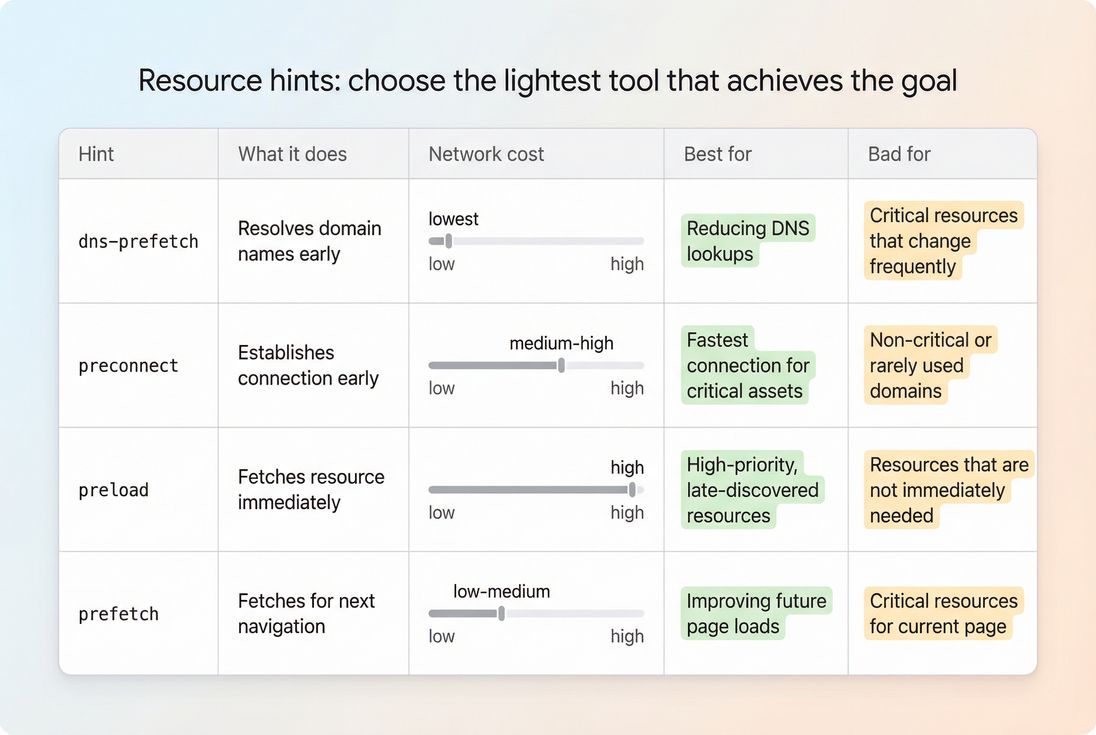
Use preconnect only when you need to remove connection setup delay for an origin you will definitely use during initial rendering.
Which origins deserve preconnect
Preconnect is most effective when it targets one of the first cross-origin requests that matter. In practice, that usually means one of these categories:
1) Your static asset host or CDN
If your HTML is on www.example.com but your images/CSS/JS are on static.examplecdn.com, the very first request to that CDN pays the handshake penalty. If that request is tied to above-the-fold optimization (hero image, critical CSS, top nav CSS), preconnect can help.
2) Font file origins (often overlooked)
Many font setups involve two different origins (for example a stylesheet on one domain and font files on another). The LCP element can be delayed by font swapping or blocking.
Related: Font loading
3) Critical third parties (rare, but real)
Examples that can be truly critical on specific templates:
- Payment provider scripts on checkout
- Fraud detection that must run before enabling checkout buttons
- Identity providers on login pages
For most analytics, chat, heatmaps, and A/B tools: preconnect is usually wasted on the first view. Consider loading those scripts later (for example with async vs defer strategies) rather than warming connections.
Practical selection rules
Use these rules to avoid "spray and pray" preconnects:
- Start with 1–2 origins on your highest-traffic templates (home, category, product).
- Only preconnect origins that are used on nearly every page view for that template.
- Only preconnect origins that are requested early and affect rendering or the first interaction.
- Avoid preconnecting to origins where the resource is loaded after consent (cookie banner acceptance), unless you can conditionally add the hint after consent.
The Website Owner's perspective
The question isn't "can I preconnect to everything?" It's "which one or two origins are most responsible for first-impression slowness?" If you're spending on ads, shaving 200–400ms off first render for new visitors can be more valuable than micro-optimizing repeat-visit caching.
How to implement preconnect safely
Basic HTML implementation
Place preconnect hints as early as possible in <head> (before the first time you reference that origin in CSS/JS).
<link rel="preconnect" href="https://cdn.example.com" crossorigin>Key points:
- Use the origin only:
https://cdn.example.com(no path). - Add
crossoriginfor cross-origin requests where the fetched resource uses CORS (common for fonts and many CDNs). Without it, the browser may create a separate connection that can't be reused the way you expect.
A common pattern is pairing preconnect with a DNS-prefetch fallback:
<link rel="dns-prefetch" href="//cdn.example.com">
<link rel="preconnect" href="https://cdn.example.com" crossorigin>
HTTP header implementation
If you control headers (CDN or origin), you can send a Link header. This is useful when HTML is generated by a CMS you can't easily edit.
Example conceptually (format varies by server/CDN):
Link: <https://cdn.example.com>; rel=preconnect; crossorigin
Preconnect does not replace preload
If the real issue is that a specific file starts downloading too late (not that the handshake is slow), preconnect won't fix that. You likely need preload for the critical file, plus preconnect if it's cross-origin.
Common mistakes that waste time
Too many preconnects
Each warmed connection uses sockets, CPU, and sometimes radio time on mobile. Excess hints can slow down the page you were trying to speed up.Preconnecting to non-critical third parties
If it doesn't impact above-the-fold rendering, it's usually not worth warming early.Adding preconnect too late
Injecting it via a tag manager after the page has started rendering is often too late to matter. The goal is to overlap connection setup with HTML parsing.Preconnecting the wrong origin
Fonts are a classic trap: you preconnect to the CSS endpoint but the actual slow fetch is the font file origin. Confirm in the waterfall.Same-origin preconnects
If the origin is already connected because it served the HTML, preconnect rarely helps. It can still matter with unusual setups, but treat it as a last resort.
How to confirm it worked
Preconnect should be validated in two layers: network evidence and user-impact evidence.
1) Network evidence: waterfall proof
In a network waterfall, you want to see:
- For the first request to the origin:
- Reduced or eliminated DNS/TCP/TLS wait time
- Earlier connection start
- Faster "request start" relative to navigation
If you use PageVitals, the cleanest way to validate is in the Network request waterfall report:
Network request waterfall
What you're looking for is simple: the first critical request should stop "paying" the handshake cost at the moment it becomes important.
2) User impact: the metric that matters
Pick the metric tied to the resource you're accelerating:
- If it's a hero image: watch LCP
(Field reporting example docs: LCP report) - If it's render-blocking CSS/fonts: watch FCP and LCP
- If it's an early third-party dependency: watch INP only if it affects interactivity timing (often it doesn't)
Related: INP
Also remember the basics of measurement:
- Compare lab tests with consistent settings (device/network).
Related: Field vs lab data - Confirm with field data when possible.
Related: CrUX data and Real user monitoring
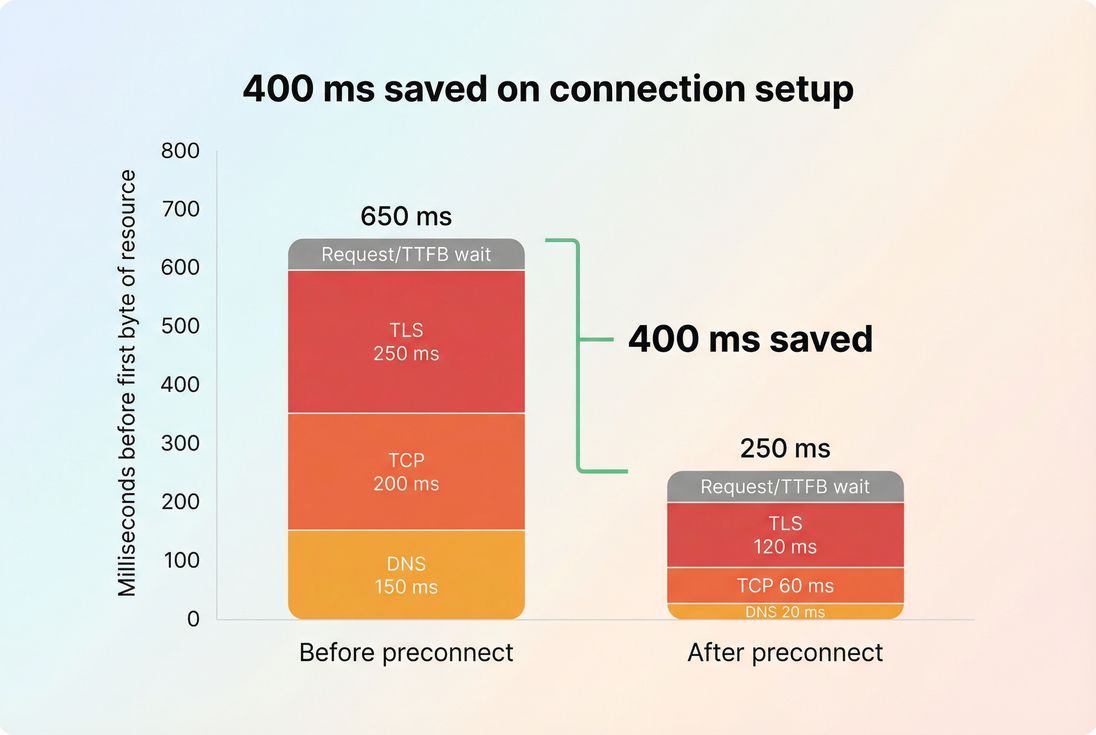
Preconnect mostly reduces the avoidable setup portion (DNS/TCP/TLS). If the remaining wait is server time or bandwidth, you'll need different optimizations.
What to do when it doesn't help
If you add preconnect and see no change, the bottleneck is probably elsewhere. Here are the common reasons – and what to check next:
The origin was already warm due to earlier requests or good caching behavior.
Check connection reuse and whether other assets already hit that origin.The critical path is blocked by something else (heavy JavaScript, render-blocking CSS, long main-thread work).
Check render-blocking resources and reduce main thread work.The resource is simply too big (large hero image, unoptimized format).
Check image optimization, image compression, and WebP vs AVIF.Backend latency dominates (slow origin response, high TTFB).
Check server response time and CDN vs origin latency.
In other words: preconnect is a sharp tool for a specific delay. If the delay isn't connection setup, you won't get a win.
A practical rollout plan
For most sites, the fastest path to value looks like this:
- Identify your first cross-origin requests on key templates (home, category, product, checkout).
- Mark which ones influence above-the-fold rendering (LCP element, critical CSS, fonts).
- Add 1 preconnect for the single most impactful origin.
- Validate in a waterfall and in LCP/FCP. Keep the change if it's consistent.
- Consider adding a second preconnect only if you can point to another origin that blocks the first screen.
If you treat preconnect like a targeted performance budget item – not a checklist – you'll avoid the common trap of warming up half the internet and speeding up nothing.
Frequently asked questions
Most sites should start with 1 to 3 preconnects on key templates. Each preconnect consumes browser connection slots and does real network work. If you add many, you can slow down other critical requests. Only preconnect origins that are used on nearly every visit and affect above the fold rendering.
It can, if your LCP element depends on a cross origin resource like a CDN image, a render blocking stylesheet, or a web font. Preconnect reduces connection setup delays before the first byte is even possible. If your LCP is dominated by server work or large images, preconnect will have little effect.
Usually no for the initial page view. Those tools are rarely required to render the first screen, so preconnecting just burns bandwidth and sockets early. If a script is truly critical to checkout or identity flows, consider loading it later with defer and only preconnecting on pages where it is immediately needed.
dns-prefetch only resolves the domain name, which is cheap and low risk. preconnect goes further by also starting the TCP and TLS handshakes, which is faster for the first request but costs more resources. Use dns-prefetch for maybe later origins and preconnect for guaranteed, render critical origins.
Validate in a request waterfall: the first request to that origin should show less waiting on DNS, TCP, and TLS. Then confirm a user facing metric improved, typically LCP or FCP. Compare before and after runs with the same test conditions and watch for regressions from too many warmed connections.
Want to take PageVitals for a spin?
Page speed monitoring and alerting for your website. Get daily Lighthouse reports for all your pages. No installation needed.
Start my free trial