Table of contents
Preload key requests
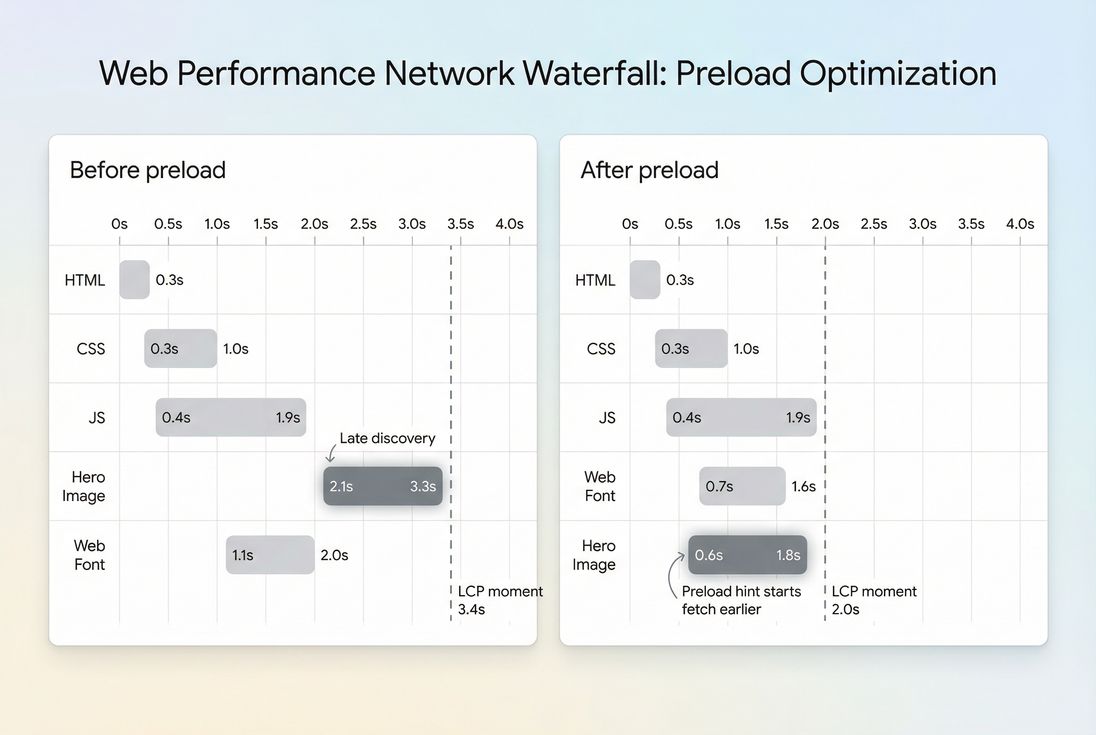
A small delay in discovering one critical file – your hero image, a font, or a CSS chunk – can quietly cost you conversions. Not because the asset is huge, but because the browser doesn't even start downloading it until late in the load.
Preload Key Requests is a Lighthouse opportunity that flags important, early-needed resources that the browser discovers too late, and suggests adding preload hints (usually <link rel="preload">) so those downloads start earlier.
What this audit is really telling you
Lighthouse isn't saying "your site has too many requests." It's saying:
- "This resource is needed early for rendering."
- "But the browser only learns about it after parsing other files."
- "So the download starts later than it should."
This is a critical rendering path problem (Critical rendering path), not a compression problem or a caching problem.
Common real-world examples:
- The LCP hero image is set as a CSS
background-image, so the browser only discovers it after downloading and parsing CSS. - A web font is needed for above-the-fold text, but the font is only referenced inside a CSS file that's requested late.
- Your app shell HTML is small, but it loads a JS bundle that dynamically injects the hero image URL – so the image request doesn't begin until after JS download + execution.
The Website Owner's perspective
If your product image or headline is what convinces people to buy, "late discovery" is a business problem. You're paying for ads, email clicks, and SEO – then making users wait longer than necessary before the page looks trustworthy.
Which "key requests" are worth preloading
A preload hint is strongest when all three are true:
- The resource is required for above-the-fold rendering or LCP (Above-the-fold optimization, LCP).
- The resource is currently discovered late (waterfall shows a delayed start).
- Starting it earlier won't steal bandwidth from something even more important.
Good candidates (most common)
| Resource type | When it's a "key request" | Typical impact |
|---|---|---|
| LCP hero image | Background image in CSS, injected by JS, or otherwise late-starting | Often reduces LCP by 100–500ms on mobile |
| Web fonts (WOFF2) | Above-the-fold text depends on it and font request starts late | Reduces FOIT/FOUT risk and can improve perceived speed |
| Critical CSS chunk | CSS needed for initial render is loaded indirectly or late | Improves FCP and reduces render-blocking delays (Render-blocking resources) |
| Module graphs (SPA) | Entry module imports are needed immediately | Can reduce startup stalls (use modulepreload) |
Usually not worth preloading
- Images already discovered early via a normal
<img>near the top of HTML (the browser already finds it quickly). - Below-the-fold images (use Lazy loading instead).
- Huge JS bundles "just in case" (preload won't fix long execution time; you may need Code splitting and to reduce JavaScript execution time).
- Third-party scripts unless they are truly required for first render (often they're not).
The Website Owner's perspective
Preload is not a "make everything faster" switch. It's a surgical tool. You're choosing which files get a head start on a congested mobile network – so the wrong choice can slow down the very thing you're trying to improve.
How Lighthouse estimates "potential savings"
This audit appears under Lighthouse "Opportunities." It generally works like this:
- Lighthouse identifies resources that are used early (often tied to first render, above-the-fold content, and LCP).
- It checks whether those resources are discoverable earlier (e.g., could be hinted in HTML).
- It uses a lab network/CPU model to estimate how much earlier the resource could be fetched if preloaded, and reports an estimated time savings.
What changes the audit result:
- Where the URL is first referenced
- HTML
<img src>is early discovery. - CSS
background-imageis later (after CSS download + parse). - JS-injected URLs are latest (after JS download + execute).
- HTML
- Request priority and competition
- Preload can elevate priority and start earlier – but too many preloads can create priority conflicts.
- Connection setup
- If the resource is on a different origin, DNS/TLS can dominate. Pairing preload with Preconnect (and sometimes DNS prefetch) can matter.
- Caching
- Strong caching (Browser caching, Cache-Control headers) reduces the need to fetch at all – so preload savings shrink. But preload can still help in cold-cache scenarios (new visitors, cleared cache, private mode).
Practical takeaway: treat the reported "savings" as directional. The real win is visible in your waterfall and in LCP/FCP improvements.
How to implement preload without breaking things
Start with one preload, validate, then add another if needed. Most issues come from trying to preload "everything Lighthouse listed."
1) Preload an LCP image
If your LCP image is late because it's a CSS background or injected by JS, preload can help.
<link rel="preload" as="image" href="/images/hero-1200.webp">If you use responsive images, don't preload the wrong size. Use imagesrcset/imagesizes:
<link
  rel="preload"
  as="image"
  href="/images/hero-1200.webp"
  imagesrcset="/images/hero-640.webp 640w, /images/hero-1200.webp 1200w, /images/hero-1920.webp 1920w"
  imagesizes="(max-width: 768px) 100vw, 1200px">
Also sanity-check that the element isn't accidentally lazy-loaded. For LCP images, avoid loading="lazy".
Related reading: Responsive images, Image optimization.
2) Preload a font correctly (avoid double downloads)
Fonts are a classic "preload key request," but they're also easy to mess up.
<link
  rel="preload"
  as="font"
  type="font/woff2"
  href="/fonts/inter-var.woff2"
  crossorigin>
Rules that prevent wasted downloads:
as="font"andtype="font/woff2"should match the actual file.crossoriginmust match how the font is requested by CSS (fonts commonly require it).- The URL must be identical (including query strings).
Related: Font loading, Brotli compression (WOFF2 is already compressed, but server compression settings still matter for other assets).
3) Prefer modulepreload for ES modules
If you're modern-bundled and the browser needs module dependencies immediately, use:
<link rel="modulepreload" href="/assets/app-entry.js">This helps the browser fetch the module graph earlier with correct semantics.
4) Be careful preloading CSS
Preloading CSS is sometimes used to reduce render-blocking, but it's easy to implement poorly.
Better first steps usually are:
- Inline truly critical CSS (Critical CSS)
- Remove unused rules (Unused CSS)
- Minify and compress (Asset minification, Gzip compression)
If you do preload CSS, validate thoroughly to avoid flashes or ordering problems.
[% image "./img/preload-decision-matrix.png", "Decision matrix showing when preload is appropriate based on discovery timing and criticality", "Create a 2x2 decision matrix chart for a page speed article. Layout: a square grid with x-axis labeled 'Discovery timing' from 'Early' on the left to 'Late' on the right, and y-axis labeled 'Critical to above-the-fold' from 'Low' at bottom to 'High' at top. Each quadrant contains a short label: top-right 'Best preload candidate', top-left 'Usually unnecessary', bottom-right 'Consider prefetch or ignore', bottom-left 'Do not preload'. Place three plotted points with labels: 'Hero image via CSS background' in top-right, 'Web font for headline' in top-right, 'Below-the-fold product carousel JS' in bottom-right. Use restrained colors: neutral baseline grid, positive quadrant subtly highlighted, negative quadrant subtly muted. Visual hierarchy: quadrant titles largest, then axes labels, then point labels. Exclusions: no icons, no illustrations, no people, no fake UI controls, no decorative shapes. Ensure legible typography and crisp lines.", "(max-width: 1024px) 100vw, 1096px", page.url %] Preload is most effective when a resource is both critical and discovered late; otherwise you risk wasted bandwidth or no measurable gain.
When preloading backfires
Most "we tried preload and nothing improved" stories fall into a few buckets.
Priority inversion (too many preloads)
If you preload several large assets, the browser may spend early bandwidth on the wrong things.
Symptoms:
- LCP gets worse on mobile only
- Waterfall shows multiple "High" priority downloads competing
Fix:
- Keep preloads to 1–3 critical files
- Remove speculative preloads (especially large JS)
Double downloads
This happens when the preload request doesn't match the later "real" request, so the browser downloads twice.
Common causes:
- Missing or wrong
as - Missing
crossoriginfor fonts - Different URL (CDN params, cache busting strings, different formats)
Fix:
- Ensure preload URL exactly matches the actual request
- Use correct
as,type, andcrossorigin
Preloading something that isn't actually critical
Lighthouse can't fully understand your business priorities. You might preload a resource that technically appears early but doesn't move what users care about.
Fix:
Preload without fixing the root cause
If your bottleneck is server time (TTFB), heavy JS (Reduce main thread work), or oversized images, preload is not the primary lever.
Fix:
- Address the dominant bottleneck first: image sizing/compression, code splitting, caching, CDN (CDN performance).
How website owners should interpret changes
Because this is an audit/opportunity (not a field metric like LCP), interpret it like a diagnostic signal:
- Audit disappears after your change
Good sign. It usually means the browser can start that key download earlier. - Estimated savings drop
Good sign, but confirm in the waterfall and check LCP. - No change in LCP
Either the resource wasn't truly gating LCP, or another bottleneck dominates (TTFB, CPU, render-blocking CSS, etc.). - LCP improves in lab but not in the field
Your real users may have different caching, devices, or network conditions. Compare lab vs field (Field vs lab data).
A practical benchmark many teams use:
- If you can move a key request ~500–1500ms earlier in the waterfall on mobile throttling, you often see a meaningful LCP shift.
- If you only move it ~50–100ms, impact may be negligible versus run-to-run noise.
How to validate (waterfall-first)
You don't need to guess. Validation is mechanical.
In Chrome DevTools
- Open Network.
- Check "Disable cache" (for testing).
- Reload.
- Find the resource you preloaded:
- It should start earlier
- It should show high priority
- There should be only one download
In Lighthouse
Re-run and confirm the "Preload key requests" audit is reduced or gone.
In PageVitals (for ongoing visibility)
Use the Lighthouse report and waterfall views to confirm earlier start times and avoid regressions:
- Lighthouse tests documentation: /docs/features/lighthouse-tests/
- Network request waterfall documentation: /docs/features/network-request-waterfall/
Preload vs prefetch vs preconnect (quick clarity)
These are easy to mix up:
- Preload: fetch now, for this page's critical rendering (Preload).
- Prefetch: fetch later/idle, for a future navigation (Prefetch).
- Preconnect: start connection setup early (DNS/TCP/TLS) for another origin (Preconnect).
- DNS prefetch: DNS only, lighter hint (DNS prefetch).
If your key resource is on a third-party origin, preconnect + preload is often the combination that actually moves the needle.
A practical "do this next" checklist
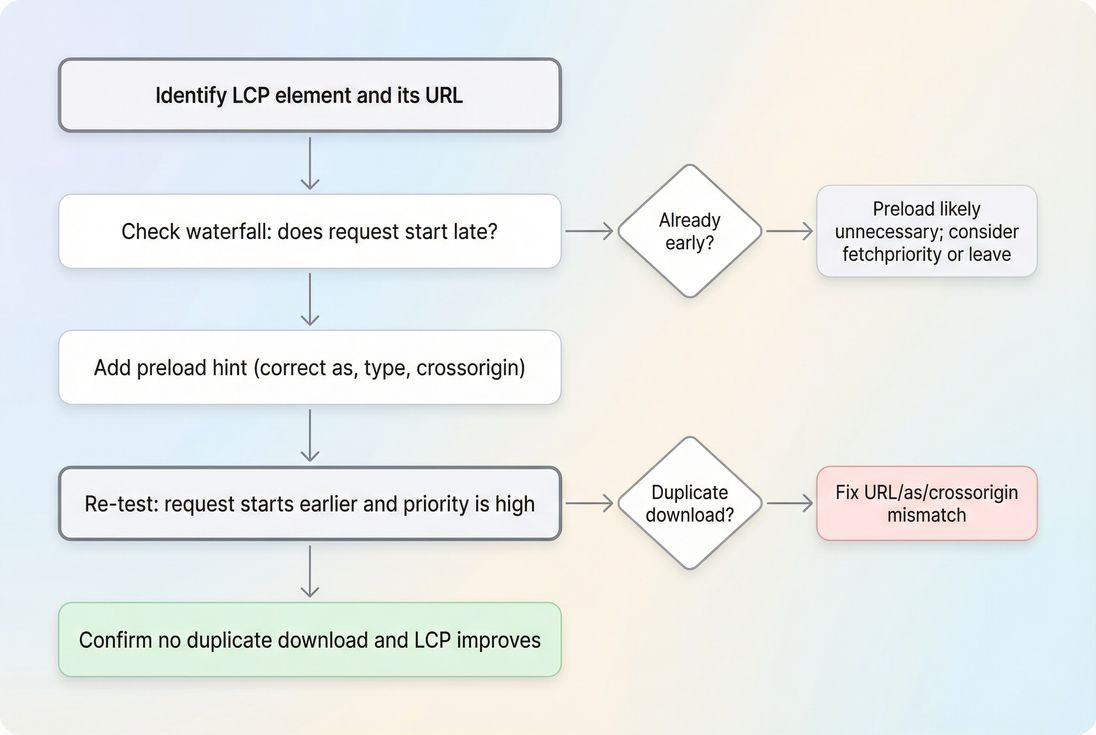
- Identify your LCP element and the exact URL (LCP).
- Look at the waterfall: does it start late?
- If yes, add one preload hint for that resource (image or font are most common).
- Re-test and confirm:
- earlier start
- no double download
- LCP improved
- Only then consider a second preload (typically a font or a critical CSS chunk).
Used this way, Preload Key Requests becomes a clean decision tool: it tells you where late discovery is hurting your most visible content – and whether you can fix it with a simple, low-risk hint instead of a large refactor.
Frequently asked questions
It means Lighthouse found resources needed early (often for above-the-fold rendering or LCP) that the browser discovers too late. Adding preload hints can start those downloads sooner. The goal is to reduce time spent waiting on late-discovered files, improving perceived speed and Core Web Vitals.
Usually 1 to 3. Common picks are the LCP hero image, one critical font, or a critical CSS chunk. Preloading more than a few can compete for bandwidth, delay other important downloads, and even make LCP worse on mobile. Start small and validate with a waterfall.
No. Preload helps when discovery is the bottleneck, not when server response time, CPU/JavaScript, or image size is the real issue. If your hero image is already requested early, preload may do nothing. Use it when the waterfall shows the key asset starting late.
The most common are preloading the wrong file (wasting bandwidth), triggering double downloads (missing as, type, or crossorigin), and preloading too many assets (priority inversion). These issues are most visible on slower mobile connections, where every extra early download competes with LCP.
Check the Network waterfall and request priorities: the preloaded resource should start earlier and have high priority. Confirm there is only one download for the resource and it is actually used for rendering (not unused). Re-run Lighthouse and compare LCP/FCP and the audit list.
Want to take PageVitals for a spin?
Page speed monitoring and alerting for your website. Get daily Lighthouse reports for all your pages. No installation needed.
Start my free trial