Table of contents
Render-blocking resources
When your page looks blank for an extra second, users don't think "CSSOM." They think the site is slow or broken – and they bounce, abandon carts, or stop trusting the brand. Render-blocking resources are one of the most common reasons a page with "good hosting" still feels slow on mobile.
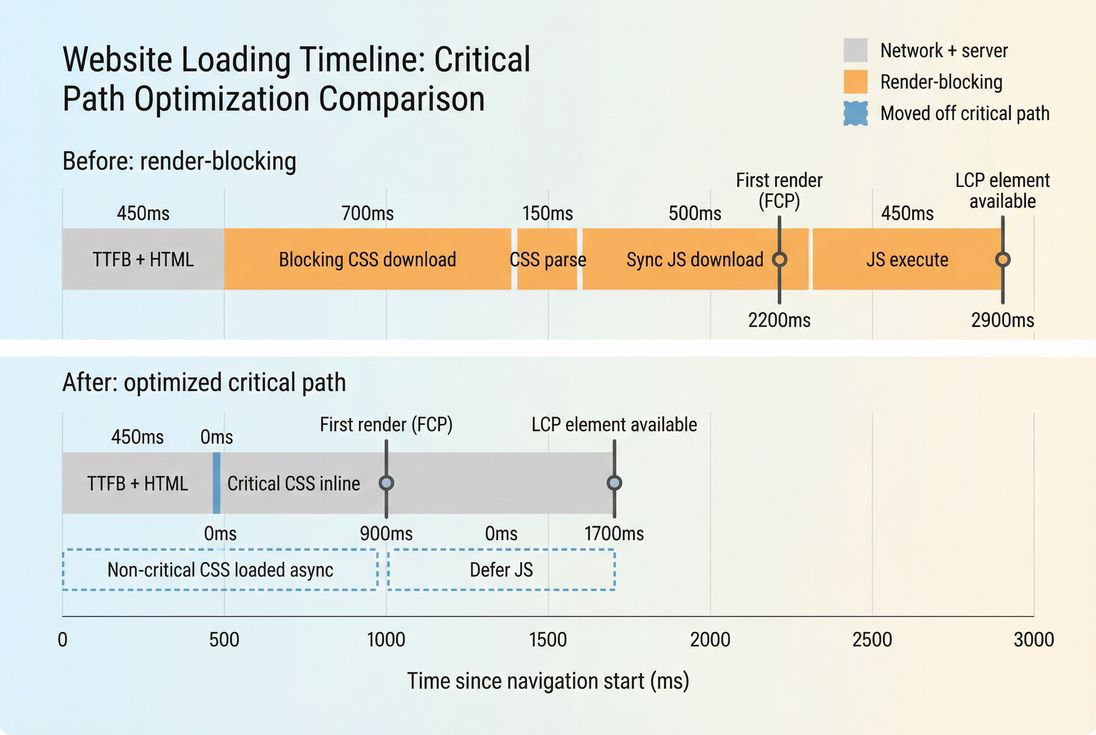
Render-blocking resources are files (mostly CSS and sometimes JavaScript) that the browser must download and process before it can render any visible content. If they're slow, the page stays visually empty longer, pushing out metrics like FCP and often LCP.
What counts as render-blocking
Render-blocking is less about file type and more about what the browser must have before it can paint pixels.
CSS is render-blocking by default
A <link rel="stylesheet" href="..."> in the document head is treated as required for rendering. The browser typically:
- starts downloading it as soon as it discovers it
- waits until it's downloaded and parsed before painting
Even a "small" stylesheet can be a problem if it's slow to fetch (third-party host, no CDN, poor caching) or if you have several of them.
Related reading: Critical rendering path and Critical CSS.
JavaScript becomes render-blocking when it blocks parsing
Classic scripts (<script src="..."> without attributes) block HTML parsing while the browser downloads and executes them. That often delays rendering because:
- the DOM is incomplete until parsing continues
- scripts may need CSSOM/layout info, forcing the browser to wait for CSS too
If you're choosing script loading attributes, see: Async vs defer.
Common "surprise" blockers
Busy sites often have blockers that don't look like blockers at first:
@importinside CSS: delays nested stylesheet discovery and loading.- Font CSS and font files: can delay text paint or cause late swaps if misconfigured. See Font loading.
- Third-party tag code inserted early: especially if it injects stylesheets or uses
document.write. See Third-party scripts. - Huge "global" CSS shipped to every page even when most rules aren't used. See Unused CSS.
The Website Owner's perspective:
If your home page or top landing pages have a long blank screen before anything appears, fixing render-blocking resources is often the fastest way to make the site feel faster – without redesigning anything.
How it delays FCP and LCP
Render-blocking resources matter because they sit directly in the "must happen before pixels" chain.
The practical sequence (no theory required)
On a typical first visit, the browser roughly does this:
- Download HTML (influenced by TTFB and HTML size)
- Parse HTML and discover CSS/JS
- Download required CSS
- Build CSS rules (CSSOM) and combine with DOM to compute styles/layout
- Only then can it paint (FCP)
- Load remaining resources needed for the main content (often the LCP image, font, or critical JS) to reach LCP
Render-blocking resources are dangerous because they stack with other delays:
- Slow origin or CDN misconfiguration → slower CSS fetch (CDN performance, CDN vs origin latency)
- Too many requests → discovery and prioritization overhead (HTTP requests)
- Large bundles → CPU parsing/execution after download (JS execution time, Reduce main thread work)
Why "it's only 40 KB" can still hurt
On mobile, the cost isn't just transfer size:
- Connection setup (DNS/TLS) if the CSS is on another domain
See DNS lookup time and TLS handshake. - Priority: the browser may wait to discover key resources until CSS/JS is handled.
- CPU: parsing/minifying gains can matter because CSS/JS must be processed before paint.
This is why you'll often see FCP improve dramatically after removing just one or two early blockers.
How to spot the real blockers
Your goal is not "zero files in the head." Your goal is: nothing unnecessary delaying above-the-fold render.
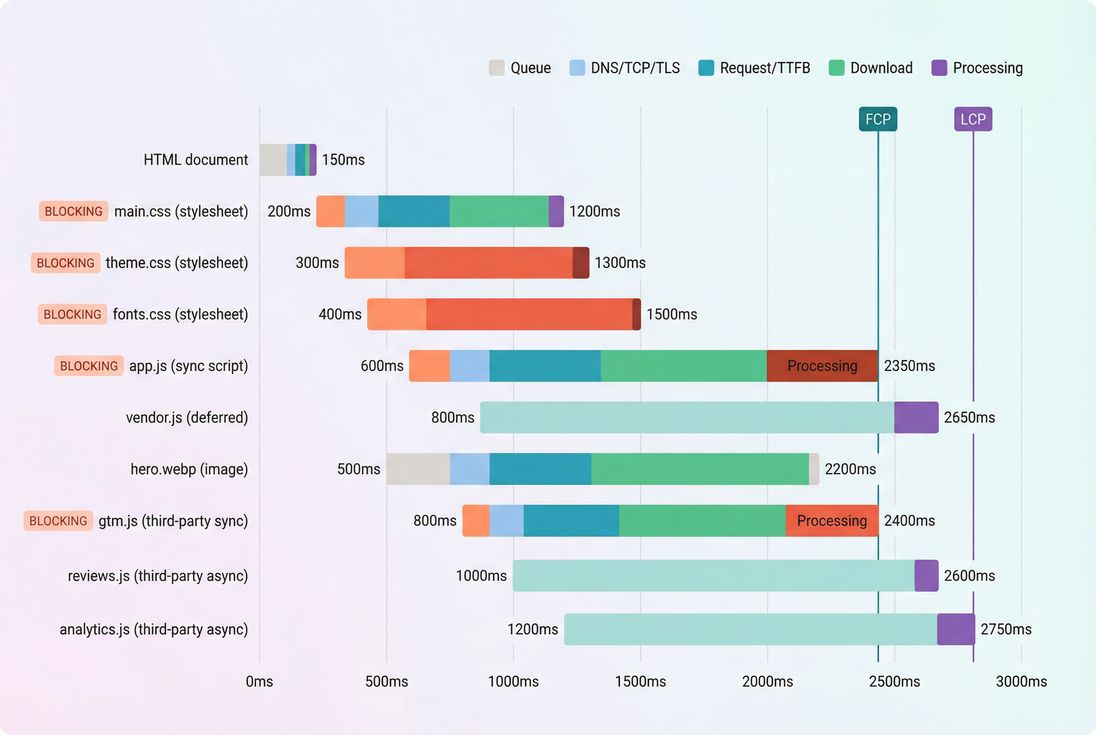
Start with a waterfall, not a checklist
A network waterfall shows you what's discovered early and what's holding up rendering. If you use PageVitals, the docs on the waterfall view are here: /docs/features/network-request-waterfall/. (The same analysis applies in Chrome DevTools Network, WebPageTest, etc.)
What you're looking for:
- CSS requests that start early and finish late
- synchronous scripts that run before first paint
- third-party requests with long connection time or slow download
- multiple stylesheets serializing (especially via
@import)
Separate "render-blocking" from "page is slow"
Render-blocking resources are one input. If you remove blockers but still have slow paints, check:
- Server delays: Server response time and TTFB
- Heavy JS work after first paint: Long tasks and Total blocking time
- LCP resource issues: oversized hero images, no preload, or slow image host
See Image optimization and Preload
Use lab + field together
Render-blocking audits are typically lab-derived (Lighthouse, synthetic tools). They're great for diagnosing causes. But validate business impact with field outcomes:
- Do FCP/LCP distributions improve in real traffic?
- Do conversion or bounce rates improve on affected landing pages?
If you're aligning data sources, read: Field vs lab data and CrUX data.
The Website Owner's perspective:
Treat render-blocking fixes like checkout fixes: test the pages that make money. Improving a blog template is nice, but improving the top paid-traffic landing page is what changes revenue this week.
Fixes that usually move the needle
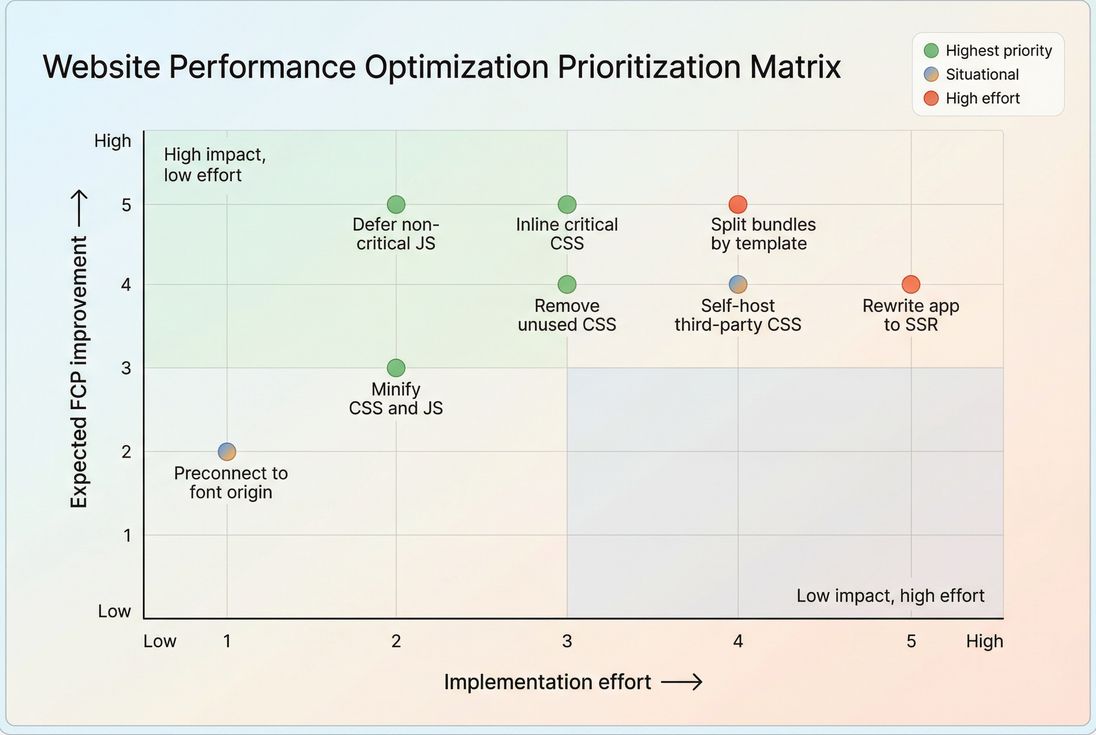
Most sites don't need exotic tricks. They need a small set of reliable changes applied consistently.
1) Inline only critical CSS
Best for: slow FCP, heavy CSS, multi-template sites
Approach:
- Extract the minimal CSS needed to render above-the-fold content
- Inline it in the HTML
<head> - Load the full stylesheet in a non-blocking way after
This directly supports Above-the-fold optimization and Critical CSS.
Watch-outs (real ones):
- If "critical" is wrong, you get flashes of unstyled content or broken layout.
- If you inline too much, HTML grows and slows TTFB-to-render.
2) Defer non-critical JavaScript
Best for: pages with tag managers, sliders, personalization, reviews, chat
Rules of thumb:
- Use
deferfor scripts needed soon but not before the first paint. - Use
asyncfor truly independent scripts (often analytics), but be careful with dependency order.
See Async vs defer.
Also check for "stealth blockers":
- inline scripts in the head that do work immediately
- tag manager containers that synchronously load more scripts
If the page is "painting late because JS is busy," also address JS bundle size and Main thread work.
3) Split CSS and JS by page/template
Best for: e-commerce and CMS sites with different templates (home, PLP, PDP, blog)
If every page downloads the union of all features, your critical path grows over time. Use:
- Code splitting for JS routes/components
- multiple CSS bundles per template instead of one global stylesheet
- remove dead weight: Unused CSS and Unused JavaScript
4) Make the network faster (when it's the limiter)
If the blocker is slow mainly due to the network:
- Ensure compression is on (Brotli compression, Gzip compression)
- Cache static assets correctly (Browser caching, Cache-Control headers, Cache TTL)
- Serve CSS/JS from a good edge (Edge caching, CDN performance)
- Reduce connection overhead for third-party origins using Preconnect and DNS prefetch
5) Be careful with "async CSS" hacks
Patterns like loading CSS with media="print" then switching to all can reduce blocking, but they can introduce:
- FOUC and layout shifts (harmful for CLS)
- fragile behavior across templates and browsers
For most businesses, critical CSS + normal stylesheet loading is safer and easier to maintain.
How to interpret changes over time
Render-blocking resources are rarely a one-and-done fix. They drift as marketing tags, A/B tests, and new templates get added.
When "render-blocking savings" goes up
If Lighthouse (or similar) reports higher potential savings, it usually means one of these happened:
- a new stylesheet was added to the head
- a third-party tool started injecting CSS
- a new synchronous script was introduced early
- global bundles grew due to feature creep
This is why performance teams use guardrails like Performance budgets.
When "render-blocking savings" goes down
This can be good – or misleading:
- Good: you inlined critical CSS, deferred scripts, and reduced early request time.
- Misleading: the tool stopped classifying something as blocking, but the page still paints late due to CPU work, images, or server delay.
Always confirm with:
- FCP/LCP in synthetic runs
- field distributions (CrUX/real-user data)
- a waterfall comparison and main-thread work review
A practical triage table
| Symptom you see | Likely blocker type | What to do first |
|---|---|---|
| Long blank screen, then fully styled | CSS in head slow/large | Inline critical CSS, remove unused CSS, ensure caching/compression |
| Blank screen until scripts finish | Sync JS in head | Add defer, split bundles, reduce JS execution time |
| Text appears late or swaps | Fonts/font CSS | Fix font loading strategy, preload critical font, ensure caching |
| Only certain landing pages are slow | Template-specific bundles | Split CSS/JS by template, remove unused per page |
| Repeat visits still slow | Poor caching | Fix Cache-Control, enable long TTL for static assets |
The Website Owner's perspective:
The trend matters more than the one-off score. If blockers creep back every sprint, your process is the problem: uncontrolled tag additions, no bundle budgets, and no consistent "above-the-fold first" rule.
How website owners operationalize it
Here's a workflow that works even if you're not hands-on in code.
Step 1: Pick the pages that matter
Start with:
- top paid-traffic landing pages
- home page
- top category (PLP) and product (PDP) pages for e-commerce
- checkout entry points
Step 2: Identify the top 1–3 blockers
From a waterfall and a Lighthouse run (PageVitals docs for Lighthouse tests: /docs/features/lighthouse-tests/):
- list the earliest CSS files and how long they take
- list synchronous scripts before paint
- mark third-party origins involved
Step 3: Choose a "safe fix" per blocker
Examples:
- Big global CSS → critical CSS + async load remainder, plus unused CSS cleanup
- App bundle blocking → defer + code splitting
- Third-party script blocking → load later, or replace with a lighter integration
Step 4: Validate you didn't trade one problem for another
After changes, confirm:
- FCP improves without introducing layout instability (Zero layout shift, Layout instability)
- LCP element still renders correctly and early
- no functional regressions (especially on checkout)
Step 5: Prevent regressions
Add:
- performance budgets on bundle size or key timings (Performance budgets)
- a review step for new tags and pixels
- a policy that "nothing sync loads in head without a reason"
If you want, share a Lighthouse report or a waterfall screenshot (redact URLs if needed). I can help you identify which specific requests are truly render-blocking and which fixes are most likely to improve FCP/LCP without breaking styling or analytics.
Frequently asked questions
There is no universal count to target because one small CSS file can be fine while one slow third-party script can be disastrous. Practically, aim for a fast first paint on mobile and keep only critical CSS on the initial path. Anything blocking above-the-fold content is worth fixing first.
You may have deferred a script or stylesheet that was indirectly required to render the LCP element, like hero styling, a slider, or font CSS. Another common cause is shifting work from network to CPU, increasing main-thread time. Always validate with a before-after waterfall and check the LCP element details.
No. Inlining everything bloats HTML, hurts caching, and can slow repeat visits. The best pattern is inlining only critical CSS for above-the-fold content, then loading the rest in a non-blocking way. Pair this with removing unused CSS and splitting large stylesheets by route or template.
They can be, especially if placed high in the document without defer or async, or if they inject blocking CSS or synchronous scripts. Tag managers, A B testing tools, chat widgets, and consent scripts are frequent culprits. The decision is business-driven: keep only what is necessary for first view and delay the rest.
Start with what blocks above-the-fold content and what affects your highest-traffic landing pages. Prioritize large CSS in the head, synchronous scripts, and slow origins. Then move to unused CSS and oversized bundles. A simple rule: fix the resources that delay first paint, then the ones that delay LCP.
Want to take PageVitals for a spin?
Page speed monitoring and alerting for your website. Get daily Lighthouse reports for all your pages. No installation needed.
Start my free trial