Table of contents
Static site performance benefits
A static site can materially change revenue outcomes because it reduces the most expensive kind of slowness: unpredictable load time spikes caused by server work, cache misses, and backend contention. When pages are consistently fast, more sessions reach product discovery, forms, and checkout without friction – and your paid traffic converts closer to its true potential.
A static site serves pre-built HTML (and assets) that do not require per-request server rendering. In practice, that means the "page generation" work happens at build time, and visitors receive the same HTML from a CDN edge cache, instead of waiting for your origin server (and database) to assemble it on every request.
Why static sites are usually faster
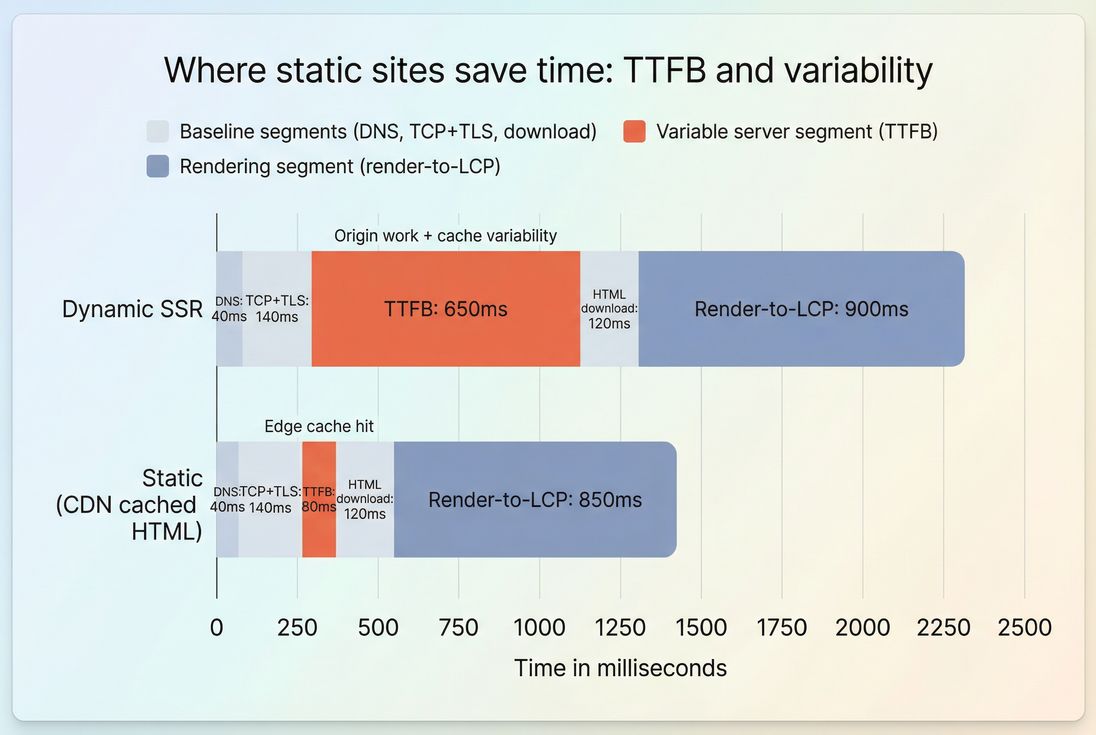
Static sites tend to "win" performance for one simple reason: they remove runtime variability.
Dynamic sites (CMS templates, SSR pages, app servers) often have performance that changes by:
- cache hit vs cache miss
- database load
- cold starts
- traffic spikes
- geographic distance to the origin
Static sites reduce or eliminate many of those factors by making the request path simpler and more cacheable.
What improves when HTML is pre-built
When the HTML is already generated, the browser can start parsing sooner. That usually improves:
- TTFB (Time to First Byte): Less origin work per request, and more CDN edge hits. See TTFB and CDN vs origin latency.
- LCP (Largest Contentful Paint): Faster start often means the LCP resource is discovered earlier. See LCP and Critical rendering path.
- Stability across locations and traffic: Edge caching smooths out spikes from load and geography. See Edge caching and CDN performance.
The Website Owner's perspective: A static architecture is less about chasing a perfect Lighthouse score and more about reducing "bad days." When traffic surges from a campaign, you want the site to stay fast without scaling databases, debugging cache layers, or paying for oversized infrastructure.
Static is not the same as "lightweight"
Static delivery solves a specific bottleneck: server-side page generation. It does not automatically fix:
- large images (often the real LCP culprit)
- heavy JavaScript and long tasks (often the INP culprit)
- layout shifts from late-loading elements (CLS)
- third-party script delays
Those still require front-end optimization work (more on that below).
What changes in your key metrics
Because "static site performance" is not a single metric, you interpret it through the metrics that static delivery most strongly affects – then verify the rest doesn't regress.
Core Web Vitals expectations
Use Core Web Vitals as your scoreboard:
- LCP: good ≤ 2.5s (75th percentile)
- INP: good ≤ 200ms (75th percentile)
- CLS: good ≤ 0.1 (75th percentile)
See Core Web Vitals, plus deep dives on INP and CLS.
What static sites typically improve most:
- TTFB and LCP consistency (especially on content and landing pages)
- Cacheability, which reduces origin dependency and p75/p90 outliers
What static sites do not guarantee:
- better INP (that's mostly JavaScript behavior and main-thread contention)
- better CLS (that's layout discipline, image dimensions, font loading)
Supporting metrics that explain "why"
If you're trying to prove static delivery helped, these supporting metrics explain the mechanism:
- Server response time / TTFB: should drop and become less spiky. See Server response time.
- FCP and Speed Index: often improve when parsing starts earlier and critical resources are discovered sooner. See FCP and Speed Index.
- HTTP requests and payload size: may be unchanged unless you also optimize assets. See HTTP requests and JS bundle size.
The Website Owner's perspective: If TTFB improves but LCP doesn't, the problem is usually not the server anymore – it's the hero image, render-blocking CSS, fonts, or too much JavaScript. Static is a strong foundation, not a finish line.
What influences static site speed
Static performance depends on how you serve static, not just that the HTML is pre-built.
CDN and edge cache behavior
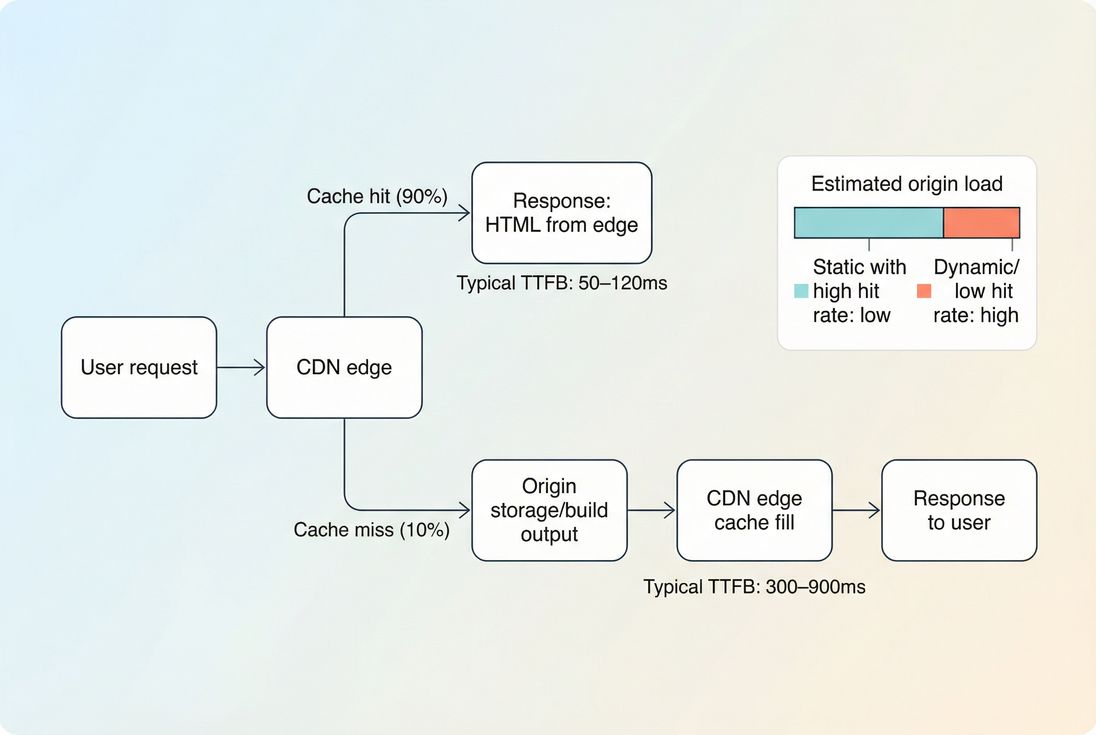
A static site is fastest when most requests are edge cache hits. That requires:
- correct Cache-Control headers and sane TTLs
- CDN configured to cache HTML (not just images/CSS)
- cache purge/invalidation strategy that doesn't force frequent misses
Relevant reads:
Compression and modern protocols
Static sites often ship lots of text (HTML, CSS, JS). Make sure it's compressed and delivered efficiently:
- Prefer Brotli where supported; otherwise Gzip. See Brotli compression and Gzip compression.
- Use modern connection behavior: HTTP/2 performance or HTTP/3 performance, and reduce handshake overhead with Connection reuse.
- Don't ignore handshake costs when you spread assets across many domains (common with third parties). See DNS lookup time and TLS handshake.
Above-the-fold and render-blocking resources
Even with instant HTML, users still wait for what blocks rendering:
- render-blocking CSS and JS (Render-blocking resources)
- unoptimized critical styles (Critical CSS)
- too much above-the-fold content or late discovery of the LCP element (Above-the-fold optimization)
Static sites make it easier to control and audit these because pages are deterministic – but you still have to do the work.
JavaScript execution and interactivity
Many "static" sites are static HTML plus a lot of client-side JavaScript (React hydration, animations, tag managers, A/B tests). That can hurt:
- INP (INP)
- Total Blocking Time in lab tools (Total blocking time)
- CPU-bound devices, especially mobile (Mobile page speed)
Key levers:
- reduce bundle size (JS bundle size)
- remove unused code (Unused JavaScript, Unused CSS)
- split code by route/component (Code splitting)
- load non-critical scripts with Async vs defer
- audit Third-party scripts
Where static sites still get slow
Static delivery removes server rendering, but there are predictable failure modes that keep static pages slow.
Large LCP images and media
For many sites, the LCP element is an image (hero banner, product image). Static doesn't fix that. Common issues:
- oversized images shipped to mobile
- no modern formats
- no responsive sizing
- missing preload for the LCP image when appropriate
Fixes:
- Image optimization
- Responsive images
- Image formats WebP vs AVIF
- use Preload carefully for the true LCP asset
Font loading delays and layout shifts
Static sites can still suffer:
- FOIT/FOUT delays that push LCP later
- CLS from swapping fonts or injecting banners
Use:
Too many third-party tags
A static marketing site can be a third-party script delivery vehicle. If you add:
- chat widgets
- heatmaps
- multiple analytics trackers
- tag manager containers with dozens of tags
…you can still end up with poor INP and long main-thread stalls. Start with:
- a third-party inventory
- defer non-essential tags
- load on interaction where possible
See Third-party scripts and Main thread work.
Personalization and "dynamic-by-accident"
Teams often reintroduce dynamic bottlenecks by:
- fetching critical content client-side (late rendering)
- building pages as a client-side app that must hydrate before content is useful
- calling multiple APIs before the above-the-fold is complete
Hybrid patterns can work, but you want the initial view to be fast without waiting on client-side data.
How to decide what should be static
Most businesses don't need an all-or-nothing decision. The practical question is: which page types benefit most from being static (or edge-cached HTML), and which must remain dynamic?
A practical page-type matrix
| Page type | Best default | Why | Watch-outs |
|---|---|---|---|
| Blog/content | Static | High cacheability, big SEO surface | Images, fonts, embeds |
| Landing pages | Static | Paid traffic sensitivity, predictable layout | Tag bloat, A/B scripts |
| Category/collection | Static or hybrid | High entry traffic, SEO | Facets, personalization |
| Product detail | Hybrid | Cache page shell, fetch inventory/price | Don't delay above-the-fold |
| Cart/checkout/account | Dynamic | User-specific state | Still optimize assets and third parties |
The Website Owner's perspective: You don't need to "make everything static" to see revenue impact. If your top entry pages (ads, SEO landers, product/category) load faster and more consistently, you improve the part of the funnel that feeds everything else.
Hybrid approaches that keep performance wins
Common high-performing patterns:
- Static HTML + API-driven widgets (price/inventory, recommendations)
- Edge caching with smart invalidation for semi-dynamic pages
- Static for anonymous users; dynamic only when authenticated
The performance goal is consistent: keep the initial render path simple, cacheable, and lightweight.
How to validate gains and prevent regressions
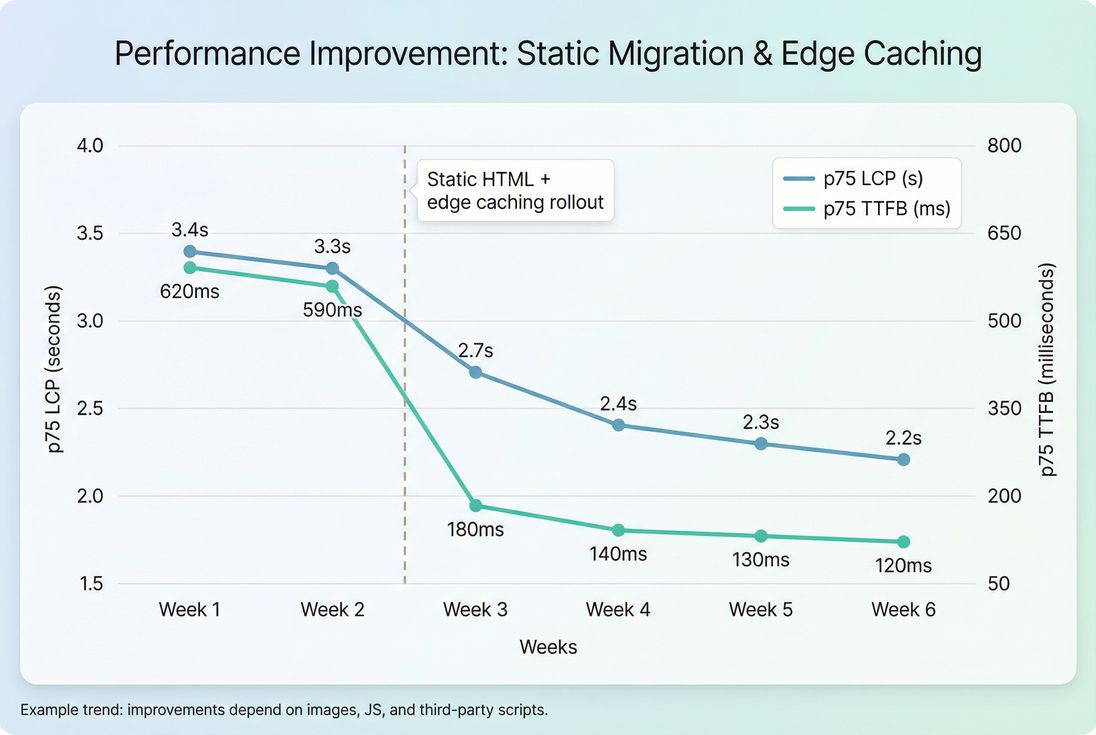
A static migration can feel faster, but you should prove it with both lab and field data, then lock it in with budgets.
Use lab tests for fast feedback
Synthetic tests help you catch regressions immediately after a deploy:
- compare waterfalls
- watch TTFB and LCP deltas
- detect new render-blocking resources and payload growth
Helpful reading:
If you're using PageVitals, you can set up repeatable synthetic monitoring and Lighthouse reporting via docs:
Use field data to confirm business reality
Field data (real users) is where you validate:
- mobile devices
- real network latency
- geographic spread
- p75 behavior (what Google and CWV use)
Read: CrUX data and Real user monitoring.
If you're using PageVitals, CrUX reporting is documented here:
Set budgets so performance stays fixed
Static sites can regress quietly: one marketing tag, a larger hero image, a new font, and you're back to slow.
Budgets make "fast" a release requirement:
- maximum JS size on key templates
- maximum image bytes above the fold
- minimum cache TTL for static assets
- thresholds for LCP/INP/CLS regressions
See Performance budgets. If you're using PageVitals budgets, the implementation details are here: Performance budgets.
What to do next (practical checklist)
If you're evaluating static or hybrid delivery, start with the work that produces the clearest, most defensible improvement:
- Pick 5–20 highest-entry pages (SEO landers, top paid landing pages, top categories).
- Baseline field and lab (CWV + TTFB + waterfall).
- Make HTML edge-cacheable (static build or edge caching) and confirm headers: Cache-Control headers, Edge caching.
- Fix LCP resource delivery (image format/sizing, preload if appropriate): Image optimization, Preload.
- Reduce JS cost (split, remove unused, defer third parties): Code splitting, Unused JavaScript, Third-party scripts.
- Re-measure p75 movement and lock in budgets.
The performance benefit of static isn't theoretical: it's a repeatable way to make load time less dependent on backend luck. But the best outcomes come from treating static delivery as the foundation – then optimizing assets, JavaScript, and third parties so your Core Web Vitals improve end-to-end.
Frequently asked questions
Often, yes, but only for the parts tied to server and caching: TTFB, LCP start time, and consistency across geographies. It will not automatically fix heavy JavaScript, large images, or third party scripts, which commonly drive INP and LCP on marketing and product pages.
The biggest repeatable win is TTFB consistency: static pages can be served from the CDN edge with minimal origin work. Real world results vary, but it is common to see TTFB drop from hundreds of milliseconds or more to low double digits on cache hits, improving LCP stability.
Fully static is rarely practical for carts and checkout, but hybrid is: keep category, product, and content pages static or edge cached, then fetch live price and inventory via APIs. That approach protects Core Web Vitals on high traffic entry pages while preserving real time accuracy where needed.
The risks are mostly operational: build and deploy workflows, cache invalidation, preview environments, and handling personalization. Performance wise, teams sometimes over rely on static and still ship large client side bundles, fonts, and third party tags, which can erase the perceived speed gain.
Use a mix of lab and field data: synthetic tests to catch regressions before deploy, and field metrics to validate across real devices and networks. Track Core Web Vitals (LCP, INP, CLS) and supporting metrics like TTFB. Set performance budgets so changes fail fast when they drift.
Want to take PageVitals for a spin?
Page speed monitoring and alerting for your website. Get daily Lighthouse reports for all your pages. No installation needed.
Start my free trial