Table of contents
TCP handshake and page speed
A slow TCP handshake is one of the most frustrating performance problems because it "charges" every new visitor up front – before your server even gets a chance to be fast. If your checkout or product pages pull resources from multiple domains, a few extra handshakes can quietly add hundreds of milliseconds to the critical path and drag down conversion.
TCP handshake is the time it takes a browser and server to establish a TCP connection (SYN → SYN-ACK → ACK) before any HTTP request data can be reliably sent. In practice, the handshake cost is roughly one network round trip – so it rises and falls with user-to-server latency.
Where handshake sits in the load
On most HTTPS sites, the browser does three "setup" steps before it can fetch a resource:
- DNS lookup (find the IP)
- TCP handshake (open the connection)
- TLS handshake (negotiate encryption)
Only after those can the browser send the HTTP request and wait for a response (which is where TTFB starts to matter).
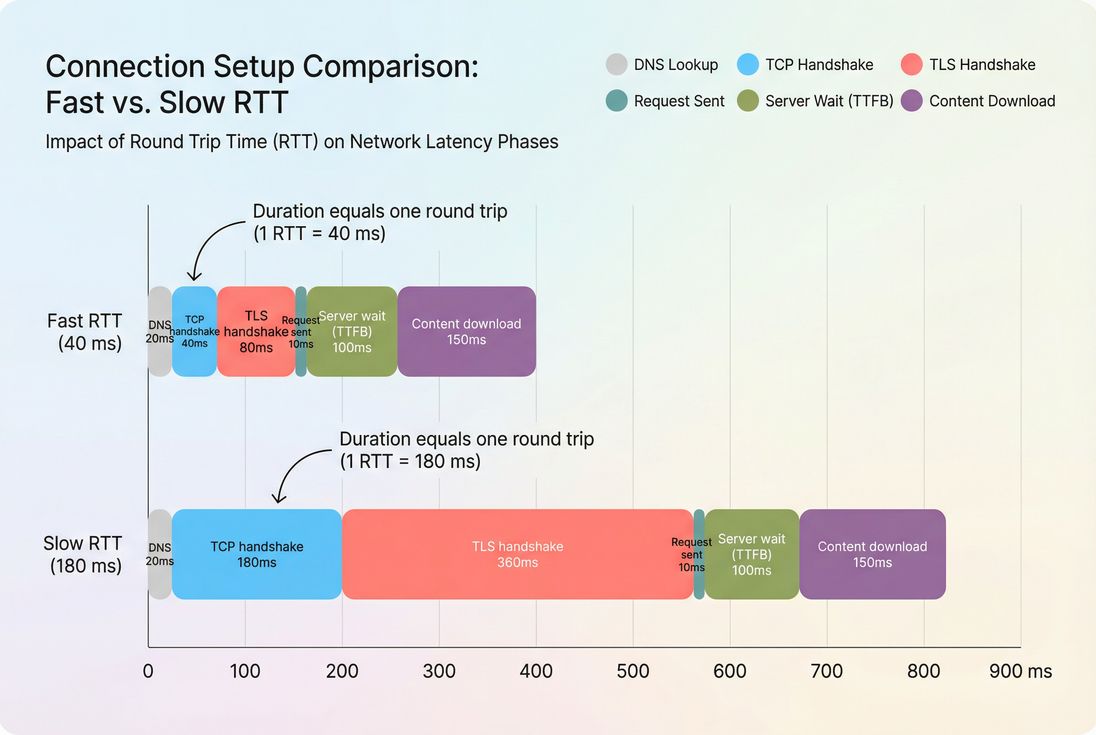
TCP handshake is paid before the first byte arrives; on higher-latency networks it can become a meaningful slice of TTFB and delay every new origin.
How it's "calculated" in tools
Most speed tools don't compute TCP handshake from first principles; they measure timings during the request lifecycle. In waterfalls, you'll usually see a phase like:
- Connect / Initial connection (often includes TCP, and sometimes DNS+TCP+TLS as a combined bucket depending on the tool)
- SSL or TLS (if split out)
- Wait (server time / TTFB)
- Receive (download)
Because vendors label phases differently, it helps to anchor on the concept:
- TCP handshake time is the time from starting a connection attempt to having an established TCP connection.
- It happens once per new connection.
- If the connection is reused, you don't pay it again for subsequent requests to the same origin.
If you need a quick mental model: TCP handshake time generally tracks network latency (round trips), while "wait" tracks backend and caching behavior (server response time).
What this metric reveals
Website owners don't optimize TCP handshake for its own sake. You use it to answer practical questions like:
- "Are users paying a connection penalty before they see anything?"
- "Did a routing or CDN change make users connect farther away?"
- "Did we add too many third parties that each require a new connection?"
- "Are we failing to reuse connections, so repeat views are slower than they should be?"
The Website Owner's perspective
If the first visit to a product page is slow but repeat navigations feel fine, TCP/TLS setup is a common culprit. If every pageview is slow, you may be paying repeated setup costs due to poor connection reuse, too many origins, or short keep-alive timeouts.
How TCP handshake influences business metrics
TCP handshake most often impacts business outcomes indirectly by inflating early-load timing:
- Higher bounce rate on landing pages when the first render is delayed (FCP and LCP)
- Lower conversion rate if checkout flows depend on third-party endpoints (payments, fraud, address validation) that each require a new connection
- Lower ad efficiency if paid traffic lands on pages that spend extra time connecting before content appears
TCP handshake can be a small number (like 60–100 ms) and still matter if it sits on the critical path for LCP, fonts, or above-the-fold assets (above-the-fold optimization, font loading).
When it breaks (and why)
A "bad" TCP handshake typically isn't one bug – it's a symptom. Here are the most common root causes that show up in real sites.
High latency (distance and routing)
Because the handshake is roughly one round trip, anything that increases RTT increases handshake time:
- Users geographically far from the server
- No edge presence or incorrect CDN configuration (CDN performance, CDN vs origin latency)
- Routing changes by ISPs (often region-specific)
- Corporate/VPN paths that detour traffic
This is why handshake problems often look "fine" in a local test location and terrible in certain countries or on mobile.
Packet loss and retransmits
TCP is reliable, but reliability has a cost. If packets are dropped during setup, the handshake can take multiple round trips due to retransmissions and timeouts.
This tends to show up as:
- Handshake time that is not just "high" but spiky and inconsistent
- A long tail in field/RUM distributions, even when medians look acceptable
Too many origins (third parties and subdomains)
Every distinct origin the browser must contact may require:
- DNS lookup
- TCP handshake
- TLS handshake
E-commerce stacks can accidentally create an "origin explosion":
- tag managers and analytics
- A/B testing
- review widgets
- personalization
- multiple CDNs for different asset types
- payment/fraud scripts
Even if each handshake is "only" 150–250 ms on mobile, 6–10 new origins can push critical content later by seconds.
See: third-party scripts and HTTP requests.
Poor connection reuse (you keep paying the setup tax)
TCP handshakes are expensive primarily when you pay them repeatedly. Common reasons:
- HTTP/1.1 usage with many parallel connections and less effective multiplexing
- Server/CDN/load balancer closing connections too aggressively (short keep-alive)
- Different hostnames for assets that could be consolidated
- Redirect chains to alternate hosts (each hop can create a new connection)
Connection reuse is a major lever, and it's why HTTP/2 performance often improves real pages even when bandwidth is unchanged. Also see: connection reuse.
TLS confusion: TCP vs TLS
Many teams see "connection time" in a waterfall and assume it's all TCP. On HTTPS, TLS often costs as much or more than TCP.
- TCP handshake establishes the transport.
- TLS handshake establishes encryption and negotiates protocol details.
If you're trying to reduce "connection setup," treat TCP and TLS together. Read: TLS handshake.
Benchmarks that help decisions
There's no universal "good" TCP handshake time because it depends on user geography and network type. But you can still use practical thresholds to decide when to act.
Rule-of-thumb ranges
For a primary site origin (HTML) for a typical US/EU audience:
| TCP handshake time | Practical interpretation | What to do |
|---|---|---|
| 0–100 ms | Healthy | Focus elsewhere unless many origins |
| 100–200 ms | Acceptable but watch | Reduce origins, ensure reuse, consider edge |
| 200–300 ms | Starting to hurt on mobile | Confirm CDN routing, preconnect critical origins |
| 300+ ms | Likely a real problem | Investigate distance/routing, connection churn, loss |
For global audiences, "healthy" may still be 150–250 ms depending on where users are relative to your edge/origin. This is why comparing lab tests to field data matters (field vs lab data).
The Website Owner's perspective
Treat handshake benchmarks as "budget inputs," not vanity numbers. If 250 ms is normal for a key market, your real question becomes: how many times per page are you paying it, and is it blocking revenue-driving content (hero, price, add-to-cart)?
A more actionable benchmark: handshake share of TTFB
Instead of chasing an absolute number, look at how much handshake contributes to TTFB:
- If connect + TLS is a large portion of TTFB, you're looking at a network/setup problem (edge, routing, reuse).
- If wait dominates, it's a backend/caching problem (edge caching, browser caching, Cache-Control headers).
How to diagnose it quickly
You want to answer two questions fast:
- Which origins are paying the handshake cost?
- Is it paid once (reused) or repeatedly (churn)?
Start with a waterfall, per origin
A network waterfall is the fastest way to see handshake behavior and connection reuse patterns.
If you use PageVitals, the Network request waterfall report is designed for this type of analysis: /docs/features/network-request-waterfall/
Look for:
- The first request to each origin: it usually includes the connect cost
- Later requests to the same origin: they should be faster if the connection is reused
- Multiple requests showing repeated connect phases: that signals connection churn
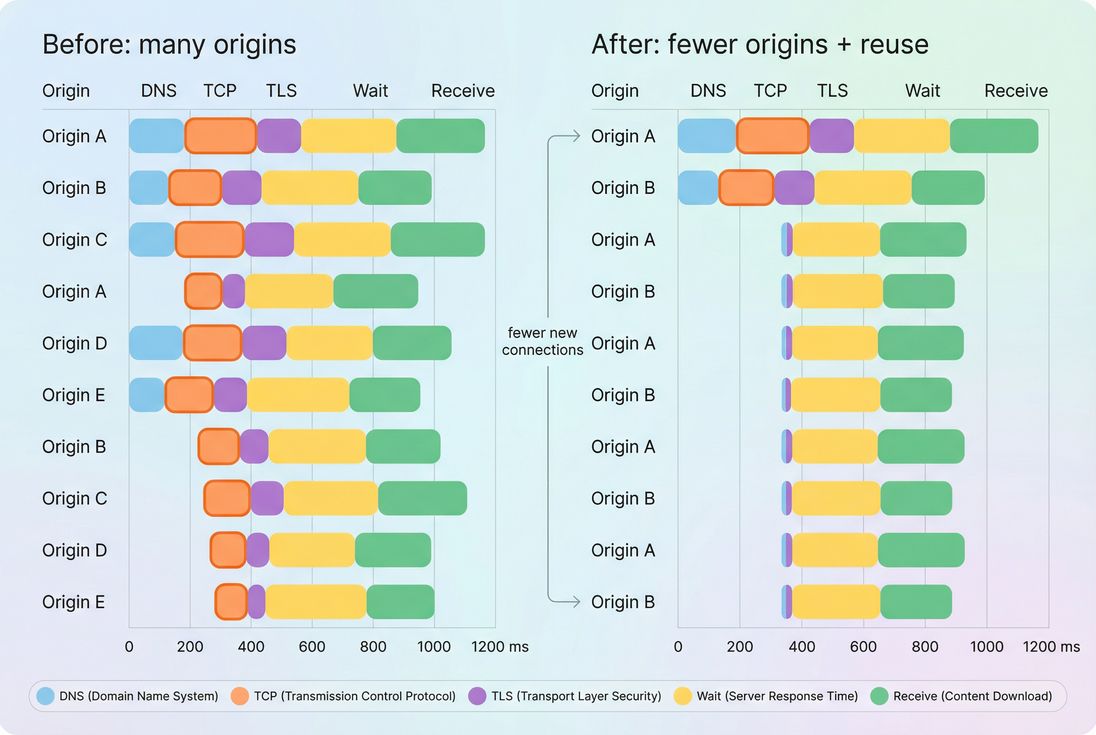
Handshakes mostly appear on the first request per origin; repeated TCP segments on later requests usually indicate connection churn or too many distinct origins.
Separate three common patterns
Pattern A: One slow handshake (main HTML origin)
Likely distance/routing/CDN issue. Validate edge configuration and regional routing (CDN performance).
Pattern B: Many "normal" handshakes (lots of origins)
Likely third-party and architecture issue. Reduce origins, defer non-critical third parties, or consolidate (third-party scripts).
Pattern C: Repeated handshakes to the same origin
Likely keep-alive timeouts, HTTP/1.1 limitations, load balancer behavior, or connection reuse issues (connection reuse, HTTP/2 performance).
Use RTT to sanity-check expectations
TCP handshake should broadly track RTT. If your RTT is high, you won't "optimize" your way to a low handshake time without changing where users connect.
If you use PageVitals, the RTT metric is documented here: /docs/metrics/round-trip-time/
At the concept level, RTT is explained in ping latency and network latency.
If you see handshake time far above expected RTT (especially in bursts), that's where you suspect packet loss or retransmits.
Don't forget redirects
Redirects create extra requests and often extra connections, especially when they point to different hosts. They can amplify handshake costs before the real page even starts. If you're investigating early delays to HTML, always check for redirects and host changes.
How to reduce TCP handshake cost
You generally have four levers. The right one depends on what your diagnosis shows.
1) Reduce new origins
This is often the highest ROI for e-commerce.
- Audit third-party scripts and remove the ones that don't clearly pay for themselves.
- Consolidate assets onto fewer hostnames where possible.
- Avoid splitting critical CSS/JS/fonts across multiple domains unless there's a strong reason.
Related: render-blocking resources, critical rendering path.
The Website Owner's perspective
If a marketing script adds 200–400 ms of connection setup on mobile and it's loaded before the user can see price and add-to-cart, it's not a "technical detail" – it's a direct conversion tradeoff. Move it later, or justify it with measurable lift.
2) Improve connection reuse
Connection reuse means you pay the handshake once and get many requests "for free" afterward.
Practical steps:
- Ensure HTTP keep-alive is enabled end-to-end (origin, load balancer, CDN).
- Prefer HTTP/2 for multiplexing many requests over one connection.
- Watch for overly short idle timeouts that force frequent reconnects.
- Reduce host variation (www vs apex, multiple asset subdomains) unless needed.
This is especially important when a page has many small resources (icons, chunks, tracking pixels). Even with asset minification and compression (Brotli compression, Gzip compression), connection churn can keep you slow.
3) Get users closer to an edge
If the main issue is raw distance/latency, you need to change where the connection terminates.
- Use a CDN effectively for static assets (edge caching)
- Consider whether HTML can be cached at the edge (even for short TTLs)
- Validate PoP selection and routing for your priority geographies (CDN vs origin latency)
This reduces RTT, which reduces handshake time and often improves the entire early load.
4) Use preconnect (selectively)
Preconnect tells the browser: "Start DNS + TCP + TLS now, because we'll need it soon." It doesn't remove handshake cost; it moves it earlier so it doesn't block later.
Use it for:
- A small number of origins required early for rendering or checkout
- Critical font/CDN origins if they delay above-the-fold text
- Payment/fraud endpoints that must run before checkout progresses
Avoid:
- Preconnecting to everything (wastes sockets and bandwidth contention)
- Preconnecting to origins only used far later (or only on some interactions)
If you're unsure, start by preconnecting one third-party origin that you know is on the critical path, measure, then expand carefully.
What improvement looks like in outcomes
You should expect improvements to show up as:
- Lower "initial connection" time on the critical request chain
- Lower TTFB when setup dominated it
- Faster start of downloading the LCP resource (especially on first visit)
- More stable performance (smaller "long tail" if loss/retransmits were involved)
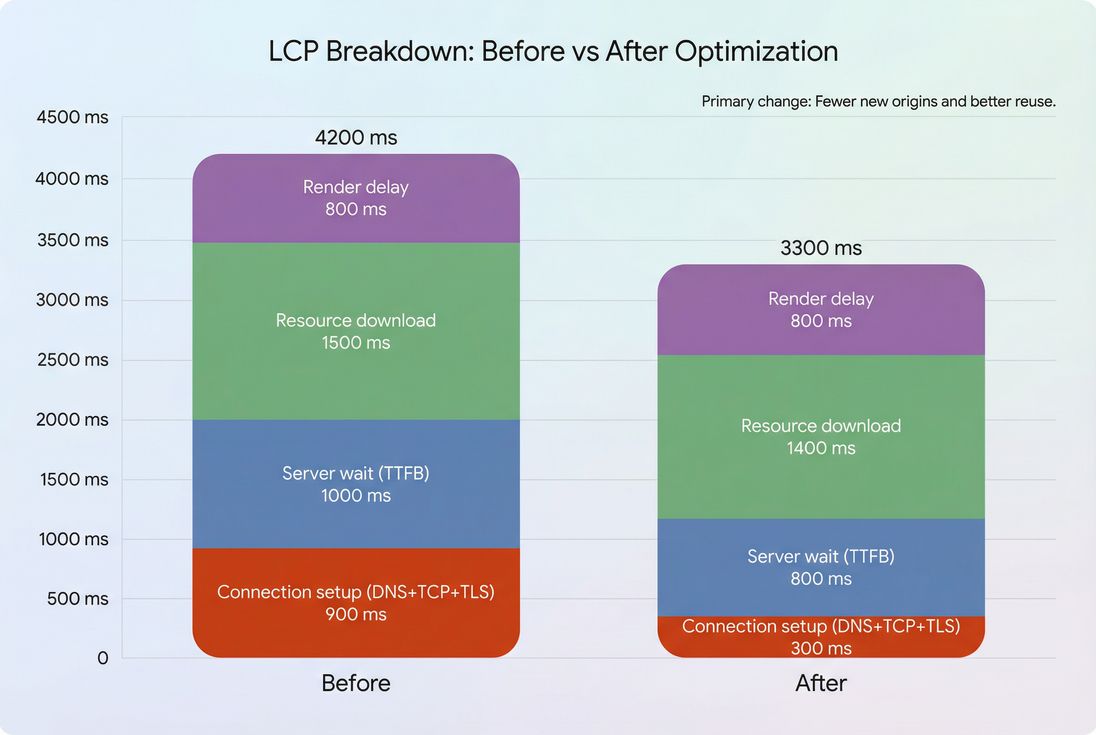
When connection setup is a meaningful part of LCP, reducing TCP/TLS costs (often by fewer origins and better reuse) can produce visible user-facing wins.
When not to chase TCP handshake
Sometimes teams fixate on handshake because it's measurable, but it's not always the bottleneck.
Deprioritize TCP handshake optimization when:
- LCP is dominated by render delay or main-thread work (reduce main thread work, JavaScript execution time)
- The handshake is small and paid once, but the page is slow due to heavy JS, layout instability, or blocking CSS (critical CSS, unused JavaScript, unused CSS, layout instability)
- Your biggest issue is backend compute or cache misses (high server "wait" time)
TCP is most worth your time when it's clearly on the critical path and/or multiplied across many origins.
A simple checklist for busy teams
If you want an operational way to use this metric in weekly performance work:
- Count origins on key templates (home, category, product, cart, checkout).
- In waterfalls, identify first request per origin and note connect/TLS cost.
- Verify connection reuse: subsequent requests should not repeat connect phases.
- If the main origin handshake is high, prioritize edge and routing.
- If third parties drive handshakes, prioritize removal, deferral, or consolidation, then selective preconnect.
Finally, validate improvements in both:
- Lab tests (repeatable) and
- Field distributions (real users), using sources like CrUX data and broader real user monitoring.
TCP handshake isn't glamorous, but it's one of the cleanest "physics limits" in page speed: if users have to travel farther (or more often), pages get slower. Your job is to make them travel less distance and fewer times.
Frequently asked questions
A solid target is under 100 ms to your primary HTML host for most US and EU users, and under 200 ms for broader regions. If you routinely see 300 ms or more, customers are paying a noticeable "connection tax" before anything loads, especially on mobile.
It can, when the LCP resource (often the HTML or a hero image request) is delayed by new connections. Handshake time doesn't directly measure LCP, but it commonly inflates TTFB and delays the start of downloading critical assets. Biggest wins appear when many new origins are involved.
A spike often means users are no longer connecting to a nearby edge or are being routed to a distant PoP. It can also happen if the CDN/WAF is forcing new connections more often due to short keep-alive timeouts. Compare regions and check connection reuse behavior in waterfalls.
No. Preconnect is best for a small number of high-impact, early-needed origins. Overusing it can increase contention on the network, waste sockets, and even slow down the critical path on mobile. Start with payment, fraud, fonts, or the one third party that gates above-the-fold rendering.
Use a network waterfall and separate "connect" time from "wait" time. High connect time points to latency, routing, or connection reuse issues. High wait time points to backend or caching issues. Since both roll into TTFB, you need the breakdown to choose the right fix.
Want to take PageVitals for a spin?
Page speed monitoring and alerting for your website. Get daily Lighthouse reports for all your pages. No installation needed.
Start my free trial