Table of contents
Third-party scripts and page speed
Third-party scripts are one of the most common reasons an otherwise "optimized" site still feels slow – especially on mobile. The business impact is straightforward: if product pages render later, taps feel laggy, or layouts jump, shoppers bounce and paid traffic gets less efficient.
A third-party script is any JavaScript (and often related CSS, fonts, images, or iframes) loaded from a domain you don't control. Third-party script impact on page speed is the extra network time, main-thread CPU work, and visual instability those external resources introduce – often early in the page load, and often outside your caching and release process.
The Website Owner's perspective: Third parties are rarely "free." You're trading speed (conversion rate, SEO, retention) for capability (ads, analytics, chat, A/B testing). The job isn't to eliminate all tags – it's to make sure each one earns its performance cost.
What third-party scripts really cost
Third-party impact shows up in three places that map directly to Core Web Vitals: loading speed (LCP), interactivity (INP), and visual stability (CLS).
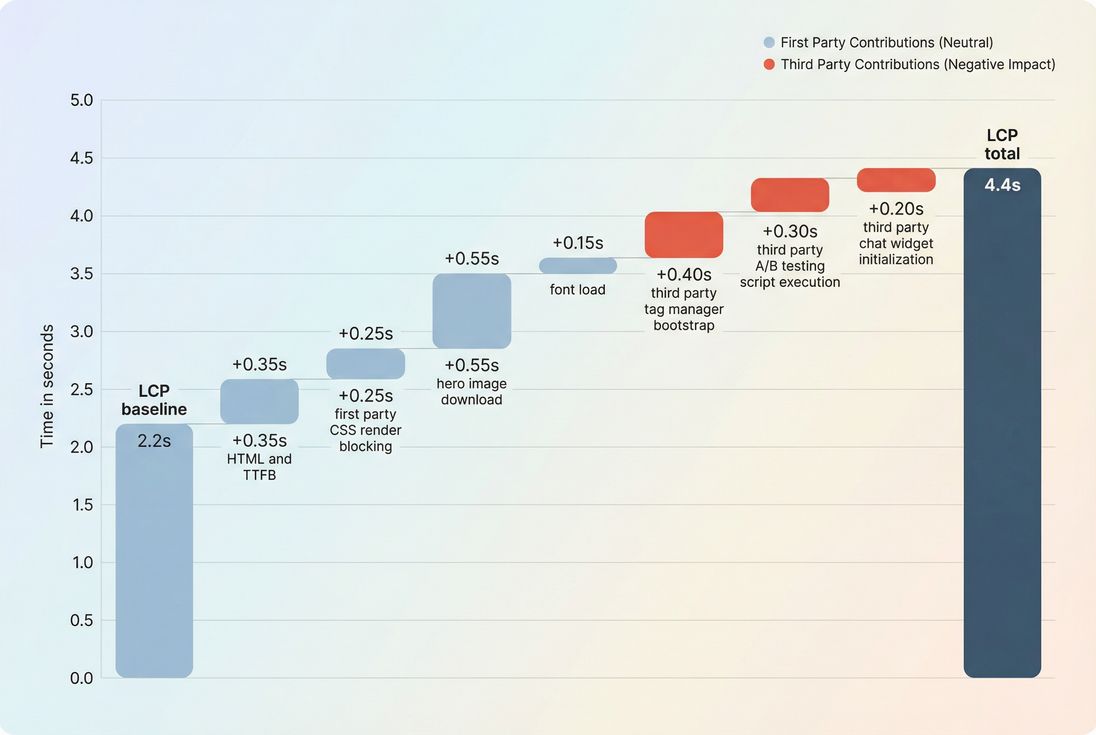
Network overhead you don't control
Every third-party domain can add its own latency taxes:
- DNS lookups (DNS lookup time)
- New TCP connections (TCP handshake)
- TLS negotiation (TLS handshake)
- Sometimes worse connection reuse if many vendors each require their own connection (Connection reuse)
Even if the script file is small, the connection setup can be expensive on mobile networks (Network latency, Mobile page speed).
Render blocking and delayed content
Third-party scripts commonly end up in the critical path by accident:
- Inserted in
<head>withoutdefer - Loaded by a tag manager that runs early
- Injecting additional scripts/styles that block rendering
This pushes out FCP and LCP, especially when combined with other Render-blocking resources or missing Critical CSS.
Main-thread contention and worse INP
Third-party JavaScript can monopolize the browser's main thread during and after load:
- Parsing and compiling large scripts
- Executing bootstraps, listeners, DOM scanning
- Repeated timers and long-running work
This shows up as:
- More Main thread work
- More Long tasks
- Worse JavaScript execution time
- Higher Total blocking time in lab tools, and often worse INP in the field
Layout shifts from injected UI
Any third-party UI that appears late can trigger CLS:
- Chat widgets
- Review badges
- Cookie banners
- Personalization inserts
- Late-loading fonts (Font loading)
If it changes layout after the user sees content, you've introduced instability (Layout instability, Zero layout shift).
How to measure third-party impact
There isn't one universal "third-party score." Instead, you measure how much of your page's loading and CPU time is attributable to third-party origins, and whether that cost lands before your key milestones (FCP/LCP) or during interaction (INP).
What tools usually "calculate"
Most speed tools group requests by origin (domain) and classify any domain that isn't your site (or your controlled subdomains) as third-party. Common rollups include:
- Request count (how many calls to third-party domains)
- Transfer size (download weight from third parties)
- CPU time / main-thread time attributed to third-party scripts
- Blocking time caused by long tasks that run on the main thread
These rollups are especially useful when you compare before vs after a tag change.
Use lab tests to find the culprits
Lab data is best for answering: "Which script is doing the damage, and when?" (See Field vs lab data.)
In PageVitals, the most actionable artifact is the network waterfall:
Use it to spot:
- Early third-party requests starting before your hero content is stable
- Synchronous scripts that delay parsing/painting
- Chains where one vendor loads multiple others
- Late but heavy execution that lands right before LCP
If you run Lighthouse-based synthetic tests, you can also use:
And if cookie banners interfere with repeatable lab results, use:
Use field data to validate business impact
Field data answers: "Are real users paying the price?" (See Measuring Web Vitals and Real user monitoring.)
You're looking for:
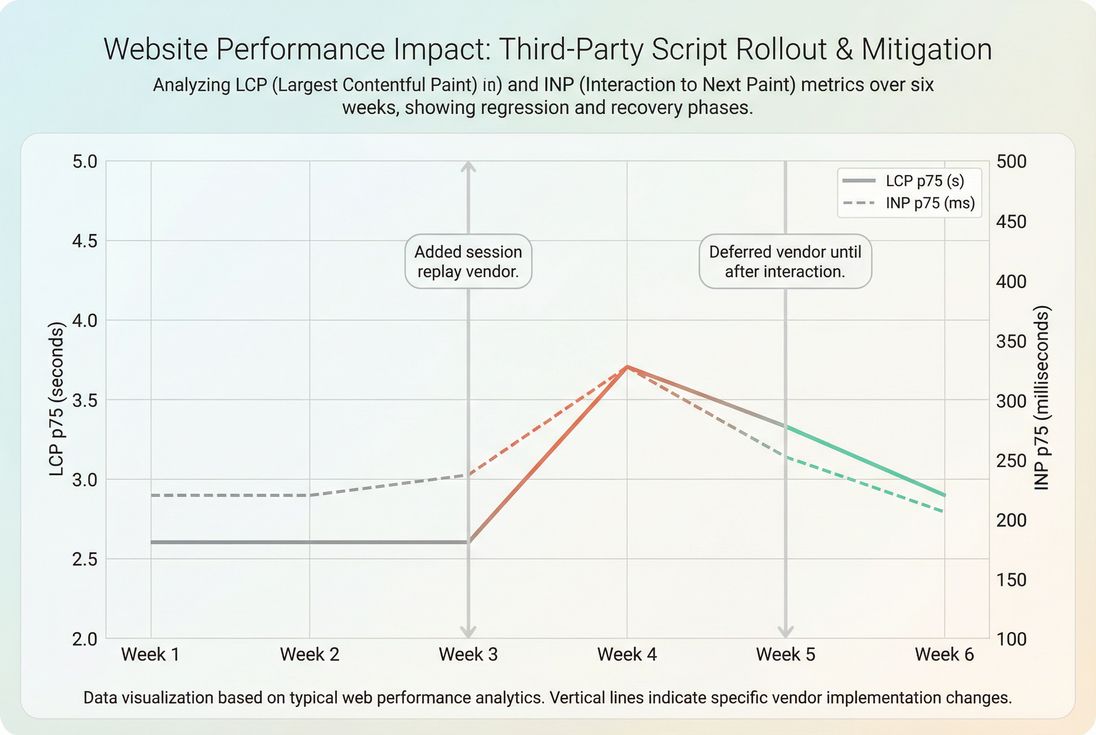
- LCP p75 increasing on landing/product pages after a tag rollout
- INP p75 regressing, especially on pages with heavy widgets
- CLS p75 worsening on pages with injected UI
If you use Chrome UX Report style aggregation, learn how it behaves:
The Website Owner's perspective: Lab tests tell you "what to fix." Field data tells you "whether it matters." Many teams waste cycles shaving milliseconds off first-party CSS while a third-party A/B tag quietly adds hundreds of milliseconds to LCP for mobile users.
A practical attribution workflow
- Inventory all third parties by domain and purpose (analytics, ads, A/B, chat, fraud, reviews).
- Run a lab test and mark which third parties begin before LCP.
- Identify top offenders by (a) early start time and (b) CPU/long tasks.
- Change one thing (remove, delay, replace, or reconfigure one vendor).
- Re-test in lab, then validate in the field over a full traffic cycle.
This is where Performance budgets become operational instead of aspirational.
Benchmarks and red flags
"Good" depends on your business model (publishing vs e-commerce vs SaaS), but the red flags are surprisingly consistent.
Red flags that usually mean regressions
If any of these are true, third parties are likely harming your Web Vitals:
- A third-party script is render-blocking (in the critical rendering path)
Related: Critical rendering path - A tag manager loads multiple vendors before LCP is reached
- You see frequent long tasks during load and immediately after
- The page "looks done" but then becomes unresponsive (INP risk)
- UI inserts cause repeated layout movement (CLS risk)
Heuristics that work for busy teams
Use these rules as quick prioritization (not as absolute standards):
| Signal | Why it matters | What to do next |
|---|---|---|
| Third parties start before LCP | They can delay your primary content | Defer, lazy load, or replace |
| Third parties dominate main-thread time | They can worsen INP | Reduce vendors, use lighter options, delay execution |
| Many third-party domains | Connection and reliability risk | Consolidate vendors, remove duplicates |
| Tag sprawl through a manager | Governance problem, not just a tech problem | Approval workflow + budgets |
| Layout shifts tied to widgets | Direct CLS impact | Reserve space, load after interaction |
The Website Owner's perspective: Don't argue about "how many tags is too many." Decide what user experience you're protecting (fast product browsing and checkout), then treat anything that threatens that experience as requiring proof of value.
Decide what stays, replaces, or goes
Most teams fail here because decisions are emotional ("marketing needs it") instead of evidence-based ("this tag pays for itself").
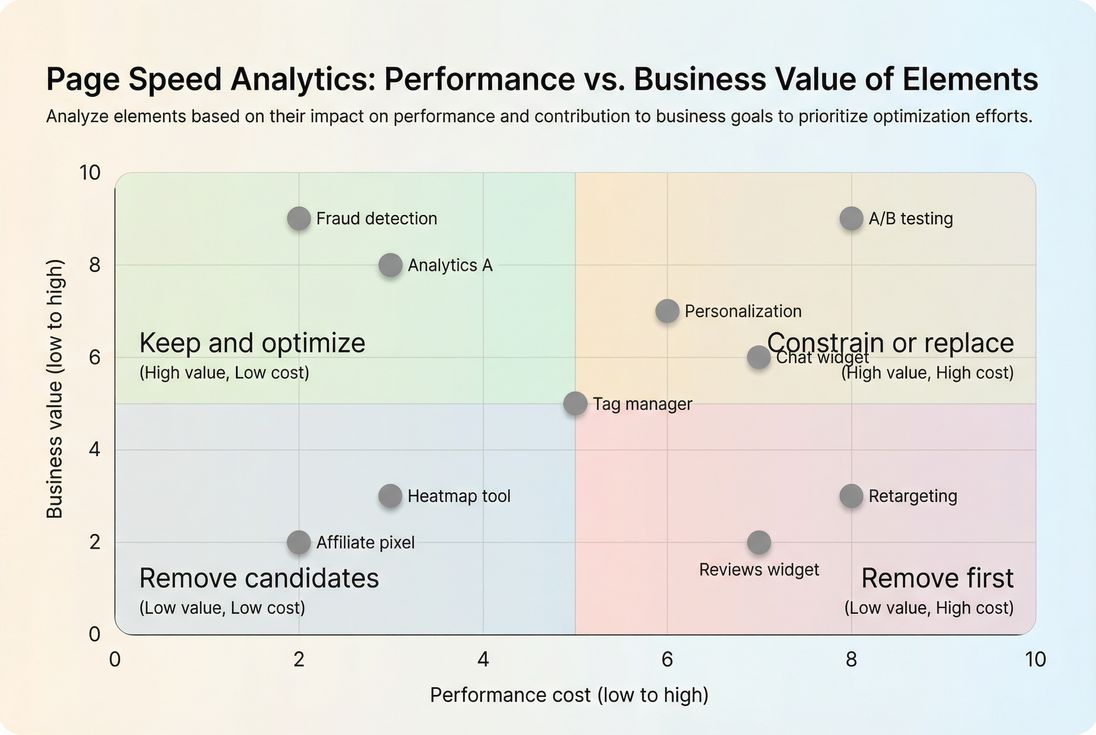
A useful approach is to score each third party on two axes:
- Business value (revenue attribution, fraud reduction, support deflection)
- Performance cost (impact on LCP/INP/CLS and reliability)
Typical consolidation wins on e-commerce sites
Common "duplicate capability" patterns:
- Multiple analytics collectors doing similar session tracking
- Several A/B/personalization tools layered over time
- Separate pixels for each ad network firing on every page
- Chat + support widget + survey widget all running at once
The fastest pages usually have fewer vendors, but more importantly they have fewer vendors loading before the page is usable.
Replace or reconfigure before removing
Removal isn't always realistic. Often you can keep the capability while reducing cost:
- Load on specific pages only (checkout vs all pages)
- Trigger on events (after add-to-cart, after consent, after interaction)
- Reduce sampling (heatmaps/session replay rarely need 100% traffic)
- Move from client-side to server-side where possible (especially for analytics/pixels)
- Reduce payload (disable features, remove plugins)
When the problem is simply too much JavaScript, revisit:
Implement safer loading patterns
Once you decide a vendor stays, your goal is to ensure it loads without stealing time from the critical path.
Put the critical path first
Your priorities should be:
- Render above-the-fold content quickly (Above-the-fold optimization)
- Hit LCP fast (LCP)
- Keep the main thread responsive for the first interactions (INP)
This often means third parties should not execute until after the page is visually stable.
Use defer and async intentionally
The attribute choice determines when scripts execute relative to parsing:
deferis usually the default for noncritical scripts that can wait.asynccan be fine for isolated scripts, but it can also create unpredictable execution order.
If your team frequently debates this, align on one rule set and document it:
Delay noncritical scripts without breaking them
Patterns that work well:
- Load after consent (especially for marketing/ads)
- Load after interaction (first scroll, first tap, opening chat)
- Idle time loading (after LCP, when CPU is available)
- Route-based loading (don't load product review widgets on category pages)
Preconnect only for proven early needs
You can reduce connection setup time with:
But be careful: preconnecting to every vendor can waste resources and battery. Only preconnect to domains that must load early and demonstrably help LCP.
Isolate layout shifts from third-party UI
If a widget must appear, prevent CLS:
- Reserve space (fixed container dimensions)
- Avoid inserting content above existing content
- Avoid late-loading fonts or ensure font fallback behavior is stable (Font loading)
Related:
Self-host carefully (when it's legal and stable)
Self-hosting third-party scripts can help caching and reduce variability, but it can also create compliance and maintenance issues. If you do self-host, treat it like first-party:
- Proper caching (Browser caching, Cache-Control headers, Cache TTL)
- Compression (Brotli compression, Gzip compression)
- Minification (Asset minification)
- CDN delivery (CDN performance)
Prevent regressions with budgets and governance
Third-party performance problems usually come back unless you operationalize control.
Make third-party additions "ship through the same process"
At minimum:
- Require a before/after lab test for any new vendor
- Record the owner (who asked for it) and success metric
- Set an expiration date ("re-justify in 90 days")
Use performance budgets as guardrails
Budgets don't need to be perfect – they need to be enforceable. In PageVitals you can set budgets and alert when changes exceed them:
Examples of enforceable budgets for third parties:
- Maximum number of third-party domains on key templates
- Maximum third-party JS transfer size on mobile
- Maximum increase allowed in LCP/INP after tag changes
Keep lab and field aligned
If lab is improving but field isn't, re-check:
- Device mix and network mix (Round Trip Time, Ping latency)
- Specific templates (PDP vs PLP vs homepage)
- Whether tags behave differently for logged-in users, regions, or consent states
For teams deciding how to balance both views:
The practical takeaway
Third-party scripts aren't inherently bad – but uncontrolled third-party execution in the critical path is one of the fastest ways to lose LCP, INP, and CLS. Treat each vendor like a paid employee: it needs an owner, a job to do, and a budget it can't exceed.
Frequently asked questions
It depends on how early they load and how much JavaScript they execute. The biggest risks are slower LCP from render blocking and extra network handshakes, worse INP from main thread long tasks, and CLS from injected UI. In practice, a single heavy tag can move a borderline page into failing.
For most e-commerce pages, aim to keep third party JavaScript smaller than first party JavaScript and avoid loading noncritical tags before the first render. As a rule of thumb, if third parties account for more than about one third of JS execution time in lab tests, you are likely sacrificing LCP and INP.
Not automatically. Tag managers add overhead, but the bigger issue is tag sprawl and early loading. Many sites keep the manager and still get fast by enforcing a tag budget, deferring noncritical vendors, and loading tags on consent or after interaction. Remove it only if governance cannot be enforced.
Use a network waterfall plus main thread timing to attribute cost to domains and scripts. Look for render blocking requests, late arriving JavaScript that runs before LCP, and long tasks tied to third party execution. Validate in field data by checking whether pages with that vendor show worse INP or LCP.
Sometimes, but it is usually tunable. Many analytics and marketing tags can load after the first render with minimal business impact, especially on product and content pages. Treat it as an experiment: delay or scope the tag, measure conversion and attribution changes, then keep the fastest configuration that preserves outcomes.
Want to take PageVitals for a spin?
Page speed monitoring and alerting for your website. Get daily Lighthouse reports for all your pages. No installation needed.
Start my free trial