Table of contents
Critical CSS and render performance
A slow first render does not just "feel" bad – it changes shopping behavior. When users land on a category or product page and see a blank screen for an extra second, you pay for the click but lose the session before they ever see the product, price, or trust signals.
Critical CSS is the smallest set of CSS required to render the above-the-fold content for the initial viewport. Improving render performance means getting pixels on screen sooner – typically reflected in metrics like First Contentful Paint (FCP), Largest Contentful Paint (LCP), and Speed Index.
Why CSS can delay the first paint
To paint anything, the browser needs enough information to build the render tree (DOM + CSSOM). That's why CSS is commonly render-blocking: until required styles are downloaded and parsed, the browser may delay painting to avoid showing unstyled or incorrectly styled content.
This is the heart of the critical rendering path problem:
- HTML arrives and is parsed into the DOM.
- External CSS is discovered and requested.
- The browser builds the CSSOM after CSS is downloaded and parsed.
- Only then can it compute layout and paint.
If your page loads a single large stylesheet (or multiple stylesheets) early in the <head>, your first paint often waits on CSS – even if the page is otherwise simple.
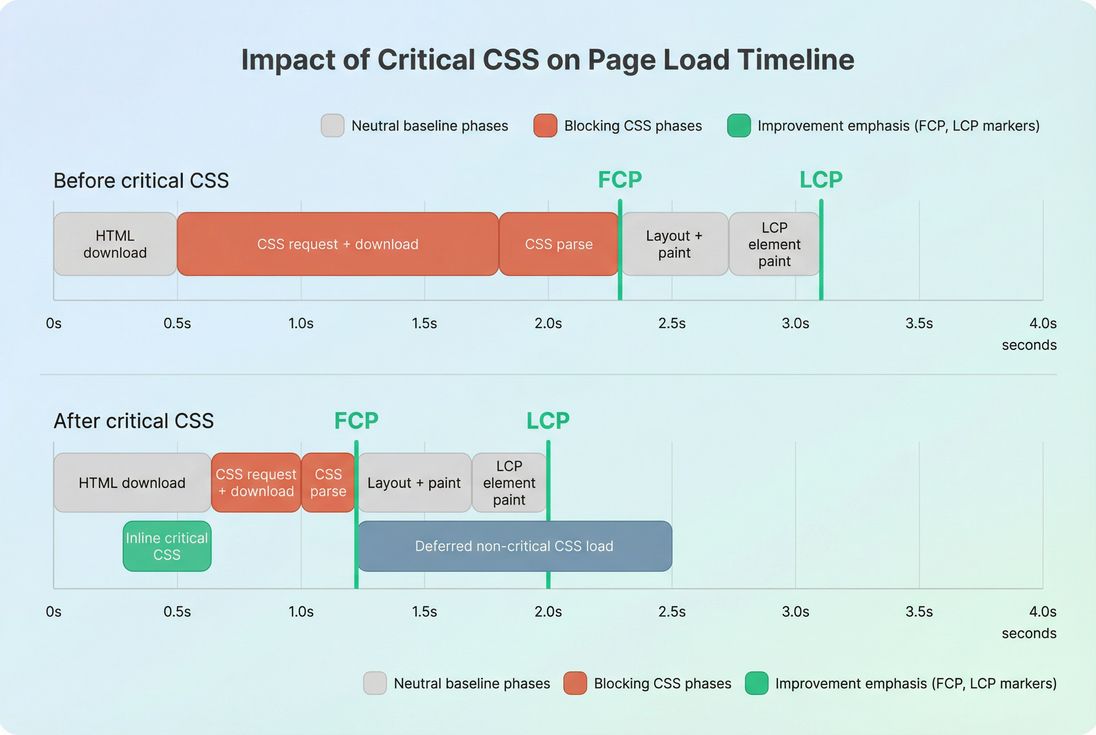
The Website Owner's perspective: If your paid traffic lands on a blank screen, you are effectively bidding for sessions that never see your merchandise. Critical CSS is one of the few optimizations that can directly reduce "blank time" without changing your design or copy.
What "critical" really means
"Critical" does not mean "important to your brand." It means required to render the initial viewport (your above-the-fold content) without broken layout or unreadable text.
Critical CSS usually includes:
- Layout and positioning for the header, nav, hero, and primary product tile(s)
- Typography rules that prevent giant reflows (font sizes, line heights, key font families)
- Spacing rules that prevent collapsing margins or sudden jumps
- Any CSS required for the LCP element (often a hero image container or product title block)
What is usually not critical:
- Styles for content far below the fold (footer, recommendations carousels below)
- Rare UI states (open modal, expanded accordion, error states)
- Admin-only or A/B test variants unless they appear above the fold for many users
This aligns tightly with above-the-fold optimization: your goal is to make the initial viewport render quickly and correctly, while letting the rest load shortly after.
Why "unused CSS" matters here
When teams ship a theme stylesheet that includes everything for every page template, the browser still has to download and parse it before it can confidently paint. That's why unused CSS is not just a "bytes" problem – it's often a render-blocking problem.
How render performance is measured in practice
Critical CSS isn't a standalone metric; it's a lever that influences paint milestones and user-perceived speed.
Here's how you'll usually see the impact:
- FCP improves when render-blocking CSS is reduced or made available sooner.
- Speed Index improves when the page fills visually sooner and more smoothly.
- LCP improves when the LCP element's layout and styling can resolve earlier (and when you avoid late style changes that delay its final render).
In lab tools (Lighthouse, WebPageTest-style results), CSS shows up as "render-blocking resources." In field data, the impact appears as improved distributions for FCP/LCP and, indirectly, better engagement.
To avoid confusion, keep this distinction in mind:
- Lab tests show you what happens in a controlled run and are great for confirming that CSS is blocking.
- Field data confirms whether real users actually got faster paints. See field vs lab data and CrUX data.
If you use PageVitals, the most actionable starting point is the request-level view (waterfall) and paint markers – see the docs on the Network request waterfall and Lighthouse tests.
When critical CSS is worth the effort
Critical CSS work pays off most when:
- Your HTML arrives quickly, but users still stare at a blank screen (CSS is the bottleneck).
- You have large theme CSS shared across templates (common in e-commerce and page builders).
- You have multiple early CSS files (framework + theme + plugins) that must all finish before paint.
- Mobile users on slower networks dominate your traffic (mobile page speed amplifies CSS costs).
It tends to matter less when:
- Your TTFB is already slow (fix backend and caching first).
- Your page is JS-heavy and blocked by JavaScript execution time and long tasks more than CSS.
- You already have a small, route-scoped stylesheet (common in well-tuned SPAs with CSS modules).
How to implement critical CSS safely
There are three broad strategies, each with real trade-offs.
Option 1: Inline critical CSS, defer the rest
This is the classic approach:
- Inline critical CSS in the
<head>so it arrives with the HTML. - Load the full stylesheet in a non-render-blocking way (commonly via
mediaswap or similar), then apply it after first paint.
Pros
- Fastest path to earlier FCP (CSS is available immediately).
- Works even when your CSS is hosted elsewhere (no extra request needed for the critical slice).
Cons
- Inlined CSS is not separately cacheable.
- If you inline too much, you bloat HTML and can slow initial delivery.
Practical benchmark: many high-performing sites keep inlined critical CSS relatively small (often in the single-digit KB range compressed), and rely on caching for the full CSS via Cache-Control headers and browser caching.
Option 2: Split CSS by template or route
Instead of one "mega stylesheet," you use page-aware bundles:
- Home gets home.css
- Category gets category.css
- Product gets product.css
- Checkout gets checkout.css
This is conceptually similar to code splitting, but for CSS. It reduces how much CSS is even eligible to become render-blocking.
Pros
- Big reduction in unused CSS and parse time.
- Better caching than inlining everything.
Cons
- Requires build pipeline support and discipline.
- More bundles can mean more requests (mitigated by HTTP/2 and good caching).
Option 3: Reduce and optimize the existing CSS
Sometimes the fastest win is simply making the same stylesheet smaller and cheaper to parse:
- Remove unused selectors (unused CSS)
- Minify (asset minification)
- Compress at the network layer (Brotli compression or Gzip compression)
- Cache aggressively (effective cache TTL)
This won't eliminate render-blocking behavior, but it reduces the penalty.
Comparison table: choose the right approach
| Approach | Best for | Risk to watch | Typical outcome |
|---|---|---|---|
| Inline critical + defer rest | Theme-heavy sites with slow FCP | Missing rules causing flicker/CLS | Strong FCP/Speed Index improvements |
| Split by template/route | Sites with multiple distinct layouts | Bundle sprawl and regressions | Sustained improvements across templates |
| Reduce existing CSS | Teams needing low-risk change | Gains may be smaller | Moderate improvement, easier rollout |
The Website Owner's perspective: Critical CSS is not a "developer vanity project" when it's tied to templates that drive revenue. If product and category pages get 30–50% of sessions, those are the templates where faster first render tends to show up as higher engagement and more product views per session.
Common failure modes (and how to avoid them)
Flash of unstyled content or late reflow
If you inline too little, you may see:
- Unstyled header/nav for a moment
- Text resizing after fonts apply
- Layout shifting when full CSS arrives
This can impact CLS if the late CSS changes sizes or positions of above-the-fold elements. Use zero layout shift principles: reserve space, set dimensions, include structural rules in the critical set.
Fonts blocking the "final" look
Even with perfect critical CSS, web fonts can delay text rendering or cause swapping. Font strategy often needs to be solved alongside critical CSS. See font loading.
Third-party CSS and tag managers
Marketing tools sometimes inject CSS or load additional stylesheets. These can quietly reintroduce render-blocking resources. This overlaps with third-party scripts – even if the problem presents as "CSS," the source might be a script.
Over-inlining and HTML bloat
Inlining is not free. If you embed a large chunk of CSS into every HTML response, you increase:
- HTML transfer size
- Time to parse the document
- Work on the main thread before first paint
Keep the inlined slice small and focused on above-the-fold layout.
How to diagnose CSS render-blocking quickly
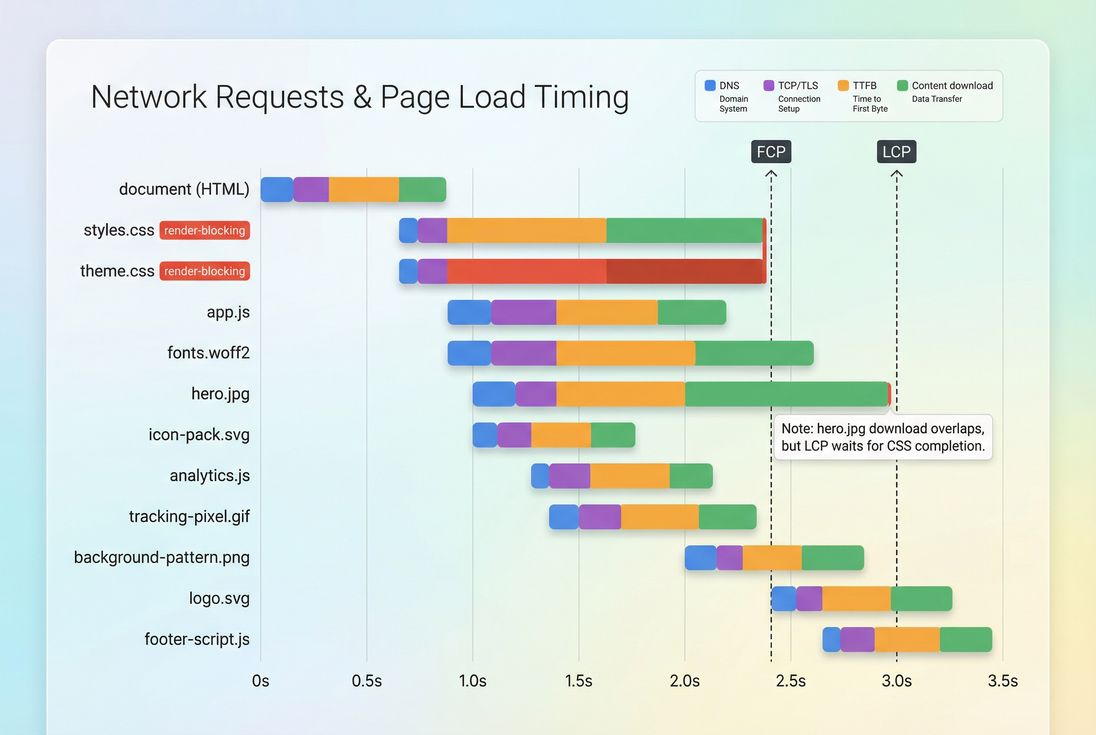
Use a mix of a waterfall view and paint timing.
What to look for in a waterfall
In a waterfall, the telltale sign is simple: FCP occurs only after the last render-blocking stylesheet finishes downloading and parsing.
Practical diagnosis checklist
- Is the CSS discovered early (in
<head>) and does it start downloading immediately? - How many CSS files are render-blocking?
- Are those CSS files large or slow to download (compression/caching issues)?
- Do you see big "unused CSS" opportunities in audits?
- Does removing or delaying a stylesheet in a test run dramatically improve FCP/LCP?
If the answer is yes to the last question, you have a strong candidate for critical CSS work.
How to keep improvements from regressing
Critical CSS is easy to break slowly: a new component gets added above the fold, a new promo banner appears, or marketing adds a new stylesheet.
A sustainable approach includes:
Template-based ownership
Tie critical CSS generation to templates (home, category, product, checkout) so the rules match real layouts.Performance budgets
Put an upper bound on render-blocking CSS bytes or on "number of blocking stylesheets." If you use PageVitals, set this up via Performance budgets.CI checks for key pages
Run scheduled or PR-based tests on your money pages. PageVitals supports CI workflows – see GitHub Actions CI/CD or the CLI CI/CD.Field validation
Use real-user distributions to confirm the win persists across devices and networks. If you're looking at CrUX-style aggregation, start with CrUX data.
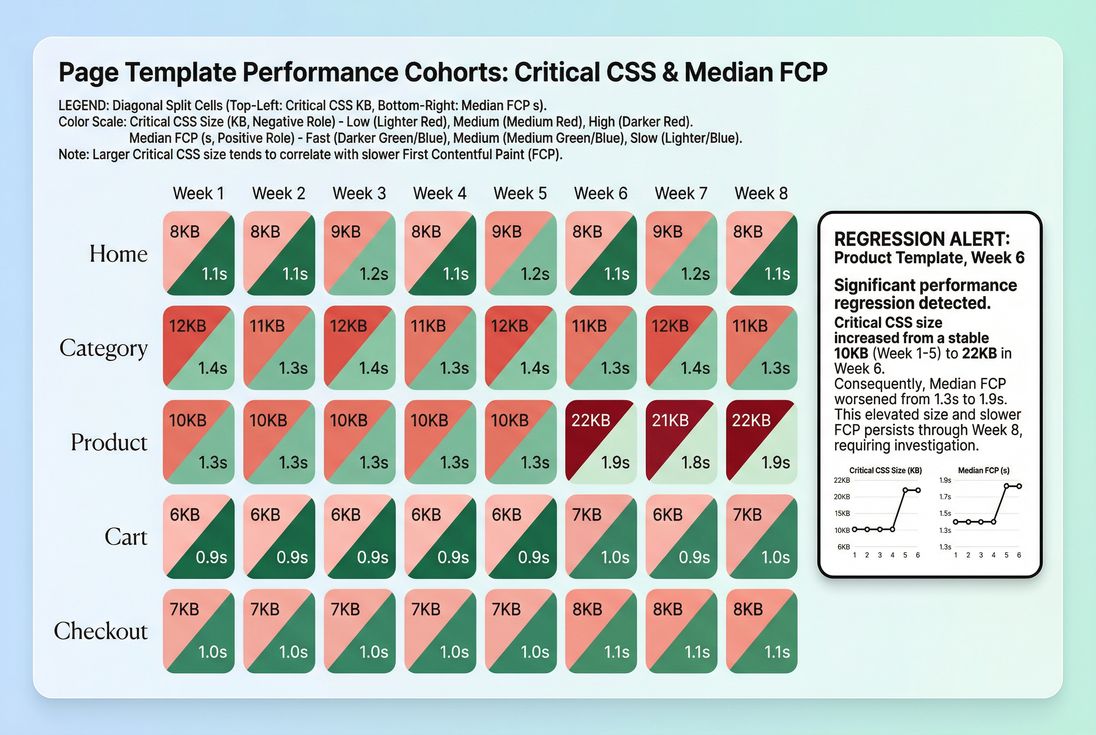
The Website Owner's perspective: This is where performance becomes operational. If you run frequent campaigns, your above-the-fold content changes often. Treat critical CSS as part of release hygiene – otherwise you'll see "mysterious" drops in conversion rate that are really just slower first render.
Decision guidance: what changes mean
When you ship a critical CSS improvement, interpret results like this:
- FCP drops, LCP unchanged: You improved the blank-screen problem, but the LCP element is still waiting on something else (often image loading, server latency, or fonts). Check LCP drivers and image optimization.
- FCP and Speed Index drop, CLS rises: You're painting sooner but missing key layout rules above the fold. Revisit the critical CSS set and CLS mitigation (layout instability).
- Lab improves, field doesn't: The change might not affect real users (cached CSS, different templates, different devices). Validate with field segmentation and ensure your optimization targets the highest-traffic templates.
- Everything improves, but dev velocity slows: Your approach may be too manual. Move toward template-based generation and automated checks (budgets + CI).
The practical "next steps" plan
If you want a straightforward path that works for most e-commerce sites:
- Pick your top 2–3 revenue templates (often category + product + home).
- Use a waterfall view to confirm CSS is render-blocking on those templates.
- Start with either:
- small inline critical CSS + deferred full CSS, or
- template-based CSS splitting if your build system supports it well.
- Validate improvements in lab runs and confirm no CLS regressions.
- Add budgets/CI so the win sticks.
Critical CSS is not about making your site "pretty faster." It's about getting shoppers to see the page sooner – so they can start making decisions sooner.
Frequently asked questions
For most sites, aim to inline only what is required to render the above the fold layout and primary fonts, typically 5 to 15 KB compressed. If you exceed roughly 20 to 30 KB compressed, you often start trading faster first paint for slower HTML delivery and worse caching.
It can. External CSS is cacheable across pages, while inlined CSS is re downloaded with every HTML document. The common compromise is to inline a small critical slice and load the full stylesheet separately with strong Cache Control headers. That preserves fast first render and good repeat view performance.
Look for first paint and LCP improving when you reduce or remove stylesheets. In a request waterfall, render blocking CSS shows up as early CSS requests that must finish before pixels appear. If FCP happens only after the final CSS download and parse, CSS is on your critical path.
Yes. If critical CSS is missing key layout rules, the page may first render in a default style and then reflow when the full CSS arrives, which can increase CLS or cause a flash of unstyled content. The fix is to include structural layout, typography, and spacing rules for above the fold elements.
Usually yes, but not with a one size fits all file. Home, category, product, and checkout pages often have different above the fold structures. Start with your top revenue templates, generate critical CSS per template or route, and validate improvements with lab tests plus field data to confirm real user impact.
Want to take PageVitals for a spin?
Page speed monitoring and alerting for your website. Get daily Lighthouse reports for all your pages. No installation needed.
Start my free trial