Table of contents
Prefetching resources explained
The fastest "optimization wins" often come from making the next click feel instant. If your category pages load fine but product pages lag, users don't wait – they bounce, abandon carts, or stop browsing. Prefetching is one of the few techniques that directly targets that business problem: reducing delay between intent (a click) and the next page becoming usable.
Prefetching resources means telling the browser to download certain files ahead of time (at low priority) because there's a good chance the user will need them soon – typically on the next navigation or next step in a flow. If done well, the next page can reuse those files from cache instead of waiting on the network.
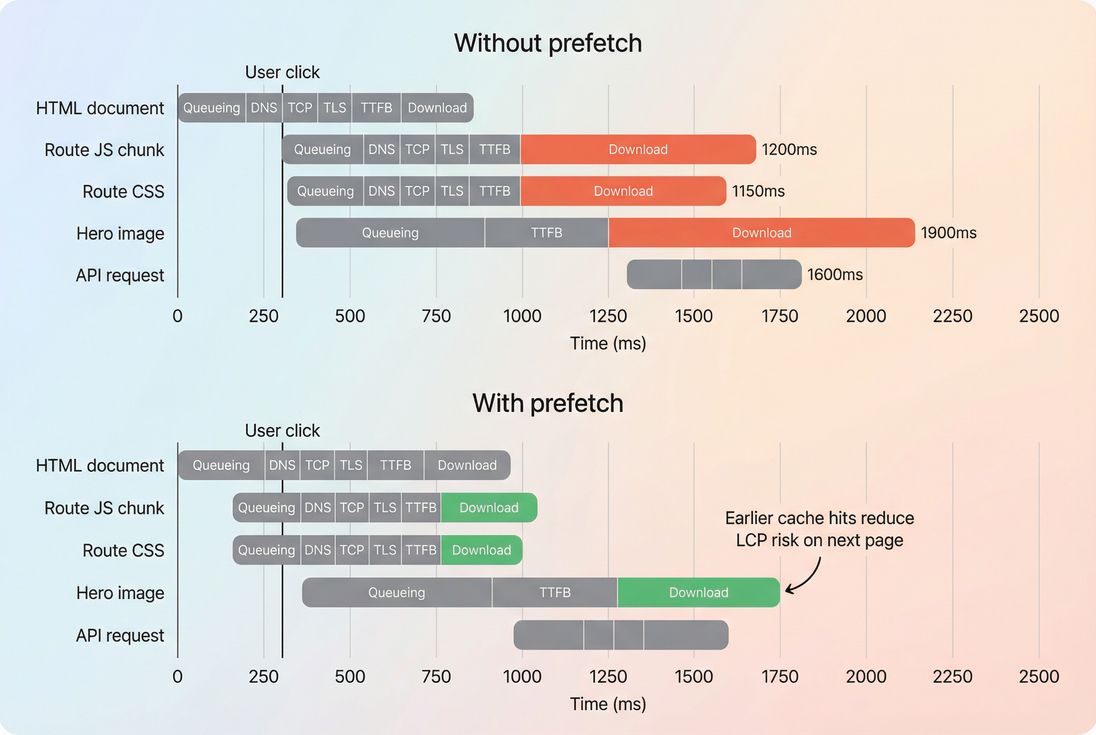
Prefetching doesn't speed up the current view much – it shifts work earlier so the next navigation can reuse cached files and reach a usable state faster.
What prefetching actually changes
Prefetching works by moving some network work into "spare time" before a user navigates. The browser fetches a resource and stores it in the HTTP cache (assuming it's cacheable). When the next page requests the same URL, it can be served from cache, avoiding (some or all of) the DNS/TCP/TLS/TTFB/download cost.
What prefetching doesn't do:
- It doesn't magically make your origin faster.
- It doesn't guarantee the resource is fetched (browsers can ignore prefetch).
- It doesn't help if the resource can't be cached or the URL changes.
Prefetching is easiest to understand as an input into the critical rendering path: it tries to remove future network dependencies so rendering can start sooner on the next view.
The Website Owner's perspective: Prefetching is a conversion lever when users routinely go "one step deeper" (PLP → PDP → cart). If your funnel drop-off correlates with slow next pages, prefetch can reduce that friction without rebuilding your stack.
When prefetch is worth doing
Prefetch is most valuable when all of the following are true:
There's a predictable next step.
Example: 60% of category visitors click a product; 40% of product visitors click "Add to cart".The next step is gated by a few heavy resources.
Typical culprits:- Route-level JS chunk (common in SPAs with code splitting)
- Critical CSS for the next template
- Hero image(s) that dominate LCP
Those resources can be cached.
Prefetch that results in a cache miss later is mostly wasted work. Strong Cache-Control headers and sensible browser caching are what make prefetch "stick."Bandwidth is constrained (especially on mobile).
Ironically, constrained networks are where prefetch can help the most if you're selective, because it smooths the cost over time. But it's also where over-prefetching can hurt the most.
A common e-commerce example:
- Category page is fast.
- Product page LCP is inconsistent because the hero image + a product-page JS chunk are late.
- Prefetching the product-page JS chunk (and sometimes the next-page CSS) on the category page can reduce the "spike" after the click.
For broader context on how prefetch fits with other early-loading tools, compare it with:
- Preload (high priority, "I need this now")
- Preconnect (warm up connection)
- DNS prefetch (warm up DNS)
- Prefetch (low priority, "I might need this soon")
Prefetch vs related hints
| Technique | Best for | Priority | Typical risk |
|---|---|---|---|
| DNS prefetch | Many third-party domains | Very low | Limited benefit if connection still slow |
| Preconnect | Known critical cross-origin | Medium | Too many connections wastes sockets |
| Preload | Current page critical asset | High | Can slow the page if misused |
| Prefetch | Likely next navigation asset | Low | Wasted bytes, cache churn |
The Website Owner's perspective: Don't prefetch because it's "best practice." Prefetch because you have a specific funnel step that's slower than it should be – and you can name the 1–3 assets that are causing it.
What influences whether it works
Prefetch success is mostly decided by three practical realities: cacheability, URL stability, and timing.
Cacheability (the biggest lever)
If the browser can't store and reuse the prefetched file, you won't see much benefit. Common reasons:
Cache-Control: no-store(often applied to HTML, sometimes mistakenly to assets)- Very short TTLs (assets expiring before reuse)
- Cookies/headers that cause
Varybehavior, leading to unexpected cache misses
If you're serious about prefetching route JS/CSS or images, invest first in:
- Asset minification so the prefetched bytes are smaller
- Strong caching rules (long TTL + versioned filenames) via Cache-Control headers
- Compression (Brotli compression or Gzip compression)
URL stability (exact match matters)
Browsers cache by URL and response characteristics. If you prefetch:
/product.bundle.js?v=123
…but the next page requests:/product.bundle.js?v=124
…that's a miss.
The most reliable prefetch targets are fingerprinted static assets (app.8d3f1c2.js) served from a CDN with long TTLs (see CDN performance and edge caching).
Timing and priority (don't steal from critical work)
Browsers schedule prefetch at low priority, but "low priority" doesn't mean "free."
On slow connections, extra requests can still compete with images, fonts, and JS needed for the current page – especially if your current page is already request-heavy (see HTTP requests).
Practical guardrails:
- Start prefetching after initial rendering stabilizes (after FCP is often safer than immediately).
- Avoid prefetching large images on the landing view unless the click probability is very high.
- Reduce background competition by cleaning up third-party scripts first.
The Website Owner's perspective: If your current page is barely passing Core Web Vitals, indiscriminate prefetching can push it over the edge. The goal is not "more downloaded" – it's "less waiting when it matters."
What to prefetch (and what not)
A good prefetch plan is basically a short, prioritized list of assets that unlock the next view.
Usually good candidates
Route JS chunk for the next template
Especially in SPAs or modular storefronts. This often reduces CPU + network delay before interactivity (see JS execution time and Main thread work).Next-view critical CSS
If your next page needs a template stylesheet that isn't already on the current page.One hero image (only when highly likely)
If you have a product grid and users frequently click the first few items, prefetching the hero image for the most likely product can help LCP on the product page. Use caution – images are large.
Usually bad candidates
- HTML documents (often not cacheable, personalized, or short-lived)
- Third-party resources (can trigger tracking, waste bytes, or fail due to policies)
- Anything you can't cache for at least minutes to hours
- Huge assets with uncertain reuse (videos, large galleries)
A practical selection model (no guesswork)
Use a simple "portfolio" view:
- Probability of needing it soon (click-through rate to the next step)
- Cost if not prefetched (size + TTFB + latency)
- Risk (bandwidth, personalization, third-party effects)
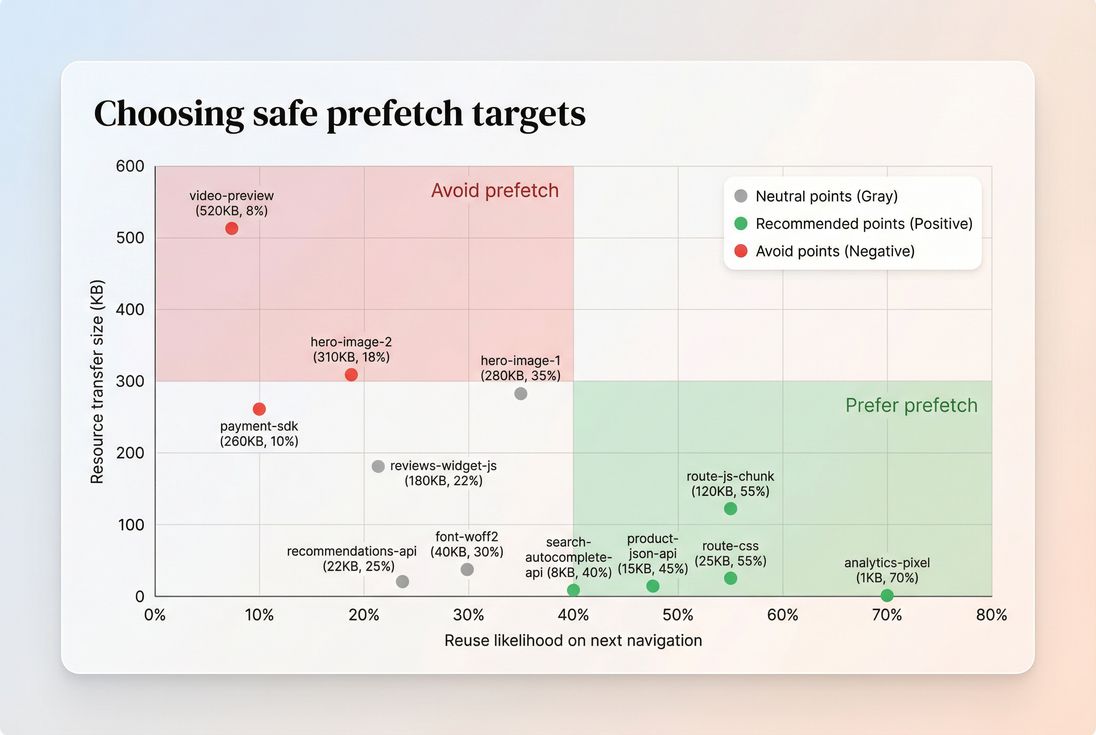
Prefetch is most reliable when targets are small-to-medium and highly likely to be used soon; large, low-likelihood assets are where prefetch turns into wasted bandwidth.
The Website Owner's perspective: Treat prefetch like inventory. You want the right items staged close to the customer, not a warehouse dumped in the checkout lane.
How to implement prefetch safely
There are three common implementation patterns, from simplest to most controllable.
1) Static resource hints in HTML
This is the classic approach:
<link rel="prefetch" href="/assets/product-route.8d3f1c2.js" as="script">
<link rel="prefetch" href="/assets/product-route.a91c0de.css" as="style">
Practical notes:
- Use
asto help the browser categorize the resource correctly. - Put these after your truly critical hints (don't crowd out critical CSS/preload).
- Prefetching is low priority, but too many hints can still create noise.
2) Prefetch on intent (hover/touch/viewport)
Instead of prefetching for everyone, prefetch when the user signals intent:
- Hover over a product card
- Touchstart on mobile
- Link enters viewport and the user is actively scrolling
This can dramatically improve "hit rate" (how often a prefetched resource is actually used).
High-level pattern:
- Wait until the page is stable
- When intent is detected, inject a prefetch
<link>for the target chunk
3) Navigation prefetch with speculation rules (advanced)
Modern Chrome supports speculation rules to prefetch (and sometimes prerender) likely navigations. This can be powerful, but you should roll it out carefully and test browser support.
If you experiment here, keep the same rules: small, high-likelihood, cacheable navigations first.
The Website Owner's perspective: The safest path is incremental: prefetch one route chunk for one high-traffic funnel step, measure it, then expand. Prefetch projects fail when teams "enable everything" and can't tell what helped or hurt.
How to measure and interpret changes
Prefetch can be invisible in the wrong test setup. If you only run single-page cold-load Lighthouse tests, you'll often miss the benefit – because prefetch mostly helps the next view.
Use the right measurement lens
Lab tests are great for first-view load (see Field vs lab data).
But many lab runs end before prefetch has time to trigger, and they don't include the next click.Field (RUM) data is where prefetch usually shows up, because it captures real navigation behavior and cache reuse (see Real user monitoring and CrUX data).
What "good" looks like in metrics
Prefetch tends to improve:
- LCP on the next page when the hero image or critical CSS/JS is staged
- TTFB sensitivity (less waiting after click), especially if you combine it with preconnect and good connection reuse
- Speed Index on the next view due to earlier visual completeness (see Speed Index)
What you might see get worse if you overdo it:
- More total requests per session
- More bytes downloaded on sessions that don't convert
- Potential regressions on mobile if bandwidth is saturated (see Mobile page speed)
A measurement approach website owners can actually use
- Pick one funnel step (example: category → product).
- List the 1–3 gating resources on the destination page.
- Ensure cache headers are correct for those files.
- Run a multistep synthetic test (category load → click product) so the prefetch has a chance to pay off.
If you're using PageVitals, the docs for setting this up and analyzing it are here:- Set up multistep tests
- Analyze multistep tests
- Use the Network request waterfall to confirm cache hits and timing shifts.
- Validate in field data by comparing next-page LCP/INP before vs after rollout (segment by device/network if possible).
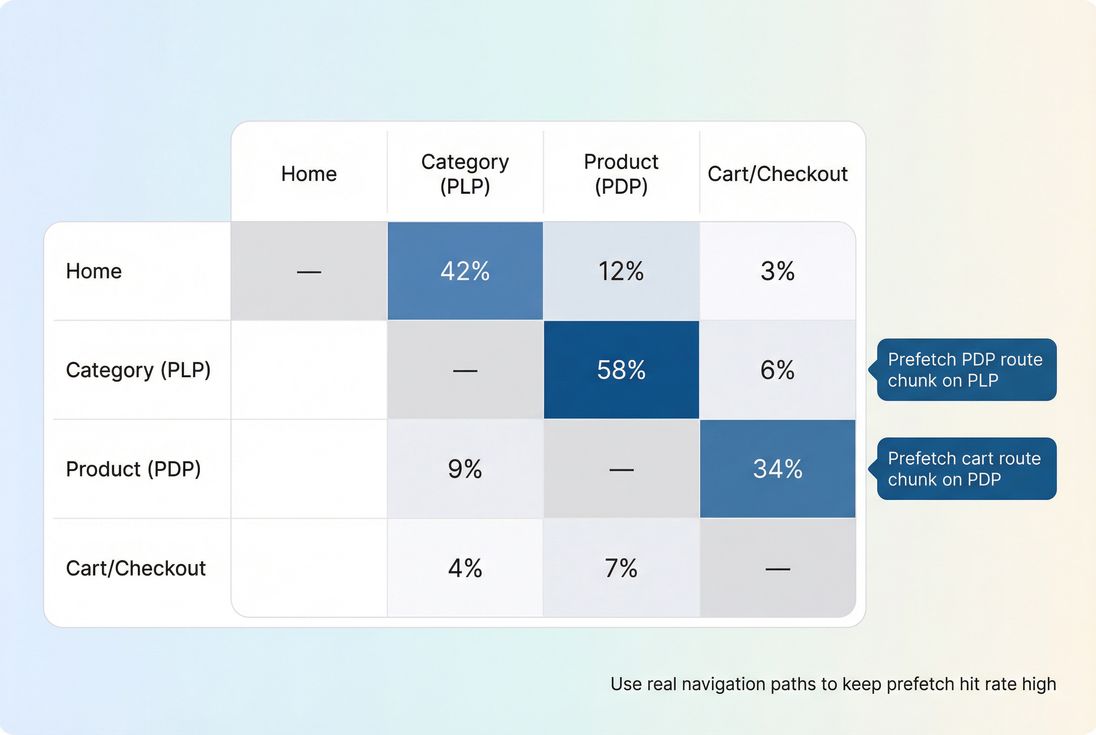
Prefetch is strongest when it follows real user paths – use your most common transitions to decide where prefetch will actually be reused.
The Website Owner's perspective: If you can't describe where prefetch helps in your funnel (and prove it with a before/after), you're not optimizing – you're guessing.
Common failure modes (and fixes)
Failure: Prefetched files aren't reused
Symptoms: Waterfall still shows full downloads after click; cache misses.
Fixes:
- Confirm long-lived caching for static assets (Cache TTL).
- Ensure URL versioning is stable (fingerprinted filenames).
- Avoid varying responses by cookies/headers for static assets.
Failure: Prefetch competes with current page
Symptoms: Current page LCP or INP worsens, especially on mobile.
Fixes:
- Reduce number of prefetched resources (start with 1–2).
- Delay prefetch until after key rendering milestones.
- Trim the page: remove unused JavaScript and unused CSS.
Failure: Prefetch triggers unwanted third-party behavior
Symptoms: Extra analytics hits, chat widgets loading, personalization side effects.
Fixes:
- Prefetch only same-origin static assets.
- Avoid prefetching third-party URLs entirely unless you deeply understand the consequences.
- Audit third-party load patterns (third-party scripts).
Bottom line
Prefetching resources is not a generic "make it faster" switch. It's a targeted technique for making the next step in a user journey feel immediate by staging a small number of cacheable assets ahead of time. Done with discipline, it can reduce funnel friction and stabilize Core Web Vitals on navigation-heavy sessions – especially for e-commerce browsing and checkout flows.
Frequently asked questions
Sometimes, but mainly for the next page or next step in a funnel. Prefetching rarely helps the first page view because it runs at low priority after critical work. You'll usually see improvements in LCP and Speed Index on subsequent navigations, not on initial landings.
Start with the most common next clicks: category to product, product to cart, cart to checkout. Prefetch only the route-level JS/CSS chunk and a small set of above-the-fold images needed immediately. Validate using multistep testing and real-user navigation paths before expanding.
Yes. Over-prefetching can compete for bandwidth on mobile, increase request counts, and waste data on users who never take the next step. It can also trigger unwanted third-party calls. Treat prefetch as a budgeted optimization: small, targeted, and continuously measured.
Preload is high priority and intended for assets needed on the current page right now. Prefetch is low priority and intended for assets likely needed soon, such as the next page. If you preload the wrong thing, you can slow down the current page. Prefetch is safer but less guaranteed.
Look for a meaningful funnel step with high click-through and measurable delay today: route JS chunks above ~50–150 KB, hero images, or API calls that gate rendering. If prefetch can reliably cut 100–300 ms on the next view for a large share of sessions, it's usually worth it.
Want to take PageVitals for a spin?
Page speed monitoring and alerting for your website. Get daily Lighthouse reports for all your pages. No installation needed.
Start my free trial